
.net remoting 实现通用消息处理窗口
.net remoting 实现通用消息处理窗口
- 实现机制是制作一个cmd窗口作为信息展示窗口,主程序将需要展示的信息抛出到cmd窗口显示,以此方式做到消息的展示。
以下是cmd窗口的代码,cmd窗体作为一个消息接收的server
  static void Main(string[] args)

         {

             try

             {

                 //声明一个TCP通道指定端口8085

                 TcpChannel channel = new TcpChannel();

                 //注册通道

                 ChannelServices.RegisterChannel(channel, false);

                 //从哪个类,发出消息

                 RemotingConfiguration.RegisterWellKnownServiceType(typeof(ToolFunction.ConsoleMessage), "ConsoleMessage", WellKnownObjectMode.SingleCall);

                 System.Console.WriteLine("Server:Press Enter key to exit");

                 //等待输入

                 System.Console.ReadLine();

             }

             catch (Exception)

             {

                 throw;

             }

         }
- 初始化client
 using System;

 using System.Collections.Generic;

 using System.Text;

 using System.Runtime.Remoting.Channels.Tcp;

 using System.Runtime.Remoting.Channels;

 using System.Runtime.Remoting;

 namespace ToolFunction

 {

     public class RemoteMessage

     {

         public static IMessage obj = null;

         /// <summary>

         /// 初始化客户端

         /// </summary>

         public static void InitClient()

         {

             if (obj == null)

             {

                 TcpChannel channel = new TcpChannel();

                 ChannelServices.RegisterChannel(channel, false);

                 IMessage _obj = (IMessage)Activator.GetObject(typeof(IMessage), "tcp://localhost:8085/ConsoleMessage");

                 obj = _obj;

             }

         }

         /// <summary>

         /// 发送消息

         /// </summary>

         /// <param name="p_strMess"></param>

         public static void SendMessage(string p_strMess)

         {

             try

             {

                 if (obj == null)

                 {

                     Console.WriteLine("Could not locate TCP server");

                 }

                 obj.ShowMess(p_strMess);

             }

             catch (Exception ex)

             {

                 CommonFunction.WriteError(ex.ToString());

             }

         }

     }

 }
- 此类要实现一个接口MarshalByRefObject只有实现此接口才能实现remoting操作
 using System;

 using System.Collections.Generic;

 using System.Text;

 namespace ToolFunction

 {

     public interface IMessage

     {

         void ShowMess(string p_strMess);

     }

     public class ConsoleMessage : MarshalByRefObject, IMessage

     {

         #region IMessage 成员

         public void ShowMess(string p_strMess)

         {

             Console.WriteLine(p_strMess);

         }

         #endregion

     }

 }
- 调用示例
//打开cmd程序

string _strExePath = Application.StartupPath + @"\MessagePlatform.exe";

            Process.Start(_strExePath);

            RemoteMessage.InitClient();
- 发送消息
RemoteMessage.SendMessage("测试消息" );
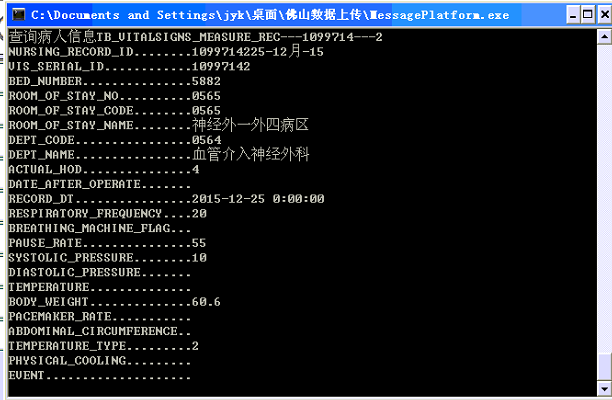
- 最后 的样子是这样的
.net remoting 实现通用消息处理窗口的更多相关文章
- Winform应用程序实现通用消息窗口
记得我之前发表过一篇文章<Winform应用程序实现通用遮罩层>,是实现了透明遮罩的消息窗口,功能侧重点在动图显示+消息提醒,效果看上去比较的炫,而本篇我又来重新设计通用消息窗口,功能重点 ...
- 浅析 Android 的窗口
来源:http://bugly.qq.com/bbs/forum.php?mod=viewthread&tid=555&fromuid=6 一.窗口的概念 在开发过程中,我们经常会 ...
- Unity3d UGUI 通用Confirm确认对话框实现(Inventory Pro学习总结)
背景 曾几何时,在Winform中,使用MessageBox对话框是如此happy,后来还有人封装了可以选择各种图标和带隐藏详情的MessageBox,现在Unity3d UGui就没有了这样的好事情 ...
- Android中将布局文件/View添加至窗口过程分析 ---- 从setContentView()谈起
本文主要内容是讲解一个视图View或者一个ViewGroup对象是如何添加至应用程序窗口中的.下文中提到的窗口可泛指我们能看到的界面,包括一个Activity呈现的界面(我们可以将之理解为应用程序窗口 ...
- 浅析Android的窗口
一.窗口的概念 在开发过程中,我们经常会遇到,各种跟窗口相关的类,或者方法.但是,在 Android 的框架设计中,到底什么是窗口?窗口跟 Android Framework 中的 Window 类又 ...
- Winform应用程序实现通用遮罩层二
之前先后发表过:<Winform应用程序实现通用遮罩层>.<Winform应用程序实现通用消息窗口>,这两款遮罩层其实都是基于弹出窗口的,今天为大家分享一个比较简单但界面相对友 ...
- 8-Flink中的窗口
戳更多文章: 1-Flink入门 2-本地环境搭建&构建第一个Flink应用 3-DataSet API 4-DataSteam API 5-集群部署 6-分布式缓存 7-重启策略 8-Fli ...
- electron_window 创建窗口
/** * 窗口基类,封装通用的窗口操作 */ const { BrowserWindow } = require('electron'); /** * 基本窗口样式 * @type {{width: ...
- Windoows窗口程序一
编写窗口程序的步骤: .定义WinMain入口函数 .定义窗口处理函数(处理消息)WindowProc .注册窗口类RegisterClass .创建窗口(在内存中创建窗口)CreateWindow ...
随机推荐
- linux 进程监控和自动重启的简单实现(转)
目的:linux 下服务器程序会因为各种原因dump掉,就会影响用户使用,这里提供一个简单的进程监控和重启功能. 实现原理:由定时任务crontab调用脚本,脚本用ps检查进程是否存在,如果不存在则重 ...
- 移植iw 到linux平台上。
https://github.com/174high/iw-3.7-Linux-porting https://github.com/174high/libnl-1.1-stable-master-l ...
- OpenGL一些函数详解(二)
OpenGL ES顶点数据绘制技巧 在OpenGL中,绘制一个长方体,需要将每个顶点的坐标放在一个数组中.保存坐标时有一些技巧(由于字母下标不好表示,因此将下标表示为单引号,如A1将在后文中表示为A' ...
- 【转】关于C execlp函数的理解
转自:http://bachue.is-programmer.com/posts/21611.html execlp(从PATH 环境变量中查找文件并执行) 相关函数 fork,execl,execl ...
- Java Networking Related (Java Examples in a Nutshell 3rd Edition)
Examples to: Use URL class to parse URLs and download the network resources specified by a URL Use U ...
- mysql 字段的类型有哪些
int型包括(tinyint, smallint, mediumint, int, bigint) tinyint是1个字节表达范围就是2的8次方(-128-128) 或者(0-255) 很多人不明白 ...
- ViewPager和Fragment组合 v4包下的页面切换
/* *主页面下 */ //-------------主页面下---------------------- package com.example.viewpagerfragment; import ...
- GetClientRect
这个函数好像就是对应于视口的,获取视口的宽高 #include <windows.h> LRESULT CALLBACK WndProc (HWND, UINT, WPARAM, LPAR ...
- c++ data语意学
Data Member的绑定 extern float x; class Point3d { public: point3d(); //问题:被传回和被设定的x是哪一个x呢? float X() c ...
- 简单实现contentOS下开机自动启动tomcat
看过网上很多写tomcat开机自启动的例子,很多都是写了一个比较复杂的脚步.找到一个比较简单的. 首先编辑 vi /etc/rc.d/rc.local 在尾部加入 export JDK_HOME=/u ...