
Vue_(组件通讯)动态组件
动态组件 传送门

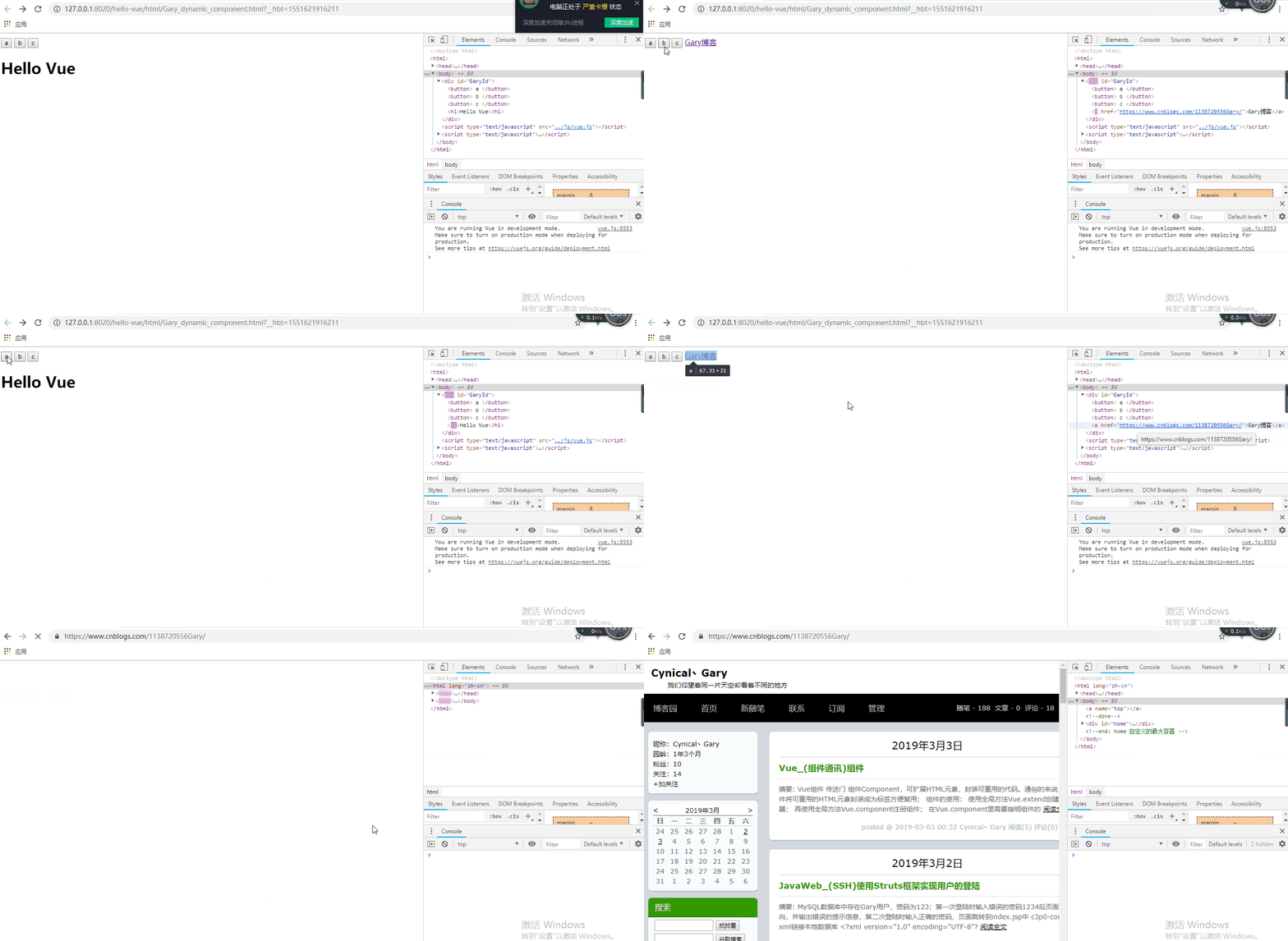
在一个元素上挂载多个组件,根据不同状态进行切换的时候,可以使用动态组件
动态组件的使用:需要使用内置组件<component></component>,根据 :is 的值决定显示哪个组件,:is的值是要显示的组件id
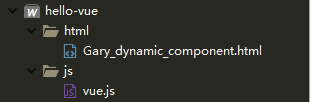
目录结构
<!DOCTYPE html>

<html>

    <head>

        <meta charset="UTF-8">

        <title>Gary</title>

    </head>

    <body>

        <div id="GaryId">

            <button @click="selectedName = 'my-component-a'"> a </button>

            <button @click="selectedName = 'my-component-b'"> b </button>

            <button @click="selectedName = 'my-component-c'"> c </button>

            <component :is="selectedName"></component>

        </div>

    </body>

    <script type="text/javascript" src="../js/vue.js" ></script>

    <script type="text/javascript">

            new Vue({

                data:{

                    selectedName:'my-component-a'

                },

                components:{

                    "my-component-a":{

                        template:"<h1>Hello Vue</h1>"

                    },

                    "my-component-b":{

                        template:"<a href='https://www.cnblogs.com/1138720556Gary/'>Gary博客</a>"

                    },

                    "my-component-c":{

                        template:"<p>欢迎来到Gary博客</p>"

                    }

                }

            }).$mount("#GaryId");

    </script>

</html>
Gary_dynamic_component.html
实现过程
Vue的data域中为组件申请一个名称
    data:{

        selectedName:'my-component-a'

    },
<div>标签中标明使用'my-component-a'组件模板
        <div id="GaryId">

            <button @click="selectedName = 'my-component-a'"> a </button>

            <button @click="selectedName = 'my-component-b'"> b </button>

            <button @click="selectedName = 'my-component-c'"> c </button>

            <component :is="selectedName"></component>

        </div>
在Vue的components中标明组件模块
  new Vue({

                data:{

                    selectedName:'my-component-a'

                },

                components:{

                    "my-component-a":{

                        template:"<h1>Hello Vue</h1>"

                    },

                    "my-component-b":{

                        template:"<a href='https://www.cnblogs.com/1138720556Gary/'>Gary博客</a>"

                    },

                    "my-component-c":{

                        template:"<p>欢迎来到Gary博客</p>"

                    }

                }

            }).$mount("#GaryId");
Vue_(组件通讯)动态组件的更多相关文章
- Vue_(组件通讯)动态组件结合keep-alive
keep-alive 传送门 <keep-alive> 包裹动态组件时,会缓存不活动的组件实例,而不是销毁它们.和 <transition> 相似,<keep-alive ...
- Vue_(组件通讯)子组件向父组件传值
Vue组件 传送门 子组件向父组件传值:子组件通过$.emit()方法以事件形式向父组件发送消息传值: 使用步骤: 1.定义组件:现有自定义组件com-a.com-b,com-a是com-b的父组件: ...
- Vue_(组件通讯)父组件向子组件传值
Vue组件 传送门 父组件向子组件传值:父组件通过属性向下传值的方式和子组件通信: 使用步骤: 1.定义组件:现有自定义组件com-a.com-b,com-a是com-b的父组件 2.准备获取数据:c ...
- Vue_(组件通讯)父子组件简单关系
Vue组件 传送门 在Vue的组件内也可以定义组件,这种关系成为父子组件的关系 如果在一个Vue实例中定义了component-a,然后在component-a中定义了component-b,那他们的 ...
- Hibernate学习---第五节:普通组件和动态组件
一.普通组件映射配置 1.创建组件类,代码如下: package learn.hibernate.bean; /** * 组件类 */ public class Phones { private St ...
- Vue两种组件类型介绍:递归组件和动态组件
一递归组件 递归组件的特性就是可以在自己的template模板中调用自己本身.值得注意的它必须设置name属性. // 递归组件 recursive.vue <template> < ...
- [Vue]组件——实现动态组件:keep-alive的使用
1.在app.vue中用一个 <keep-alive> 元素将其动态组件包裹起来: keepAlive为true时,第一次被创建的时候缓存下来,为false时,不会缓存 <keep- ...
- Vue 组件4 动态组件
动态组件 通过使用保留的<component>元素,动态的绑定到它的is特性,我们让多个组件同时使用同一个挂载点,并动态切换: var vm = new Vue({ el: '#examp ...
- Vue组件的操作-自定义组件,动态组件,递归组件
作者 | Jeskson 来源 | 达达前端小酒馆 v-model双向绑定 创建双向数据绑定,v-model指令用来在input,select,checkbox,radio等表单控件.v-model指 ...
随机推荐
- 二、maven学习
maven工程运行环境修改 例如maven自带Tomcat6,我们想使用Tomcat7 pom.xml #配置多一个Tomcat7<plugins> <plugin> < ...
- 今天朋友带领去谷歌ok2eat 餐厅吃免费午餐
中午去队友公司免费吃饭.朋友带我们去她的楼下吃,就算是googler真的也不是所有cafe都知道,感谢朋友带领.
- Java学习笔记【十二、网络编程】
原计划的学习结束时间是3月4日,目前看来已经延迟了,距离低标还差一些,多方面原因,也不找借口,利用周末赶赶进度,争取本周末把低标完成吧! 参考: http://www.runoob.com/java/ ...
- 安装openblas库
http://www.openblas.net/ Linux:下载源码直接make即可
- export命令用来设置环境变量。
sh-# export export CONSOLE="/dev/console" export HOME="/" export LD_LIBRARY_PATH ...
- Centos网卡名称命名
1. vim /etc/sysconfig/grub 编辑/etc/sysconfig/grub文件 添加 net.ifnames=0 biosname=0 GRUB_TIMEOUT= GR ...
- centos7初始化bashshell脚本
centos7初始化bashshell脚本 #!/bin/bash if [[ "$(whoami)" != "root" ]]; then echo &quo ...
- MongoDB本地安装与启用(windows 7/10)
MongoDB的安装与MongoDB服务配置 Mongo DB 是目前在IT行业非常流行的一种非关系型数据库(NoSql),其灵活的数据存储方式备受当前IT从业人员的青睐.Mongo DB很好的实现了 ...
- 第11章 Spring Boot使用Actuator
在生产环境中,需要实时或定期监控服务的可用性,spring-Boot的Actuator 功能提供了很多监控所需的接口. Actuator是Spring Boot提供的对应用系统的自省和监控的集成功能, ...
- 两步创建vue全局组件
import Login from './Login' export default { install: function(Vue){ Vue.component('Login', Login); ...