
centos7安装gitlab 支持带认证https,开启邮件功能 超级简单.
官方安装说明:https://about.gitlab.com/install/#centos-7
自定义yum源 自行搞定
下载gitlab
官方安装:
curl -s https://packages.gitlab.com/install/repositories/gitlab/gitlab-ce/script.rpm.sh | sudo bash
清华大学源下载:
wget https://mirrors.tuna.tsinghua.edu.cn/gitlab-ce/yum/el7/gitlab-ce-11.10.4-ce.0.el7.x86_64.rpm
yum install gitlab-ce-11.10.4-ce.0.el7.x86_64.rpm -y
关防火墙 和 selinux
vim /etc/selinux/config
修改配置文件
vim /etc/gitlab/gitlab.rb
设置 https支持 [这里要注意,必须设置为https://你的域名,不然后面设置证书什么都不会生效的] <----- 有坑的.请注意
##! https://docs.gitlab.com/omnibus/settings/configuration.html#configuring-the-external-url-for-gitlab

external_url 'https://gitlab.你的域名.com'
设置证书
再也不用忽略证书问题了,因为证书没问题了.

证书可以从 letsencrypt 生成免费的证书..(默认浏览器和工具都不会提示不安全警告的.)

详情参考:https://github.com/Neilpang/acme.sh/wiki/%E8%AF%B4%E6%98%8E

##! Most root CA's are included by default

nginx['ssl_client_certificate'] = "/home/centos/sslkeys/ca.crt"

##! enable/disable 2-way SSL client authentication

# nginx['ssl_verify_client'] = "off"

##! if ssl_verify_client on, verification depth in the client certificates chain

# nginx['ssl_verify_depth'] = "1"

nginx['ssl_certificate'] = "/home/centos/sslkeys/fullchain.cer"

nginx['ssl_certificate_key'] = "/home/centos/sslkeys/gitlab.你的域名.com.key"
设置Email支持
### GitLab email server settings

###! Docs: https://docs.gitlab.com/omnibus/settings/smtp.html

###! **Use smtp instead of sendmail/postfix.**

#这里使用的是阿里云推送 每日免费200封.

#  详细开通 这里哦 --->  https://dm.console.aliyun.com/?spm=5176.12818093.my.ddm.488716d0ezCKP2#/directmail/Home/cn-hangzhou

gitlab_rails['smtp_enable'] = true

gitlab_rails['smtp_address'] = "smtpdm.aliyun.com"

gitlab_rails['smtp_port'] = 465

gitlab_rails['smtp_user_name'] = "admin@mail.你填写的域名.com"

gitlab_rails['smtp_password'] = "密码"

gitlab_rails['smtp_domain'] = "smtpdm.aliyun.com"

gitlab_rails['smtp_authentication'] = "login"

gitlab_rails['smtp_enable_starttls_auto'] = true

gitlab_rails['smtp_tls'] = true

### Email Settings

gitlab_rails['gitlab_email_enabled'] = true

gitlab_rails['gitlab_email_from'] = 'admin@mail.你的域名.com'  #注意要和你的用户名地址要匹配的

gitlab_rails['gitlab_email_display_name'] = 'Gitlab'

gitlab_rails['gitlab_email_reply_to'] = 'noreply@mail.wutoon.com'

gitlab_rails['gitlab_email_subject_suffix'] = ''
阿里云邮件推送 需要设置的项目

先添加域名,不明白看他们的文档, 配置好后要按照要求修改dns解析项目
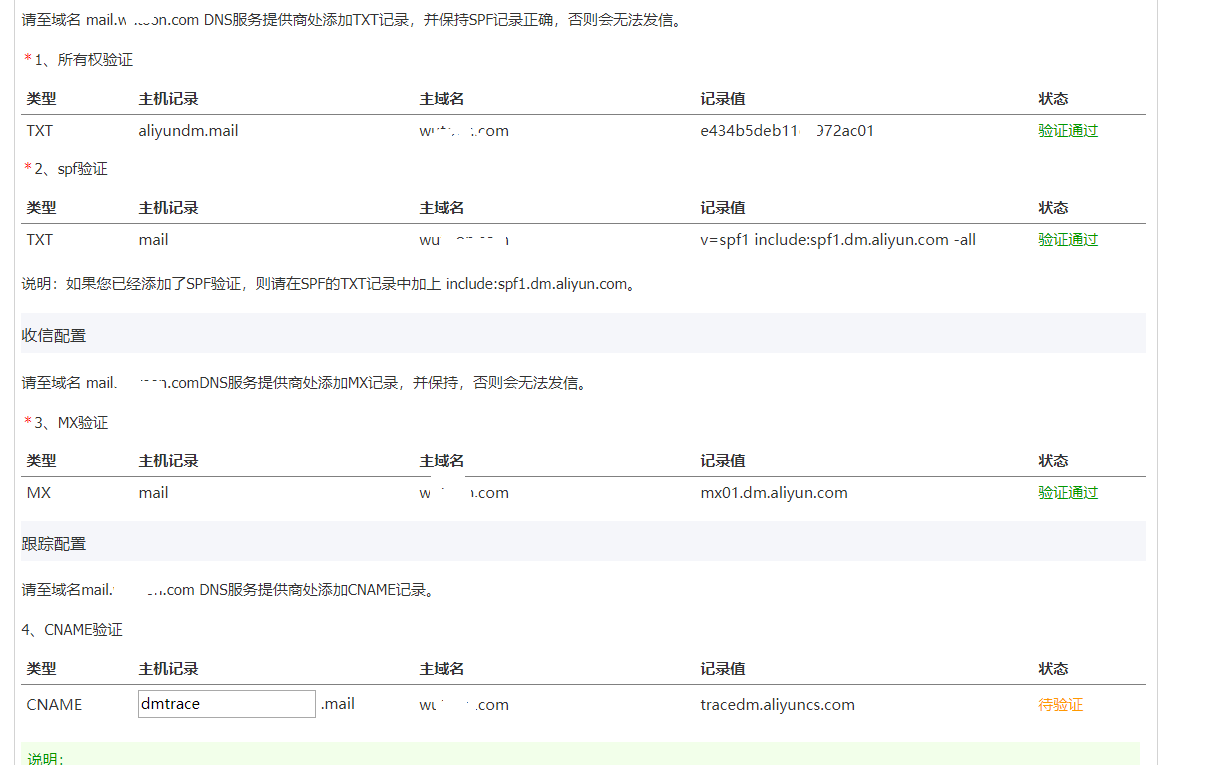
配置完成执行
gitlab-ctl reconfigure
然后浏览器登录你的 gitlab 第一次它会要求你创建一个管理员密码.
配置觉得有问题可以 vim /etc/gitlab/gitlab.rb 保存之后 在执行 gitlab-ctl reconfigure 重新配置完成即可.
测试email 命令. []
进入控制台gitlab-rails console (测试邮件服务是否正常)
Notify.test_email("XXX@XXX.XX","title","content").deliver_now
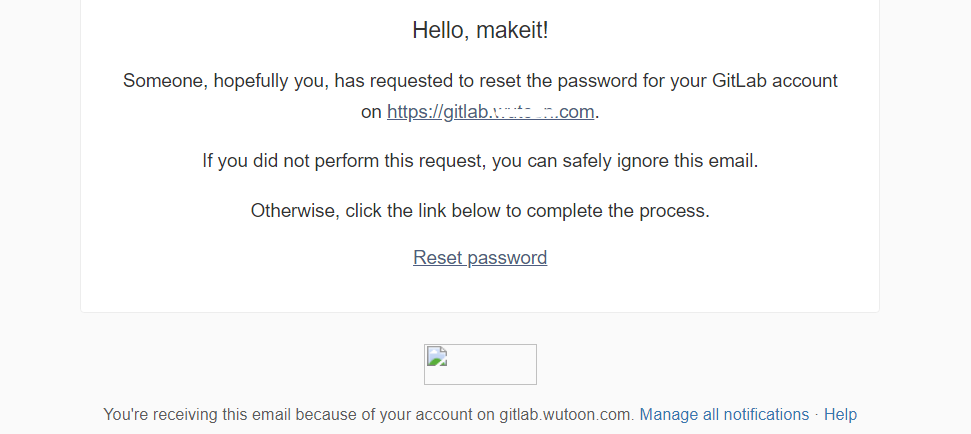
测试完成,可以尝试点击忘记密码
centos7安装gitlab 支持带认证https,开启邮件功能 超级简单.的更多相关文章
- Centos7 安装gitLab
我这里使用的是centos 7 64bit,我试过centos 6也是可以的! 1. 安装依赖软件 yum -y install policycoreutils openssh-server open ...
- CentOS7安装GitLab、汉化、邮箱配置及使用
同步首发:http://www.yuanrengu.com/index.php/20171112.html 一.GitLab简介 GitLab是利用Ruby On Rails开发的一个开源版本管理系统 ...
- CentOs7安装gitlab(转!)
沧浪之水清兮,可以濯吾缨; 沧浪之水浊兮,可以濯吾足. ...
- centos7安装gitlab与gitlab的汉化
Gitlab概述 GitLab是一个利用 Ruby on Rails 开发的开源应用程序,实现一个自托管的Git项目仓库,可通过Web界面进行访问公开的或者私人项目. GitLab拥有与Github ...
- CentOS7安装GitLab、汉化、邮箱配置及使用(转载)
同步首发: https://www.cnblogs.com/heyonggang/p/7778203.html http://www.yuanrengu.com/index.php/20171112. ...
- CentOS7安装GitLab、汉化及使用
同步首发:http://www.yuanrengu.com/index.php/20171112.html 一.GitLab简介 GitLab是利用Ruby On Rails开发的一个开源版本管理系统 ...
- centos7 安装gitlab任意版本
主要还是根据官网:https://www.gitlab.cc/installation/#centos-7 1.安装依赖: sudo yum install curl policycoreutils ...
- centos7安装gitlab并汉化
一.基础环境准备 1.安装依赖包 [root@gitlab-server ~]#yum install curl policycoreutils openssh-server openssh-clie ...
- Centos7安装GitLab
GitLab CE Download Archives gitlab安装调试小记 Gitlab Free Trial GitLab搭建手记 Gitlab社区版的使用 GUI PNG Gitlab升级到 ...
随机推荐
- C#如何调用C++(基础篇)
闲暇之余,记一下笔记!记录一下c#如何调用C++的动态库(dll). 步骤: 一.创建一个C++类,例如: AddOperate.h extern _declspec(dllexport) int S ...
- springboot启动流程(十一)aop切面处理过程
所有文章 https://www.cnblogs.com/lay2017/p/11478237.html 正文 spring的两大核心就是ioc和aop.在关于ioc依赖注入的文章中,我们了解了如何根 ...
- 第五章、Celery分布式系统
Celery 官方 Celery 官网:http://www.celeryproject.org/ Celery 官方文档英文版:http://docs.celeryproject.org/en/la ...
- CentOS7安装CDH 第三章:CDH中的问题和解决方法
相关文章链接 CentOS7安装CDH 第一章:CentOS7系统安装 CentOS7安装CDH 第二章:CentOS7各个软件安装和启动 CentOS7安装CDH 第三章:CDH中的问题和解决方法 ...
- vuejs开发流程
https://www.cnblogs.com/yexiaowang/p/8489250.html
- 切换composer国内镜像 Laravel China停用,切换阿里云composer全量镜像
composer config -g repo.packagist composer https://packagist.phpcomposer.com Laravel China 镜像完成历史使命, ...
- “高可用性”(High Availability)??
“高可用性”(High Availability)通常来描述一个系统经过专门的设计,从而减少停工时间,而保持其服务的高度可用性. 计算机的高可用性 计算机系统的可用性用平均无故障时间(MTTF)来度量 ...
- 网页报警提示 This page includes a password or credit card input in a non-secure context. A warning has been added to the URL bar. For more information, see https://goo.gl/zmWq3m.
This page includes a password or credit card input in a non-secure context. A warning has been added ...
- Paper Reading:DetNet
论文:DetNet: A Backbone network for Object Detection 发表时间:2018 发表作者:(Face++)Chao Peng, Gang Yu (Tsingh ...
- vue 之 render 函数不能渲染非全局自定义函数-方案
import customCom from 'xxx.vue' render: (h) => { return h(customCom) }