
(三十六)c#Winform自定义控件-步骤控件-HZHControls
官网
前提
入行已经7,8年了,一直想做一套漂亮点的自定义控件,于是就有了本系列文章。
GitHub:https://github.com/kwwwvagaa/NetWinformControl
码云:https://gitee.com/kwwwvagaa/net_winform_custom_control.git
如果觉得写的还行,请点个 star 支持一下吧
欢迎前来交流探讨: 企鹅群568015492 idkey=6e08741ef16fe53bf0314c1c9e336c4f626047943a8b76bac062361bab6b4f8d">
目录
https://www.cnblogs.com/bfyx/p/11364884.html
准备工作
也没什么可准备的了
开始
添加一个用户控件,命名UCStep
来点属性
  public event EventHandler IndexChecked;

         private Color m_stepBackColor = Color.FromArgb(, , );

         /// <summary>

         /// 步骤背景色

         /// </summary>

         [Description("步骤背景色"), Category("自定义")]

         public Color StepBackColor

         {

             get { return m_stepBackColor; }

             set { m_stepBackColor = value; }

         }

         private Color m_stepForeColor = Color.FromArgb(, , );

         /// <summary>

         /// 步骤前景色

         /// </summary>

         [Description("步骤前景色"), Category("自定义")]

         public Color StepForeColor

         {

             get { return m_stepForeColor; }

             set { m_stepForeColor = value; }

         }

         private Color m_stepFontColor = Color.White;

         /// <summary>

         /// 步骤文字颜色

         /// </summary>

         [Description("步骤文字景色"), Category("自定义")]

         public Color StepFontColor

         {

             get { return m_stepFontColor; }

             set { m_stepFontColor = value; }

         }

         private int m_stepWidth = ;

         /// <summary>

         /// 步骤宽度

         /// </summary>

         [Description("步骤宽度景色"), Category("自定义")]

         public int StepWidth

         {

             get { return m_stepWidth; }

             set { m_stepWidth = value; }

         }

         private string[] m_steps = new string[] { "step1", "step2", "step3" };

         [Description("步骤"), Category("自定义")]

         public string[] Steps

         {

             get { return m_steps; }

             set

             {

                 if (m_steps == null || m_steps.Length <= )

                     return;

                 m_steps = value;

                 Refresh();

             }

         }

         private int m_stepIndex = ;

         [Description("步骤位置"), Category("自定义")]

         public int StepIndex

         {

             get { return m_stepIndex; }

             set

             {

                 if (m_stepIndex >= Steps.Length)

                     return;

                 m_stepIndex = value;

                 Refresh();

                 if (IndexChecked != null)

                 {

                     IndexChecked(this, null);

                 }

             }

         }
重绘
  protected override void OnPaint(PaintEventArgs e)

         {

             base.OnPaint(e);

             var g = e.Graphics;

             g.SmoothingMode = SmoothingMode.AntiAlias;  //使绘图质量最高,即消除锯齿

             g.InterpolationMode = InterpolationMode.HighQualityBicubic;

             g.CompositingQuality = CompositingQuality.HighQuality;

             if (m_steps != null && m_steps.Length > )

             {

                 System.Drawing.SizeF sizeFirst = g.MeasureString(m_steps[], this.Font);

                 int y = (this.Height - m_stepWidth -  - (int)sizeFirst.Height) / ;

                 if (y < )

                     y = ;

                 int intTxtY = y + m_stepWidth + ;

                 int intLeft = ;

                 if (sizeFirst.Width > m_stepWidth)

                 {

                     intLeft = (int)(sizeFirst.Width - m_stepWidth) /  + ;

                 }

                 int intRight = ;

                 System.Drawing.SizeF sizeEnd = g.MeasureString(m_steps[m_steps.Length - ], this.Font);

                 if (sizeEnd.Width > m_stepWidth)

                 {

                     intRight = (int)(sizeEnd.Width - m_stepWidth) /  + ;

                 }

                 int intSplitWidth = ;

                 intSplitWidth = (this.Width - m_steps.Length - (m_steps.Length * m_stepWidth) - intRight) / (m_steps.Length - );

                 if (intSplitWidth < )

                     intSplitWidth = ;

                 for (int i = ; i < m_steps.Length; i++)

                 {

                     #region 画圆,横线

                     g.FillEllipse(new SolidBrush(m_stepBackColor), new Rectangle(new Point(intLeft + i * (m_stepWidth + intSplitWidth), y), new Size(m_stepWidth, m_stepWidth)));

                     if (m_stepIndex > i)

                     {

                         g.FillEllipse(new SolidBrush(m_stepForeColor), new Rectangle(new Point(intLeft + i * (m_stepWidth + intSplitWidth) + , y + ), new Size(m_stepWidth - , m_stepWidth - )));

                         if (i != m_steps.Length - )

                         {

                             if (m_stepIndex == i + )

                             {

                                 g.DrawLine(new Pen(m_stepForeColor, ), new Point(intLeft + i * (m_stepWidth + intSplitWidth) + m_stepWidth, y + (m_stepWidth / )), new Point((i + ) * (m_stepWidth + intSplitWidth) - intSplitWidth / , y + (m_stepWidth / )));

                                 g.DrawLine(new Pen(m_stepBackColor, ), new Point(intLeft + i * (m_stepWidth + intSplitWidth) + m_stepWidth + intSplitWidth / , y + (m_stepWidth / )), new Point((i + ) * (m_stepWidth + intSplitWidth), y + (m_stepWidth / )));

                             }

                             else

                             {

                                 g.DrawLine(new Pen(m_stepForeColor, ), new Point(intLeft + i * (m_stepWidth + intSplitWidth) + m_stepWidth, y + (m_stepWidth / )), new Point((i + ) * (m_stepWidth + intSplitWidth), y + (m_stepWidth / )));

                             }

                         }

                     }

                     else

                     {

                         if (i != m_steps.Length - )

                         {

                             g.DrawLine(new Pen(m_stepBackColor, ), new Point(intLeft + i * (m_stepWidth + intSplitWidth) + m_stepWidth, y + (m_stepWidth / )), new Point((i + ) * (m_stepWidth + intSplitWidth), y + (m_stepWidth / )));

                         }

                     }

                     System.Drawing.SizeF _numSize = g.MeasureString((i + ).ToString(), this.Font);

                     g.DrawString((i + ).ToString(), Font, new SolidBrush(m_stepFontColor), new Point(intLeft + i * (m_stepWidth + intSplitWidth) + (m_stepWidth - (int)_numSize.Width) /  + , y + (m_stepWidth - (int)_numSize.Height) /  + ));

                     #endregion

                     System.Drawing.SizeF sizeTxt = g.MeasureString(m_steps[i], this.Font);

                     g.DrawString(m_steps[i], Font, new SolidBrush(m_stepIndex > i ? m_stepForeColor : m_stepBackColor), new Point(intLeft + i * (m_stepWidth + intSplitWidth) + (m_stepWidth - (int)sizeTxt.Width) /  + , intTxtY));

                 }

             }

         }
全部代码
 using System;

 using System.Collections.Generic;

 using System.ComponentModel;

 using System.Drawing;

 using System.Data;

 using System.Linq;

 using System.Text;

 using System.Windows.Forms;

 using System.Drawing.Drawing2D;

 namespace HZH_Controls.Controls

 {

     public partial class UCStep : UserControl

     {

         [Description("步骤更改事件"), Category("自定义")]

         public event EventHandler IndexChecked;

         private Color m_stepBackColor = Color.FromArgb(, , );

         /// <summary>

         /// 步骤背景色

         /// </summary>

         [Description("步骤背景色"), Category("自定义")]

         public Color StepBackColor

         {

             get { return m_stepBackColor; }

             set { m_stepBackColor = value; }

         }

         private Color m_stepForeColor = Color.FromArgb(, , );

         /// <summary>

         /// 步骤前景色

         /// </summary>

         [Description("步骤前景色"), Category("自定义")]

         public Color StepForeColor

         {

             get { return m_stepForeColor; }

             set { m_stepForeColor = value; }

         }

         private Color m_stepFontColor = Color.White;

         /// <summary>

         /// 步骤文字颜色

         /// </summary>

         [Description("步骤文字景色"), Category("自定义")]

         public Color StepFontColor

         {

             get { return m_stepFontColor; }

             set { m_stepFontColor = value; }

         }

         private int m_stepWidth = ;

         /// <summary>

         /// 步骤宽度

         /// </summary>

         [Description("步骤宽度景色"), Category("自定义")]

         public int StepWidth

         {

             get { return m_stepWidth; }

             set { m_stepWidth = value; }

         }

         private string[] m_steps = new string[] { "step1", "step2", "step3" };

         [Description("步骤"), Category("自定义")]

         public string[] Steps

         {

             get { return m_steps; }

             set

             {

                 if (m_steps == null || m_steps.Length <= )

                     return;

                 m_steps = value;

                 Refresh();

             }

         }

         private int m_stepIndex = ;

         [Description("步骤位置"), Category("自定义")]

         public int StepIndex

         {

             get { return m_stepIndex; }

             set

             {

                 if (m_stepIndex >= Steps.Length)

                     return;

                 m_stepIndex = value;

                 Refresh();

                 if (IndexChecked != null)

                 {

                     IndexChecked(this, null);

                 }

             }

         }

         public UCStep()

         {

             InitializeComponent();

             this.SetStyle(ControlStyles.AllPaintingInWmPaint, true);

             this.SetStyle(ControlStyles.DoubleBuffer, true);

             this.SetStyle(ControlStyles.ResizeRedraw, true);

             this.SetStyle(ControlStyles.Selectable, true);

             this.SetStyle(ControlStyles.SupportsTransparentBackColor, true);

             this.SetStyle(ControlStyles.UserPaint, true);

         }

         protected override void OnPaint(PaintEventArgs e)

         {

             base.OnPaint(e);

             var g = e.Graphics;

             g.SmoothingMode = SmoothingMode.AntiAlias;  //使绘图质量最高,即消除锯齿

             g.InterpolationMode = InterpolationMode.HighQualityBicubic;

             g.CompositingQuality = CompositingQuality.HighQuality;

             if (m_steps != null && m_steps.Length > )

             {

                 System.Drawing.SizeF sizeFirst = g.MeasureString(m_steps[], this.Font);

                 int y = (this.Height - m_stepWidth -  - (int)sizeFirst.Height) / ;

                 if (y < )

                     y = ;

                 int intTxtY = y + m_stepWidth + ;

                 int intLeft = ;

                 if (sizeFirst.Width > m_stepWidth)

                 {

                     intLeft = (int)(sizeFirst.Width - m_stepWidth) /  + ;

                 }

                 int intRight = ;

                 System.Drawing.SizeF sizeEnd = g.MeasureString(m_steps[m_steps.Length - ], this.Font);

                 if (sizeEnd.Width > m_stepWidth)

                 {

                     intRight = (int)(sizeEnd.Width - m_stepWidth) /  + ;

                 }

                 int intSplitWidth = ;

                 intSplitWidth = (this.Width - m_steps.Length - (m_steps.Length * m_stepWidth) - intRight) / (m_steps.Length - );

                 if (intSplitWidth < )

                     intSplitWidth = ;

                 for (int i = ; i < m_steps.Length; i++)

                 {

                     #region 画圆,横线

                     g.FillEllipse(new SolidBrush(m_stepBackColor), new Rectangle(new Point(intLeft + i * (m_stepWidth + intSplitWidth), y), new Size(m_stepWidth, m_stepWidth)));

                     if (m_stepIndex > i)

                     {

                         g.FillEllipse(new SolidBrush(m_stepForeColor), new Rectangle(new Point(intLeft + i * (m_stepWidth + intSplitWidth) + , y + ), new Size(m_stepWidth - , m_stepWidth - )));

                         if (i != m_steps.Length - )

                         {

                             if (m_stepIndex == i + )

                             {

                                 g.DrawLine(new Pen(m_stepForeColor, ), new Point(intLeft + i * (m_stepWidth + intSplitWidth) + m_stepWidth, y + (m_stepWidth / )), new Point((i + ) * (m_stepWidth + intSplitWidth) - intSplitWidth / , y + (m_stepWidth / )));

                                 g.DrawLine(new Pen(m_stepBackColor, ), new Point(intLeft + i * (m_stepWidth + intSplitWidth) + m_stepWidth + intSplitWidth / , y + (m_stepWidth / )), new Point((i + ) * (m_stepWidth + intSplitWidth), y + (m_stepWidth / )));

                             }

                             else

                             {

                                 g.DrawLine(new Pen(m_stepForeColor, ), new Point(intLeft + i * (m_stepWidth + intSplitWidth) + m_stepWidth, y + (m_stepWidth / )), new Point((i + ) * (m_stepWidth + intSplitWidth), y + (m_stepWidth / )));

                             }

                         }

                     }

                     else

                     {

                         if (i != m_steps.Length - )

                         {

                             g.DrawLine(new Pen(m_stepBackColor, ), new Point(intLeft + i * (m_stepWidth + intSplitWidth) + m_stepWidth, y + (m_stepWidth / )), new Point((i + ) * (m_stepWidth + intSplitWidth), y + (m_stepWidth / )));

                         }

                     }

                     System.Drawing.SizeF _numSize = g.MeasureString((i + ).ToString(), this.Font);

                     g.DrawString((i + ).ToString(), Font, new SolidBrush(m_stepFontColor), new Point(intLeft + i * (m_stepWidth + intSplitWidth) + (m_stepWidth - (int)_numSize.Width) /  + , y + (m_stepWidth - (int)_numSize.Height) /  + ));

                     #endregion

                     System.Drawing.SizeF sizeTxt = g.MeasureString(m_steps[i], this.Font);

                     g.DrawString(m_steps[i], Font, new SolidBrush(m_stepIndex > i ? m_stepForeColor : m_stepBackColor), new Point(intLeft + i * (m_stepWidth + intSplitWidth) + (m_stepWidth - (int)sizeTxt.Width) /  + , intTxtY));

                 }

             }

         }

     }

 }
 namespace HZH_Controls.Controls

 {

     partial class UCStep

     {

         /// <summary>

         /// 必需的设计器变量。

         /// </summary>

         private System.ComponentModel.IContainer components = null;

         /// <summary>

         /// 清理所有正在使用的资源。

         /// </summary>

         /// <param name="disposing">如果应释放托管资源,为 true;否则为 false。</param>

         protected override void Dispose(bool disposing)

         {

             if (disposing && (components != null))

             {

                 components.Dispose();

             }

             base.Dispose(disposing);

         }

         #region 组件设计器生成的代码

         /// <summary>

         /// 设计器支持所需的方法 - 不要

         /// 使用代码编辑器修改此方法的内容。

         /// </summary>

         private void InitializeComponent()

         {

             this.SuspendLayout();

             //

             // UCStep

             //

             this.AutoScaleMode = System.Windows.Forms.AutoScaleMode.None;

             this.BackColor = System.Drawing.Color.Transparent;

             this.Name = "UCStep";

             this.Size = new System.Drawing.Size(, );

             this.ResumeLayout(false);

         }

         #endregion

     }

 }
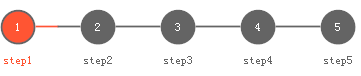
用处及效果
最后的话
如果你喜欢的话,请到 https://gitee.com/kwwwvagaa/net_winform_custom_control 点个星 星吧
(三十六)c#Winform自定义控件-步骤控件-HZHControls的更多相关文章
- (三十三)c#Winform自定义控件-日期控件
前提 入行已经7,8年了,一直想做一套漂亮点的自定义控件,于是就有了本系列文章. 开源地址:https://gitee.com/kwwwvagaa/net_winform_custom_control ...
- (七十七)c#Winform自定义控件-采样控件-HZHControls
官网 http://www.hzhcontrols.com 前提 入行已经7,8年了,一直想做一套漂亮点的自定义控件,于是就有了本系列文章. GitHub:https://github.com/kww ...
- (三十)c#Winform自定义控件-文本框(三)
前提 入行已经7,8年了,一直想做一套漂亮点的自定义控件,于是就有了本系列文章. 开源地址:https://gitee.com/kwwwvagaa/net_winform_custom_control ...
- (十二)c#Winform自定义控件-分页控件
前提 入行已经7,8年了,一直想做一套漂亮点的自定义控件,于是就有了本系列文章. 开源地址:https://gitee.com/kwwwvagaa/net_winform_custom_control ...
- 程序员编程艺术第三十六~三十七章、搜索智能提示suggestion,附近点搜索
第三十六~三十七章.搜索智能提示suggestion,附近地点搜索 作者:July.致谢:caopengcs.胡果果.时间:二零一三年九月七日. 题记 写博的近三年,整理了太多太多的笔试面试题,如微软 ...
- 第三十六个知识点:Index Calculus算法
第三十六个知识点:Index Calculus算法 我们这篇博客继续描述一种数学攻击,这种数学攻击被叫做Index Calculus(IC)算法. 注意这里Index Calculus算法没有找到合适 ...
- NeHe OpenGL教程 第三十六课:从渲染到纹理
转自[翻译]NeHe OpenGL 教程 前言 声明,此 NeHe OpenGL教程系列文章由51博客yarin翻译(2010-08-19),本博客为转载并稍加整理与修改.对NeHe的OpenGL管线 ...
- Java进阶(三十六)深入理解Java的接口和抽象类
Java进阶(三十六)深入理解Java的接口和抽象类 前言 对于面向对象编程来说,抽象是它的一大特征之一.在Java中,可以通过两种形式来体现OOP的抽象:接口和抽象类.这两者有太多相似的地方,又有太 ...
- Gradle 1.12用户指南翻译——第三十六章. Sonar Runner 插件
本文由CSDN博客万一博主翻译,其他章节的翻译请参见: http://blog.csdn.net/column/details/gradle-translation.html 翻译项目请关注Githu ...
随机推荐
- java8-date和timeAPI
一 我们为什么要学习 java.timeAPI 原先的Date and Calendar 类的api比较复杂,不易于理解,应用起来不是很灵活. Calendar 是个线程不安全的类会导致SimpleD ...
- Java8-Lamda和Stream原理引入
一说明 这边文章主要是带大家为什么会有lamda表达式的出现,流式思想的产生.具体的Lamda表达式操作,Stream流会在后面的文章更新,有兴趣的朋友也可以加一下我微信公众号,分享学习干货. 二ja ...
- Codeforces Round #609 (Div. 2)
A题 给出n,求大于n的两个合数a和b,并且a-b = n 直接输出n的倍数即可 int n; int main() { cin >> n; cout << 9*n <& ...
- 面试连环炮系列(二十一):你们的项目怎么使用kafka
你们的项目怎么使用kafka? 我们采用kafka进行日志采集,准确点说是ELK方案,即elasticsearch + logstash + kibana + kafka.通过Spring AOP的方 ...
- Cannot read property 'createElement' of undefined
场景: 架构:React+TS+DVA 具体场景: 在将之前后缀为jsx的组件转化为tsx后缀的组件时,抛出Cannot read property 'createElement' of unde ...
- vue-practice
vue-完整代码 这是一个完整的vue案例,但是接口似乎都失效了,单是代码本身还是很有参考价值的呦!~ 里面包含了:vue,vue-router,....,还是直接看json文件吧 { "n ...
- 腾讯云推出一站式 DevOps 解决方案 —— CODING DevOps
在产业互联网的大背景下,如何将人工智能.大数据等前沿技术与实体产业相结合,推动传统企业转型升级,已经成为每一个企业不得不思考的问题.落后的软件研发能力已经拖慢了中国大量企业的数字化转型进程. 为了满足 ...
- MySQL基础-存储过程
存储过程 定义:将一批为了完成特定功能的SQL语句集,根据传入的参数(也可没有),调用,完成单个sql语句更复杂的功能 存储过程思想很简单,就是SQL语句层面上的代码封装和重用 优点:1) 可封装,并 ...
- Bash脚本编程之字符串处理
简介 其实这里说得字符串处理,对应的是bash官网中的[Shell Parameter Expansion],不过直接去看这部分内容实在是太难以理解了.就按照马哥所说的字符串处理会比较好理解,平常使用 ...
- RF之关键字、变量、循环
关键字的使用: RF的能力是由关键字提供的,所以,我们必须对RF的常用关键字有个了解 . 最常用的关键字就在RF的关键字中.http://robotframework.org 其中Builtin是标准 ...