
(七十七)c#Winform自定义控件-采样控件-HZHControls
官网
前提
入行已经7,8年了,一直想做一套漂亮点的自定义控件,于是就有了本系列文章。
GitHub:https://github.com/kwwwvagaa/NetWinformControl
码云:https://gitee.com/kwwwvagaa/net_winform_custom_control.git
如果觉得写的还行,请点个 star 支持一下吧
欢迎前来交流探讨: 企鹅群568015492 
来都来了,点个【推荐】再走吧,谢谢
NuGet
Install-Package HZH_Controls
目录
https://www.cnblogs.com/bfyx/p/11364884.html
用处及效果
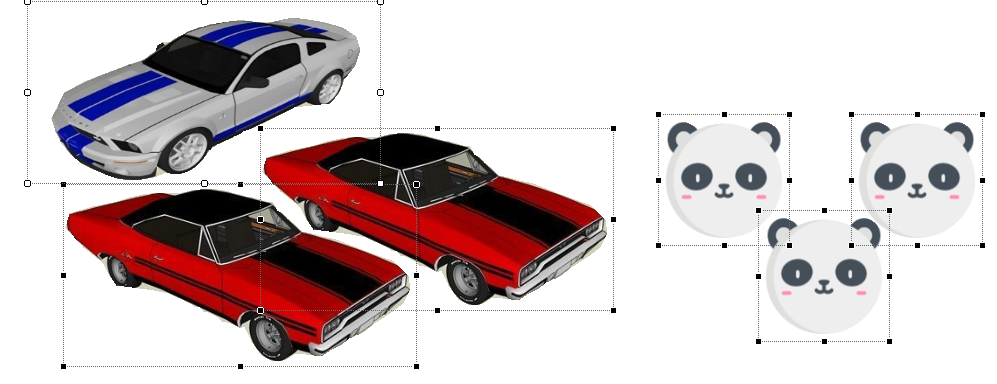
注意观察各个控件交叠的地方,是不是发现他们没有遮挡?这就是这个控件的妙处了。
准备工作
先说明一下这个控件的作用,很多时候我们需要一个图片类型的控件,但是有需要密集的放在一起,如果单纯的设置背景图或image的话 交叠在一起的部分就会存在遮挡现象,所有就有了这个控件。
该控件可以根据设置的采样图片来裁剪有用的绘图区域,这样的好处就是在交叠的时候,无用区域不会遮挡。
这个用GDI+画的,另外也用到了一点三角函数,不明白的话 可以先百度下
开始
添加一个类UCSampling ,继承UserControl
添加属性
   /// <summary>

         /// The sampling imag

         /// </summary>

         private Bitmap samplingImag = null;

         /// <summary>

         /// Gets or sets the sampling imag.

         /// </summary>

         /// <value>The sampling imag.</value>

         [Browsable(true), Category("自定义属性"), Description("采样图片"), Localizable(true)]

         public Bitmap SamplingImag

         {

             get { return samplingImag; }

             set

             {

                 samplingImag = value;

                 ResetBorderPath();

                 Invalidate();

             }

         }

         /// <summary>

         /// The transparent

         /// </summary>

         private Color? transparent = null;

         /// <summary>

         /// Gets or sets the transparent.

         /// </summary>

         /// <value>The transparent.</value>

         [Browsable(true), Category("自定义属性"), Description("透明色,如果为空,则使用0,0坐标处的颜色"), Localizable(true)]

         public Color? Transparent

         {

             get { return transparent; }

             set

             {

                 transparent = value;

                 ResetBorderPath();

                 Invalidate();

             }

         }

         /// <summary>

         /// The alpha

         /// </summary>

         private int alpha = ;

         /// <summary>

         /// Gets or sets the alpha.

         /// </summary>

         /// <value>The alpha.</value>

         [Browsable(true), Category("自定义属性"), Description("当作透明色的透明度,小于此透明度的颜色将被认定为透明,0-255"), Localizable(true)]

         public int Alpha

         {

             get { return alpha; }

             set

             {

                 if (value <  || value > )

                     return;

                 alpha = value;

                 ResetBorderPath();

                 Invalidate();

             }

         }

         /// <summary>

         /// The color threshold

         /// </summary>

         private int colorThreshold = ;

         /// <summary>

         /// Gets or sets the color threshold.

         /// </summary>

         /// <value>The color threshold.</value>

         [Browsable(true), Category("自定义属性"), Description("透明色颜色阀值"), Localizable(true)]

         public int ColorThreshold

         {

             get { return colorThreshold; }

             set

             {

                 colorThreshold = value;

                 ResetBorderPath();

                 Invalidate();

             }

         }

         /// <summary>

         /// The bit cache

         /// </summary>

         private Bitmap _bitCache;
在大小改变或图片改变时重新计算边界
/// <summary>
/// The m border path
/// </summary>
GraphicsPath m_borderPath = new GraphicsPath(); /// <summary>
/// Handles the SizeChanged event of the UCSampling control.
/// </summary>
/// <param name="sender">The source of the event.</param>
/// <param name="e">The <see cref="EventArgs"/> instance containing the event data.</param>
void UCSampling_SizeChanged(object sender, EventArgs e)
{
ResetBorderPath();
} /// <summary>
/// Resets the border path.
/// </summary>
private void ResetBorderPath()
{
if (samplingImag == null)
{
m_borderPath = this.ClientRectangle.CreateRoundedRectanglePath();
}
else
{
var bit = new Bitmap(this.ClientRectangle.Width, this.ClientRectangle.Height);
using (var bitg = Graphics.FromImage(bit))
{
bitg.DrawImage(samplingImag, this.ClientRectangle, , , samplingImag.Width, samplingImag.Height, GraphicsUnit.Pixel);
}
_bitCache = bit;
m_borderPath = new GraphicsPath();
List<PointF> lstPoints = GetBorderPoints(bit, transparent ?? samplingImag.GetPixel(, ));
m_borderPath.AddLines(lstPoints.ToArray());
m_borderPath.CloseAllFigures();
}
} /// <summary>
/// Gets the border points.
/// </summary>
/// <param name="bit">The bit.</param>
/// <param name="transparent">The transparent.</param>
/// <returns>List<PointF>.</returns>
private List<PointF> GetBorderPoints(Bitmap bit, Color transparent)
{
float diameter = (float)Math.Sqrt(bit.Width * bit.Width + bit.Height * bit.Height);
int intSplit = ;
intSplit = (int)( - (diameter - ) / );
if (intSplit < )
intSplit = ;
List<PointF> lstPoint = new List<PointF>();
for (int i = ; i < ; i += intSplit)
{
for (int j = (int)diameter / ; j > ; j--)
{
Point p = GetPointByAngle(i, j, new PointF(bit.Width / , bit.Height / ));
if (p.X < || p.Y < || p.X >= bit.Width || p.Y >= bit.Height)
continue;
Color _color = bit.GetPixel(p.X, p.Y);
if (!(((int)_color.A) <= alpha || IsLikeColor(_color, transparent)))
{
if (!lstPoint.Contains(p))
{
lstPoint.Add(p);
}
break;
}
}
}
return lstPoint;
} /// <summary>
/// Determines whether [is like color] [the specified color1].
/// </summary>
/// <param name="color1">The color1.</param>
/// <param name="color2">The color2.</param>
/// <returns><c>true</c> if [is like color] [the specified color1]; otherwise, <c>false</c>.</returns>
private bool IsLikeColor(Color color1, Color color2)
{
var cv = Math.Sqrt(Math.Pow((color1.R - color2.R), ) + Math.Pow((color1.G - color2.G), ) + Math.Pow((color1.B - color2.B), ));
if (cv <= colorThreshold)
return true;
else
return false;
}
  #region 根据角度得到坐标    English:Get coordinates from angles

         /// <summary>

         /// 功能描述:根据角度得到坐标    English:Get coordinates from angles

         /// 作  者:HZH

         /// 创建日期:2019-09-28 11:56:25

         /// 任务编号:POS

         /// </summary>

         /// <param name="angle">angle</param>

         /// <param name="radius">radius</param>

         /// <param name="origin">origin</param>

         /// <returns>返回值</returns>

         private Point GetPointByAngle(float angle, float radius, PointF origin)

         {

             float y = origin.Y + (float)Math.Sin(Math.PI * (angle / 180.00F)) * radius;

             float x = origin.X + (float)Math.Cos(Math.PI * (angle / 180.00F)) * radius;

             return new Point((int)x, (int)y);

         }

         #endregion
取边界的思路如下:
1,以控件中心为原点,按照一定的角度顺时针依次进行旋转,
2、每次旋转后,按照此角度从外向内,找到第一个不是透明的点记录下来,这就是外边界点
这个取边界算法感觉并不是太好,如果哪位小伙伴有更好的算法,希望可以探讨一下
重绘
   protected override void OnPaint(PaintEventArgs e)

         {

             base.OnPaint(e);

             e.Graphics.SetGDIHigh();

             this.Region = new System.Drawing.Region(m_borderPath);

             if (_bitCache != null)

                 e.Graphics.DrawImage(_bitCache, , );

         }
最后的话
如果你喜欢的话,请到 https://gitee.com/kwwwvagaa/net_winform_custom_control 点个星星吧
(七十七)c#Winform自定义控件-采样控件-HZHControls的更多相关文章
- (三十六)c#Winform自定义控件-步骤控件-HZHControls
官网 http://www.hzhcontrols.com 前提 入行已经7,8年了,一直想做一套漂亮点的自定义控件,于是就有了本系列文章. GitHub:https://github.com/kww ...
- (三十三)c#Winform自定义控件-日期控件
前提 入行已经7,8年了,一直想做一套漂亮点的自定义控件,于是就有了本系列文章. 开源地址:https://gitee.com/kwwwvagaa/net_winform_custom_control ...
- (十二)c#Winform自定义控件-分页控件
前提 入行已经7,8年了,一直想做一套漂亮点的自定义控件,于是就有了本系列文章. 开源地址:https://gitee.com/kwwwvagaa/net_winform_custom_control ...
- DevExpress winform XtraEditor常用控件
最近在公司里面开始使用DevExpress winform的第三方控件进行开发和维护,这里整理一些常用控件的资料以便于后续查看 ComboBoxEdit 这个控件和winform自带的控件差不多,使用 ...
- WinForm容器内控件批量效验是否允许为空?设置是否只读?设置是否可用等方法分享
WinForm容器内控件批量效验是否允许为空?设置是否只读?设置是否可用等方法分享 在WinForm程序中,我们有时需要对某容器内的所有控件做批量操作.如批量判断是否允许为空?批量设置为只读.批量设置 ...
- Winform中checklistbox控件的常用方法
Winform中checklistbox控件的常用方法最近用到checklistbox控件,在使用其过程中,收集了其相关的代码段1.添加项checkedListBox1.Items.Add(" ...
- {VS2010C#}{WinForm}{ActiveX}VS2010C#开发基于WinForm的ActiveX控件
在VS2010中使用C#开发基于WinForm的ActiveX控件 常见的一些ActiveX大部分是使用VB.Delphi.C++开发,使用C#开发ActiveX要解决下面三个问题: 使.NET组件可 ...
- Atitit. .net c# web 跟客户端winform 的ui控件结构比较
Atitit. .net c# web 跟客户端winform 的ui控件结构比较 .net 4.5 webform Winform 命名空间 System.Web.UI.WebControls ...
- WinForm窗体及其控件的自适应
3步骤: 1.在需要自适应的Form中实例化全局变量 AutoSizeFormClass.cs源码在下方 AutoSizeFormClass asc = new AutoSizeFormClass ...
随机推荐
- MQTT版本升级过程及源码解析
MQTT版本升级过程及源码解析 首先说一下为什么要写这篇文章呢,在我发现网上对MQTT的文章介绍实在太少了,可能也是使用这个的频率比较低吧!还有对问题的定位以及解决的方式和办法也太少了,所以特意写这篇 ...
- 一文看尽Java-并发编程知识点
一.前言 从7月份开始一直加班比较多,一直到双11结束,博客没跟上写,接下来写一点总结性的东西,比如Java并发编程总结.Mybatis源码总结.Spring源码和基础知识总结,首先来看下并发 ...
- Redis 中的数据库
前面我们花了很多的时间介绍了 redis 中基本的数据结构,及其内部的实现情况,这些都是非常基础的东西,可能不经意间你就会用到他们,希望你花点时间了解一下. 接下来,我们将走近 redis 数据库,学 ...
- std::unique_ptr的用法
std::ofstream("demo.txt") << 'x'; // 准备要读的文件 { std::unique_ptr<std::FILE, decltyp ...
- iOS 网络基本剖析
一.网络通信的本质 数据传输,数据交换 Client <======> 服务器 二.HTTP.TCP,IP.UDP.Socket关系刨析 Socket:套接字,是一个用于网络传输 ...
- 【解决】OCI runtime exec failed......executable file not found in $PATH": unknown
[问题]使用docker exec + sh进入容器时报错 [root@localhost home]# docker exec -it container-test bash OCI runtime ...
- 2017 ACM/ICPC 沈阳 L题 Tree
Consider a un-rooted tree T which is not the biological significance of tree or plant, but a tree as ...
- 地兵布阵 -----------HDU-1166
C国的死对头A国这段时间正在进行军事演习,所以C国间谍头子Derek和他手下Tidy又开始忙乎了.A国在海岸线沿直线布置了N个工兵营地,Derek和Tidy的任务就是要监视这些工兵营地的活动情况.由于 ...
- linux—ln
1. 软连接:不可删除源文件,删除源文件导致链接文件找不到,出现红色闪烁. 2. 硬链接: 源文件删除后,链接文件可以正常打开,链接前后的文件inode号相同,硬链接只能针对文件做链接,,不能针 ...
- 使用 defineProperty 劫持数据属性的改变
使用defineProperty劫持数据属性的变化 例子一:有一个全局变量a,有一个全局函数b,实现一个`bindData`,执行后,a的任何赋值都会触发b的执行 // var a = 1;a = 1 ...