
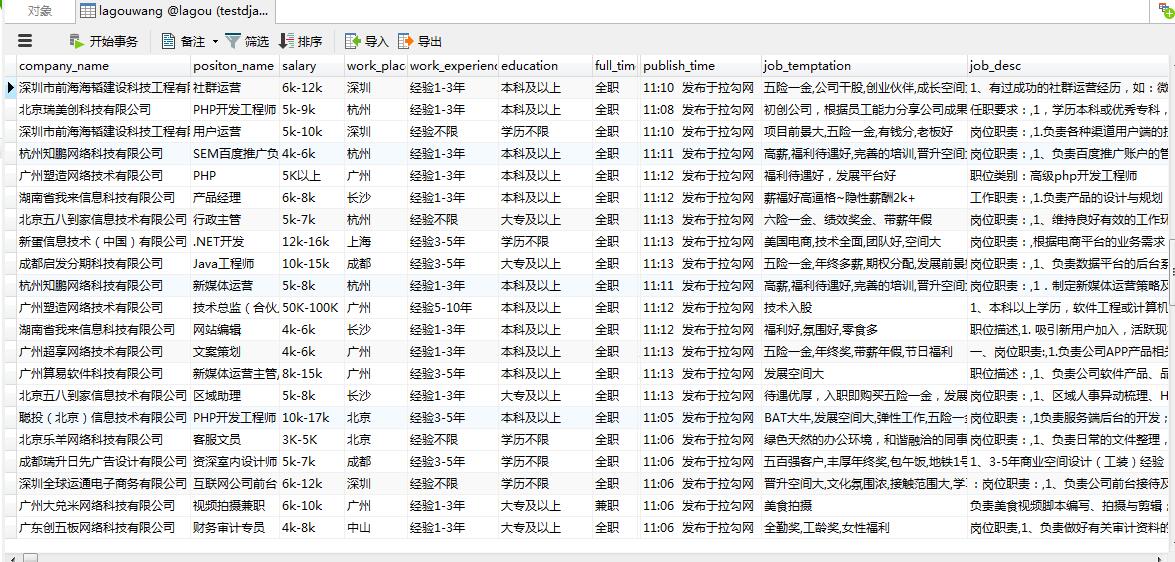
scrapy基础知识之 CrawlSpiders爬取lagou招聘保存在mysql(分布式):
items.py
 import scrapy

 class LagouItem(scrapy.Item):

     # define the fields for your item here like:

     # name = scrapy.Field()

     #id

     # obj_id=scrapy.Field()

     #职位名

     positon_name=scrapy.Field()

     #工作地点

     work_place=scrapy.Field()

     #发布日期

     publish_time=scrapy.Field()

     #工资

     salary=scrapy.Field()

     #工作经验

     work_experience=scrapy.Field()

     #学历

     education=scrapy.Field()

     #full_time

     full_time=scrapy.Field()

     #标签

     tags=scrapy.Field()

     #公司名字

     company_name=scrapy.Field()

     # #产业

     # industry=scrapy.Field()

     #职位诱惑

     job_temptation=scrapy.Field()

     #工作描述

     job_desc=scrapy.Field()

     #公司logo地址

     logo_image=scrapy.Field()

      #领域

     field=scrapy.Field()

     #发展阶段

     stage=scrapy.Field()

     #公司规模

     company_size=scrapy.Field()

     # 公司主页

     home = scrapy.Field()

     #职位发布者

     job_publisher=scrapy.Field()

     #投资机构

     financeOrg=scrapy.Field()

     #爬取时间

     crawl_time=scrapy.Field()
lagou.py
# -*- coding: utf-8 -*-

import scrapy

from scrapy.linkextractors import LinkExtractor

from scrapy.spiders import CrawlSpider, Rule

from LaGou.items import LagouItem

from LaGou.utils.MD5 import get_md5

from datetime import datetime

class LagouSpider(CrawlSpider):

    name = 'lagou'

    allowed_domains = ['lagou.com']

    start_urls = ['https://www.lagou.com/zhaopin/']

    content_links=LinkExtractor(allow=(r"https://www.lagou.com/jobs/\d+.html"))

    page_links=LinkExtractor(allow=(r"https://www.lagou.com/zhaopin/\d+"))

    rules = (

        Rule(content_links, callback="parse_item", follow=False),

        Rule(page_links,follow=True)

    )

    def parse_item(self, response):

        item=LagouItem()

        #获取到公司拉钩主页的url作为ID

        # item["obj_id"]=get_md5(response.url)

        #公司名称

        item["company_name"]=response.xpath('//dl[@class="job_company"]//a/img/@alt').extract()[0]

        # 职位

        item["positon_name"]=response.xpath('//div[@class="job-name"]//span[@class="name"]/text()').extract()[0]

        #工资

        item["salary"]=response.xpath('//dd[@class="job_request"]//span[1]/text()').extract()[0]

        # 工作地点

        work_place=response.xpath('//dd[@class="job_request"]//span[2]/text()').extract()[0]

        item["work_place"]=work_place.replace("/","")

        # 工作经验

        work_experience=response.xpath('//dd[@class="job_request"]//span[3]/text()').extract()[0]

        item["work_experience"]=work_experience.replace("/","")

        # 学历

        education=response.xpath('//dd[@class="job_request"]//span[4]/text()').extract()[0]

        item["education"]=education.replace("/","")

        # full_time

        item['full_time']=response.xpath('//dd[@class="job_request"]//span[5]/text()').extract()[0]

        #tags

        tags=response.xpath('//dd[@class="job_request"]//li[@class="labels"]/text()').extract()

        item["tags"]=",".join(tags)

        #publish_time

        item["publish_time"]=response.xpath('//dd[@class="job_request"]//p[@class="publish_time"]/text()').extract()[0]

        # 职位诱惑

        job_temptation=response.xpath('//dd[@class="job-advantage"]/p/text()').extract()

        item["job_temptation"]=",".join(job_temptation)

        # 工作描述

        job_desc=response.xpath('//dd[@class="job_bt"]/div//p/text()').extract()

        item["job_desc"]=",".join(job_desc).replace("\xa0","").strip()

        #job_publisher

        item["job_publisher"]=response.xpath('//div[@class="publisher_name"]//span[@class="name"]/text()').extract()[0]

        # 公司logo地址

        logo_image=response.xpath('//dl[@class="job_company"]//a/img/@src').extract()[0]

        item["logo_image"]=logo_image.replace("//","")

        # 领域

        field=response.xpath('//ul[@class="c_feature"]//li[1]/text()').extract()

        item["field"]="".join(field).strip()

        # 发展阶段

        stage=response.xpath('//ul[@class="c_feature"]//li[2]/text()').extract()

        item["stage"]="".join(stage).strip()

        # 投资机构

        financeOrg=response.xpath('//ul[@class="c_feature"]//li[3]/p/text()').extract()

        if financeOrg:

            item["financeOrg"]="".join(financeOrg)

        else:

            item["financeOrg"]=""

        #公司规模

        if financeOrg:

             company_size= response.xpath('//ul[@class="c_feature"]//li[4]/text()').extract()

             item["company_size"]="".join(company_size).strip()

        else:

            company_size = response.xpath('//ul[@class="c_feature"]//li[3]/text()').extract()

            item["company_size"] = "".join(company_size).strip()

        # 公司主页

        item["home"]=response.xpath('//ul[@class="c_feature"]//li/a/@href').extract()[0]

        # 爬取时间

        item["crawl_time"]=datetime.now()

        yield item
pipelines.py
# -*- coding: utf-8 -*-

# Define your item pipelines here

#

# Don't forget to add your pipeline to the ITEM_PIPELINES setting

# See: http://doc.scrapy.org/en/latest/topics/item-pipeline.html

import pymysql

class LagouPipeline(object):

    def process_item(self, item, spider):

        con = pymysql.connect(host="127.0.0.1", user="root", passwd="", db="lagou",charset="utf8")

        cur = con.cursor()

        sql = ("insert into lagouwang(company_name,positon_name,salary,work_place,work_experience,education,full_time,tags,publish_time,job_temptation,job_desc,job_publisher,logo_image,field,stage,financeOrg,company_size,home,crawl_time)"

               "VALUES (%s,%s,%s,%s,%s,%s,%s,%s,%s,%s,%s,%s,%s,%s,%s,%s,%s,%s,%s)")

        lis=(item["company_name"],item["positon_name"],item["salary"],item["work_place"],item["work_experience"],item["education"],item['full_time'],item["tags"],item["publish_time"],item["job_temptation"],item["job_desc"],item["job_publisher"],item["logo_image"],item["field"],item["stage"],item["financeOrg"],item["company_size"],item["home"],item["crawl_time"])

        cur.execute(sql, lis)

        con.commit()

        cur.close()

        con.close()

        return item
middlewares.py (主要是User_Agent的随机切换 没有加ip代理)
import random

from LaGou.settings import USER_AGENTS

class RandomUserAgent(object):

    def process_request(self, request, spider):

        useragent = random.choice(USER_AGENTS)

        request.headers.setdefault("User-Agent", useragent)
settings.py
BOT_NAME = 'LaGou'

SPIDER_MODULES = ['LaGou.spiders']

NEWSPIDER_MODULE = 'LaGou.spiders'

ROBOTSTXT_OBEY = False

DOWNLOAD_DELAY = 5

COOKIES_ENABLED = False

USER_AGENTS = [

    "Mozilla/5.0 (compatible; MSIE 9.0; Windows NT 6.1; Win64; x64; Trident/5.0; .NET CLR 3.5.30729; .NET CLR 3.0.30729; .NET CLR 2.0.50727; Media Center PC 6.0)",

    "Mozilla/5.0 (compatible; MSIE 8.0; Windows NT 6.0; Trident/4.0; WOW64; Trident/4.0; SLCC2; .NET CLR 2.0.50727; .NET CLR 3.5.30729; .NET CLR 3.0.30729; .NET CLR 1.0.3705; .NET CLR 1.1.4322)",

    "Mozilla/4.0 (compatible; MSIE 7.0b; Windows NT 5.2; .NET CLR 1.1.4322; .NET CLR 2.0.50727; InfoPath.2; .NET CLR 3.0.04506.30)",

    "Mozilla/5.0 (Windows; U; Windows NT 5.1; zh-CN) AppleWebKit/523.15 (KHTML, like Gecko, Safari/419.3) Arora/0.3 (Change: 287 c9dfb30)",

    "Mozilla/5.0 (X11; U; Linux; en-US) AppleWebKit/527+ (KHTML, like Gecko, Safari/419.3) Arora/0.6",

    "Mozilla/5.0 (Windows; U; Windows NT 5.1; en-US; rv:1.8.1.2pre) Gecko/20070215 K-Ninja/2.1.1",

    "Mozilla/5.0 (Windows; U; Windows NT 5.1; zh-CN; rv:1.9) Gecko/20080705 Firefox/3.0 Kapiko/3.0",

    "Mozilla/5.0 (X11; Linux i686; U;) Gecko/20070322 Kazehakase/0.4.5"

   ]

DOWNLOADER_MIDDLEWARES = {

      'LaGou.middlewares.RandomUserAgent': 1,

#    'LaGou.middlewares.MyCustomDownloaderMiddleware': 543,

}

ITEM_PIPELINES = {

      #'scrapy_redis.pipelines.RedisPipeline':300,

    'LaGou.pipelines.LagouPipeline': 300,

}
main.py(用于启动调试)
 #coding=utf-8

 from scrapy.cmdline import execute

 execute(["scrapy","crawl","lagou"])
在settings.py配置加入如下代码会实现分布式数据保存在redis里面,怎么从redis取出数据参考前几章
DUPEFILTER_CLASS = "scrapy_redis.dupefilter.RFPDupeFilter"

SCHEDULER = "scrapy_redis.scheduler.Scheduler"

SCHEDULER_PERSIST = True

ITEM_PIPELINES = {

      'scrapy_redis.pipelines.RedisPipeline':300,

    #'LaGou.pipelines.LagouPipeline': 300,

}
主要用到知识点:CrawlSpider的(LinkExtractor,Rule),内容的处理(xpath,extract),字符的处理(join,replace,strip,split),User_Agent随机切换等
scrapy基础知识之 CrawlSpiders爬取lagou招聘保存在mysql(分布式):的更多相关文章
- scrapy基础知识之 CrawlSpiders(爬取腾讯校内招聘):
import scrapyfrom scrapy.spider import CrawlSpider,Rulefrom scrapy.linkextractors import LinkExtract ...
- scrapy基础知识之 CrawlSpiders:
通过下面的命令可以快速创建 CrawlSpider模板 的代码: scrapy genspider -t crawl spidername xx.com LinkExtractors class sc ...
- python之scrapy爬取jingdong招聘信息到mysql数据库
1.创建工程 scrapy startproject jd 2.创建项目 scrapy genspider jingdong 3.安装pymysql pip install pymysql 4.set ...
- 将爬取的数据保存到mysql中
为了把数据保存到mysql费了很多周折,早上再来折腾,终于折腾好了 安装数据库 1.pip install pymysql(根据版本来装) 2.创建数据 打开终端 键入mysql -u root -p ...
- scrapy实战2分布式爬取lagou招聘(加入了免费的User-Agent随机动态获取库 fake-useragent 使用方法查看:https://github.com/hellysmile/fake-useragent)
items.py # -*- coding: utf-8 -*- # Define here the models for your scraped items # # See documentati ...
- scrapy基础知识之将item 通过pipeline保存数据到mysql mongoDB:
pipelines.py class xxPipeline(object): def process_item(self, item, spider): con=pymysql.connect(hos ...
- 0.Python 爬虫之Scrapy入门实践指南(Scrapy基础知识)
目录 0.0.Scrapy基础 0.1.Scrapy 框架图 0.2.Scrapy主要包括了以下组件: 0.3.Scrapy简单示例如下: 0.4.Scrapy运行流程如下: 0.5.还有什么? 0. ...
- pymysql 使用twisted异步插入数据库:基于crawlspider爬取内容保存到本地mysql数据库
本文的前提是实现了整站内容的抓取,然后把抓取的内容保存到数据库. 可以参考另一篇已经实现整站抓取的文章:Scrapy 使用CrawlSpider整站抓取文章内容实现 本文也是基于这篇文章代码基础上实现 ...
- 【图文详解】scrapy爬虫与动态页面——爬取拉勾网职位信息(2)
上次挖了一个坑,今天终于填上了,还记得之前我们做的拉勾爬虫吗?那时我们实现了一页的爬取,今天让我们再接再厉,实现多页爬取,顺便实现职位和公司的关键词搜索功能. 之前的内容就不再介绍了,不熟悉的请一定要 ...
随机推荐
- style原则问题
就近原则 1.“行内”覆盖“嵌入”,“嵌入”覆盖“外部”Style.xml <Window.Resources> <Grid.Resources> ….中间层 <Butt ...
- 那些证书相关的玩意儿(SSL,X.509,PEM,DER,CRT,CER,KEY,CSR,P12等)(使用OpenSSL的命令行)
之前没接触过证书加密的话,对证书相关的这些概念真是感觉挺棘手的,因为一下子来了一大堆新名词,看起来像是另一个领域的东西,而不是我们所熟悉的编程领域的那些东西,起码我个人感觉如此,且很长时间都没怎么搞懂 ...
- wpf中防止界面卡死的写法
原文:wpf中防止界面卡死的写法 ); this.Dispatcher.BeginInvoke(new Action(() => { this.button1.Content = "计 ...
- linq中不能准确按拼音排序
在LinqToObject中,利用OrderBy/OrderByDescending, ThenBy/ThenByDescending这4个方法排序时,发现不能正确的按拼音排序,所以在排序时增加编码支 ...
- 微信小程序把玩(二十)slider组件
原文:微信小程序把玩(二十)slider组件 slider滑动组件用的不太多,在其他平台反正我是用的不多 主要属性: wxml <slider max="100" step= ...
- WPF修改窗体标题栏的颜色
WPF程序通常情况下没办法修改窗体标题栏的样式,包括标题栏的背景颜色. 不过借助一个叫Fluent.Ribbon的第三方控件,貌似可以修改标题栏的背景颜色. 可以通过NuGet来安装这个控件:Inst ...
- CRS-2800: Cannot start resource 'ora.asm' as it is already in the INTERMEDIATE state on server ‘RAC02’
在安装ORACLE RAC的Grid Infrastructure时,在节点1运行/u01/app/11.2.0/grid/root.sh正常,当在节点2运行/u01/app/11.2.0/grid/ ...
- The specified type member 'IsLock' is not supported in LINQ to Entities. Only initializers, entity members, and entity navigation properties are supported.
var query = from C in objDb.GetDb<A>() join a in objDb.GetDb<B>().Where(m => m.Comput ...
- .NET Core2.1项目在Linux上使用验证码报Unable to load shared library 'gdiplus' or one of its dependencies
-- ::, 线程ID:[] 日志级别:ERROR 出错类:WebApp.HttpGlobalExceptionFilter property:[(null)] - 错误描述:System.TypeI ...
- [收录] Highcharts-ng —— AngularJS 的图表扩展
原文:http://www.tuicool.com/articles/u6VZJjQ Highcharts-ng 是一个 AngularJS 的指令扩展,实现了在AngularJS 应用中集成High ...