
基于Spark的电影推荐系统(推荐系统~2)
第四部分-推荐系统-数据ETL
- 本模块完成数据清洗,并将清洗后的数据load到Hive数据表里面去
前置准备:
spark +hive
vim $SPARK_HOME/conf/hive-site.xml

	<?xml version="1.0"?>

		<?xml-stylesheet type="text/xsl" href="configuration.xsl"?>

	<configuration>

	<property>

			<name>hive.metastore.uris</name>

			<value>thrift://hadoop001:9083</value>

	</property>

	</configuration>
- 启动Hive metastore server
[root@hadoop001 conf]# nohup hive --service metastore &
[root@hadoop001 conf]# netstat -tanp | grep 9083
tcp 0 0 0.0.0.0:9083 0.0.0.0:* LISTEN 24787/java
[root@hadoop001 conf]#
测试:
[root@hadoop001 ~]# spark-shell --master local[2]
scala> spark.sql("select * from liuge_db.dept").show;

+------+-------+-----+

|deptno|  dname|  loc|

+------+-------+-----+

|     1|  caiwu| 3lou|

|     2|  renli| 4lou|

|     3|  kaifa| 5lou|

|     4|qiantai| 1lou|

|     5|lingdao|4 lou|

+------+-------+-----+
==》保证Spark SQL 能够访问到Hive 的元数据才行。
然而我们采用的是standalone模式:需要启动master worker
[root@hadoop001 sbin]# pwd
/root/app/spark-2.4.3-bin-2.6.0-cdh5.7.0/sbin
[root@hadoop001 sbin]# ./start-all.sh
[root@hadoop001 sbin]# jps
26023 Master
26445 Worker
Spark常用端口
8080	spark.master.ui.port	Master WebUI

8081	spark.worker.ui.port	Worker WebUI

18080	spark.history.ui.port	History server WebUI

7077	SPARK_MASTER_PORT	    Master port

6066	spark.master.rest.port	Master REST port

4040	spark.ui.port	        Driver WebUI
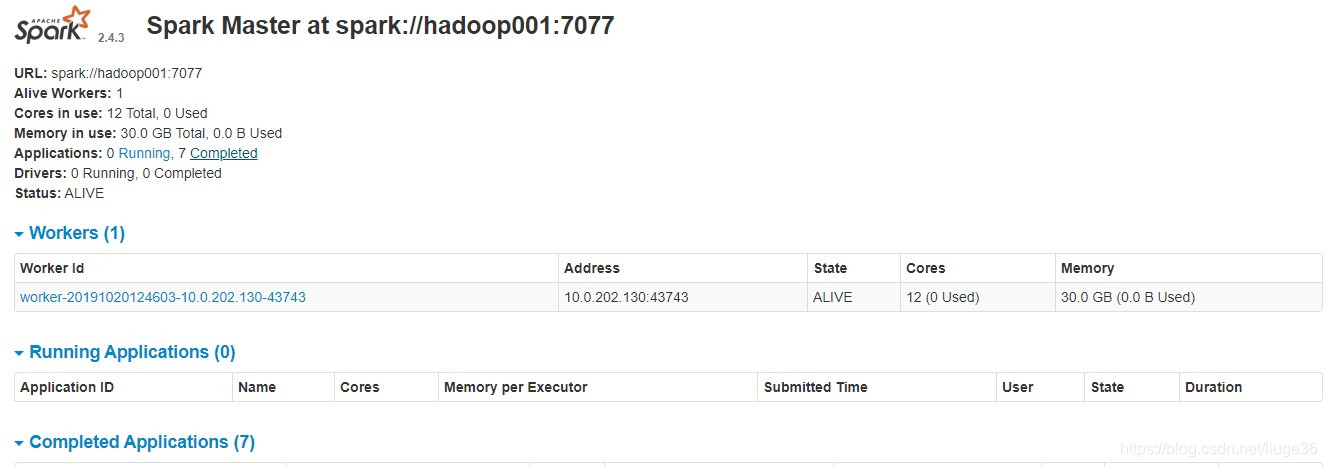
这个时候打开:http://hadoop001:8080/
开始项目Coding
IDEA+Scala+Maven进行项目的构建
步骤一: 新建scala项目后,可以参照如下pom进行配置修改
<project xmlns="http://maven.apache.org/POM/4.0.0" xmlns:xsi="http://www.w3.org/2001/XMLSchema-instance" xsi:schemaLocation="http://maven.apache.org/POM/4.0.0 http://maven.apache.org/maven-v4_0_0.xsd">

  <modelVersion>4.0.0</modelVersion>

  <groupId>com.csylh</groupId>

  <artifactId>movie-recommend</artifactId>

  <version>1.0</version>

  <inceptionYear>2008</inceptionYear>

  <properties>

    <scala.version>2.11.8</scala.version>

    <spark.version>2.4.3</spark.version>

  </properties>

  <repositories>

    <repository>

      <id>scala-tools.org</id>

      <name>Scala-Tools Maven2 Repository</name>

      <url>http://scala-tools.org/repo-releases</url>

    </repository>

  </repositories>

  <dependencies>

    <dependency>

      <groupId>org.apache.spark</groupId>

      <artifactId>spark-core_2.11</artifactId>

      <version>${spark.version}</version>

    </dependency>

    <dependency>

      <groupId>org.apache.hadoop</groupId>

      <artifactId>hadoop-client</artifactId>

      <version>2.6.0</version>

    </dependency>

    <dependency>

      <groupId>org.apache.spark</groupId>

      <artifactId>spark-sql_2.11</artifactId>

      <version>${spark.version}</version>

    </dependency>

    <dependency>

      <groupId>org.apache.spark</groupId>

      <artifactId>spark-hive_2.11</artifactId>

      <version>${spark.version}</version>

    </dependency>

    <dependency>

      <groupId>org.apache.spark</groupId>

      <artifactId>spark-mllib_2.11</artifactId>

      <version>${spark.version}</version>

    </dependency>

    <dependency>

      <groupId>org.apache.spark</groupId>

      <artifactId>spark-streaming_2.11</artifactId>

      <version>${spark.version}</version>

    </dependency>

    <dependency>

      <groupId>org.apache.spark</groupId>

      <artifactId>spark-streaming-kafka-0-8_2.11</artifactId>

      <version>${spark.version}</version>

    </dependency>

    <dependency>

      <groupId>org.apache.kafka</groupId>

      <artifactId>kafka-clients</artifactId>

      <version>1.1.1</version>

    </dependency>

    <!--// 0.10.2.1-->

    <dependency>

      <groupId>mysql</groupId>

      <artifactId>mysql-connector-java</artifactId>

      <version>5.1.39</version>

    </dependency>

    <dependency>

      <groupId>log4j</groupId>

      <artifactId>log4j</artifactId>

      <version>1.2.17</version>

    </dependency>

  </dependencies>

  <build>

    <!--<sourceDirectory>src/main/scala</sourceDirectory>-->

    <!--<testSourceDirectory>src/test/scala</testSourceDirectory>-->

    <plugins>

      <plugin>

        <!-- see http://davidb.github.com/scala-maven-plugin -->

        <groupId>net.alchim31.maven</groupId>

        <artifactId>scala-maven-plugin</artifactId>

        <version>3.1.3</version>

        <executions>

          <execution>

            <goals>

              <goal>compile</goal>

              <goal>testCompile</goal>

            </goals>

            <configuration>

              <args>

                <arg>-dependencyfile</arg>

                <arg>${project.build.directory}/.scala_dependencies</arg>

              </args>

            </configuration>

          </execution>

        </executions>

      </plugin>

      <plugin>

        <groupId>org.apache.maven.plugins</groupId>

        <artifactId>maven-surefire-plugin</artifactId>

        <version>2.13</version>

        <configuration>

          <useFile>false</useFile>

          <disableXmlReport>true</disableXmlReport>

          <!-- If you have classpath issue like NoDefClassError,... -->

          <!-- useManifestOnlyJar>false</useManifestOnlyJar -->

          <includes>

            <include>**/*Test.*</include>

            <include>**/*Suite.*</include>

          </includes>

        </configuration>

      </plugin>

    </plugins>

  </build>

</project>
步骤二:新建com.csylh.recommend.dataclearer.SourceDataETLApp
import com.csylh.recommend.entity.{Links, Movies, Ratings, Tags}

import org.apache.spark.sql.{SaveMode, SparkSession}

/**

  * Description:

  *    hadoop001  file:///root/data/ml/ml-latest 下的文件

  *    ====>  SparkSQL ETL

  *    ===>  load data to Hive数据仓库

  *

  * @Author: 留歌36

  * @Date: 2019-07-12 13:48

  */

object SourceDataETLApp{

  def main(args: Array[String]): Unit = {

    // 面向SparkSession编程

    val spark = SparkSession.builder()

//          .master("local[2]")

      .enableHiveSupport() //开启访问Hive数据, 要将hive-site.xml等文件放入Spark的conf路径

      .getOrCreate()

    val sc = spark.sparkContext

    // 设置RDD的partitions 的数量一般以集群分配给应用的CPU核数的整数倍为宜, 4核8G ,设置为8就可以

    // 问题一:为什么设置为CPU核心数的整数倍?

    // 问题二:数据倾斜,拿到数据大的partitions的处理,会消耗大量的时间,因此做数据预处理的时候,需要考量会不会发生数据倾斜

    val minPartitions = 8

    //  在生产环境中一定要注意设置spark.sql.shuffle.partitions,默认是200,及需要配置分区的数量

    val shuffleMinPartitions = "8"

    spark.sqlContext.setConf("spark.sql.shuffle.partitions",shuffleMinPartitions)

    /**

      * 1

      */

    import spark.implicits._

    val links = sc.textFile("file:///root/data/ml/ml-latest/links.txt",minPartitions) //DRIVER

      .filter(!_.endsWith(",")) //EXRCUTER

      .map(_.split(",")) //EXRCUTER

      .map(x => Links(x(0).trim.toInt, x(1).trim.toInt, x(2).trim.toInt)) //EXRCUTER

      .toDF()

    println("===============links===================:",links.count())

    links.show()

    // 把数据写入到HDFS上

    links.write.mode(SaveMode.Overwrite).parquet("/tmp/links")

    // 将数据从HDFS加载到Hive数据仓库中去

    spark.sql("drop table if exists links")

    spark.sql("create table if not exists links(movieId int,imdbId int,tmdbId int) stored as parquet")

    spark.sql("load data inpath '/tmp/links' overwrite into table links")

    /**

      * 2

      */

    val movies = sc.textFile("file:///root/data/ml/ml-latest/movies.txt",minPartitions)

      .filter(!_.endsWith(","))

      .map(_.split(","))

      .map(x => Movies(x(0).trim.toInt, x(1).trim.toString, x(2).trim.toString))

      .toDF()

    println("===============movies===================:",movies.count())

    movies.show()

    // 把数据写入到HDFS上

    movies.write.mode(SaveMode.Overwrite).parquet("/tmp/movies")

    // 将数据从HDFS加载到Hive数据仓库中去

    spark.sql("drop table if exists movies")

    spark.sql("create table if not exists movies(movieId int,title String,genres String) stored as parquet")

    spark.sql("load data inpath '/tmp/movies' overwrite into table movies")

    /**

      * 3

      */

    val ratings = sc.textFile("file:///root/data/ml/ml-latest/ratings.txt",minPartitions)

      .filter(!_.endsWith(","))

      .map(_.split(","))

      .map(x => Ratings(x(0).trim.toInt, x(1).trim.toInt, x(2).trim.toDouble, x(3).trim.toInt))

      .toDF()

    println("===============ratings===================:",ratings.count())

    ratings.show()

    // 把数据写入到HDFS上

    ratings.write.mode(SaveMode.Overwrite).parquet("/tmp/ratings")

    // 将数据从HDFS加载到Hive数据仓库中去

    spark.sql("drop table if exists ratings")

    spark.sql("create table if not exists ratings(userId int,movieId int,rating Double,timestamp int) stored as parquet")

    spark.sql("load data inpath '/tmp/ratings' overwrite into table ratings")

    /**

      * 4

      */

    val tags = sc.textFile("file:///root/data/ml/ml-latest/tags.txt",minPartitions)

      .filter(!_.endsWith(","))

      .map(x => rebuild(x))  // 注意这个坑的解决思路

      .map(_.split(","))

      .map(x => Tags(x(0).trim.toInt, x(1).trim.toInt, x(2).trim.toString, x(3).trim.toInt))

      .toDF()

    tags.show()

    // 把数据写入到HDFS上

    tags.write.mode(SaveMode.Overwrite).parquet("/tmp/tags")

    // 将数据从HDFS加载到Hive数据仓库中去

    spark.sql("drop table if exists tags")

    spark.sql("create table if not exists tags(userId int,movieId int,tag String,timestamp int) stored as parquet")

    spark.sql("load data inpath '/tmp/tags' overwrite into table tags")

  }

  /**

    * 该方法是用于处理不符合规范的数据

    * @param input

    * @return

    */

  private def rebuild(input:String): String ={

    val a = input.split(",")

    val head = a.take(2).mkString(",")

    val tail = a.takeRight(1).mkString

    val tag = a.drop(2).dropRight(1).mkString.replaceAll("\"","")

    val output = head + "," + tag + "," + tail

    output

  }

}
再有一些上面主类引用到的case 对象,你可以理解为Java 实体类
package com.csylh.recommend.entity

/**

  * Description: 数据的schema

  *

  * @Author: 留歌36

  * @Date: 2019-07-12 13:46

  */

case class Links(movieId:Int,imdbId:Int,tmdbId:Int)
package com.csylh.recommend.entity

/**

  * Description: TODO

  *

  * @Author: 留歌36

  * @Date: 2019-07-12 14:09

  */

case class Movies(movieId:Int,title:String,genres:String)
package com.csylh.recommend.entity

/**

  * Description: TODO

  *

  * @Author: 留歌36

  * @Date: 2019-07-12 14:10

  */

case class Ratings(userId:Int,movieId:Int,rating:Double,timestamp:Int)
package com.csylh.recommend.entity

/**

  * Description: TODO

  *

  * @Author: 留歌36

  * @Date: 2019-07-12 14:11

  */

case class Tags(userId:Int,movieId:Int,tag:String,timestamp:Int)
步骤三:将创建的项目进行打包上传到服务器
mvn clean package -Dmaven.test.skip=true
[root@hadoop001 ml]# ll -h movie-recommend-1.0.jar

-rw-r--r--. 1 root root 156K 10月 20 13:56 movie-recommend-1.0.jar

[root@hadoop001 ml]#
步骤四:提交运行上面的jar,编写shell脚本
[root@hadoop001 ml]# vim etl.sh
export HADOOP_CONF_DIR=/root/app/hadoop-2.6.0-cdh5.7.0/etc/hadoop
$SPARK_HOME/bin/spark-submit
--class com.csylh.recommend.dataclearer.SourceDataETLApp
--master spark://hadoop001:7077
--name SourceDataETLApp
--driver-memory 10g
--executor-memory 5g
/root/data/ml/movie-recommend-1.0.jar
步骤五:sh etl.sh 即可
先把数据写入到HDFS上
创建Hive表
load 数据到表
sh etl.sh之前:
[root@hadoop001 ml]# hadoop fs -ls /tmp

19/10/20 19:26:58 WARN util.NativeCodeLoader: Unable to load native-hadoop library for your platform... using builtin-java classes where applicable

Found 2 items

drwx------   - root supergroup          0 2019-04-01 16:27 /tmp/hadoop-yarn

drwx-wx-wx   - root supergroup          0 2019-04-02 09:33 /tmp/hive

[root@hadoop001 ml]# hadoop fs -ls /user/hive/warehouse

19/10/20 19:27:03 WARN util.NativeCodeLoader: Unable to load native-hadoop library for your platform... using builtin-java classes where applicable

[root@hadoop001 ml]#
sh etl.sh之后:
这里的shell 是 ,spark on standalone,后面会spark on yarn。其实也没差,都可以
[root@hadoop001 ~]# hadoop fs -ls /tmp

19/10/20 19:43:17 WARN util.NativeCodeLoader: Unable to load native-hadoop library for your platform... using builtin-java classes where applicable

Found 6 items

drwx------   - root supergroup          0 2019-04-01 16:27 /tmp/hadoop-yarn

drwx-wx-wx   - root supergroup          0 2019-04-02 09:33 /tmp/hive

drwxr-xr-x   - root supergroup          0 2019-10-20 19:42 /tmp/links

drwxr-xr-x   - root supergroup          0 2019-10-20 19:42 /tmp/movies

drwxr-xr-x   - root supergroup          0 2019-10-20 19:43 /tmp/ratings

drwxr-xr-x   - root supergroup          0 2019-10-20 19:43 /tmp/tags

[root@hadoop001 ~]# hadoop fs -ls /user/hive/warehouse

19/10/20 19:43:32 WARN util.NativeCodeLoader: Unable to load native-hadoop library for your platform... using builtin-java classes where applicable

Found 4 items

drwxr-xr-x   - root supergroup          0 2019-10-20 19:42 /user/hive/warehouse/links

drwxr-xr-x   - root supergroup          0 2019-10-20 19:42 /user/hive/warehouse/movies

drwxr-xr-x   - root supergroup          0 2019-10-20 19:43 /user/hive/warehouse/ratings

drwxr-xr-x   - root supergroup          0 2019-10-20 19:43 /user/hive/warehouse/tags

[root@hadoop001 ~]#
这样我们就把数据etl到我们的数据仓库里了,接下来,基于这份基础数据做数据加工
有任何问题,欢迎留言一起交流~~
更多文章:基于Spark的电影推荐系统:https://blog.csdn.net/liuge36/column/info/29285
基于Spark的电影推荐系统(推荐系统~2)的更多相关文章
- 基于Spark的电影推荐系统(电影网站)
第一部分-电影网站: 软件架构: SpringBoot+Mybatis+JSP 项目描述:主要实现电影网站的展现 和 用户的所有动作的地方 技术选型: 技术 名称 官网 Spring Boot 容器 ...
- 基于Spark的电影推荐系统(实战简介)
写在前面 一直不知道这个专栏该如何开始写,思来想去,还是暂时把自己对这个项目的一些想法 和大家分享 的形式来展现.有什么问题,欢迎大家一起留言讨论. 这个项目的源代码是在https://github. ...
- 基于Spark的电影推荐系统(推荐系统~4)
第四部分-推荐系统-模型训练 本模块基于第3节 数据加工得到的训练集和测试集数据 做模型训练,最后得到一系列的模型,进而做 预测. 训练多个模型,取其中最好,即取RMSE(均方根误差)值最小的模型 说 ...
- 基于Spark的电影推荐系统(推荐系统~7)
基于Spark的电影推荐系统(推荐系统~7) 22/100 发布文章 liuge36 第四部分-推荐系统-实时推荐 本模块基于第4节得到的模型,开始为用户做实时推荐,推荐用户最有可能喜爱的5部电影. ...
- 基于Spark的电影推荐系统(推荐系统~1)
第四部分-推荐系统-项目介绍 行业背景: 快速:Apache Spark以内存计算为核心 通用 :一站式解决各个问题,ADHOC SQL查询,流计算,数据挖掘,图计算 完整的生态圈 只要掌握Spark ...
- 基于Spark的电影推荐系统
数据文件: u.data(userid itemid rating timestamp) u.item(主要使用 movieid movietitle) 数据操作 把u.data导入RDD, t ...
- 基于Mahout的电影推荐系统
基于Mahout的电影推荐系统 1.Mahout 简介 Apache Mahout 是 Apache Software Foundation(ASF) 旗下的一个开源项目,提供一些可扩展的机器学习领域 ...
- 基于pytorch的电影推荐系统
本文介绍一个基于pytorch的电影推荐系统. 代码移植自https://github.com/chengstone/movie_recommender. 原作者用了tf1.0实现了这个基于movie ...
- 数据算法 --hadoop/spark数据处理技巧 --(9.基于内容的电影推荐 10. 使用马尔科夫模型的智能邮件营销)
九.基于内容的电影推荐 在基于内容的推荐系统中,我们得到的关于内容的信息越多,算法就会越复杂(设计的变量更多),不过推荐也会更准确,更合理. 本次基于评分,提供一个3阶段的MR解决方案来实现电影推荐. ...
随机推荐
- zookeeper 单机. 集群环境搭建
zookeeper分布式系统中面临的很多问题, 如分布式锁,统一的命名服务,配置中心,集群的管理Leader的选举等 环境准备 分布式系统中各个节点之间通信,Zookeeper保证了这个过程中 数据的 ...
- Aspose.Cell导出带chart图表
最终实现的效果就是这样,代码比较多,我放在了CSDN上了,是无需模板的,别听网上瞎吹,说什么要模板,地址是:https://download.csdn.net/download/chanelwtt/1 ...
- 25 个 Linux 下最炫酷又强大的命令行神器,你用过其中哪几个呢?
本文首发于:微信公众号「运维之美」,公众号 ID:Hi-Linux. 「运维之美」是一个有情怀.有态度,专注于 Linux 运维相关技术文章分享的公众号.公众号致力于为广大运维工作者分享各类技术文章和 ...
- php tp5 composer
## php tp5 composer安装tp5.1需要先去装个Apache或者Nginx,再装个php环境.一般Windows可以直接使用xmapp.然后tp5好像python的django啊... ...
- 快速开始使用spark
1.版本说明 在spark2.0版本以前,spakr编程接口是RDD(Resilient Distributed Dataset,弹性分布式数据集),spark2.0版本即以上,RDD被Dataset ...
- kvm-web管理工具webvirtmgr
前言: 使用开源的虚拟化技术,对公司自有的少数服务器进行虚拟化,在满足业务需求的同时,并未增加投入,同时也避免了使用云主机的不便,技术层面,kvm是开源的虚拟化产品,虚拟化性能出众,更重要的是免费!! ...
- Android [启动方式:standard singleTop singleTask singleInstance]
栈顶Activity是当前正在显示的. 以A.B举例 1.standard 不同的Activity都存放在同一个栈中,每次创建实例都会堆放到栈顶,逐次返回直至退出. 创建实例B 创建实例A 点击返回时 ...
- C++:Memory Management
浅谈C++内存管理 new和delete 在C++中,我们习惯用new申请堆中的内存,配套地,使用delete释放内存. class LiF; LiF* lif = new LiF(); // 分配内 ...
- windows无法安装到这个磁盘怎样解决,及激活
在cmd输入.sql server 2008 slmgr.vbs -ipk KH2J9-PC326-T44D4-39H6V-TVPBY 这个问题遇到的挺多次的,依稀记得上次搞这个问题搞了很久,今天 ...
- python连接数据库查询
import sqlite3 as db conn = db.connect(r'D:/data/test.db') print ('Opend database successfully \n') ...