
SpringBoot整合Mail发送邮件&发送模板邮件
整合mail发送邮件,其实就是通过代码来操作发送邮件的步骤,编辑收件人、邮件内容、邮件附件等等。通过邮件可以拓展出短信验证码、消息通知等业务。
一、pom文件引入依赖
<dependency>
    <groupId>org.springframework.boot</groupId>
    <artifactId>spring-boot-starter-mail</artifactId>
</dependency>
<!--freemarker模板引擎是为了后面发送模板邮件 不需要的可以不引入-->
<dependency>
    <groupId>org.springframework.boot</groupId>
    <artifactId>spring-boot-starter-freemarker</artifactId>
</dependency>
二、application.yml文件中配置
spring:
  mail:
    host: smtp.qq.xyz #这里换成自己的邮箱类型 例如qq邮箱就写smtp.qq.com
    username: xx@qq.com #QQ邮箱
    password: xxxxxxxxxxx #邮箱密码或者授权码
    protocol: smtp #发送邮件协议
    properties.mail.smtp.auth: true
    properties.mail.smtp.port: 465 #端口号465或587
    properties.mail.smtp.starttls.enable: true
    properties.mail.smtp.starttls.required: true
    properties.mail.smtp.ssl.enable: true #开启SSL
    default-encoding: utf-8
freemarker:
  cache: false # 缓存配置 开发阶段应该配置为false 因为经常会改
  suffix: .html # 模版后缀名 默认为ftl
  charset: UTF-8 # 文件编码
  template-loader-path: classpath:/templates/  # 存放模板的文件夹,以resource文件夹为相对路径
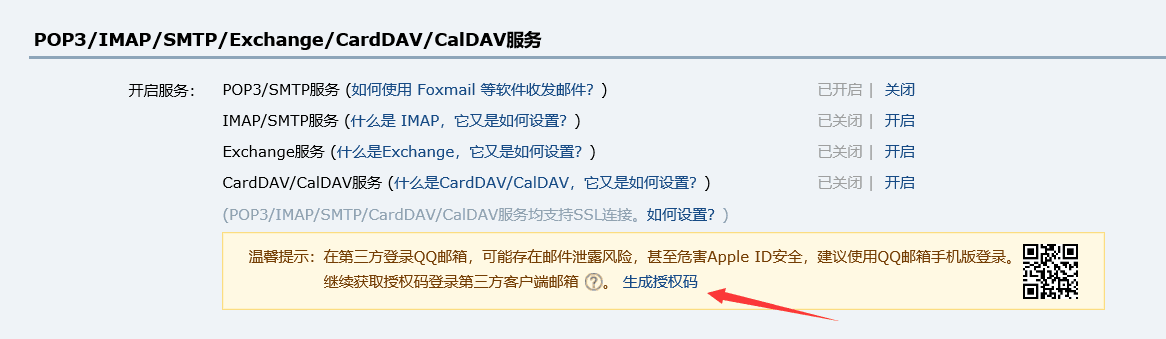
邮箱密码暴露在配置文件很不安全,一般都是采取授权码的形式。点开邮箱,然后在账户栏里面点击生成授权码:
三、编写MailUtils工具类
@Component

@Slf4j

public class MailUtils{

    /**

     * Spring官方提供的集成邮件服务的实现类,目前是Java后端发送邮件和集成邮件服务的主流工具。

     */

    @Resource

    private JavaMailSender mailSender;

    /**

     * 从配置文件中注入发件人的姓名

     */

    @Value("${spring.mail.username}")

    private String fromEmail;

    @Autowired

    private FreeMarkerConfigurer freeMarkerConfigurer;

    /**

     * 发送文本邮件

     * @param to      收件人

     * @param subject 标题

     * @param content 正文

     */

    public void sendSimpleMail(String to, String subject, String content) {

        SimpleMailMessage message = new SimpleMailMessage();

        //发件人

        message.setFrom(fromEmail);

        message.setTo(to);

        message.setSubject(subject);

        message.setText(content);

        mailSender.send(message);

    }

    /**

     * 发送html邮件

     */

    public void sendHtmlMail(String to, String subject, String content) {

        try {

            //注意这里使用的是MimeMessage

            MimeMessage message = mailSender.createMimeMessage();

            MimeMessageHelper helper = new MimeMessageHelper(message, true);

            helper.setFrom(fromEmail);

            helper.setTo(to);

            helper.setSubject(subject);

            //第二个参数:格式是否为html

            helper.setText(content, true);

            mailSender.send(message);

        }catch (MessagingException e){

            log.error("发送邮件时发生异常!", e);

        }

    }

    /**

     * 发送模板邮件

     * @param to

     * @param subject

     * @param template

     */

    public void sendTemplateMail(String to, String subject, String template){

        try {

            // 获得模板

            Template template1 = freeMarkerConfigurer.getConfiguration().getTemplate(template);

            // 使用Map作为数据模型,定义属性和值

            Map<String,Object> model = new HashMap<>();

            model.put("myname","Ray。");

            // 传入数据模型到模板,替代模板中的占位符,并将模板转化为html字符串

            String templateHtml = FreeMarkerTemplateUtils.processTemplateIntoString(template1,model);

            // 该方法本质上还是发送html邮件,调用之前发送html邮件的方法

            this.sendHtmlMail(to, subject, templateHtml);

        } catch (TemplateException e) {

            log.error("发送邮件时发生异常!", e);

        } catch (IOException e) {

            log.error("发送邮件时发生异常!", e);

        }

    }

    /**

     * 发送带附件的邮件

     * @param to

     * @param subject

     * @param content

     * @param filePath

     */

    public void sendAttachmentsMail(String to, String subject, String content, String filePath) {

        try {

            MimeMessage message = mailSender.createMimeMessage();

            //要带附件第二个参数设为true

            MimeMessageHelper helper = new MimeMessageHelper(message, true);

            helper.setFrom(fromEmail);

            helper.setTo(to);

            helper.setSubject(subject);

            helper.setText(content, true);

            FileSystemResource file = new FileSystemResource(new File(filePath));

            String fileName = filePath.substring(filePath.lastIndexOf(File.separator));

            helper.addAttachment(fileName, file);

            mailSender.send(message);

        }catch (MessagingException e){

            log.error("发送邮件时发生异常!", e);

        }

    }

}
MailUtils其实就是进一步封装Mail提供的JavaMailSender类,根据业务场景可以在工具类里面添加对应的方法,这里提供了发送文本邮件、html邮件、模板邮件、附件邮件的方法。
四、Controller层的实现
@Api(tags = "邮件管理")

@RestController

@RequestMapping("/mail")

public class MailController {

    @Autowired

    private MailUtils mailUtils;

    /**

     * 发送注册验证码

     * @return 验证码

     * @throws Exception

     */

    @ApiOperation("发送注册验证码")

    @GetMapping("/test")

    public String send(){

        mailUtils.sendSimpleMail("ruiyeclub@foxmail.com","普通文本邮件","普通文本邮件内容");

        return "OK";

    }

    /**

     * 发送注册验证码

     * @return 验证码

     * @throws Exception

     */

    @ApiOperation("发送注册验证码")

    @PostMapping("/sendHtml")

    public String sendTemplateMail(){

        mailUtils.sendHtmlMail("ruiyeclub@foxmail.com","一封html测试邮件",

                "<div style=\"text-align: center;position: absolute;\" >\n"

                        +"<h3>\"一封html测试邮件\"</h3>\n"

                        + "<div>一封html测试邮件</div>\n"

                        + "</div>");

        return "OK";

    }

    @ApiOperation("发送html模板邮件")

    @PostMapping("/sendTemplate")

    public String sendTemplate(){

        mailUtils.sendTemplateMail("ruiyeclub@foxmail.com", "基于模板的html邮件", "hello.html");

        return "OK";

    }

    @ApiOperation("发送带附件的邮件")

    @GetMapping("sendAttachmentsMail")

    public String sendAttachmentsMail(){

        String filePath = "D:\\projects\\springboot\\template.png";

        mailUtils.sendAttachmentsMail("xxxx@xx.com", "带附件的邮件", "邮件中有附件", filePath);

        return "OK";

    }

}
为了方便测试,这里使用了swagger3,详情可以查看SpringBoot整合Swagger3生成接口文档。
四、测试结果

如果需要达到通过邮件发送验证码的功能,可以使用redis。后台随机生成验证码,然后把用户的主键设为key,验证码的内容设为value,还可以设置个60s过期存储,发送成功后,用户登录通过主键从redis拿到对应的验证码,然后再进行登录验证就好了。
SpringBoot整合Mail发送邮件&发送模板邮件的更多相关文章
- SpringBoot 整合 Shiro 密码登录与邮件验证码登录(多 Realm 认证)
导入依赖(pom.xml) <!--整合Shiro安全框架--> <dependency> <groupId>org.apache.shiro</group ...
- SpringBoot整合Mail
前言 SpringBoot实现邮件功能是非常的方便快捷的,因为SpringBoot默认有starter实现了Mail. 发送邮件应该是网站的必备功能之一,什么注册验证,忘记密码或者是给用户发送营销信息 ...
- SpringBoot整合ActiveMQ发送邮件
虽然ActiveMQ以被其他MQ所替代,但仍有学习的意义,本文采用邮件发送的例子展示ActiveMQ 1. 生产者1.1 引入maven依赖1.2 application.yml配置1.3 创建配置类 ...
- 使用javaMail和velocity来发送模板邮件
之前在ssh项目中有用过javaMail和velocity来发送邮件,实现的效果如下所示. 这类邮件主要用于公司的推广宣传,比如商城的促销等场景. 今天打算将邮件模块也集成到ssm项目,也算是对之前做 ...
- .Net Mail SMTP 发送网络邮件
刚刚迈入"开发"的行列 一直有一个想法 我什么时候能给我庞大的用户信息数据库给每一位用户邮箱发送推荐信息呢? 刚迈入"编程两个月的时间" 我采用 SMTP 发送 ...
- SpringBoot 整合Mail发送功能问题与解决
SpringBootLean 是对springboot学习与研究项目,是根据实际项目的形式对进行配置与处理,欢迎star与fork. [oschina 地址] http://git.oschina.n ...
- SpringBoot整合JavaMail发送邮件
JavaMail是SUN提供给广大Java开发人员的一款邮件发送和接受的一款开源类库,支持常用的邮件协议,如:SMTP.POP3.IMAP,开发人员使用JavaMail编写邮件程序时,不再需要考虑底层 ...
- JavaEE开发之SpringBoot整合MyBatis以及Thymeleaf模板引擎
上篇博客我们聊了<JavaEE开发之SpringBoot工程的创建.运行与配置>,从上篇博客的内容我们不难看出SpringBoot的便捷.本篇博客我们继续在上篇博客的基础上来看一下Spri ...
- spring 5.x 系列第19篇 ——spring简单邮件、附件邮件、内嵌资源邮件、模板邮件发送 (xml配置方式)
源码Gitub地址:https://github.com/heibaiying/spring-samples-for-all 一.说明 1.1 项目结构说明 邮件发送配置文件为springApplic ...
随机推荐
- Python之浅谈基础
执行python的两种方式 交互式(jupyter) 通过cmd或jupyter运行python代码 优点:运行一句执行一句 缺点:关闭cmd或jupyter后数据消失 命令行式(pycharm) 优 ...
- C++ 调用Python文件方法传递字典参数并接收返回值
首先本地需要安装有Python环境,然后在c++工程中包含Python的头文件,引用Python的lib库. //python 初始化 Py_Initialize(); if (!Py_IsIniti ...
- CSS3的过渡效果,使用transition实现鼠标移入/移出效果
在css中使用伪类虽然实现了样式的改变,但由于没有过渡效果会显得很生硬.以前如果要实现过渡,就需要借助第三方的js框架来实现.现在只需要使用CSS3的过渡(transition)功能,就可以从一组样式 ...
- 我终于弄懂了Python的装饰器(一)
此系列文档: 1. 我终于弄懂了Python的装饰器(一) 2. 我终于弄懂了Python的装饰器(二) 3. 我终于弄懂了Python的装饰器(三) 4. 我终于弄懂了Python的装饰器(四) 一 ...
- 简单了解一下 Swagger
一.Swagger 1.什么是 Swagger ? Swagger 是一个规范和完整的框架,用于生成.描述.调用以及可视化的 Restful 风格的 Web 服务. 简单的理解:是一款 REST AP ...
- Linux 相关学习内容(不定期更新)
Linux 主要目录 / 根目录,在 linux 下有且只有一个根目录,所有的东西都是从这里开始 /bin 可执行二进制文件的目录,如常用的命令,ls, tar, mv, cat.. /boot 放置 ...
- WPF DataGrid ScrollBar Style
效果图如下 代码 <DataGrid.Resources> <Style TargetType="{x:Type ScrollBar}"> <Sett ...
- python中常见的数据类型
str 常用方法 1. 索引(下标) s = 'ABCDEFGHIJKLMN's1 = s[0]print('s[0] = ' + s1) #s[0] = A 2. 切片:顾头不顾尾 s = 'A ...
- Canonical通过Flutter启用Linux桌面应用程序支持
子标题:Ubuntu团队为所有Linux发行版上的Flutter应用程序制作了一个新的基于GTK +的主机. 此文翻译自:https://medium.com/flutter/announcing-f ...
- 解决vue项目中使用ivew定制主题报 .bezierEasingMixin();错误
背景:在使用view-design(iview)定制主体时(覆盖变量方式)出现less错误 完整错误如下 解决方法: 在vue.config.js中添加 less-loader:5.0.x modul ...