
ios 淘宝评论详情、朋友圈布局masony实现
最近做项目,用到了类似于淘宝的朋友圈的功能,然后自己抽出了一个小demo,与大家分享
介绍:用的是masony布局的cell这样的话,文本,以及图片可以自适应,不用人工再去计算高度,很方便。
注:该demo不涉及交互回复评论哦,只有展示的功能
给大家看一下图片效果:
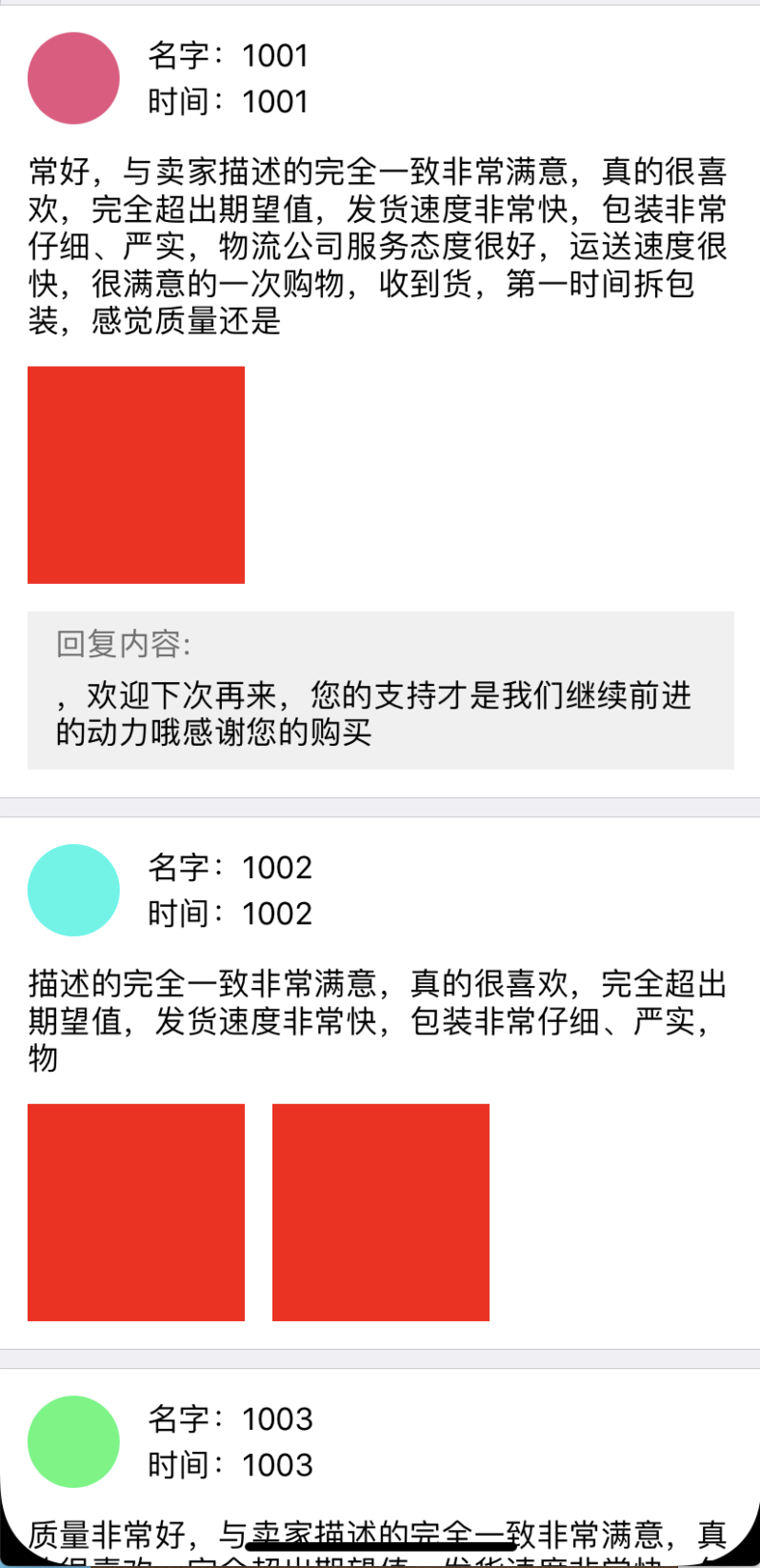
下边贴上核心代码:
#import "AC_FriendCircleCell.h"

@interface AC_FriendCircleCell()

@property (nonatomic,strong)UIImageView *headIMG;

@property (nonatomic,strong)UILabel *nameL;

@property (nonatomic,strong)UILabel *timeL;

@property (nonatomic,strong)UILabel *introL;

@property (nonatomic,strong)UIView *imgs;

@property (nonatomic,strong)UIView *replyView;

@property (nonatomic,strong)UILabel *replayL;

@property (nonatomic,strong)UILabel *replyContent;

//重要!!!!

@property (nonatomic,strong)id bottimView;//记录最下边的一个view

@property MASConstraint *midMasContraint;//记录暂存中间可能是最后一个的约束、

@end
初始化:
#pragma mark - 创建页面

- (void)createUI{

    _headIMG = [[UIImageView alloc]init];

    _timeL = [[UILabel alloc]init];

    _nameL = [[UILabel alloc]init];

    _introL = [[UILabel alloc]init];

    _introL.numberOfLines =  0;

    _imgs = [[UIView alloc]init];

    _replyView = [[UIView alloc]init];

    _replyView.backgroundColor = RGBColor(240, 240, 240);

    _replyView.clipsToBounds = YES;

    _replayL = [[UILabel alloc]init];

    _replayL.text = @"回复内容:";

    _replayL.textColor = RGBColor(110, 110, 110);

    _replyContent = [[UILabel alloc]init];

    _replyContent.numberOfLines = 0;

    [self.contentView addSubview:_headIMG];

    [self.contentView addSubview:_timeL];

    [self.contentView addSubview:_nameL];

    [self.contentView addSubview:_introL];

    [self.contentView addSubview:_imgs];

    [self.contentView addSubview:_replyView];

    [_replyView addSubview:_replayL];

    [_replyView addSubview:_replyContent];

    //设置约束 给不需要变化的部分设置约束

    [_headIMG mas_makeConstraints:^(MASConstraintMaker *make) {

        make.top.mas_offset(15).priorityHigh();

        make.left.mas_offset(15);

        make.height.mas_offset(50);

        make.width.mas_offset(50);

    }];

    _headIMG.layer.cornerRadius = 25;

    _headIMG.layer.masksToBounds = YES;

    [_nameL  mas_makeConstraints:^(MASConstraintMaker *make) {

        make.left.mas_equalTo(self.headIMG.mas_right).offset(15);

        make.right.mas_offset(-15);

        make.height.mas_offset(50/2);

        make.top.mas_equalTo(self.headIMG.mas_top).priorityHigh();

    }];

    [_timeL mas_makeConstraints:^(MASConstraintMaker *make) {

        make.left.mas_equalTo(self.nameL.mas_left);

        make.right.mas_equalTo(self.nameL.mas_right);

        make.height.mas_equalTo(self.nameL.mas_height);

        make.top.mas_equalTo(self.nameL.mas_bottom);

    }];

}
设置内容并更新masoney
 //对最后一个控件进行设置约束

    [self.midMasContraint uninstall];

    if (self.bottimView == self.introL) {

        [self.introL mas_updateConstraints:^(MASConstraintMaker *make) {

            self.midMasContraint = make.bottom.mas_offset(-);

        }];

    }else if (self.bottimView  == self.imgs) {

        [self.imgs mas_updateConstraints:^(MASConstraintMaker *make) {

            self.midMasContraint = make.bottom.mas_offset(-);

        }];

    }else if (self.bottimView  == self.replyView) {

        [self.replyView mas_updateConstraints:^(MASConstraintMaker *make) {

            self.midMasContraint = make.bottom.mas_offset(-);

        }];

    }
对指定的view进行更新
//设置评论内容

- (void)setIntro:(UIView*)lastView andContent:(NSString*)content{

    [_introL mas_remakeConstraints:^(MASConstraintMaker *make) {

        make.left.mas_equalTo(self.headIMG.mas_left);

        make.right.mas_equalTo(self.nameL.mas_right);

        make.top.mas_equalTo(lastView.mas_bottom).offset().priorityHigh();

    }];

    _bottimView = _introL;

}
如法炮制,都加上便可以实现上述效果了。
ios 淘宝评论详情、朋友圈布局masony实现的更多相关文章
- iOS app url scheme跳转到淘宝商品详情页 唤醒app
最近涉及的一个业务,在app内的一个广告,点击打开webView,加载的是一个淘宝商品详情页,效果是打开该webView自动跳转至淘宝对应的页面,同时在自己的app仍然加载页面,点击评论等也同样能跳转 ...
- Python天猫淘宝评论爬虫
说明 由于Github 打包的exe某些文件上传被.gitignore了,所以不提供windows二进制包 https://github.com/hunterhug/taobaocomment 一个抓 ...
- 仿淘宝商品详情页上拉弹出新ViewController
新项目就要开始做了,里面有购物那块,就试着先把淘宝商品详情页的效果做了一下. 1.需求 1.第一次上拉时,A视图拉到一定距离将视图B从底部弹出,A视图也向上 2.显示B视图时下拉时,有刷新效果,之后将 ...
- Vue实现仿淘宝商品详情属性选择的功能
Vue实现仿淘宝商品详情属性选择的功能 先看下效果图:(同个属性内部单选,属性与属性之间可以多选) 主要实现过程: 所使用到的数据类型是(一个大数组里面嵌套了另一个数组)具体格式如下: attrA ...
- python3抓取淘宝评论内容
好久没有写爬虫了,今天研究了下淘宝商品评论的内容. 一开始用最简单的方法,挂代理,加请求头,对网页请求,是抓不到数据的,在网上找了一些相关文章,也基本已经过时了,就是网站逻辑有改动,用旧的方法是抓不到 ...
- Android开发案例 - 淘宝商品详情
所有电商APP的商品详情页面几乎都是和淘宝的一模一样(见下图): 采用上下分页的模式 商品基本参数 & 选购参数在上页展示 商品图文详情等其他信息放在下页展示 知识要点 垂直方向的ViewPa ...
- 抓取天猫和淘宝的详情页图片|Golang
taobao.go package main import ( "crypto/md5" "encoding/hex" "fmt" &quo ...
- Android开发案例 - 淘宝商品详情【转】
http://erehmi.cnblogs.com/ 所有电商APP的商品详情页面几乎都是和淘宝的一模一样(见下图): 采用上下分页的模式 商品基本参数 & 选购参数在上页展示 商品图文详情等 ...
- 一篇文章教会你用Python爬取淘宝评论数据(写在记事本)
[一.项目简介] 本文主要目标是采集淘宝的评价,找出客户所需要的功能.统计客户评价上面夸哪个功能多,比如防水,容量大,好看等等. 很多人学习python,不知道从何学起.很多人学习python,掌握了 ...
随机推荐
- web notification api
Web Notifications API 使页面可以发出通知,通知将被显示在页面之外的系统层面上(通常使用操作系统的标准通知机制,但是在不同的平台和浏览器上的表现会有差异) 要显示一条通知,你需要先 ...
- JVM 专题二十二:垃圾回收(六)垃圾回收器 (三)
4. GC日志分析 4.1 日志分析 通过阅读GC日志,我们可以了解Java虚拟机内存分配与回收策略. 内存分配与垃圾回收的参数列表-XX:+PrintGC:输出GC日志.类似-verbose: gc ...
- 爬虫python3:TypeError: cannot use a string pattern on a bytes-like object
import re from common_p3 import download def crawl_sitemap(url): sitemap = download(url) links = re. ...
- MYSQL 之 JDBC(十五):数据库连接池
在使用开发基于数据库的web程序时,传统的模式基本是按一下步骤: 在主程序(如servlet.bean)中建立数据库连接 进行sql操作 断开数据库连接 这种模式开发存在各种各样的问题,最重要的是:数 ...
- Java实现 LeetCode第30场双周赛 (题号5177,5445,5446,5447)
这套题不算难,但是因为是昨天晚上太晚了,好久没有大晚上写过代码了,有点不适应,今天上午一看还是挺简单的 5177. 转变日期格式 给你一个字符串 date ,它的格式为 Day Month Yea ...
- 模板方法模式(c++实现)
外观模式 目录 外观模式 模式定义 模式动机 UML类图 源码实现 优点 缺点 模式定义 模板方法模式(Facade),定义一个操作中的算法的骨架,而将一些步骤延迟到子类中.模板方法使得子类可以不改变 ...
- redis未授权访问简单总结
redis环境搭建 下载有漏洞的redis版本 wget http://download.redis.io/releases/redis-3.2.11.tar.gz 编译文件 make 进入src目录 ...
- python怎么自学?今日头条技术大佬的真实经历分享
大家好,我是武州,27岁,目前在字节跳动担任Python后端工程师一职. (摆拍一下,假装是保安) 在开始今天的文章之前,不知道你们有没有遇到过这样的问题: 大学没学到什么实质技术,毕业后找不到高薪的 ...
- C++语法小记---一个有趣的现象
下面的代码会飞吗? #include <iostream> #include <string> using namespace std; class Test { public ...
- 试一试 GraphQL
GraphQL 简介 一种用于 API 的查询语言. GraphQL 既是一种用于 API 的查询语言也是一个满足你数据查询的运行时. GraphQL 对你的 API 中的数据提供了一套易于理解的完整 ...