
jackson学习之九:springboot整合(配置文件)
欢迎访问我的GitHub
这里分类和汇总了欣宸的全部原创(含配套源码):https://github.com/zq2599/blog_demos
系列文章汇总
- jackson学习之一:基本信息
- jackson学习之二:jackson-core
- jackson学习之三:常用API操作
- jackson学习之四:WRAP_ROOT_VALUE(root对象)
- jackson学习之五:JsonInclude注解
- jackson学习之六:常用类注解
- jackson学习之七:常用Field注解
- jackson学习之八:常用方法注解
- jackson学习之九:springboot整合(配置文件)
- jackson学习之十(终篇):springboot整合(配置类)
关于springboot整合jackson
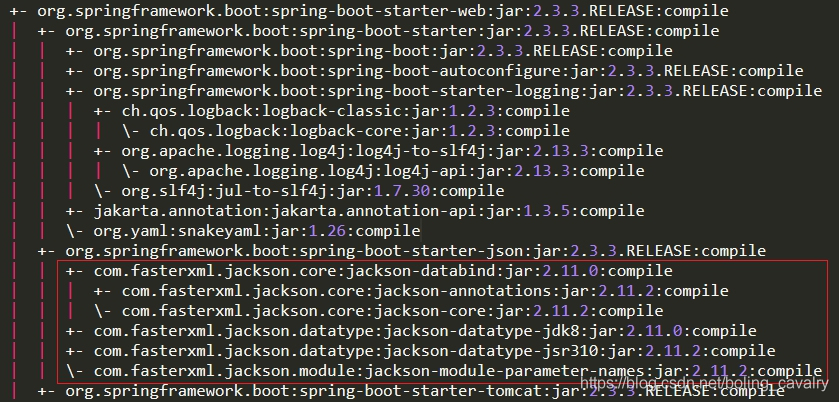
- 本文是《jackson学习》系列的第九篇,学习如何在springboot项目中使用jackson,以springboot-2.3.3版本为例,jackson是springboot的默认json处理工具,如下图红框所示,jackson在maven配置中被spring-boot-starter-web间接依赖,可直接使用:
- 在springboot项目中常用的配置方式有两种:
- 用properties或yml配置文件来配置,即本篇的内容;
- 用配置类来配置,这是下一篇文章的主题;
本篇概览
今天实战内容如下:
- 开发springboot应用,体验springboot默认支持jackson,包括jackson注解和ObjectMapper实例的注入;
- 在application.yml中添加jackson配置,验证是否生效;
源码下载
- 如果您不想编码,可以在GitHub下载所有源码,地址和链接信息如下表所示(https://github.com/zq2599/blog_demos):
| 名称 | 链接 | 备注 |
|---|---|---|
| 项目主页 | https://github.com/zq2599/blog_demos | 该项目在GitHub上的主页 |
| git仓库地址(https) | https://github.com/zq2599/blog_demos.git | 该项目源码的仓库地址,https协议 |
| git仓库地址(ssh) | git@github.com:zq2599/blog_demos.git | 该项目源码的仓库地址,ssh协议 |
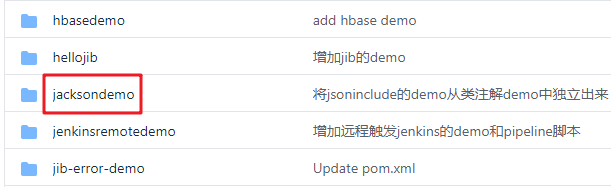
- 这个git项目中有多个文件夹,本章的应用在jacksondemo文件夹下,如下图红框所示:
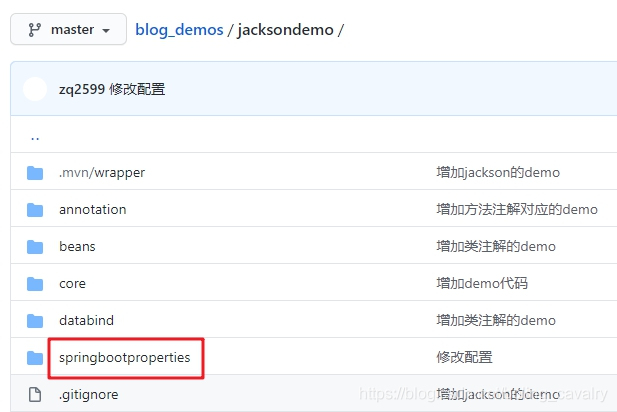
- jacksondemo是父子结构的工程,本篇的代码在springbootproperties子工程中,如下图:
开始实战
- 由于同属于《jackson学习》系列文章,因此本篇的springboot工程作为jacksondemo的子工程存在,pom.xml如下,需要注意的是parent不能使用spring-boot-starter-parent,而是通过dependencyManagement节点来引入springboot依赖:
<?xml version="1.0" encoding="UTF-8"?>

<project xmlns="http://maven.apache.org/POM/4.0.0" xmlns:xsi="http://www.w3.org/2001/XMLSchema-instance"

         xsi:schemaLocation="http://maven.apache.org/POM/4.0.0 https://maven.apache.org/xsd/maven-4.0.0.xsd">

    <modelVersion>4.0.0</modelVersion>

    <parent>

        <artifactId>jacksondemo</artifactId>

        <groupId>com.bolingcavalry</groupId>

        <version>1.0-SNAPSHOT</version>

        <relativePath>../pom.xml</relativePath>

    </parent>

    <groupId>com.bolingcavalry</groupId>

    <artifactId>springbootproperties</artifactId>

    <version>0.0.1-SNAPSHOT</version>

    <name>springbootproperties</name>

    <description>Demo project for Spring Boot</description>

    <properties>

        <java.version>1.8</java.version>

    </properties>

    <!--不用spring-boot-starter-parent作为parent时的配置-->

    <dependencyManagement>

        <dependencies>

            <dependency>

                <groupId>org.springframework.boot</groupId>

                <artifactId>spring-boot-dependencies</artifactId>

                <version>2.3.3.RELEASE</version>

                <type>pom</type>

                <scope>import</scope>

            </dependency>

        </dependencies>

    </dependencyManagement>

    <dependencies>

        <dependency>

            <groupId>org.springframework.boot</groupId>

            <artifactId>spring-boot-starter-web</artifactId>

        </dependency>

        <dependency>

            <groupId>org.springframework.boot</groupId>

            <artifactId>spring-boot-starter-test</artifactId>

            <scope>test</scope>

            <exclusions>

                <exclusion>

                    <groupId>org.junit.vintage</groupId>

                    <artifactId>junit-vintage-engine</artifactId>

                </exclusion>

            </exclusions>

        </dependency>

        <!-- swagger依赖 -->

        <dependency>

            <groupId>io.springfox</groupId>

            <artifactId>springfox-swagger2</artifactId>

        </dependency>

        <!-- swagger-ui -->

        <dependency>

            <groupId>io.springfox</groupId>

            <artifactId>springfox-swagger-ui</artifactId>

        </dependency>

    </dependencies>

    <build>

        <plugins>

            <plugin>

                <groupId>org.springframework.boot</groupId>

                <artifactId>spring-boot-maven-plugin</artifactId>

            </plugin>

        </plugins>

    </build>

</project>
- 启动类很平常:
package com.bolingcavalry.springbootproperties;

import org.springframework.boot.SpringApplication;

import org.springframework.boot.autoconfigure.SpringBootApplication;

@SpringBootApplication

public class SpringbootpropertiesApplication {

    public static void main(String[] args) {

        SpringApplication.run(SpringbootpropertiesApplication.class, args);

    }

}
- 由于用到了swagger,因此要添加swagger配置:
package com.bolingcavalry.springbootproperties;

import org.springframework.context.annotation.Bean;

import org.springframework.context.annotation.Configuration;

import springfox.documentation.builders.ApiInfoBuilder;

import springfox.documentation.builders.PathSelectors;

import springfox.documentation.builders.RequestHandlerSelectors;

import springfox.documentation.service.ApiInfo;

import springfox.documentation.service.Contact;

import springfox.documentation.service.Tag;

import springfox.documentation.spi.DocumentationType;

import springfox.documentation.spring.web.plugins.Docket;

import springfox.documentation.swagger2.annotations.EnableSwagger2;

@Configuration

@EnableSwagger2

public class SwaggerConfig {

    @Bean

    public Docket createRestApi() {

        return new Docket(DocumentationType.SWAGGER_2)

                .apiInfo(apiInfo())

                .tags(new Tag("JsonPropertySerializationController", "JsonProperty相关测试"))

                .select()

                // 当前包路径

                .apis(RequestHandlerSelectors.basePackage("com.bolingcavalry.springbootproperties.controller"))

                .paths(PathSelectors.any())

                .build();

    }

    //构建 api文档的详细信息函数,注意这里的注解引用的是哪个

    private ApiInfo apiInfo() {

        return new ApiInfoBuilder()

                //页面标题

                .title("SpringBoot整合Jackson(基于配置文件)")

                //创建人

                .contact(new Contact("程序员欣宸", "https://github.com/zq2599/blog_demos", "zq2599@gmail.com"))

                //版本号

                .version("1.0")

                //描述

                .description("API 描述")

                .build();

    }

}
- 序列化和反序列化用到的Bean类,可见使用了JsonProperty属性来设置序列化和反序列化时的json属性名,field0字段刻意没有get方法,是为了验证JsonProperty的序列化能力:
package com.bolingcavalry.springbootproperties.bean;

import com.fasterxml.jackson.annotation.JsonProperty;

import io.swagger.annotations.ApiModel;

import io.swagger.annotations.ApiModelProperty;

import java.util.Date;

@ApiModel(description = "JsonProperty注解测试类")

public class Test {

    @ApiModelProperty(value = "私有成员变量")

    @JsonProperty(value = "json_field0", index = 1)

    private Date field0 = new Date();

    public void setField0(Date field0) {

        this.field0 = field0;

    }

    @ApiModelProperty(value = "来自get方法的字符串")

    @JsonProperty(value = "json_field1", index = 0)

    public String getField1() {

        return "111";

    }

    @Override

    public String toString() {

        return "Test{" +

                "field0=" + field0 +

                '}';

    }

}
- 测试用的Controller代码如下,很简单只有两个接口,serialization返回序列化结果,deserialization接受客户端请求参数,反序列化成实例,通过toString()来检查反序列化的结果,另外,还通过Autowired注解从spring容器中将ObjectMapper实例直接拿来用:
package com.bolingcavalry.springbootproperties.controller;

import com.bolingcavalry.springbootproperties.bean.Test;

import com.fasterxml.jackson.core.JsonProcessingException;

import com.fasterxml.jackson.databind.ObjectMapper;

import io.swagger.annotations.Api;

import io.swagger.annotations.ApiOperation;

import org.slf4j.Logger;

import org.slf4j.LoggerFactory;

import org.springframework.beans.factory.annotation.Autowired;

import org.springframework.web.bind.annotation.RequestBody;

import org.springframework.web.bind.annotation.RequestMapping;

import org.springframework.web.bind.annotation.RequestMethod;

import org.springframework.web.bind.annotation.RestController;

@RestController

@RequestMapping("/jsonproperty")

@Api(tags = {"JsonPropertySerializationController"})

public class JsonPropertySerializationController {

    private static final Logger logger = LoggerFactory.getLogger(JsonPropertySerializationController.class);

    @Autowired

    ObjectMapper mapper;

    @ApiOperation(value = "测试序列化", notes = "测试序列化")

    @RequestMapping(value = "/serialization", method = RequestMethod.GET)

    public Test serialization() throws JsonProcessingException {

        Test test = new Test();

        logger.info(mapper.writeValueAsString(test));

        return test;

    }

    @ApiOperation(value = "测试反序列化", notes="测试反序列化")

    @RequestMapping(value = "/deserialization",method = RequestMethod.PUT)

    public String deserialization(@RequestBody Test test) {

        return test.toString();

    }

}
验证(不用配置文件)
- 先来看看没有配置文件时,默认的jackson配置的表现,直接在IDEA上运行SpringbootpropertiesApplication;
- 浏览器访问http://localhost:8080/swagger-ui.html ,如下图红框1,json_field0和json_field1都是JsonProperty注释,出现在了swagger的model中,这证明jackson注解已经生效:
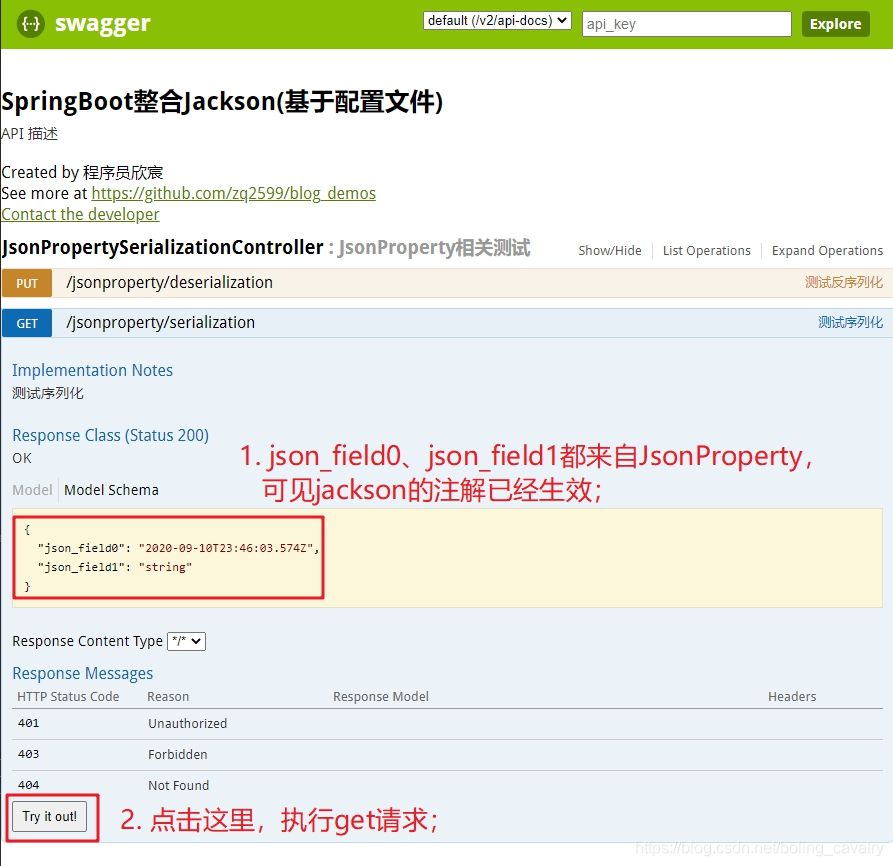
- 点击上图的红框2,看看springboot引用返回的序列化结果,如下图:
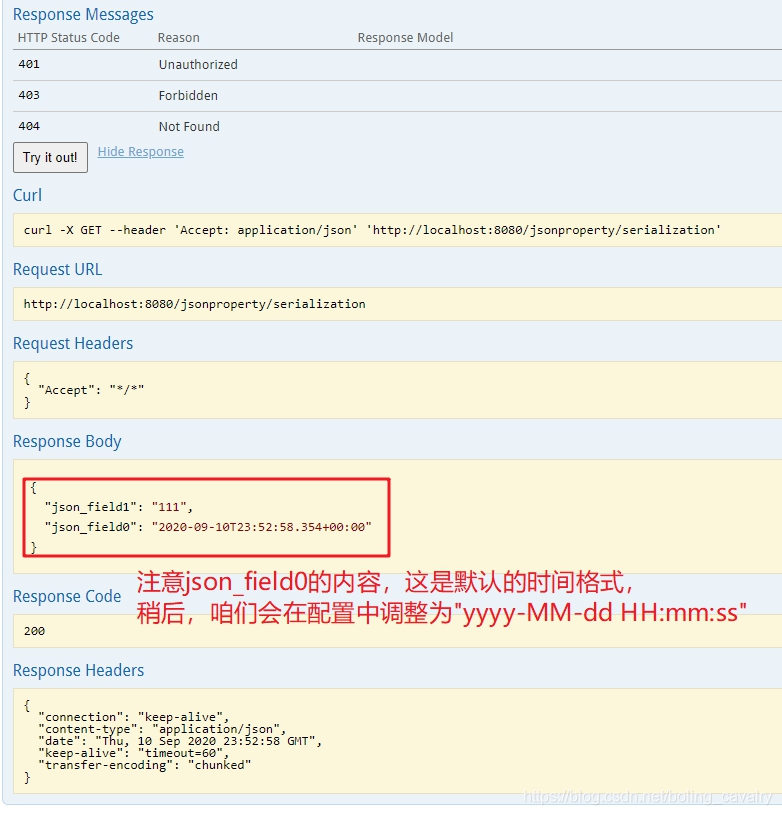
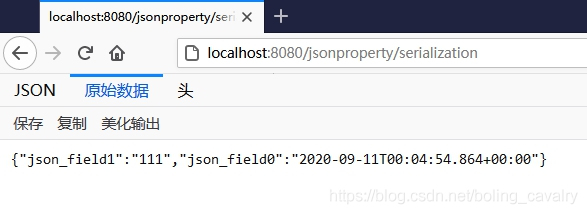
- 另外,上述红框中的json格式,每个属性单独一行,像是做了格式化调整的,这是springboot做的?还是swagger展示的时候做的?用浏览器访问http://localhost:8080/jsonproperty/serialization ,结果如下,可见springboot返回的是未经过格式化的json:
- 接下来咱们添加jackson相关的配置信息并验证是否生效;
添加配置文件并验证
- 在resources目录新增application.yml文件,内容如下:
spring:

  jackson:

    # 日期格式化

    date-format: yyyy-MM-dd HH:mm:ss

    # 序列化相关

    serialization:

      # 格式化输出

      indent_output: true

      # 忽略无法转换的对象

      fail_on_empty_beans: true

    # 反序列化相关

    deserialization:

      # 解析json时,遇到不存在的属性就忽略

      fail_on_unknown_properties: false

    # 设置空如何序列化

    defaultPropertyInclusion: NON_EMPTY

    parser:

      # 允许特殊和转义符

      allow_unquoted_control_chars: true

      # 允许单引号

      allow_single_quotes: true
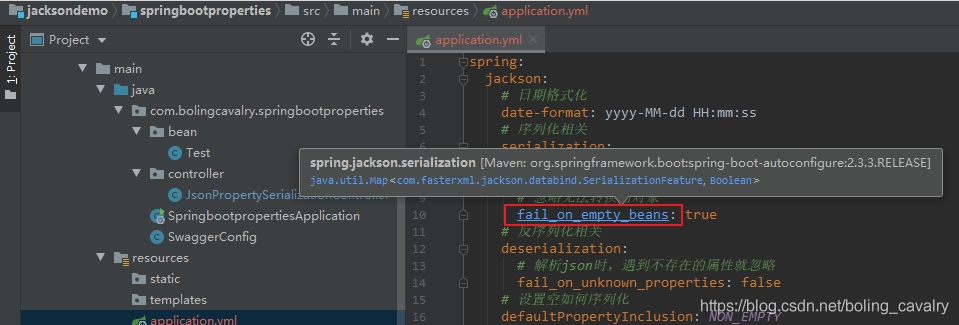
- 将鼠标放置下图红框位置,再按住Ctlr键,IDEA会弹出一个浮层,提示该配置对应的jackson代码,如下图:
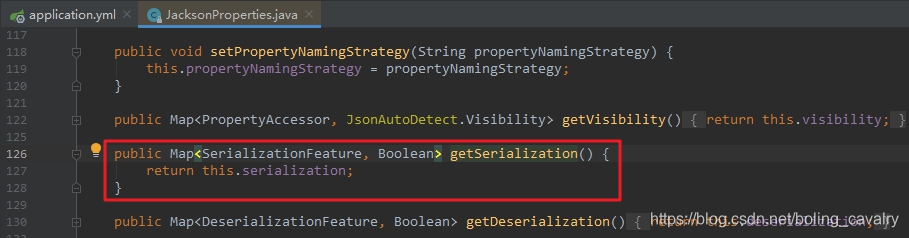
- 在上图中,按住Ctlr键,用鼠标点击红框位置即可打开此配置对应的jackson源码,如下图:
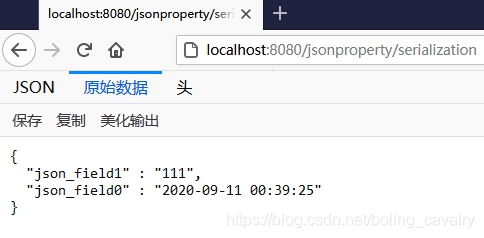
4. 重新运行springboot应用,用浏览器访问:http://localhost:8080/jsonproperty/serialization ,结果如下图,可见json_field0的格式变成了yyyy-MM-dd HH:mm:ss,而且json输出也做了格式化,证明application.yml中的配置已经生效:
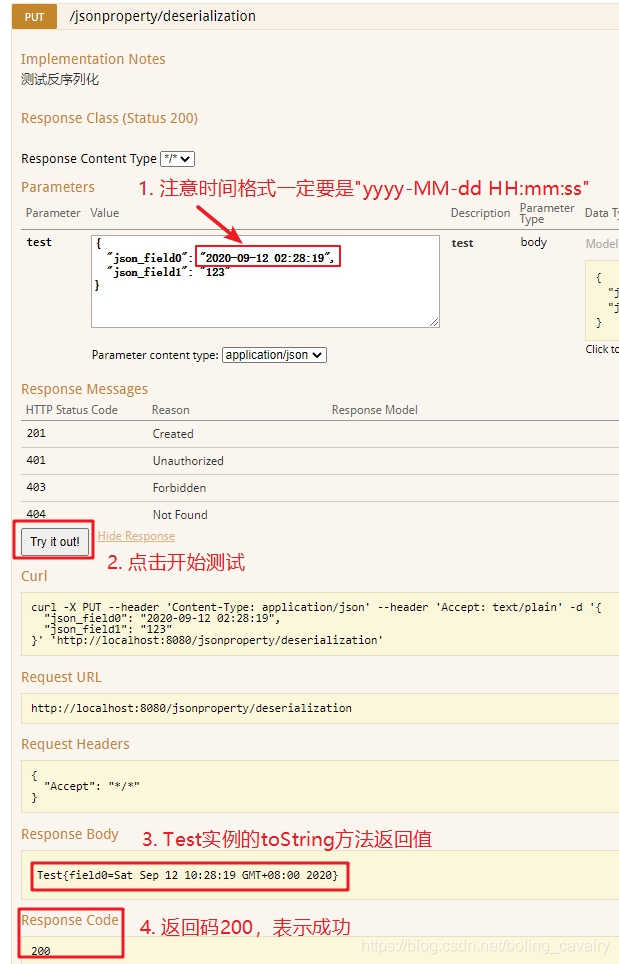
5. 再来试试反序列化,打开swagger页面,操作和响应如下图所示,注意红框1里面请求参数的格式:
- 至此,在springboot中通过yml配置jackson的操作实战就完成了,接下来的章节,咱们在配置类中用代码来完成yml的配置;
你不孤单,欣宸原创一路相伴
欢迎关注公众号:程序员欣宸
微信搜索「程序员欣宸」,我是欣宸,期待与您一同畅游Java世界...
https://github.com/zq2599/blog_demos
jackson学习之九:springboot整合(配置文件)的更多相关文章
- Java开发学习(三十九)----SpringBoot整合mybatis
一.回顾Spring整合Mybatis Spring 整合 Mybatis 需要定义很多配置类 SpringConfig 配置类 导入 JdbcConfig 配置类 导入 MybatisConfig ...
- springboot学习笔记-6 springboot整合RabbitMQ
一 RabbitMQ的介绍 RabbitMQ是消息中间件的一种,消息中间件即分布式系统中完成消息的发送和接收的基础软件.这些软件有很多,包括ActiveMQ(apache公司的),RocketMQ(阿 ...
- 【转】SpringBoot学习笔记(7) SpringBoot整合Dubbo(使用yml配置)
http://blog.csdn.net/a67474506/article/details/61640548 Dubbo是什么东西我这里就不详细介绍了,自己可以去谷歌 SpringBoot整合Dub ...
- SpringBoot学习笔记(16)----SpringBoot整合Swagger2
Swagger 是一个规范和完整的框架,用于生成,描述,调用和可视化RESTful风格的web服务 http://swagger.io Springfox的前身是swagger-springmvc,是 ...
- Spring Boot2 系列教程 (九) | SpringBoot 整合 Mybatis
前言 如题,今天介绍 SpringBoot 与 Mybatis 的整合以及 Mybatis 的使用,本文通过注解的形式实现. 什么是 Mybatis MyBatis 是支持定制化 SQL.存储过程以及 ...
- SpringBoot学习10:springboot整合mybatis
需求:通过使用 SpringBoot+SpringMVC+MyBatis 整合实现一个对数据库中的 t_user 表的 CRUD 的操作 1.创建maven项目,添加项目所需依赖 <!--spr ...
- springboot学习笔记-5 springboot整合shiro
shiro是一个权限框架,具体的使用可以查看其官网 http://shiro.apache.org/ 它提供了很方便的权限认证和登录的功能. 而springboot作为一个开源框架,必然提供了和sh ...
- SpringBoot学习16:springboot整合junit单元测试
1.创建maven项目,修改pom.xml文件 <!--springboot项目依赖的父项目--> <parent> <groupId>org.springfram ...
- SpringBoot学习7:springboot整合jsp
springboot内部对jsp的支持并不是特别理想,而springboot推荐的视图是Thymeleaf,对于java开发人员来说还是大多数人员喜欢使用jsp 1.创建maven项目,添加pom依赖 ...
随机推荐
- EasyUI 表单插件 multiline easyui-textbox 多行换行失效问题
1.问题描述:原始html: <input class="easyui-textbox" name="myname" id="myid" ...
- 深入浅出Dotnet Core的项目结构变化
有时候,越是基础的东西,越是有人不明白. 前几天Review一个项目的代码,发现非常基础的内容,也会有人理解出错. 今天,就着这个点,写一下Dotnet Core的主要类型的项目结构,以及之间的转 ...
- 意想不到,这个神奇的bug让我加班到深夜
给大家分享一个近期解决的线上问题,起因是这样的,近期参与公司的一个项目,工程量很大,代码编写测试过后终于到了紧张的上线时刻. 项目上线 上线前照例忐忑不安了一番,因为工程量比较大,预估可能不会很顺利, ...
- Go从入门到放弃(笔记存档)
前言 考虑到印象笔记以后不续费了,这里转存到博客园一份 因内容是自己写的笔记, 未作任何润色, 所以看着很精简, 请见谅 查看官方文档 在新的go安装包中,为了减小体积默认去除了go doc 安装go ...
- 10步写了个Django网站,正经网站···
Django做网站只要10步,真的只有10步,不信?咱们来数数-- 今天主要讲解用Pycharm编辑器搭建网站,网站功能是 实现在局域网中快速传递大文件! 比如:同事要给你个1G的文件,你丢一 ...
- Linux Clone函数
Linux Clone函数 之前某一次有过一次面试,问了内核中是怎么创建命名空间的? 下面就来扒一扒clone的精髓,以及如何通过它创建命名空间. 目录 Linux Clone函数 使用clone创建 ...
- ASP.NET Core错误处理中间件[1]: 呈现错误信息
NuGet包"Microsoft.AspNetCore.Diagnostics"中提供了几个与异常处理相关的中间件.当ASP.NET Core应用在处理请求过程中出现错误时,我们可 ...
- Kaggle泰坦尼克-Python(建模完整流程,小白学习用)
参考Kernels里面评论较高的一篇文章,整理作者解决整个问题的过程,梳理该篇是用以了解到整个完整的建模过程,如何思考问题,处理问题,过程中又为何下那样或者这样的结论等! 最后得分并不是特别高,只是到 ...
- mysql过滤复制
- ActiceMQ详解
1. MQ理解 1.1 MQ的产品种类和对比 MQ即消息中间件.MQ是一种理念,ActiveMQ是MQ的落地产品. 消息中间件产品 各类MQ对比 Kafka 编程语言:Scala 大数据领域的主流MQ ...