
Laya 踩坑日记-BitmapFont 不显示空格
项目中有用到艺术字,美术通过 bmfont64 将字体导给我了,结果发现在应用上 空格不显示 如图:
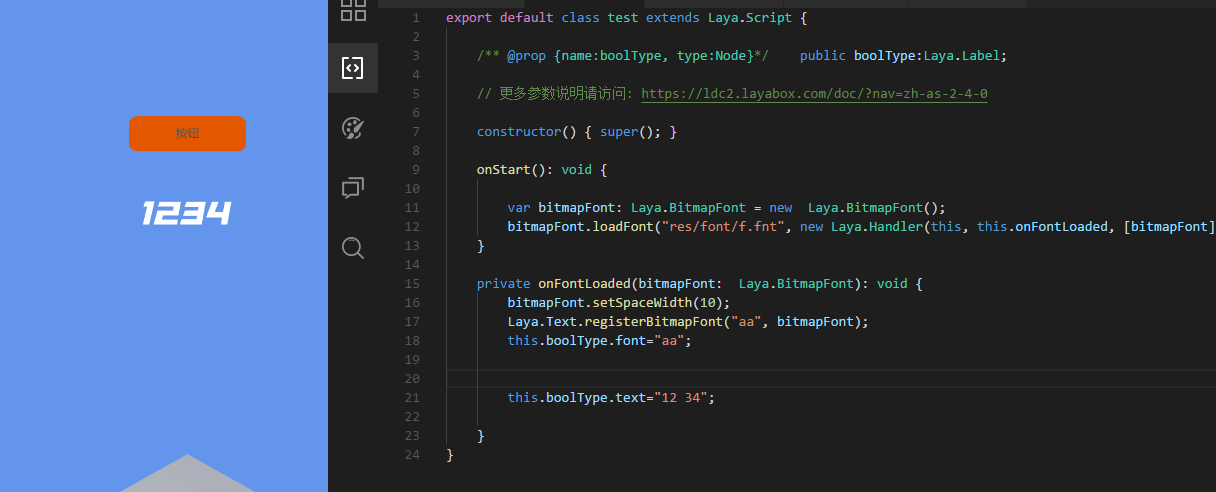
今天去深究了一下这个问题,发现是底层没封装好,然后自己改了一下
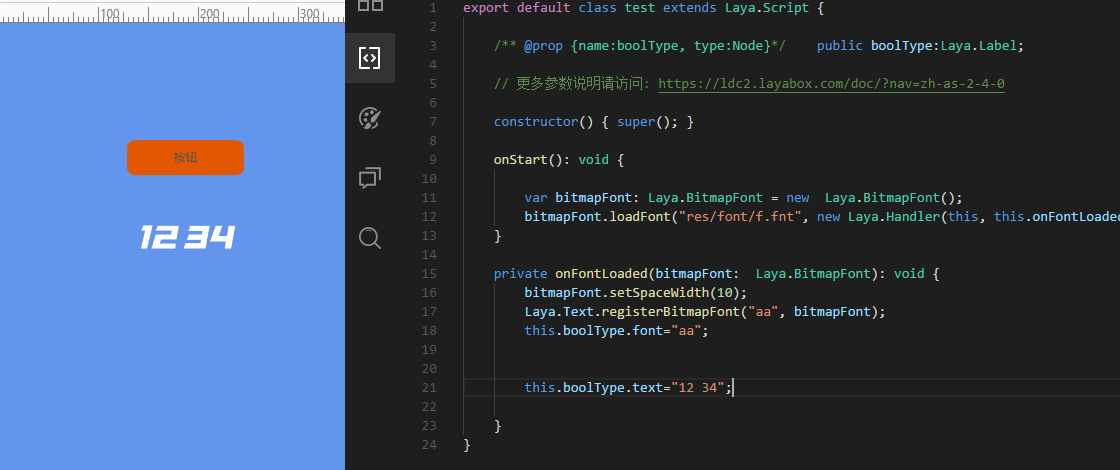
下面是改过的 BitmapFont 类 在laya.core.js 里面
class BitmapFont {

        constructor() {

            this._fontCharDic = {};

            this._fontWidthMap = {};

            this._maxWidth = 0;

            this._spaceWidth = 10;

            this.fontSize = 12;

            this.autoScaleSize = false;

            this.letterSpacing = 0;

        }

        loadFont(path, complete) {

            this._path = path;

            this._complete = complete;

            if (!path || path.indexOf(".fnt") === -1) {

                console.error('Bitmap font configuration information must be a ".fnt" file');

                return;

            }

            ILaya.loader.load([{ url: path, type: ILaya.Loader.XML }, { url: path.replace(".fnt", ".png"), type: ILaya.Loader.IMAGE }], Handler.create(this, this._onLoaded));

        }

        _onLoaded() {

            this.parseFont(ILaya.Loader.getRes(this._path), ILaya.Loader.getRes(this._path.replace(".fnt", ".png")));

            this._complete && this._complete.run();

        }

        parseFont(xml, texture) {

            if (xml == null || texture == null)

                return;

            this._texture = texture;

            var tScale = 1;

            var tInfo = xml.getElementsByTagName("info");

            if (!tInfo[0].getAttributeNode) {

                return this.parseFont2(xml, texture);

            }

            this.fontSize = parseInt(tInfo[0].getAttributeNode("size").nodeValue);

            var tPadding = tInfo[0].getAttributeNode("padding").nodeValue;

            var tPaddingArray = tPadding.split(",");

            this._padding = [parseInt(tPaddingArray[0]), parseInt(tPaddingArray[1]), parseInt(tPaddingArray[2]), parseInt(tPaddingArray[3])];

            var chars = xml.getElementsByTagName("char");

            var i = 0;

            for (i = 0; i < chars.length; i++) {

                var tAttribute = chars[i];

                var tId = parseInt(tAttribute.getAttributeNode("id").nodeValue);

                var xOffset = parseInt(tAttribute.getAttributeNode("xoffset").nodeValue) / tScale;

                var yOffset = parseInt(tAttribute.getAttributeNode("yoffset").nodeValue) / tScale;

                var xAdvance = parseInt(tAttribute.getAttributeNode("xadvance").nodeValue) / tScale;

                var region = new Rectangle();

                region.x = parseInt(tAttribute.getAttributeNode("x").nodeValue);

                region.y = parseInt(tAttribute.getAttributeNode("y").nodeValue);

                region.width = parseInt(tAttribute.getAttributeNode("width").nodeValue);

                region.height = parseInt(tAttribute.getAttributeNode("height").nodeValue);

                var tTexture = Texture.create(texture, region.x, region.y, region.width, region.height, xOffset, yOffset);

                this._maxWidth = Math.max(this._maxWidth, xAdvance + this.letterSpacing);

                this._fontCharDic[tId] = tTexture;

                this._fontWidthMap[tId] = xAdvance;

            }

        }

        parseFont2(xml, texture) {

            if (xml == null || texture == null)

                return;

            this._texture = texture;

            var tScale = 1;

            var tInfo = xml.getElementsByTagName("info");

            this.fontSize = parseInt(tInfo[0].attributes["size"].nodeValue);

            var tPadding = tInfo[0].attributes["padding"].nodeValue;

            var tPaddingArray = tPadding.split(",");

            this._padding = [parseInt(tPaddingArray[0]), parseInt(tPaddingArray[1]), parseInt(tPaddingArray[2]), parseInt(tPaddingArray[3])];

            var chars = xml.getElementsByTagName("char");

            var i = 0;

            for (i = 0; i < chars.length; i++) {

                var tAttribute = chars[i].attributes;

                var tId = parseInt(tAttribute["id"].nodeValue);

                var xOffset = parseInt(tAttribute["xoffset"].nodeValue) / tScale;

                var yOffset = parseInt(tAttribute["yoffset"].nodeValue) / tScale;

                var xAdvance = parseInt(tAttribute["xadvance"].nodeValue) / tScale;

                var region = new Rectangle();

                region.x = parseInt(tAttribute["x"].nodeValue);

                region.y = parseInt(tAttribute["y"].nodeValue);

                region.width = parseInt(tAttribute["width"].nodeValue);

                region.height = parseInt(tAttribute["height"].nodeValue);

                var tTexture = Texture.create(texture, region.x, region.y, region.width, region.height, xOffset, yOffset);

                this._maxWidth = Math.max(this._maxWidth, xAdvance + this.letterSpacing);

                this._fontCharDic[tId] = tTexture;

                this._fontWidthMap[tId] = xAdvance;

            }

        }

        getCharTexture(char) {

            return this._fontCharDic[char.charCodeAt(0)];

        }

        destroy() {

            if (this._texture) {

                for (var p in this._fontCharDic) {

                    var tTexture = this._fontCharDic[p];

                    if (tTexture)

                        tTexture.destroy();

                }

                this._texture.destroy();

                this._fontCharDic = null;

                this._fontWidthMap = null;

                this._texture = null;

                this._complete = null;

                this._padding = null;

            }

        }

        setSpaceWidth(spaceWidth) {

            this._spaceWidth = spaceWidth;

        }

        getCharWidth(char) {

            var code = char.charCodeAt(0);

            if (this._fontWidthMap[code])

                return this._fontWidthMap[code] + this.letterSpacing;

            if (char === " ")

                return this._spaceWidth + this.letterSpacing;

            return 0;

        }

        getTextWidth(text) {

            var tWidth = 0;

            for (var i = 0, n = text.length; i < n; i++) {

                tWidth += this.getCharWidth(text.charAt(i));

            }

            return tWidth;

        }

        getMaxWidth() {

            return this._maxWidth;

        }

        getMaxHeight() {

            return this.fontSize;

        }

        _drawText(text, sprite, drawX, drawY, align, width) {

            var tWidth = this.getTextWidth(text);

            var tTexture;

            var dx = 0;

            align === "center" && (dx = (width - tWidth) / 2);

            align === "right" && (dx = (width - tWidth));

            var tx = 0;

            for (var i = 0, n = text.length; i < n; i++) {

                tTexture = this.getCharTexture(text.charAt(i));

                if (tTexture) {

                    sprite.graphics.drawImage(tTexture, drawX + tx + dx, drawY);

                    tx += this.getCharWidth(text.charAt(i));

                }

                //添加

                else{

                    tx += this.getCharWidth(text.charAt(i));

                }

            }

        }

    }
效果如图:
Laya 踩坑日记-BitmapFont 不显示空格的更多相关文章
- Laya 踩坑日记-BitmapFont 字体模糊
基于bitmap 制作的字体,放到项目中,因为最终使用的是位图字体(所有的字全是一张图片),所以一旦出现压缩./放大等情况的时候, 字体就开始模糊了,暂时没有他好的办法解决
- Laya 踩坑日记-人物模型穿模,模型显示不正常
最近做游戏,人物要跑到很远的位置,z轴距离大概有20000个单位,然后就发现一个bug,到远处人物模型穿了,而且没办法改,这就尴尬了 Z轴对应值 0 100000 100000 当距离零点 ...
- Laya 踩坑日记 ---A* 导航寻路
要做寻路,然后看了看laya 官方的例子,感觉看的一脸懵逼,早了半天的api 也没找到在哪有寻路的,最后一看代码,原来是用的github上的A星方案 https://github.com/bgrin ...
- AI相关 TensorFlow -卷积神经网络 踩坑日记之一
上次写完粗浅的BP算法 介绍 本来应该继续把 卷积神经网络算法写一下的 但是最近一直在踩 TensorFlow的坑.所以就先跳过算法介绍直接来应用场景,原谅我吧. TensorFlow 介绍 TF是g ...
- 人工智能(AI)库TensorFlow 踩坑日记之一
上次写完粗浅的BP算法 介绍 本来应该继续把 卷积神经网络算法写一下的 但是最近一直在踩 TensorFlow的坑.所以就先跳过算法介绍直接来应用场景,原谅我吧. TensorFlow 介绍 TF是g ...
- hexo博客谷歌百度收录踩坑日记
title: hexo博客谷歌百度收录踩坑日记 toc: false date: 2018-04-17 00:09:38 百度收录文件验证 无论怎么把渲染关掉或者render_skip都说我的格式错误 ...
- Hexo搭建静态博客踩坑日记(二)
前言 Hexo搭建静态博客踩坑日记(一), 我们说到利用Hexo快速搭建静态博客. 这节我们就来说一下主题的问题与主题的基本修改操作. 起步 chrome github hexo git node.j ...
- Hexo搭建静态博客踩坑日记(一)
前言 博客折腾一次就好, 找一个适合自己的博客平台, 专注于内容进行提升. 方式一: 自己买服务器, 域名, 写前端, 后端(前后分离最折腾, 不分离还好一点)... 方式二: 利用Hexo, Hug ...
- JavaScript 新手的踩坑日记
引语 在1995年5月,Eich 大神在10天内就写出了第一个脚本语言的版本,JavaScript 的第一个代号是 Mocha,Marc Andreesen 起的这个名字.由于商标问题以及很多产品已经 ...
随机推荐
- 题解 CF611H 【New Year and Forgotten Tree】
Solution 提供一种新思路. 首先考虑如何判断一个状态是否合法. 考虑把所有十进制长度一样的数缩成一个点. 这样的点的个数 \(\le 5\). 蒟蒻猜了一个结论:只要满足对于所有缩出来的点的子 ...
- 题解-CF429C Guess the Tree
题面 CF429C Guess the Tree 给一个长度为 \(n\) 的数组 \(a_i\),问是否有一棵树,每个节点要么是叶子要么至少有两个儿子,而且 \(i\) 号点的子树大小是 \(a_i ...
- LibreOj-10012-「一本通-1-2-例-2」Best-Cow-Fences
题目地址 思路 二分平均值,区间为$0$~$2000$.将每个$a[i]$减去平均值,就只用考虑字段和是否$>=0$了. 关于计算子段和,可以使用前缀和表示,$sum[i]$表示前$i$个数的和 ...
- 哔哩哔哩直播录制工具v1.1.18
软件介绍 看直播有时候非常精彩想要录制下来,或者非常喜欢某个主播想录制下直播全程,可去找录制软件的时候却发现有这样那样的问题,导致一番操作不尽人意.但是现在<B站直播录制工具>可以完美解决 ...
- celery 原理和组件
Celery介绍 https://www.cnblogs.com/xiaonq/p/11166235.html#i1 1.1 celery应用举例 Celery 是一个 基于python开发的分布式异 ...
- NMO not setuid-root (Unix-only)
EM操作Reorganize Objects时提示的错误 错误提示: NMO not setuid-root (Unix-only) 解决方法: 1.停止EM emctl stop dbconsole ...
- tp5使用PHPExcel(下载引入/composer与模板/生成方式搭配使用)
PHPExcel使用 一:引入 tp5.0,tp5.1: 1:composer方式 a:根目录下执行:composer require phpoffice/phpexcel b:引入(可new \PH ...
- html+css一些简单案例:爱心点击,盒子模型,2d动画
canvas绘制爱心 效果预览 上代码 <!doctype html> <html> <head> <title>HTML5 Canvas爱心飘动动画特 ...
- 腾讯健康码16亿亮码背后的Elasticsearch系统调优实践【>>戳文章免费体验Elasticsearch服务30天】
[活动]Elasticsearch Service免费体验馆>>Elasticsearch Service新用户特惠狂欢低至4折>>Elasticsearch Service企 ...
- PHP比较数组、对象是否为空
PHP简单对比对象.数组是不是为空: 1 <?php 2 /*简单的比较对象和数组是不是为空*/ 3 4 #定义空类EmptyClass 5 class EmptyClass{} 6 7 $em ...