
SoapUI5.0创建WebService接口模拟服务端(转)
转载自:https://blog.csdn.net/a19881029/article/details/26348627
使用SoapUI创建WebService接口模拟服务端需要接口描述文件
MathUtil.wsdl:
<?xml version="1.0" encoding="UTF-8"?>

<wsdl:definitions targetNamespace="http://sean.com"

        xmlns:apachesoap="http://xml.apache.org/xml-soap"

        xmlns:impl="http://sean.com"

        xmlns:intf="http://sean.com"

        xmlns:wsdl="http://schemas.xmlsoap.org/wsdl/"

        xmlns:wsdlsoap="http://schemas.xmlsoap.org/wsdl/soap/"

        xmlns:xsd="http://www.w3.org/2001/XMLSchema">

 <wsdl:types>

  <schema elementFormDefault="qualified"

        targetNamespace="http://sean.com"

        xmlns="http://www.w3.org/2001/XMLSchema">

   <element name="add">

    <complexType>

     <sequence>

      <element name="x" type="xsd:int"/>

      <element name="y" type="xsd:int"/>

     </sequence>

    </complexType>

   </element>

   <element name="addResponse">

    <complexType>

     <sequence>

      <element name="addReturn" type="xsd:int"/>

     </sequence>

    </complexType>

   </element>

  </schema>

 </wsdl:types>

   <wsdl:message name="addResponse">

      <wsdl:part element="impl:addResponse" name="parameters">

      </wsdl:part>

   </wsdl:message>

   <wsdl:message name="addRequest">

      <wsdl:part element="impl:add" name="parameters">

      </wsdl:part>

   </wsdl:message>

   <wsdl:portType name="MathUtil">

      <wsdl:operation name="add">

         <wsdl:input message="impl:addRequest" name="addRequest">

       </wsdl:input>

         <wsdl:output message="impl:addResponse" name="addResponse">

       </wsdl:output>

      </wsdl:operation>

   </wsdl:portType>

   <wsdl:binding name="MathUtilSoapBinding" type="impl:MathUtil">

      <wsdlsoap:binding style="document"

            transport="http://schemas.xmlsoap.org/soap/http"/>

      <wsdl:operation name="add">

         <wsdlsoap:operation soapAction=""/>

         <wsdl:input name="addRequest">

            <wsdlsoap:body use="literal"/>

         </wsdl:input>

         <wsdl:output name="addResponse">

            <wsdlsoap:body use="literal"/>

         </wsdl:output>

      </wsdl:operation>

   </wsdl:binding>

   <wsdl:service name="MathUtilService">

      <wsdl:port binding="impl:MathUtilSoapBinding" name="MathUtil">

         <wsdlsoap:address

                location="http://localhost:8080/webservice_create/services/MathUtil"/>

      </wsdl:port>

   </wsdl:service>

</wsdl:definitions>
通过MathUtil.wsdl文件在SoapUI中创建一个SOAP项目:
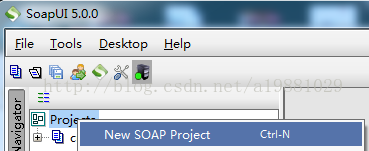
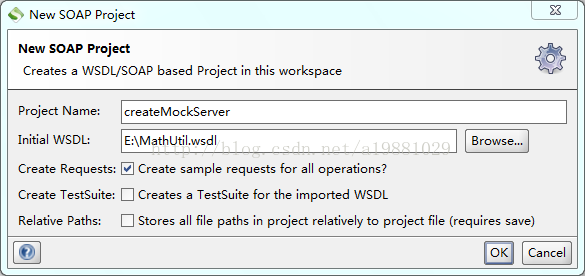
确认后,会在新建的SOAP项目下自动生成模拟客户端
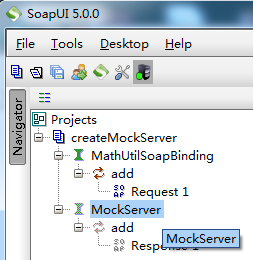
在模拟客户端的基础上创建一个接口模拟服务端(Mock Service):
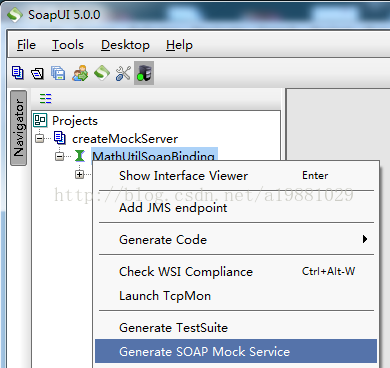
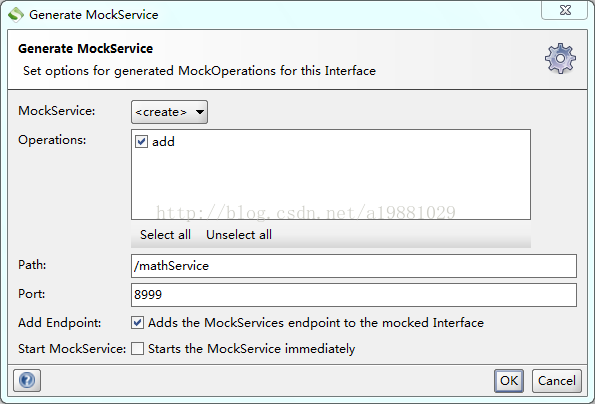
双击Response1可以设置接口服务端返回值:
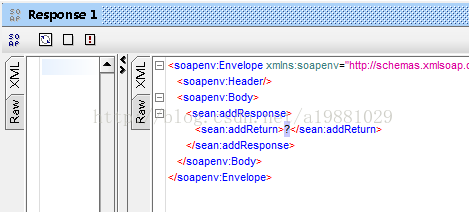
返回值默认为"?",一定要进行修改,否则调用该接口时会报错
AxisFault

 faultCode: {http://schemas.xmlsoap.org/soap/envelope/}Server.userException

 faultSubcode:

 faultString: java.lang.NumberFormatException: For input string: "?"

 faultActor:

 faultNode:

 faultDetail:

    {http://xml.apache.org/axis/}stackTrace:java.lang.NumberFormatException: For input string: "?"
双击创建的接口模拟服务端:
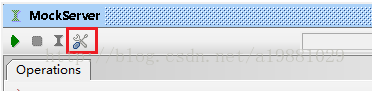
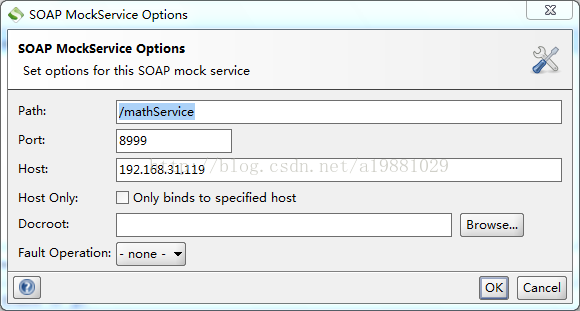
修改接口模拟服务端配置:
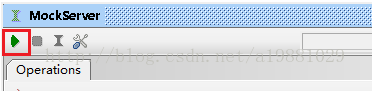
配置完成后,启动模拟服务端:

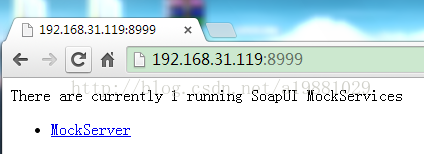
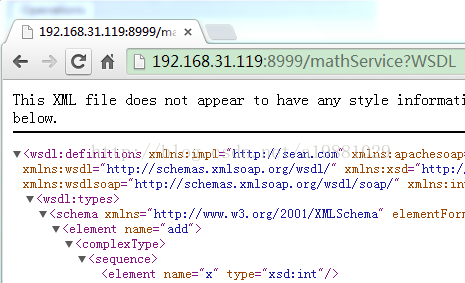
此时模拟服务端已经启动,可以使用了:
SoapUI5.0创建WebService接口模拟服务端(转)的更多相关文章
- 【转】SoapUI5.0创建WebService接口模拟服务端
原文:http://blog.csdn.net/a19881029/article/details/26348627 使用SoapUI创建WebService接口模拟服务端需要接口描述文件 MathU ...
- 【JMeter4.0学习(三)】之SoapUI创建WebService接口模拟服务端以及JMeter对SOAP协议性能测试脚本开发
目录: 创建WebService接口模拟服务端 下载SoapUI 新建MathUtil.wsdl文件 创建一个SOAP项目 接口模拟服务端配置以及启动 JMeter对SOAP协议性能测试脚本开发 [阐 ...
- Axis创建webservice客户端和服务端
原创作品,允许转载,转载时请务必以超链接形式标明文章 原始出处 .作者信息和本人声明.否则将追究法律责任. 作者:永恒の_☆ 地址:http://blog.csdn.net/chenghui0317/ ...
- CXF创建webservice客户端和服务端
转 一.CXF的介绍 Apache CXF是一个开源的WebService框架,CXF大大简化了Webservice的创建,同时它继承了XFire的传统,一样可以和spring天然的进行无缝的集成.C ...
- 13.Axis创建webservice客户端和服务端
转自:https://blog.csdn.net/chenghui0317/article/details/9318317 一.Axis的介绍 Web Service是现在最适合实现SOA的技术,而A ...
- 通过Java WebService接口从服务端下载文件
一. 前言 本文讲述如何通过webservice接口,从服务端下载文件.报告到客户端.适用于跨系统间的文件交互,传输文件不大的情况(控制在几百M以内).对于这种情况搭建一个FTP环境,增加了系统部署的 ...
- Delphi XE5通过WebService开发Web服务端和手机客户端
Delphi XE5通过WebService开发Web服务端和手机客户端介绍 我们开发一个三层的android程序 建立一个webservices stand-alone vcl applicati ...
- 一些java考过的测试题和自己制作模拟服务端和客户端
媒体 1,java环境变量: PATH: .;%JAVA_HOME%\bin;%JAVA_HOME%\jre\bin; CLASSPATH: .;%JAVA_HOME%\jre\lib\rt.jar ...
- WebService技术,服务端发布到Tomcat(使用Servlet发布),客户端使用axis2实现(二)
还是在WebService技术,服务端and客户端JDK-wsimport工具(一)的基础上实现.新建一个包:com.aixs2client.目录结构如下: 一.服务端: 1.还是使用com.webs ...
随机推荐
- POJ1006 Biorhythms【中国剩余定理】
<题目链接> 题目大意: 人体的体力每23天会达到峰值,情感每28天会达到峰值,智力每33天会达到峰值,一个人在a天体力达到峰值,b天情感达到峰值,c天智力达到峰值,求这个人下一次体力情感 ...
- HDU 2795 Billboard【点修改】
<题目链接> 题目大意: 有一块h*w的矩形广告板,要往上面贴广告,然后给n个1*wi的广告,要求把广告贴上去,而且要求广告要尽量往上贴并且尽量靠左, 求第n个广告的所在的位置,不能贴则为 ...
- 中间人攻击工具ettercap
中间人攻击工具ettercap (一).简介 (二).模块划分 1.Snifer 2.MITM 3.Filter 4.Log 5.Plugin (三).特性 (四).用户操作界面 (五).指定目标 ( ...
- 使用 Spring Boot 搭建一套增删改查(无多余代码)
前言 这是我学习 Spring Boot 的第三篇文章,终于可以见到效果了.错过的同学可以看看之前的文章 我们为什么要学习 Spring Boot Spring Boot 入门详细分析 在入门的基础上 ...
- vue 百度地图实现标记多个maker,并点击任意一个maker弹出对应的提示框信息, (附: 通过多个地址,标记多个marker 的 方法思路)
通过点击不同筛选条件,筛选出不同企业所在的地点, 根据每个企业的经纬度 在地图上标记多个maker,点击任意一个maker,会弹出infoWindow 信息窗口: 说明: 因每个人写法不同.需求不同 ...
- SQLite中的运算符表达式
SQLite中的运算符表达式 在SQLite中,运算符包括了一元运算符,二元运算符(二进制运算符)和三元元素符.图3.12中给出了这些运算符需要的参数以及优先级.其中,一元运算符的优先级最高,三元运算 ...
- navicat 官方使用手册,中文版,快捷键大全
2017年1月23日09:52:51 这个官方中文文档很详细 https://www.navicat.com.cn/manual/online_manual/cn/navicat/win_manual ...
- 用type动态创建Form
type时所有元类的父亲object是type(object的类型是type),type也是object(type继承自object) >>> isinstance(object, ...
- C++ 多继承与虚基类
转载来自:CSDN insistGoGo (http://blog.csdn.net/insistgogo) 多继承的定义:派生类的基类大于一个 语法: class 派生类名:继承方式1 基类名1 ...
- BZOJ4460 : [Jsoi2013]广告计划
首先预处理出$f[i][j]$表示第$i$位是字符$j$的字符串集合. 考虑枚举答案$n$,那么模式串中模$n$相同的字符都要按顺序在同一行出现. 设$g[i][j]$表示第$i$列开始出现模$n$为 ...