
Android开发 ---如何操作资源目录中的资源文件5 ---Raw资源管理与国际化
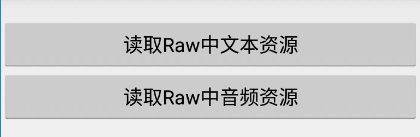
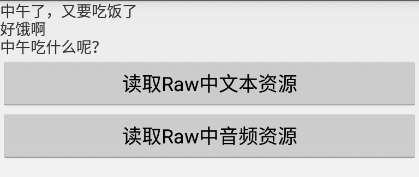
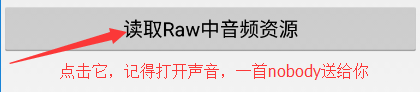
效果图:

1、activity_main.xml
描述:
定义两个按钮,一个是Raw资源管理,一个是处理国际化语言,其中i18n表示简体中文
<?xml version="1.0" encoding="utf-8"?>

<LinearLayout xmlns:android="http://schemas.android.com/apk/res/android"

    android:id="@+id/activity_main"

    android:layout_width="match_parent"

    android:layout_height="match_parent"

    android:orientation="vertical">

    <Button

        android:layout_width="match_parent"

        android:layout_height="wrap_content"

        android:text="Raw资源管理"

        android:onClick="test_5"

        />

    <Button

        android:layout_width="match_parent"

        android:layout_height="wrap_content"

        android:text="@string/i18n"

        android:onClick="test_5"

        />

</LinearLayout>
2、MainActivity.java
描述:
页面跳转
package com.example.android_shaperesoucesdemo;

import android.app.Activity;

import android.content.Intent;

import android.os.Bundle;

import android.view.View;

public class MainActivity extends Activity {

    @Override

    protected void onCreate(Bundle savedInstanceState) {

        super.onCreate(savedInstanceState);

        setContentView(R.layout.activity_main);

    }

    public void test_5(View view){

        Intent intent = new Intent(this,RawActivity.class);

        startActivity(intent);

    }

}
3、activity_raw.xml
描述:
定义两个按钮,一个实现读取Raw资源文件中的文本资源;一个实现读取Raw资源文件中的音频资源
<?xml version="1.0" encoding="utf-8"?>

<LinearLayout xmlns:android="http://schemas.android.com/apk/res/android"

    android:id="@+id/activity_raw"

    android:layout_width="match_parent"

    android:layout_height="match_parent"

    android:orientation="vertical"

    >

    <TextView

        android:layout_width="match_parent"

        android:layout_height="wrap_content"

        android:id="@+id/showMessage"

        />

    <Button

        android:layout_width="match_parent"

        android:layout_height="wrap_content"

        android:text="读取Raw中文本资源"

        android:onClick="readTxt"

        />

    <Button

        android:layout_width="match_parent"

        android:layout_height="wrap_content"

        android:text="读取Raw中音频资源"

        android:onClick="readMp3"

        />

</LinearLayout>
4、RawActivity.java
package com.example.android_shaperesoucesdemo;

import android.app.Activity;

import android.media.MediaPlayer;

import android.os.Bundle;

import android.view.View;

import android.widget.TextView;

import java.io.IOException;

import java.io.InputStream;

public class RawActivity extends Activity {

    private TextView showMessage;

    @Override

    protected void onCreate(Bundle savedInstanceState) {

        super.onCreate(savedInstanceState);

        setContentView(R.layout.activity_raw);

        showMessage = (TextView)findViewById(R.id.showMessage);

    }

    //读取文本资源

    public void readTxt(View view){
     //定义一个输入流,读取raw文件中的hello文件
     //Android读取asserts和raw文件夹下的文件 经常需要用到读取“/res/raw”和"/asserts"文件夹下的文件

        InputStream  input = getResources().openRawResource(R.raw.hello);

        try {
       //获取流的大小

            int size = input.available();
       //将流转换为字节

            byte[] bytes = new byte[size];
       //读出字节

            input.read(bytes);

            input.close();
       //将字节转换成字符串显示在UI界面上

            showMessage.setText(new String(bytes));

        } catch (IOException e) {

            e.printStackTrace();

        }

    }
  //定义一个读取MP3文件资源的方法

    public void readMp3(View view) throws IOException{
     //MediaPlayer是播放音频和视频的组件
     //通过组件获取raw中的音乐文件nobody

        MediaPlayer mp = MediaPlayer.create(this,R.raw.nobody);
     //开始播放音乐

        mp.start();

    }

}
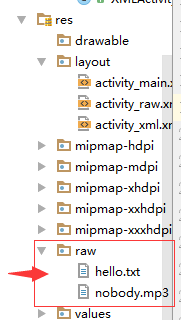
5、res目录下创建一个raw包,在包中创建一个文本文件hello.txt,并在包中放一首音乐nobody.mp3
在hello.txt文件中随便输入一些内容
6、处理国际化:
在res资源目录下创建一个values-zh-rCN的包,包中创建一个String.xml文件
<?xml version="1.0" encoding="utf-8"?>

<resources>

    <string name="app_name">Android_Resouces_2</string>

    <!--定义字符串-->

    <string name="i18n">国际化</string>

</resources>
在main目录下创建一个assets的资源目录
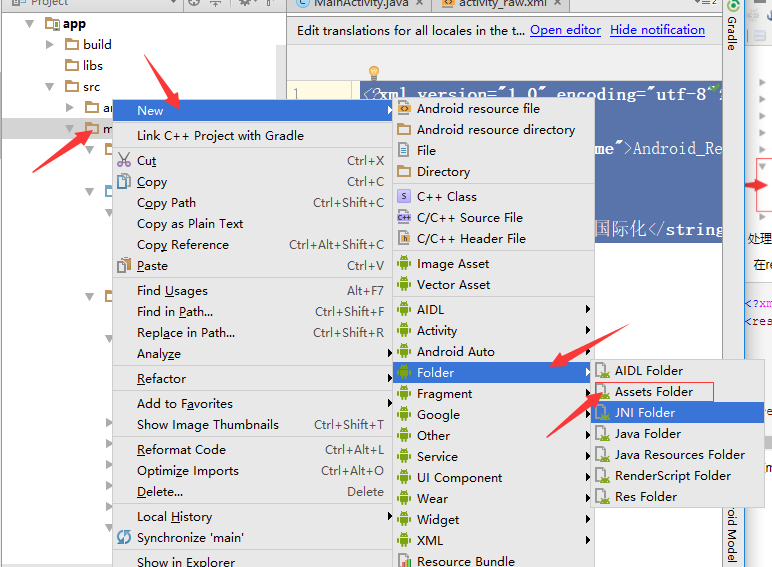
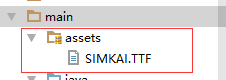
然后在assets目录下放入一个SIMKAL.TTF文件,这个文件是简体中文
文件下载地址:http://www.font5.com.cn/zitixiazai/1/534.html
Android开发 ---如何操作资源目录中的资源文件5 ---Raw资源管理与国际化的更多相关文章
- Android开发---如何操作资源目录中的资源文件4 ---访问xml的配置资源文件的内容
Android开发---如何操作资源目录中的资源文件4 XML,位于res/xml/,这些静态的XML文件用于保存程序的数据和结构. XmlPullParser可以用于解释xml文件 效果图: 描述: ...
- Android开发---如何操作资源目录中的资源文件3--圆角边框、背景颜色渐变效果、边框颜色
Android开发---如何操作资源目录中的资源文件3 效果图 1.圆角边框 2.背景颜色渐变效果 1.activity_main.xml 描述: 定义了一个shape资源管理按钮 <?xml ...
- Android开发 ---如何操作资源目录中的资源文件2
Android开发 ---如何操作资源目录中的资源文件2 一.颜色资源管理 效果图: 描述: 1.改变字体的背景颜色 2.改变字体颜色 3.改变按钮颜色 4.图像颜色切换 操作描述: 点击(1)中的颜 ...
- Android开发---如何操作资源目录中的资源文件
效果图: 1.activity_main.xml <?xml version="1.0" encoding="utf-8"?> <Linear ...
- android开发之-查看、编辑手机sqlite数据库文件-实测
效果图: 1.开始——运行——输入cmd ,输入adb shell,错误:一是“adb不是内部命令或外部命令,也不是可运行的程序或批处理文件”,二是“error:device not found”. ...
- 在/proc文件系统中增加一个目录hello,并在这个目录中增加一个文件world,文件的内容为hello world
一.题目 编写一个内核模块,在/proc文件系统中增加一个目录hello,并在这个目录中增加一个文件world,文件的内容为hello world.内核版本要求2.6.18 二.实验环境 物理主机:w ...
- 创建一个目录info,并在目录中创建一个文件test.txt,把该文件的信息读取出来,并显示出来
/*4.创建一个目录info,并在目录中创建一个文件test.txt,把该文件的信息读取出来,并显示出来*/ #import <Foundation/Foundation.h>#defin ...
- python实现在目录中查找指定文件的方法
python实现在目录中查找指定文件的方法 本文实例讲述了python实现在目录中查找指定文件的方法.分享给大家供大家参考.具体实现方法如下: 1. 模糊查找 代码如下: import os from ...
- 如何查找一个目录中所有c文件的总行数
如何查找一个目录中所有c文件的行数 面试题问到了一题,如何统计wc文件夹下所有文件的行数,包括了子目录. 最后在 https://blog.csdn.net/a_ran/article/details ...
随机推荐
- vm15安装MACOS
VMWare15 安装 Mac OS 系统文章目录VMWare15 安装 Mac OS 系统安装环境工具准备准备工作MAC虚拟机设置启动MAC前准备工作安装系统安装VMware Tool注意事项参考链 ...
- Linux系统中文件定位与查找
Linux系统中文件查找 关键词 文件查找 | find | locate 本文主要介绍有关文件查找的两个命令——find和locate,以及压缩打包的命令——compress, gzip,bzip2 ...
- 3月22 关于CSS
CSS(Cascading Style Sheep 叠层样式表,作用是美化HTML网页)/*注释内容*/ 为注释的方法. 样式表的分类: 1.内联样式表 和HTML联合显示,控制精确,但是可重用性差, ...
- 使用org.apache.poi导出Excel表格
public HSSFWorkbook MakeExcel(List<TransactionLogVO> logList) { // SimpleDateFormat sdf = new ...
- zzw原创_根据某一文件复制出大量固定位数后缀名的递增的文件
1.trre.sh :根据某一文件复制出大量固定位数后后缀递增的文件. 如将 SPINFO_190516_20170109.001 复制成SPINFO_190516_20170109.002 ...
- [LightOJ 1265] Island of Survival
Island of Survival You are in a reality show, and the show is way too real that they threw into an i ...
- PHP闭包函数
# 提到闭包就不得不想起匿名函数,也叫闭包函数(closures),貌似PHP闭包实现主要就是靠它.声明一个匿名函数是这样: $func = function() { }; //带结束符 # 可以看到 ...
- Tomcat修改版本号教程(CentOS)
1 到apache-tomcat安装目录下的lib子文件夹,找到catalina.jar备份该文件然后将该文件下载到本地. 2 使用winrar等工具直接打开该jar包进入到org/apache/ca ...
- 把旧系统迁移到.Net Core 2.0 日记 (16) --Cors跨域访问
IE浏览器的Intranet局域网设置默认是可以跨域访问的.chrome就不可以. 这里说的跨域是指javascript代码不能跨域, 当然你在后端controller代码里用HttpClient.G ...
- Spring boot返回JSON类型响应及Content-Type设置
一.背景 服务器软件用Spring boot开发,API调用的响应消息格式为JSON. 对端调用接口后无法解析响应. 抓包看Response的Body部分确实是正确的JSON格式字符串. 二.问题分析 ...