
Unity(IOC)学习笔记
版权声明:本文为博主原创文章,未经博主允许不得转载。 https://blog.csdn.net/m0_37591671/article/details/79432564
Unity(IOC)学习笔记
1.IOC
在介绍如何在程序中使用Unity之前,首先说一下什么是IOC:
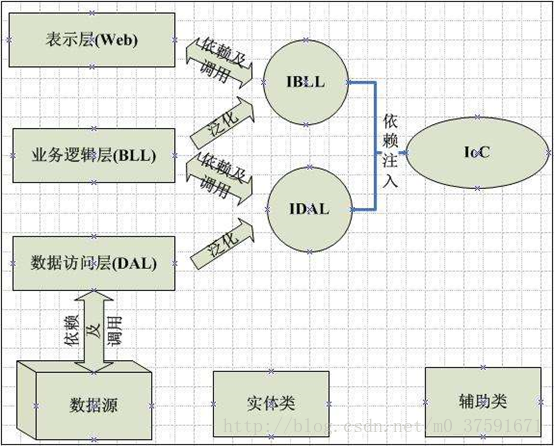
IOC是Inversion of Control的缩写,被翻译为控制反转,是一种全新的设计模式,用来削减计算机程序的耦合问题,把程序上层对下层的依赖,转移到第三方的容器来装配。 控制反转一般分为两种类型,依赖注入(Dependency Injection,简称DI)和依赖查找(Dependency Lookup)。依赖注入应用比较广泛。
实现Ioc的框架有很多,比如astle Windsor、Unity、Spring.NET、StructureMap,我们这里学习使用微软提供的Unity。
2.Unity
下面介绍如何在程序中使用Unity:
第一步:
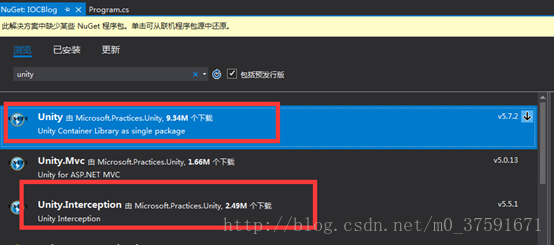
首先在Nuget添加Unity包,引用→右键→管理Nuget程序包,要实现AOP必须也添加下面的Unity.Interception包
这里添加Unity版本为5.5.6,Unity.Abstractions版本3.1.3,Unity.Interception版本5.3.1
第二步:
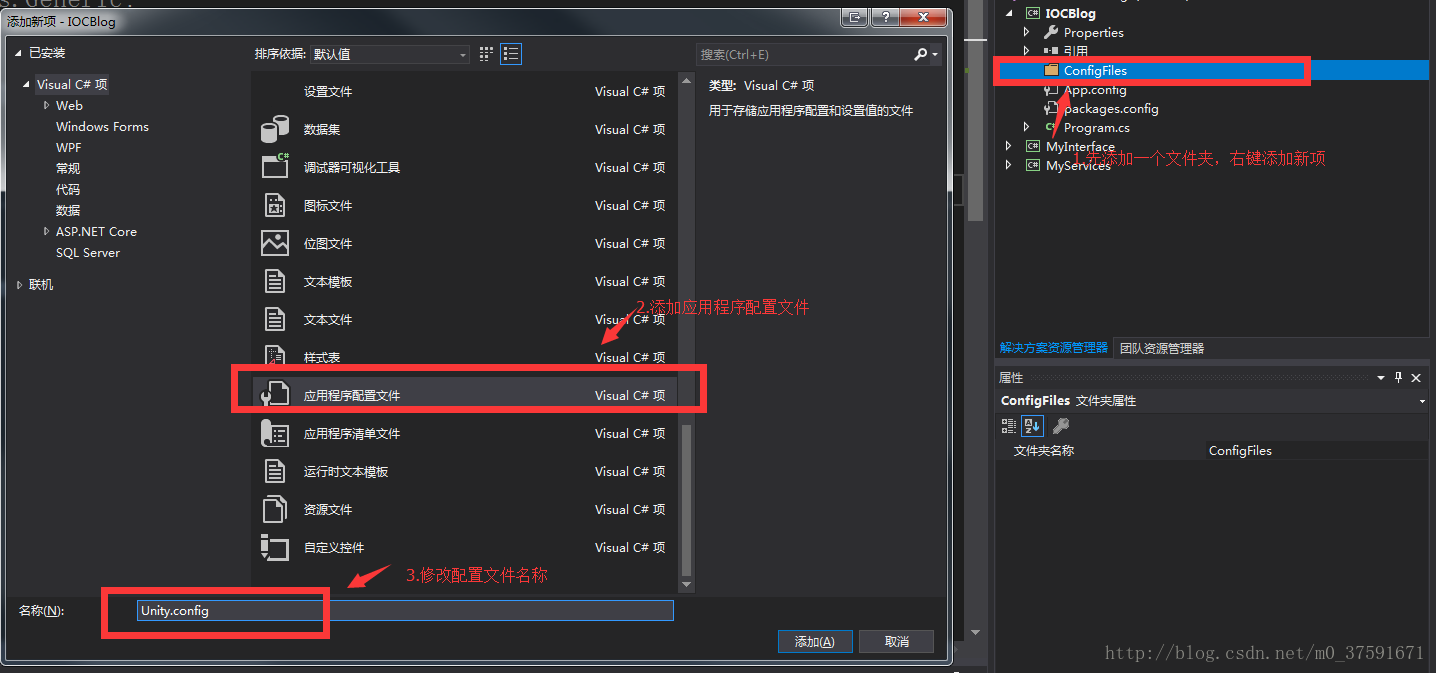
程序中添加一个配置文件的文件夹ConfigFiles,添加配置文件:
第三步:
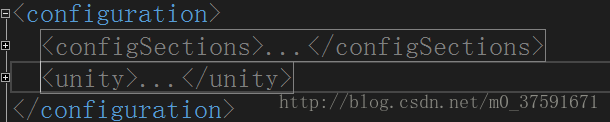
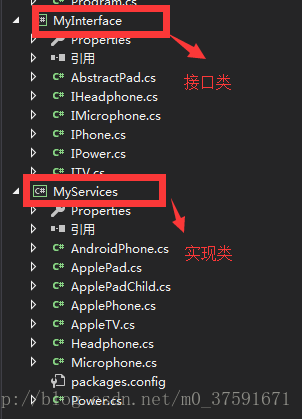
配置文件:文件结构为
具体配置为:

<?xml version="1.0" encoding="utf-8" ?>

<configuration>

  <configSections>

    <section name="unity" type="Microsoft.Practices.Unity.Configuration.UnityConfigurationSection, Unity.Configuration"/>

  </configSections>

  <unity>

    <sectionExtension type="Microsoft.Practices.Unity.InterceptionExtension.Configuration.InterceptionConfigurationExtension, Unity.Interception.Configuration"/>

    <containers>

      <container name="testContainer">

        <register type="MyInterface.IPhone,MyInterface" mapTo="MyServices.ApplePhone, MyServices"/>

        <register type="MyInterface.IPhone,MyInterface" mapTo="MyServices.AndroidPhone, MyServices" name="Android"/>

        <register type="MyInterface.IMicrophone, MyInterface" mapTo="MyServices.Microphone, MyServices"/>

        <register type="MyInterface.IHeadphone, MyInterface" mapTo="MyServices.Headphone, MyServices"/>

        <register type="MyInterface.IPower, MyInterface" mapTo="MyServices.Power, MyServices"/>

      </container>

      <container name="testContainerAOP">

        <extension type="Interception"/>

        <register type="MyInterface.IPhone,MyInterface" mapTo="MyServices.ApplePhone, MyServices">

          <interceptor type="InterfaceInterceptor"/>

          <interceptionBehavior type="MyFramework.LogBehavior, MyFramework"/>

          <lifetime type="transient" />

          <!--<constructor>

            <param name="pubContext" type="IPubContext" />

            <param name="id" type="System.Int32" value="3" />

          </constructor>-->

        </register>

        <register type="MyInterface.IMicrophone, MyInterface" mapTo="MyServices.Microphone, MyServices"/>

        <register type="MyInterface.IHeadphone, MyInterface" mapTo="MyServices.Headphone, MyServices"/>

        <register type="MyInterface.IPower, MyInterface" mapTo="MyServices.Power, MyServices"/>

        <register type="MyInterface.IPhone,MyInterface" mapTo="MyServices.AndroidPhone, MyServices" name="android"/>

        <register type="MyInterface.IPhone,MyInterface" mapTo="MyServices.ApplePhone, MyServices" name="apple"/>

      </container>

    </containers>

  </unity>

</configuration>
这里注册了两个Unity容器“testContainer”,“testContainerAOP”,后者是带有AOP的。
解释一下这个register:
<register type="MyInterface.IPhone,MyInterface" mapTo="MyServices.ApplePhone, MyServices"/>
MyInterface.IPhone:表示抽象接口的IPhone抽象类。
MyInterface为抽象类命名空间,即dll名称
MyServices.ApplePhone:表示实现的具体的ApplePhone类。
MyServices:为具体实现类命名空间,即dll名称
第四步:
Unity在程序中使用方式,这里是用配置文件:
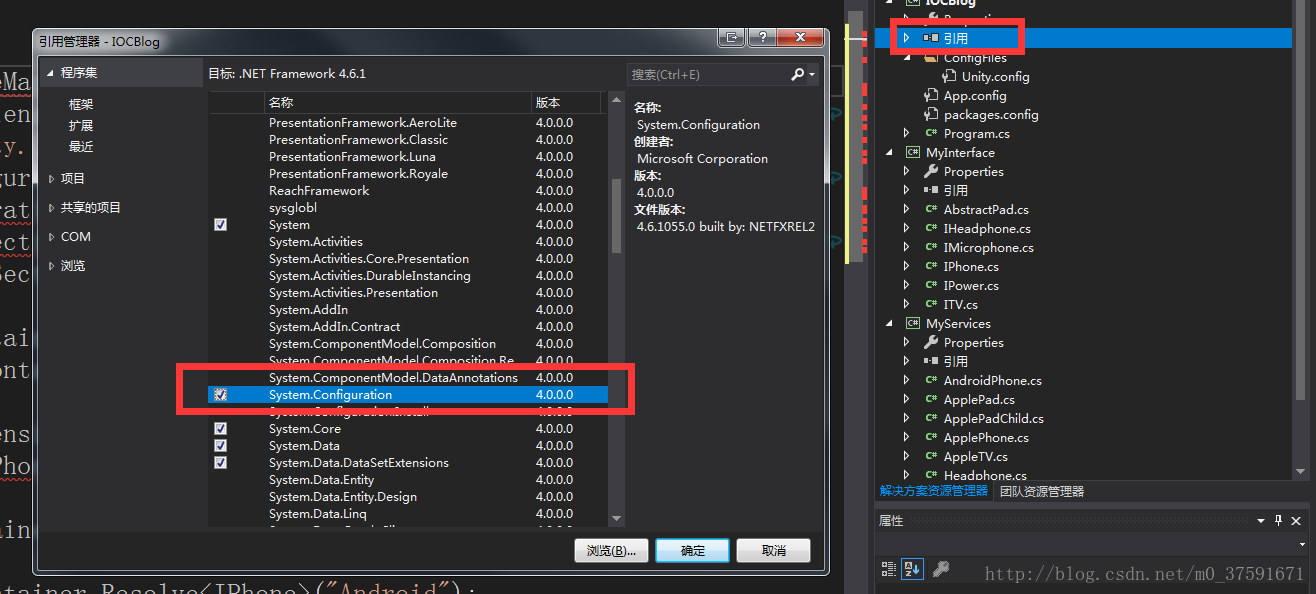
1.首先要添加System.Configuration的引用(引用右键→添加引用→框架):
2.找配置文件的路径
   ExeConfigurationFileMap fileMap = new ExeConfigurationFileMap();

            fileMap.ExeConfigFilename = Path.Combine(AppDomain.CurrentDomain.BaseDirectory + "CfgFiles\\Unity.Config");//找配置文件的路径
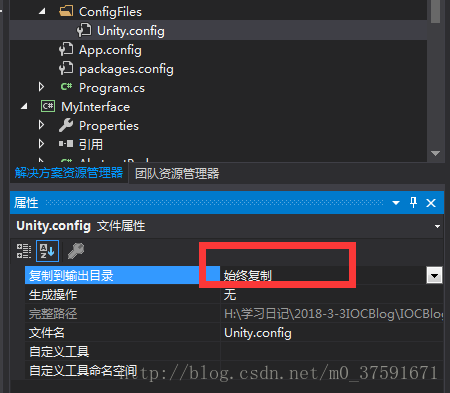
这里要注意吧Unity.config文件修改为始终复制:
3. 声明容器IUnityContainer
IUnityContainer container = new UnityContainer();

 section.Configure(container, "testContainer");
4.Resolve解析类型对象
IPhone phone = container.Resolve<IPhone>();

phone.Call();

IPhone android = container.Resolve<IPhone>("Android");

android.Call();
这里要说一下通过命名注册来区分生成的不同对象实例,即 上面的"Android",在配置文件中是这样注册的:
<register type="MyInterface.IPhone,MyInterface" mapTo="MyServices.AndroidPhone, MyServices" name="Android"/>
5.将MyServices编译生成的dll拷贝到项目文件的Bin/debug文件夹。
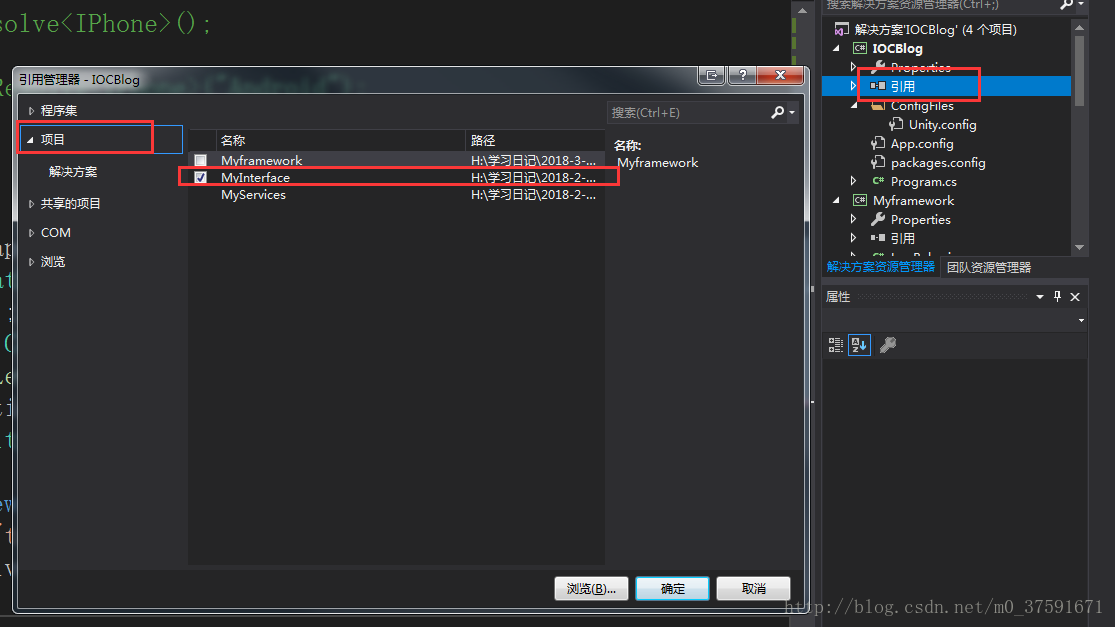
6.在项目中添加对接口的引用:
具体代码:
  static void Main(string[] args)

        {

            {

                //通过配置文件

                ExeConfigurationFileMap fileMap = new ExeConfigurationFileMap();

                fileMap.ExeConfigFilename = Path.Combine(AppDomain.CurrentDomain.BaseDirectory + "ConfigFiles\\Unity.Config");//找配置文件的路径

                Configuration configuration = ConfigurationManager.OpenMappedExeConfiguration(fileMap, ConfigurationUserLevel.None);

                UnityConfigurationSection section = (UnityConfigurationSection)configuration.GetSection(UnityConfigurationSection.SectionName);

                IUnityContainer container = new UnityContainer();

                section.Configure(container, "testContainer");

                container.AddNewExtension<Interception>().Configure<Interception>()

               .SetInterceptorFor<IPhone>(new InterfaceInterceptor());

                IPhone phone = container.Resolve<IPhone>();

                phone.Call();

                IPhone android = container.Resolve<IPhone>("Android");

                android.Call();

            }

        }
3.Unity中实现AOP
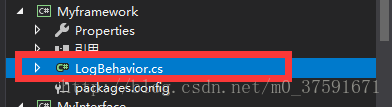
1.首先添加一个LogBehavior 的类,用来实现记录日志功能。
先要添加在Myframwork类库添加Unity,版本一样,以免冲突。然后继承IInterceptionBehavior接口。
public class LogBehavior: IInterceptionBehavior

    {

        public IEnumerable<Type> GetRequiredInterfaces()

        {

            return Type.EmptyTypes;

        }

        public IMethodReturn Invoke(IMethodInvocation input, GetNextInterceptionBehaviorDelegate getNext)

        {

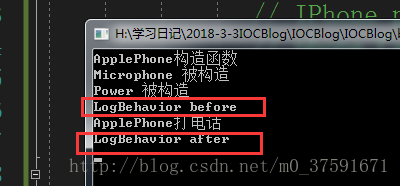
            Console.WriteLine("LogBehavior before");

            IMethodReturn method = getNext()(input, getNext);

            Console.WriteLine("LogBehavior after");

            return method;

        }

        public bool WillExecute

        {

            get { return true; }

        }

    }
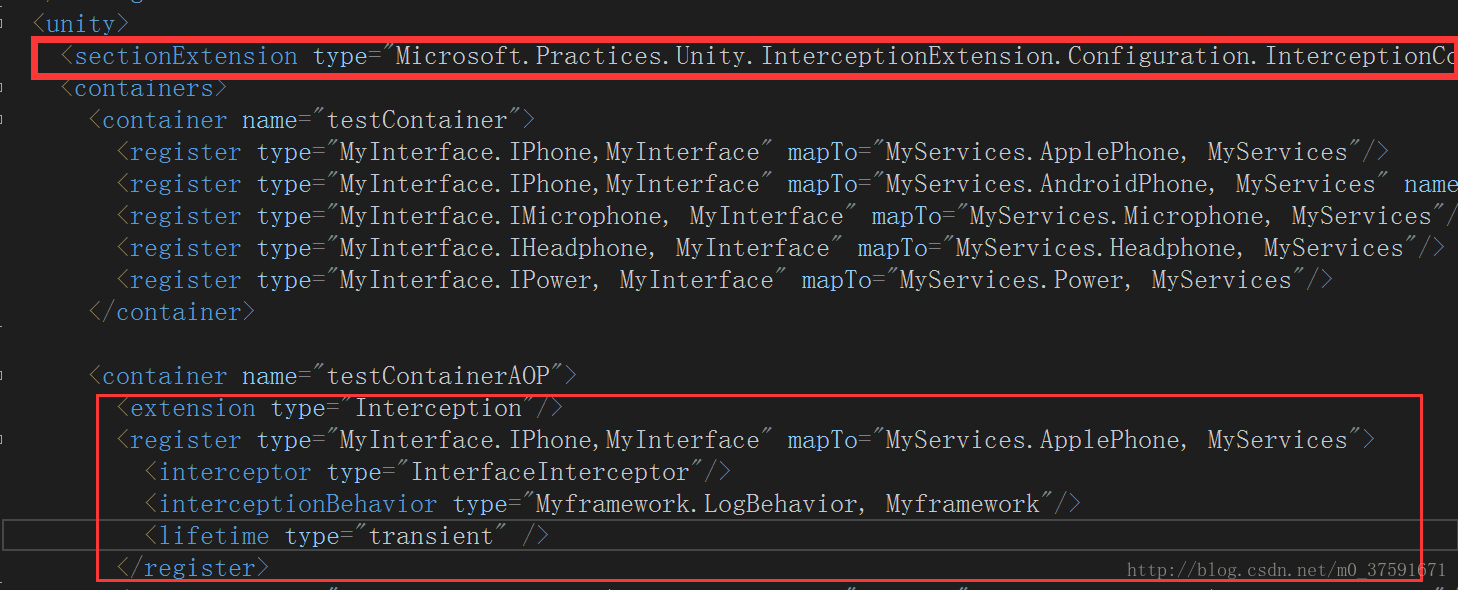
2.在配置文件中配置:
<configuration>

  <configSections>

    <section name="unity" type="Microsoft.Practices.Unity.Configuration.UnityConfigurationSection, Unity.Configuration"/>

  </configSections>

  <unity>

    <sectionExtension type="Microsoft.Practices.Unity.InterceptionExtension.Configuration.InterceptionConfigurationExtension, Unity.Interception.Configuration"/>

    <containers>

      <container name="testContainer">

        <register type="MyInterface.IPhone,MyInterface" mapTo="MyServices.ApplePhone, MyServices"/>

        <register type="MyInterface.IPhone,MyInterface" mapTo="MyServices.AndroidPhone, MyServices" name="Android"/>

        <register type="MyInterface.IMicrophone, MyInterface" mapTo="MyServices.Microphone, MyServices"/>

        <register type="MyInterface.IHeadphone, MyInterface" mapTo="MyServices.Headphone, MyServices"/>

        <register type="MyInterface.IPower, MyInterface" mapTo="MyServices.Power, MyServices"/>

      </container>

      <container name="testContainerAOP">

        <extension type="Interception"/>

        <register type="MyInterface.IPhone,MyInterface" mapTo="MyServices.ApplePhone, MyServices">

          <interceptor type="InterfaceInterceptor"/>

          <interceptionBehavior type="Myframework.LogBehavior, Myframework"/>

          <lifetime type="transient" />

        </register>

        <register type="MyInterface.IMicrophone, MyInterface" mapTo="MyServices.Microphone, MyServices"/>

        <register type="MyInterface.IHeadphone, MyInterface" mapTo="MyServices.Headphone, MyServices"/>

        <register type="MyInterface.IPower, MyInterface" mapTo="MyServices.Power, MyServices"/>

        <register type="MyInterface.IPhone,MyInterface" mapTo="MyServices.AndroidPhone, MyServices" name="android"/>

        <register type="MyInterface.IPhone,MyInterface" mapTo="MyServices.ApplePhone, MyServices" name="apple"/>

      </container>

    </containers>

  </unity>

</configuration>
3.将Myframwork编译生成的dll拷贝到项目文件的Bin/debug文件夹。
4.在程序中使用:
 ExeConfigurationFileMap fileMap = new ExeConfigurationFileMap();

                fileMap.ExeConfigFilename = Path.Combine(AppDomain.CurrentDomain.BaseDirectory + "ConfigFiles\\Unity.Config");//找配置文件的路径

                Configuration configuration = ConfigurationManager.OpenMappedExeConfiguration(fileMap, ConfigurationUserLevel.None);

                UnityConfigurationSection section = (UnityConfigurationSection)configuration.GetSection(UnityConfigurationSection.SectionName);

                IUnityContainer container = new UnityContainer();

                section.Configure(container, "testContainerAOP");

                IPhone phone = container.Resolve<IPhone>();

                phone.Call();
5.运行效果:
Unity(IOC)学习笔记的更多相关文章
- Unity Shader学习笔记-1
本篇文章是对Unity Shader入门精要的学习笔记,插图大部分来自冯乐乐女神的github 如果有什么说的不正确的请批评指正 目录 渲染流水线 流程图 Shader作用 屏幕映射 三角形遍历 两大 ...
- 从0开始学习Unity的学习笔记(I 界面学习和简单模型拼装)
先给一个大致今天学习的图,然后后面是细节 1.下载Unity :官网下载需要版本 2.Unity安装:一定不要有中文路径:一台电脑可以安装不同版本的Unity,但是要安装在不同的文件夹下: 3. 新建 ...
- 【Unity Shader学习笔记】Unity基础纹理-单张纹理
1 单张纹理 1.1 纹理 使用纹理映射(Texture Mapping)技术,我们把一张图片逐纹素(Texel)地控制模型的颜色. 美术人员建模时,会在建模软件中利用纹理展开技术把纹理映射坐标(Te ...
- Unity sqlite学习笔记一
1.SQLITE的常识 SQLite是一个开源免费的数据库,一般用于嵌入系统或者小规模的应用软件开发中,你可以像使用Access一样使用它. sqlite的主要优点:零配置(Zero Configur ...
- unity 3D 学习笔记
1.父对象的初始位置设,即刚开始的空对象的根节点位置应当设置成(0,0,0) 这样设置可以避免以后出现奇怪的坐标. GameObject实际上就是一些组件的容器. unity 使用公用变量原因是,在U ...
- Unity Shader学习笔记 - 用UV动画实现沙滩上的泡沫
这个泡沫效果来自远古时代的Unity官方海岛Demo, 原效果直接复制3个材质球在js脚本中做UV动画偏移,这里尝试在shader中做动画并且一个pass中完成: // Upgrade NOTE: r ...
- Unity的学习笔记(XLua的初学用法并在lua中使用unity周期函数)
自己最近也在研究怎么用lua控制UI,然后看着网上介绍,决定选用XLua,毕竟TX爸爸出的,有人维护,自己琢磨着怎么用,于是弄出来一个能用的作为记录. 当然,XLua主要是用于热更新,我自己是拿来尝试 ...
- 【Unity Shader学习笔记】Unity基础纹理-渐变纹理
纹理可以用来存储任何表面属性. 可以通过使用渐变纹理来实现插画风格的渲染效果. 这项技术是由Valve公司提出的.Valve使用它来渲染游戏中具有插画风格的角色. 我们使用半兰伯特模型计算漫反射. 因 ...
- 【Unity Shader学习笔记】Unity基础纹理-法线贴图
1 高度纹理 使用一张纹理改变物体表面法线,为模型提供更多细节. 有两种主要方法: 1.高度映射:使用一张高度纹理(height map)来模拟表面位移(displacement).得到一个修改后的法 ...
- 【Unity Shader学习笔记】Unity光照基础-高光反射
1.原理 1.1.Phong模型 计算高光反射需要表面法线.视角方向.光源方向.反射方向等. 在这四个矢量中,我们实际上只需要知道其中3个矢量即可,而第4个矢量(反射方向r)可以通过其他信息计算得到: ...
随机推荐
- vue组件中 IS 用法
//html <link rel="stylesheet" href="http://www.jq22.com/demo/animate-141106223642/ ...
- 玲珑学院 1014 Absolute Defeat
SAMPLE INPUT 3 2 2 2 1 1 5 1 4 1 2 3 4 5 4 10 3 1 2 3 4 SAMPLE OUTPUT 1 0 15 前缀和,每个元素都判断一下. #include ...
- asp.net core系列 39 Razor 介绍与详细示例
原文:asp.net core系列 39 Razor 介绍与详细示例 一. Razor介绍 在使用ASP.NET Core Web开发时, ASP.NET Core MVC 提供了一个新特性Razor ...
- 【Codeforces Round #426 (Div. 2) B】The Festive Evening
[Link]:http://codeforces.com/contest/834/problem/B [Description] [Solution] 模拟水题; 注意一个字母单个出现的时候,结束和开 ...
- IE兼容性开发的笔记
当前项目组开发的产品对外承诺支持IE9和IE11,但在推广应用过程中发现存在相当比例的用户实际上还在使用IE8.而这相当比例中的用户还包含了大部分的公司领导.为了满足公司内部各阶层人士体验我们产品的诉 ...
- 程序猿的量化交易之路(14)--Cointrader数据表(2)
Cointrader表结构 转载须注明出处:http://blog.csdn.net/minimicall?viewmode=contents,http://cloudtrader.top 设置(se ...
- 25.C++多线程
#include <iostream> #include <thread> #include <Windows.h> using namespace std; vo ...
- MD5和sha1加密算法--散列加密技术 MD5:128bit的大整数
在很多电子商务和社区应用中,我们都要存放很多的客户的资料,其中包括了很多的隐私信息和客户不愿被别人看到的信息,当然好有客户执行各种操作的密码,此时就需要对客户的信息进行加密再存储,目前有两种比较好的加 ...
- 笔记四:onsubmit和onclick的区别
今天碰到关于表单提交的问题,我是用submit还是用onclick好呢,然后我去百度了一下两者的区别: onsubmit只能表单上使用,提交表单前会触发, onclick是按钮等控件使用, 用来触发点 ...
- 关于使用toFixed()函数时报错"toFixed() is not a function"的问题
toFixed()函数只有数字类型的参数才可使用,字符串类型的参数需用parseFloat或者parseInt转换后再使用