
Bootstrap手机网站开发案例
Bootstrap手机网站开发案例
一、总结
一句话总结:Bootstrap手机网站开发注意事项(3点):a、引入viewpoint声明,b、通过屏幕宽动态控制元素显隐 c、图片添加自适应
1、Bootstrap手机网站开发注意事项(3点)?
a、引入手机声明
11 <meta name="viewport" content="width=device-width, initial-scale=1.0">
b、通过屏幕宽动态控制元素显隐
135 <script>

136 w=$(window).width();

137

138 if(w<700){

139     $('.bottom-right').hide();

140     $('.navbar-left').css({'text-align':'center'});

141 }

142

143 $('.panel-body img').addClass('img-responsive');

144 </script>
c、图片添加自适应
143 $('.panel-body img').addClass('img-responsive');
2、页面引用原生数据库操作方法及位置?
php放开头
  1 <?php

  2 include 'public/common/config.php';

  3 $sql="select * from message";

  4 $rst=mysql_query($sql);

  5

  6 ?>

  7 <!doctype html>
3、应用框架内元素方法,比如bootstrap中的幻灯片?
引模块加指定id进行样式微调
 21         .navbar-brand{

 22             padding:0px;

 23         }
4、模型中foreach循环拆开写?
 98         <?php

 99         while($row=mysql_fetch_assoc($rst)){

100         ?>
119         <?php

120         }

121         ?>
5、网站到数据库内容转实体方法?
110 <?php echo htmlspecialchars_decode($row[content]) ?>
6、除uedit外另一个富文本编辑器?
kd,kindeditor,用法和ueditor很像,引文件加js
16 <script src="public/kd/kindeditor-min.js"></script>
122 var editor;

123 KindEditor.ready(function(K) {

124     editor = K.create('#txt', {

125         resizeType : 1,

126         allowPreviewEmoticons : false,

127         allowImageUpload : false,

128         items : [

129             'fontname', 'fontsize', '|', 'forecolor', 'hilitecolor', 'bold', 'italic', 'underline',

130             'removeformat', '|', 'justifyleft', 'justifycenter', 'justifyright', 'insertorderedlist',

131             'insertunorderedlist', '|', 'emoticons', 'image', 'link']

132     });

133 });
7、通过header跳转方法?
12 header('location:index.php');
二、Bootstrap手机网站开发案例
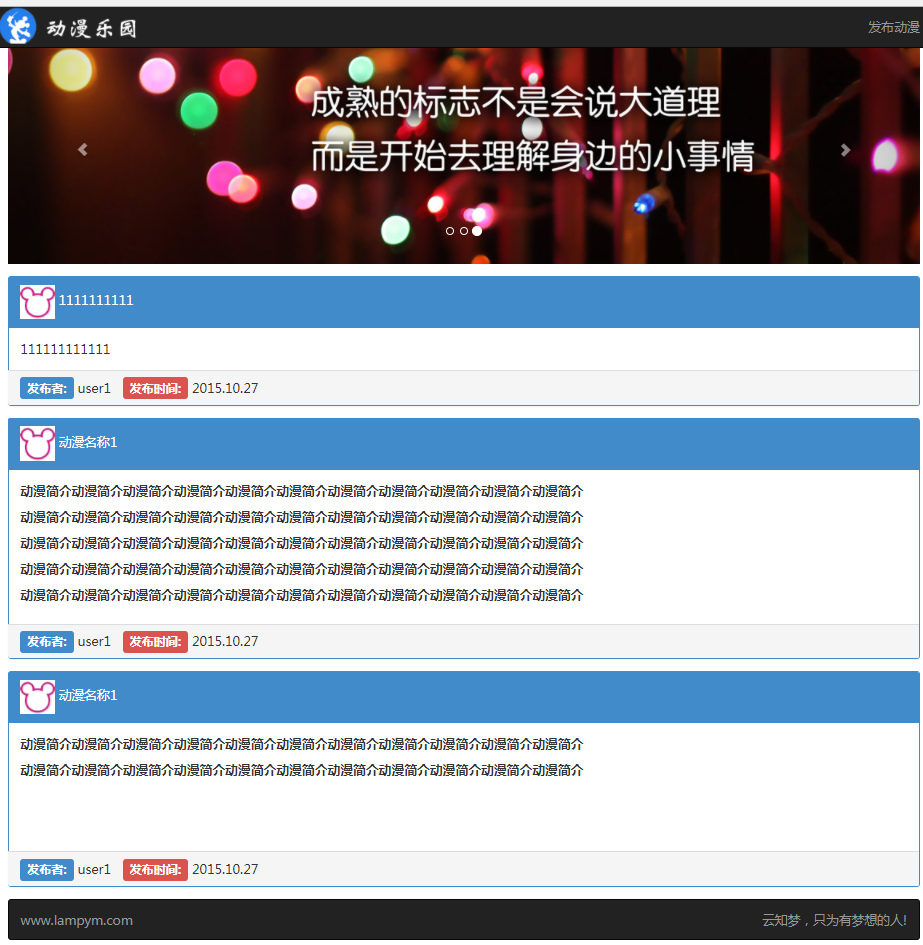
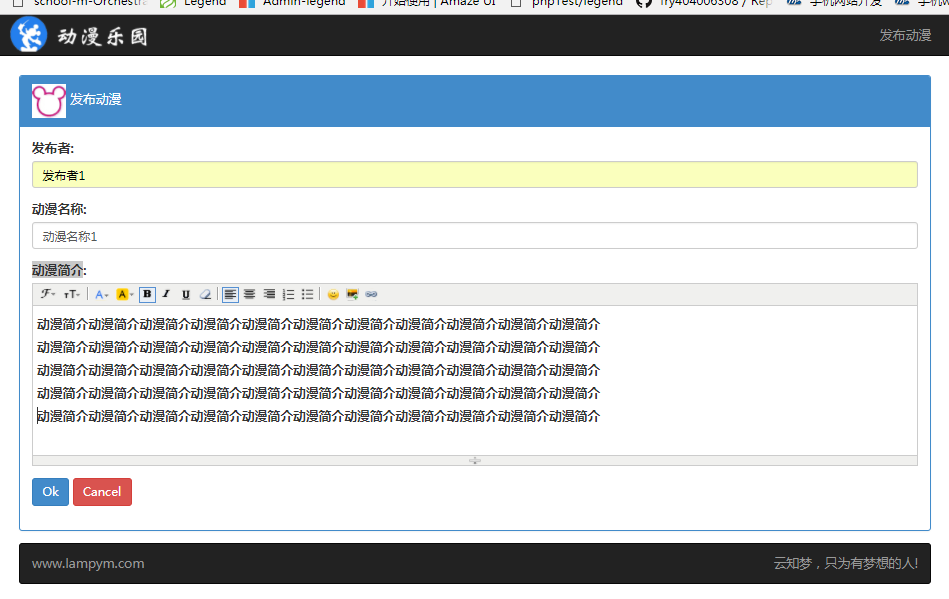
1、index.php
 <?php

 include 'public/common/config.php';

 $sql="select * from message";

 $rst=mysql_query($sql);

 ?>

 <!doctype html>

 <html lang="en">

 <head>

     <meta charset="UTF-8">

 11     <meta name="viewport" content="width=device-width, initial-scale=1.0">

     <title>动漫乐园</title>

     <link rel="stylesheet" href="public/bs/css/bootstrap.min.css">

     <script src="public/js/jquery.js"></script>

     <script src="public/bs/js/bootstrap.min.js"></script>

     <style>

         *{

             font-family: 微软雅黑;

             font-size:16px;

         }

 21         .navbar-brand{

             padding:0px;

         }

         .page{

             padding-top:60px;

         }

         .navbar2{

             padding-right:15px;

         }

         .panel-primary{

             margin-top:15px;

             margin-bottom:15px;

         }

     </style>

 </head>

 <body>

     <div class="container page">

         <nav class="navbar navbar-inverse navbar-fixed-top" role="navigation">

             <div class="container">

                 <div class="navbar-header">

                   <button type="button" class="navbar-toggle" data-toggle="collapse" data-target="#bs-example-navbar-collapse-1">

                     <span class="sr-only">Toggle navigation</span>

                     <span class="icon-bar"></span>

                     <span class="icon-bar"></span>

                     <span class="icon-bar"></span>

                   </button>

                   <a class="navbar-brand" href="index.php">

                       <img src="public/images/logo.png" alt="">

                   </a>

                 </div>

                 <!-- Collect the nav links, forms, and other content for toggling -->

                 <div class="collapse navbar-collapse" id="bs-example-navbar-collapse-1">

                   <ul class="nav navbar-nav navbar-right">

                     <li><a href="add.php">发布动漫</a></li>

                   </ul>

                 </div>

             </div>

         </nav>

         <!-- 幻灯片 -->

         <div id="carousel-example-generic" class="carousel slide" data-ride="carousel">

           <!-- Indicators -->

           <ol class="carousel-indicators">

             <li data-target="#carousel-example-generic" data-slide-to="0" class="active"></li>

             <li data-target="#carousel-example-generic" data-slide-to="1"></li>

             <li data-target="#carousel-example-generic" data-slide-to="2"></li>

           </ol>

           <!-- Wrapper for slides -->

           <div class="carousel-inner">

             <div class="item active">

               <img src="public/images/a.jpg" alt="...">

             </div>

             <div class="item">

               <img src="public/images/b.jpg" alt="...">

             </div>

             <div class="item">

               <img src="public/images/c.jpg" alt="...">

             </div>

           </div>

           <!-- Controls -->

           <a class="left carousel-control" href="#carousel-example-generic" data-slide="prev">

             <span class="glyphicon glyphicon-chevron-left"></span>

           </a>

           <a class="right carousel-control" href="#carousel-example-generic" data-slide="next">

             <span class="glyphicon glyphicon-chevron-right"></span>

           </a>

         </div>

         <!-- 内容部分 -->

 98         <?php

         while($row=mysql_fetch_assoc($rst)){

         ?>

         <div class="panel panel-primary">

             <div class="panel-heading">

                 <div class="panel-title">

                     <img src="public/images/head.jpg" alt="">

                     <span><?php echo $row[title]?></span>

                 </div>

             </div>

             <div class="panel-body">

                 <?php echo htmlspecialchars_decode($row[content]) ?>

             </div>

             <div class="panel-footer">

                 <span><span class='label label-primary'>发布者:</span> user1</span>

                 <span style='margin-left:10px;'><span class='label label-danger'>发布时间:</span> 2015.10.27</span>

             </div>

         </div>

119         <?php

         }

         ?>

         <!-- 底部导航条 -->

         <nav class="navbar navbar-inverse navbar2" role="navigation">

           <ul class="nav navbar-nav navbar-left">

             <li><a href="#">www.lampym.com</a></li>

           </ul>

           <ul class="nav navbar-nav navbar-right bottom-right">

             <li><a href="#">云知梦,只为有梦想的人!</a></li>

           </ul>

         </nav>

     </div>

 </body>

 <script>

 w=$(window).width();

 if(w<){

     $('.bottom-right').hide();

     $('.navbar-left').css({'text-align':'center'});

 }

 $('.panel-body img').addClass('img-responsive');

 </script>

 </html>
2、add.php
 <?php

 include 'public/common/config.php';

 $sql="select * from message";

 $rst=mysql_query($sql);

 ?>

 <!doctype html>

 <html lang="en">

 <head>

     <meta charset="UTF-8">

     <meta name="viewport" content="width=device-width, initial-scale=1.0">

     <title>index</title>

     <link rel="stylesheet" href="public/bs/css/bootstrap.min.css">

     <script src="public/js/jquery.js"></script>

     <script src="public/bs/js/bootstrap.min.js"></script>

     <script src="public/kd/kindeditor-min.js"></script>

     <style>

         *{

             font-family: 微软雅黑;

             font-size:16px;

         }

         .navbar-brand{

             padding:0px;

         }

         .page{

             padding-top:60px;

         }

         .navbar2{

             padding-right:15px;

         }

         .panel-primary{

             margin-top:15px;

             margin-bottom:15px;

         }

         .ke-container{

             width:100%!important;

         }

     </style>

 </head>

 <body>

     <div class="container page">

         <nav class="navbar navbar-inverse navbar-fixed-top" role="navigation">

             <div class="container">

                 <div class="navbar-header">

                   <button type="button" class="navbar-toggle" data-toggle="collapse" data-target="#bs-example-navbar-collapse-1">

                     <span class="sr-only">Toggle navigation</span>

                     <span class="icon-bar"></span>

                     <span class="icon-bar"></span>

                     <span class="icon-bar"></span>

                   </button>

                   <a class="navbar-brand" href="index.php">

                       <img src="public/images/logo.png" alt="">

                   </a>

                 </div>

                 <!-- Collect the nav links, forms, and other content for toggling -->

                 <div class="collapse navbar-collapse" id="bs-example-navbar-collapse-1">

                   <ul class="nav navbar-nav navbar-right">

                     <li><a href="add.php">发布动漫</a></li>

                   </ul>

                 </div>

             </div>

         </nav>

         <div class="panel panel-primary">

             <div class="panel-heading">

                 <div class="panel-title">

                     <img src="public/images/head.jpg" alt="">

                     <span>发布动漫</span>

                 </div>

             </div>

             <div class="panel-body">

                 <form action="insert.php" method='post'>

                     <div class="form-group">

                         <label for="">发布者:</label>

                         <input type="text" class='form-control' name='username'>

                     </div>

                     <div class="form-group">

                         <label for="">动漫名称:</label>

                         <input type="text" class='form-control' name='title'>

                     </div>

                     <div class="form-group">

                         <label for="">动漫简介:</label>

                         <textarea name="content" id="txt" cols="30" rows="10" class='form-control'></textarea>

                     </div>

                     <div class="form-group">

                         <input type="submit" value="Ok" class='btn btn-primary'>

                         <input type="reset" value="Cancel" class='btn btn-danger'>

                     </div>

                 </form>

             </div>

         </div>

         <nav class="navbar navbar-inverse navbar2" role="navigation">

           <ul class="nav navbar-nav navbar-left">

             <li><a href="#">www.lampym.com</a></li>

           </ul>

           <ul class="nav navbar-nav navbar-right bottom-right">

             <li><a href="#">云知梦,只为有梦想的人!</a></li>

           </ul>

         </nav>

     </div>

 </body>

 <script>

 w=$(window).width();

 if(w<700){

     $('.bottom-right').hide();

     $('.navbar-left').css({'text-align':'center'});

 }

 $('.panel-body img').addClass('img-responsive');

 var editor;

 KindEditor.ready(function(K) {

     editor = K.create('#txt', {

         resizeType : ,

         allowPreviewEmoticons : false,

         allowImageUpload : false,

         items : [

             'fontname', 'fontsize', '|', 'forecolor', 'hilitecolor', 'bold', 'italic', 'underline',

             'removeformat', '|', 'justifyleft', 'justifycenter', 'justifyright', 'insertorderedlist',

             'insertunorderedlist', '|', 'emoticons', 'image', 'link']

     });

 });

 </script>

 </html>
3、insert.php
 <?php

 include 'public/common/config.php';

 $username=$_POST['username'];

 $title=$_POST['title'];

 $content=htmlspecialchars(addslashes($_POST['content']));

 $time=time();

 $sql="insert into message(username,title,content,time) values('{$username}','{$title}','{$content}','{$time}')";

 if(mysql_query($sql)){

     header('location:index.php');

 };

 ?>
Bootstrap手机网站开发案例的更多相关文章
- JM-1 手机网站开发测试环境搭建
JM-1 手机网站开发测试环境搭建 一.总结 一句话总结:WEB服务器环境可实现局域网内轻松访问.360wifi可以实现局域网. 二.微网站开发环境: 1.把微网站放到本机wamp环境下,用pc浏览器 ...
- HTML5移动端手机网站开发流程
基本上开发手机网站,可大致分为两大类.一类是用框架开发手机网站.一类是自己手写手机网站. 一.框架开发手机网站 一般用现在常用的开发框架有:目前Web前端最火的框架(BootStrap).jQuery ...
- WEBAPP开发技巧(手机网站开发注意事项)
以下只是我个人得总结,如果你有更好的建议,请留言,一起共勉进步!!- -! 1.要响应式开发web,也就是页面必须自适应屏幕大小,可以采用流体布局,如之前的文章(自适应宽度布局),其他具体的小问题可以 ...
- 手机移动端网站开发流程HTML5
手机移动端网站开发流程HTML5 最近一直在研究移动手机网站的开发,发现做手机网站没有想象中的那么难.为什么会这么说呢?我们试想下:我们连传统的PC网站都会做,难道连一个小小的手机网站难道都搞不定吗? ...
- 零基础C#网站开发实战教学(全套)最新更新2019-12-16。。。
这是林枫山自己编写制作的全套Visual Studio 2013 C# 网站开发案例实战教学教程,欢迎下载学习. 下载目录链接如下(如果链接下载不了,请加QQ:714259796获取教程): 网站界面 ...
- 软件工程概论 网站开发要掌握的技术 &登录界面
1.网站系统开发需要掌握的技术 一.界面和用户体验(Interface and User Experience) 1.1 知道如何在基本不影响用户使用的情况下升级网站.通常来说,你必须有版本控制系统( ...
- 手机版WEB开发经验分享,手机版网站开发注意事项,网站自适应,手机版网站自适应,移动安卓APP自适应
转自 http://my.oschina.net/cart/blog/282477 做前端开发不短了,用过jQuery Mobile jqMobi 也纯手工写过.. 最后总结如下: jQuery Mo ...
- jQuery Mobile手机网站案例
jQuery Mobile手机网站案例 一.总结 一句话总结:jQuery Mobile是纯手机框架,和amazeui和bootstrap都可以做手机网站. 1.另一款文本编辑器? jd编辑器 二.j ...
- 移动平台3G手机网站前端开发布局技巧
本文转载至:移动平台3G手机网站前端开发布局技巧汇总 - 前端开发-武方博 您或许正在或准备参与一个WepApp项目,您或许正在Google搜索mobile development相 关的文章,您或许 ...
随机推荐
- Kurento应用开发指南(以Kurento 5.0为模板) 之中的一个:简单介绍,安装与卸载
文件夹 1. Kurento是什么 3 2. Kurento简单介绍 3 2.1 WebRTC媒体server ...
- 整理wmic使用,不重启变环境变量 .
整理wmic使用,不重启变环境变量 . 利用wmic修改是直接生效的:(e:\tools 是新添加的目录) wmic ENVIRONMENT where "name='path' and u ...
- WebForm使用JQuery实现DropDownList无刷新联动
目录(?)[-] 1 JS代码 2 页面相关控件用的是平台封装的控件普通DropDownList也可以 3 后台C代码 注意事项 原来用的微软封装的Ajax控件UpdatePannel和Scri ...
- webpack4 多页面,多环境配置,逐行解释
项目需求制作为新的app的分享页,故需要制作多页面应用,那既然app是新的,这边我们也要更新上,经过多方考察(度娘)下,综合了一些他人的优点并结合项目实况产生了此文. 本文为了解释详细,篇幅可能会较长 ...
- C# 文件转byte数组,byte数组再转换文件
using System;using System.Collections.Generic;using System.ComponentModel;using System.Data;using Sy ...
- Java基础学习总结(52)——Liunx系统Centos上搭建Java开发环境
一.安装jdk 1.查看Linux自带的JDK是否已安装 [plain] view plain copy print? java –version 如果出现openjdk,最好还是先卸载掉openjd ...
- JPA的配置文件persistence.xml参数详解
<?xml version="1.0" encoding="UTF-8"?> <persistence version="1.0&q ...
- django-rest-framework框架 第一篇
本课件是为了教学任务自己写的学习django-rest-framework框架. 方便自己授课,也成为学生的复习教程. 本课程学习后:具有REST编程思维:并可以通过django及专业的django- ...
- java学习笔记之基础语法(一)
1.java语言基础由关键字.标识符.注释.常量和变量.运算符.语句.函数和数组等组成. 2.1关键字 定义:被java语言赋予了特殊含义的单词 特点:关键字中所有的字母都是小写. 2.2用于定义数据 ...
- C语言深度剖析-----内存管理的艺术
动态内存分配 为什么使用动态内存分配 例:记录卖出的商品 卖出商品最多只能记录1000个 两种改进的方法 都需要动态内存分配 第二种方法需要重置内存 calloc和realloc realloc重置内 ...