
Neo4j创建自动索引
一、创建Neo4j的Legacy indexing
1.为节点创建索引
官方API的创建示例为:
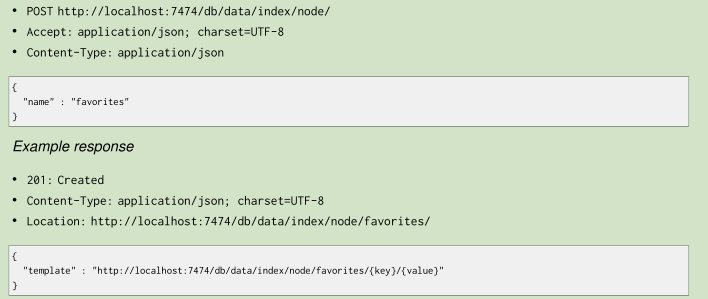
将一节点添加至索引:
public static void AddNodeIndex(String nid)

    {

        String txUri=SERVER_ROOT_URI+"index/node/favorites";

        WebResource resource = Client.create().resource(txUri);

        String entity="{\"value\" : \"n204\",\"uri\" : \"http://192.168.209.128:7474/db/data/node/"+nid+"\",\"key\" : \"n201\"}";

        ClientResponse response = resource.accept(MediaType.APPLICATION_JSON)

                .type(MediaType.APPLICATION_JSON).entity(entity)

                .post(ClientResponse.class);

        System.out.println(response.getStatus());

        System.out.println(response.getEntity(String.class));

        response.close();

    }
ps:nid是要添加索引的节点ID value是索引值 key是索引名称
2.通过属性查找节点
public static void GetNodeByIndex()

    {

        String txUri=SERVER_ROOT_URI+"index/node/favorites/n201/n201";

        WebResource resource = Client.create().resource(txUri);

        ClientResponse response = resource.accept(MediaType.APPLICATION_JSON)

                .type(MediaType.APPLICATION_JSON)

                .get(ClientResponse.class);

        System.out.println(response.getStatus());

        System.out.println(response.getEntity(String.class));

        response.close();

    }
txUri路径中:favorites为刚创建的索引名称,第一个n201是节点索引key,第二个n201是节点索引值
二、自动创建索引(Legacy Automatic Indexes)
What default configuration means depends on how you have configured your database. If you haven’t
changed any indexing configuration, it means the indexes will be using a Lucene-based backend.
数据库配置之后,就可以自动创建索引
1.配置文件配置
Auto-indexing must be enabled through configuration before we can create or configure them. Firstly
ensure that you’ve added some config like this into your server’s conf/neo4j.properties file:
打开conf/neo4j.properties文件如图
配置下面的节点
# Enable auto-indexing for nodes, default is false.

node_auto_indexing=true

# The node property keys to be auto-indexed, if enabled.

node_keys_indexable=name,ki

# Enable auto-indexing for relationships, default is false.

relationship_auto_indexing=true

# The relationship property keys to be auto-indexed, if enabled.

relationship_keys_indexable=name,ki
Node_keys_indexable、relationship_keys_indexable对应节点、关系的属性
配置完成之后重启服务
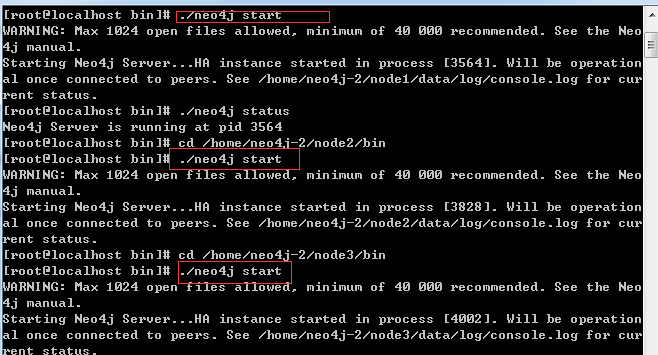
重启三个节点的集群
2。测试索引
插入一个节点和关系
    // 创建节点

    @Test

    public void test2() {

        URI uri = CreateSimpleGraph.createNode();

        CreateSimpleGraph.addProperty(uri, "name", "张三");

        URI uri1 = CreateSimpleGraph.createNode();

        CreateSimpleGraph.addProperty(uri1, "name", "李四");

    }

// 为节点设置关系

    @Test

    public void test6() {

        for (int i = ; i < ; i++) {

            try {

                URI suri = new URI("http://192.168.209.128:7474/db/data/node/171391");

                String uri1="http://192.168.209.128:7474/db/data/node/";

                URI euri = new URI("http://192.168.209.128:7474/db/data/node/171392");

                URI reluri= CreateSimpleGraph.addRelationship(suri, euri, "家人","{\"ki\" : \"1234567890\", \"name\" : \"无\" }");

                System.out.println(reluri);

            } catch (URISyntaxException e) {

                // 异常信息输出该内容

                e.printStackTrace();

            }

        }

    }
3.通过属性查找节点
public static void GetNodeByAutoIndex(String ki)

    {

//        String txUri=SERVER_ROOT_URI+"index/node/node_auto_index/name/"+ki;

        String txUri=SERVER_ROOT_URI+"index/auto/node/ki/"+ki;

        WebResource resource = Client.create().resource(txUri);

        ClientResponse response = resource.accept(MediaType.APPLICATION_JSON)

                .type(MediaType.APPLICATION_JSON)

                .get(ClientResponse.class);

        System.out.println(response.getStatus());

        System.out.println(response.getEntity(String.class));

        response.close();

    }

    public static void GetRelationshipByAutoIndex(String ki)

    {

//        String txUri=SERVER_ROOT_URI+"index/node/node_auto_index/name/"+ki;

        String txUri=SERVER_ROOT_URI+"index/auto/relationship/ki/"+ki;

        WebResource resource = Client.create().resource(txUri);

        ClientResponse response = resource.accept(MediaType.APPLICATION_JSON)

                .type(MediaType.APPLICATION_JSON)

                .get(ClientResponse.class);

        System.out.println(response.getStatus());

        System.out.println(response.getEntity(String.class));

        response.close();

    }
关系的输出结果为:
[ {

  "extensions" : { },

  "metadata" : {

    "id" : ,

    "type" : "家人"

  },

  "data" : {

    "name" : "无",

    "ki" : ""

  },

  "property" : "http://192.168.209.128:7474/db/data/relationship/337/properties/{key}",

  "start" : "http://192.168.209.128:7474/db/data/node/171391",

  "self" : "http://192.168.209.128:7474/db/data/relationship/337",

  "end" : "http://192.168.209.128:7474/db/data/node/171392",

  "type" : "家人",

  "properties" : "http://192.168.209.128:7474/db/data/relationship/337/properties"

} ]
这里说明一下,传值为中文的时候,查询不出来,可能需要编码,因为工作暂时没有用到,就没有再研究了
三、NEO4J批量插入和用户密码问题
1.批量操作
批量操作的官方文档地址:http://neo4j.com/docs/milestone/rest-api-batch-ops.html
public static int BatchInserterNode(String body) {

        // String

        // body="[{\"method\":\"POST\",\"to\":\"/node\",\"body\":{\"name\":\"aaa\",\"lead\":\"aaa1\"},\"id\":0},{\"method\":\"POST\",\"to\":\"/node\",\"body\":{\"name\":\"bbb\",\"lead\":\"bbb1\"},\"id\":1}]";

        // POST {} to the node entry point URI

        ClientResponse response = GetResourceInstance("batch")

                .accept(MediaType.APPLICATION_JSON)

                .type(MediaType.APPLICATION_JSON).entity(body)

                .post(ClientResponse.class);

        // System.out.println(String.format(

        // "POST to [%s], status code [%d], location header [%s]",

        // nodeEntryPointUri, response.getStatus(), location.toString()));

        String entity = response.getEntity(String.class);

        response.close();

        int status = response.getStatus();

        return status;

    }

//调用

//批量插入速度测试

    @Test

    public void test10()

    {

        StringBuilder sbody=new StringBuilder();

        sbody.append("[");

        for (int i = ; i < ; i++) {

            if(i>)

            {

                sbody.append(",");

            }

            sbody.append("{");

            sbody.append("\"method\":\"POST\",\"to\":\"/node\",\"body\":{\"name\":\"n"+i+"\",\"lead\":\"a"+i+"\"},\"id\":"+i+"");

            sbody.append("}");

        }

        sbody.append("]");

        long st = System.currentTimeMillis();

        int status= CreateSimpleGraph.BatchInserterNode(sbody.toString());

        System.out.println("插入状态:"+status);

        long et = System.currentTimeMillis();

        System.out.println("插入10000条数据总共耗时:" + (et - st) + "毫秒");

    }
批量插入的速度10000条大概在6秒左右吧
2.NEO4J密码操作
本次用的版本是:neo4j-enterprise-2.2.0-unix,连接数据库的时候需要输入用户名称密码。上个版本好像是不用的。
使用密码时:
public void checkDatabaseIsRunning() {

        // START SNIPPET: checkServer

        WebResource resource = Client.create().resource(SERVER_ROOT_URI);

        ClientResponse response = resource.get(ClientResponse.class);

        resource.addFilter(new HTTPBasicAuthFilter("neo4j", ""));

        if (response.getStatus() == ) {

            System.out.println("连接成功!");

        } else {

            System.out.println("连接失败!");

        }

        // System.out.println(String.format("GET on [%s], status code [%d]",

        // SERVER_ROOT_URI, response.getStatus()));

        response.close();

        // END SNIPPET: checkServer

    }
如不需要使用密码,可以在配置文件进行配置
vi /conf/neo4j-server.properties这个文件
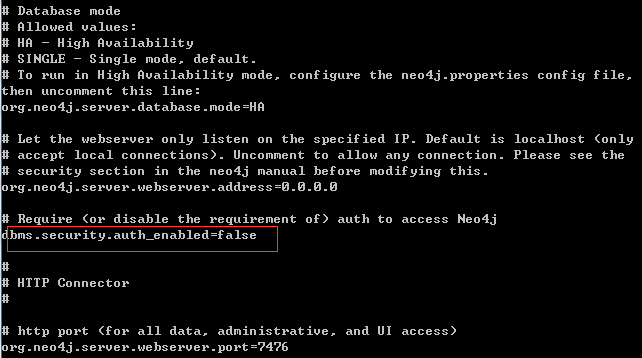
这里改成false即可,默认是True
参考文档
http://neo4j.com/docs/milestone/rest-api-batch-ops.html
http://neo4j.com/docs/milestone/rest-api-auto-indexes.html
http://neo4j.com/docs/milestone/rest-api-security.html
Neo4j创建自动索引的更多相关文章
- Eclipse下maven使用嵌入式(Embedded)Neo4j创建Hello World项目
Eclipse下maven使用嵌入式(Embedded)Neo4j创建Hello World项目 新建一个maven工程,这里不赘述如何新建maven工程. 添加Neo4j jar到你的工程 有两种方 ...
- MongoDB 创建基础索引、组合索引、唯一索引以及优化
一.索引 MongoDB 提供了多样性的索引支持,索引信息被保存在system.indexes 中,且默认总是为_id创建索引,它的索引使用基本和MySQL 等关系型数据库一样.其实可以这样说说,索引 ...
- 《高性能MySQL》——第五章创建高性能索引
1.创建索引基本语法格 在MySQL中,在已经存在的表上,可以通过ALTER TABLE语句直接为表上的一个或几个字段创建索引.基本语法格式如下: ALTER TABLE 表名 ADD [UNIQUE ...
- LabVIEW中数组的自动索引
我们在LabVIEW里面使用While或者是For循环结构的时候,就会发现每一个循环中在它们的循环结构的边界都可以自动完成一个数组元素的索引或累积.LabVIEW中循环结构的这种能力就叫做自动索引(A ...
- windows系统中 利用kibana创建elasticsearch索引等操作
elasticsearch之借用kibana平台创建索引 1.安装好kibana平台 确保kibana以及elasticsearch正常运行 2.打开kibana平台在Dev Tools 3.创建一个 ...
- 利用Phoenix为HBase创建二级索引
为什么需要Secondary Index 对于Hbase而言,如果想精确地定位到某行记录,唯一的办法是通过rowkey来查询.如果不通过rowkey来查找数据,就必须逐行地比较每一列的值,即全表扫瞄. ...
- mysql创建唯一索引UNIQUE INDEX,以及报错“#失败原因: [Execute: Duplicate entry '733186700' for key 'uniq_video_id_index']”
要给t_video_prods表的video_id字段创建唯一所以,可以使用下面这条语句: alter table t_video_prods add UNIQUE INDEX `uniq_video ...
- MYSQ创建联合索引,字段的先后顺序,对查询的影响分析
MYSQ创建联合索引,字段的先后顺序,对查询的影响分析 前言 最左匹配原则 为什么会有最左前缀呢? 联合索引的存储结构 联合索引字段的先后顺序 b+树可以存储的数据条数 总结 参考 MYSQ创建联合索 ...
- es创建普通索引以及各种查询
创建索引 创建普通索引: PUT /my_index { "settings": { "index": { "number_of_shards&quo ...
随机推荐
- 《C与指针》第十二章练习
本章例程 //12.3 #include <stdio.h> #include <stdlib.h> typedef struct NODE{ struct NODE *lin ...
- Ubuntu下安装boost
今天开始安装配置Ubuntu开发环境(Ubuntu 12.04).在干活之前就预计到会遇到很多问题,但是没想到一开始就卡壳,可能是linux中各种包的依赖关系太复杂了,决定写个帖子记录一下,免得以后再 ...
- hdu1087 dp
题意:给定一串数字,要求选取一个严格递增的子序列,使序列和最大. dp[i] 表示以 i 为结尾的子序列的最大和,dp[i] = max{dp[j]+a[i]}(j 从 0 到 i-1),dp[0]是 ...
- Adb工具配置和设备连接
ADB全程Android Debug Bridge,是Android SDK里的一个工具,用这个工具可以直接操作管理Android模拟器或者真实的Android设备(如手机). 一.Adb工具使用配置 ...
- Web前端MVC框架
MVC: 模型层(model).视图层(view).控制层(controller) Model:即数据模型,用来包装和应用程序的业务逻辑相关的数据或者对数据进行处理,模型可以直接访问数据. View: ...
- Weblogic是瓦特?和JVM是瓦特关系?
所谓固定内存60M是瓦特? 以下内容是个瓦特? “总内存大小=堆内存+非堆内存1200m:为堆内存大小,如果不指定后者参数则有最大数限制,网上很多文章认为这就是JVM内存,-Xmx为设置最大堆内存60 ...
- 调试腾讯微博 win8 版 共享失败的问题
我是社交控,喜欢分享内容.分享到 腾讯微博时总失败,心想不能就这么算了,要看看异常的细节. 在VS 2012里,我选择 Debug > Debug Installed App Package, ...
- C#获取json字符串指定的值
Newtonsoft.Json在json和对象之间转化是一个非常强大的工具. 对象转化json字符串 Newtonsoft.Json.JsonConvert.SerializeObject() jso ...
- 双系统 fedora 恢复引导
因为硬盘坏了,所以买了个固态的用用. 先装windows,再装fedora及常用必备的驱动软件装上. 快要完成了心情都挺好,可是在一次关机时window7关机很慢一直在删索引,我嫌时间太长,直接按电源 ...
- 基于Cloud Foundry平台部署nodejs项目上线
Cloud Foundry(以下简称CF),CF是Vmware公司的PaaS服务平台,Paas(Platform as a Service,平台即服务), 是为开发者提供一个应用运行的平台,有了这人平 ...