
拉勾网爬取全国python职位并数据分析薪资,工作经验,学历等信息
- 首先前往拉勾网“爬虫”职位相关页面
- 确定网页的加载方式是JavaScript加载
- 通过谷歌浏览器开发者工具分析和寻找网页的真实请求,确定真实数据在position.Ajax开头的链接里,请求方式是POST
- 使用requests的post方法获取数据,发现并没有返回想要的数据,说明需要加上headers和每隔多长时间爬取
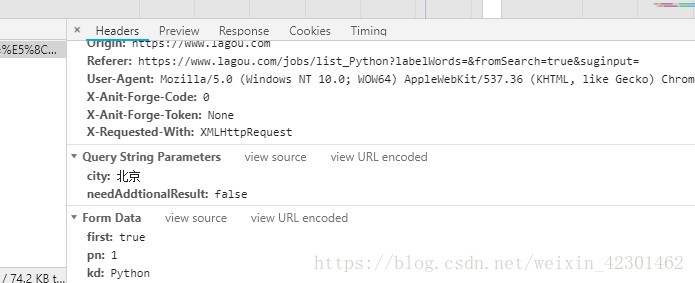
我们可以看到拉勾网列表页的信息一般js加载的都在xhr和js中,通过发送ajax加载POST请求,获取页面信息。
- 这个是ajax的头信息,通过Form Data中的的信息获取页面
- 下面是scrapy爬虫的 代码部分

 import scrapy

 import json

 from lagou.items import LagouItem

 class LagoupositionSpider(scrapy.Spider):

     name = 'lagouposition'

     allowed_domains = ['lagou.com']

     kd = input('请输入你要搜索的职位信息:')

     ct =input('请输入要搜索的城市信息')

     page=1

     start_urls = ["https://www.lagou.com/jobs/list_"+str(kd)+"&city="+str(ct)]

     headers={"User-Agent": "Mozilla/5.0 (Windows NT 10.0; WOW64) AppleWebKit/537.36 (KHTML, like Gecko) Chrome/67.0.3396.99 Safari/537.36",

              'Referer': 'https://www.lagou.com/jobs/list_'+str(kd)+'?labelWords=&fromSearch=true&suginput=',

              'Cookie':' _ga=GA1.2.1036647455.1532143907; user_trace_token=20180721113217-aacd6291-8c96-11e8-a020-525400f775ce; LGUID=20180721113217-aacd667e-8c96-11e8-a020-525400f775ce; index_location_city=%E5%8C%97%E4%BA%AC; _gid=GA1.2.1320510576.1532272161; WEBTJ-ID=20180723084204-164c4960832159-09bf89fcd2732e-5e442e19-1049088-164c496083348; JSESSIONID=ABAAABAABEEAAJAC7D58B57D1CAE4616ED47AACF945615E; _gat=1; LGSID=20180723203627-04b27de6-8e75-11e8-9ee6-5254005c3644; PRE_UTM=; PRE_HOST=www.baidu.com; PRE_SITE=https%3A%2F%2Fwww.baidu.com%2Flink%3Furl%3DYhfCtaCVlOHCdncJxMCMMS3PB1wGlwfw9Yt2c_FXqgu%26wd%3D%26eqid%3D8f013ed00002f4c7000000035b55cbc4; PRE_LAND=https%3A%2F%2Fwww.lagou.com%2F; Hm_lvt_4233e74dff0ae5bd0a3d81c6ccf756e6=1532306722,1532306725,1532306732,1532349358; SEARCH_ID=cdd7822cf3e2429fbc654720657d5873; LGRID=20180723203743-3221dec8-8e75-11e8-a35a-525400f775ce; Hm_lpvt_4233e74dff0ae5bd0a3d81c6ccf756e6=1532349434; TG-TRACK-CODE=search_code'

              }

     def parse(self, response):

         with open('lagou.html','w') as f:

             f.write(response.text)

         url="https://www.lagou.com/jobs/positionAjax.json?needAddtionalResult=false"

         formdata={'first':'true','kd':str(self.kd),'pn':'','city':str(self.ct)}

         yield scrapy.FormRequest(url,formdata=formdata,callback=self.parse_detail,headers=self.headers)

     def parse_detail(self,response):

         text=json.loads(response.text)

         res=[]

         try:

             res = text["content"]["positionResult"]["result"]

             print(res)

         except:

             pass

         if len(res)>0:

             item = LagouItem()

             for position in res:

                 try:

                     item['title']=position['positionName']

                     item['education']=position['education']

                     item['company']=position['companyFullName']

                     item['experience']=position['workYear']

                     item['location']=position['city']

                     item['salary'] = position['salary']

                     print(item)

                 except:

                     pass

                 yield item

             self.page+=1

             url='https://www.lagou.com/jobs/positionAjax.json?needAddtionalResult=false

             formdata={'first':'false','kd':str(self.kd),'pn':str(self.page),'city':str(self.ct)}

             print('===========================',formdata)

             yield scrapy.FormRequest(url, callback=self.parse_detail, formdata=formdata,headers=self.headers)

         else:

             print("爬取结束!")
注意拉钩网有反爬措施, 我们在Formreqest提交POST请求消息必须携带kd等键值对,在setting中也许设置
 DOWNLOAD_DELAY = 20

 #设置爬取时间

 ROBOTSTXT_OBEY = False

 #是否遵循发爬虫协议

 DEFAULT_REQUEST_HEADERS = {

     'Accept': 'text/html,application/xhtml+xml,application/xml;q=0.9,*/*;q=0.8',

     'Accept-Language': 'zh-CN,zh;q=0.8',

     'Content-Type': 'application/x-www-form-urlencoded; charset=UTF-8',

     'Host': 'www.lagou.com',

     'Origin': 'https://www.lagou.com',

     'Referer': 'https://www.lagou.com/jobs',

     'User-Agent': 'Mozilla/5.0 (Windows NT 10.0; WOW64) AppleWebKit/537.36 (KHTML, like Gecko) Chrome/60.0.3112.113 Safari/537.36',

     'X-Anit-Forge-Code': '',

     'X-Anit-Forge-Token': 'None',

     'X-Requested-With': 'XMLHttpRequest'

 }

 #请求头信息headers
接下来就是在items中设置爬取信息的字段
 import scrapy

 class LagouItem(scrapy.Item):

     # define the fields for your item here like:

     # name = scrapy.Field()

     # pass

     education= scrapy.Field()

     company= scrapy.Field()

     experience= scrapy.Field()

     location= scrapy.Field()

     salary= scrapy.Field()

     title= scrapy.Field()
在Pipeline.py文件中设置保存爬取文件的格式等
 import json

 class LagouPipeline(object):

     def open_spider(self,spider):

         self.file=open('pythonposition.json','w',encoding='utf-8')

     def process_item(self, item, spider):

         python_dict=dict(item)

         content=json.dumps(python_dict,ensure_ascii=False)+'\n'

         self.file.write(content)

         return item

     def close_spider(self,spider):

         self.file.close()
注意一定要把setting中的ITEM_PIPELINES解注释,接下来就是跑起我们的项目,通过input输入想要爬取的职位和城市,

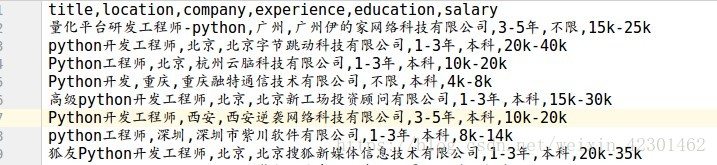
上面就是爬取到的信息总共是855条招聘消息,接下来就是用jumpter-notebook打开爬取到的csv文件用pandas,numpy,和mupltlib进行分析
 import pandas as pd

 import numpy as np

 import seaborn as sns

 lagou=pd.read_csv('./examples/lagou.csv')

 lagou.info()

 #查看缺失值情况
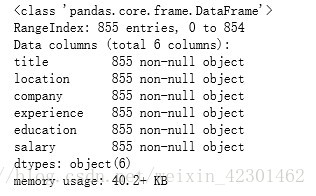
通过读取文件并显示出855条招聘信息是否有缺失值
 city=lagou['location']

 city=pd.DataFrame(city.unique())

 city
通过上面可以看到招聘python职位的城市,总共有38城市
 education=lagou['education']

 education=pd.DataFrame(education.unique())

 lagou['education'] = lagou['education'].replace('不限','unlimited')

 lagou['education'] = lagou['education'].replace('大专','junior')

 lagou['education'] = lagou['education'].replace('本科','regular')

 lagou['education'] = lagou['education'].replace('硕士','master')

 lagou['education'] = lagou['education'].replace('博士','doctor')

 #seaborn不支持中文需将对应的中文替换

 import seaborn as sns

 sns.set_style('whitegrid')

 sns.countplot(x='education',data=lagou,palette='Greens_d')
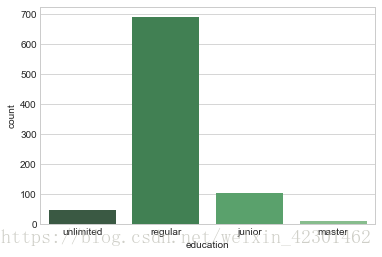
通过上图可以看到大多数的Python职位招聘还是本科学历为主
 experience=lagou['experience']

 experience=pd.DataFrame(experience.unique())

 lagou['experience'] = lagou['experience'].replace('不限','unlimited')

 lagou['experience'] = lagou['experience'].replace('3-5年','3-5')

 lagou['experience'] = lagou['experience'].replace('1-3年','1-3')

 lagou['experience'] = lagou['experience'].replace('5-10年','5-10')

 lagou['experience'] = lagou['experience'].replace('1年以下','<1')

 lagou['experience'] = lagou['experience'].replace('应届毕业生','intern')

 experience

 sns.countplot(x="experience", data=lagou,palette="Blues_d")
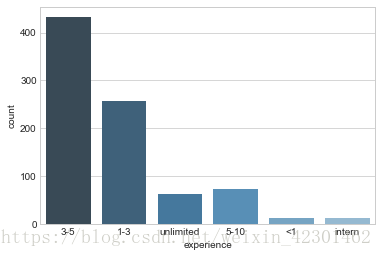
上图是招聘的工作经验的人数分布图,可以看到3-5年的Python工程师比较抢手,其次就是1-3年工作经验的
 import matplotlib.pyplot as plt

 %matplotlib inline

 f, ax1= plt.subplots(figsize=(20,20))

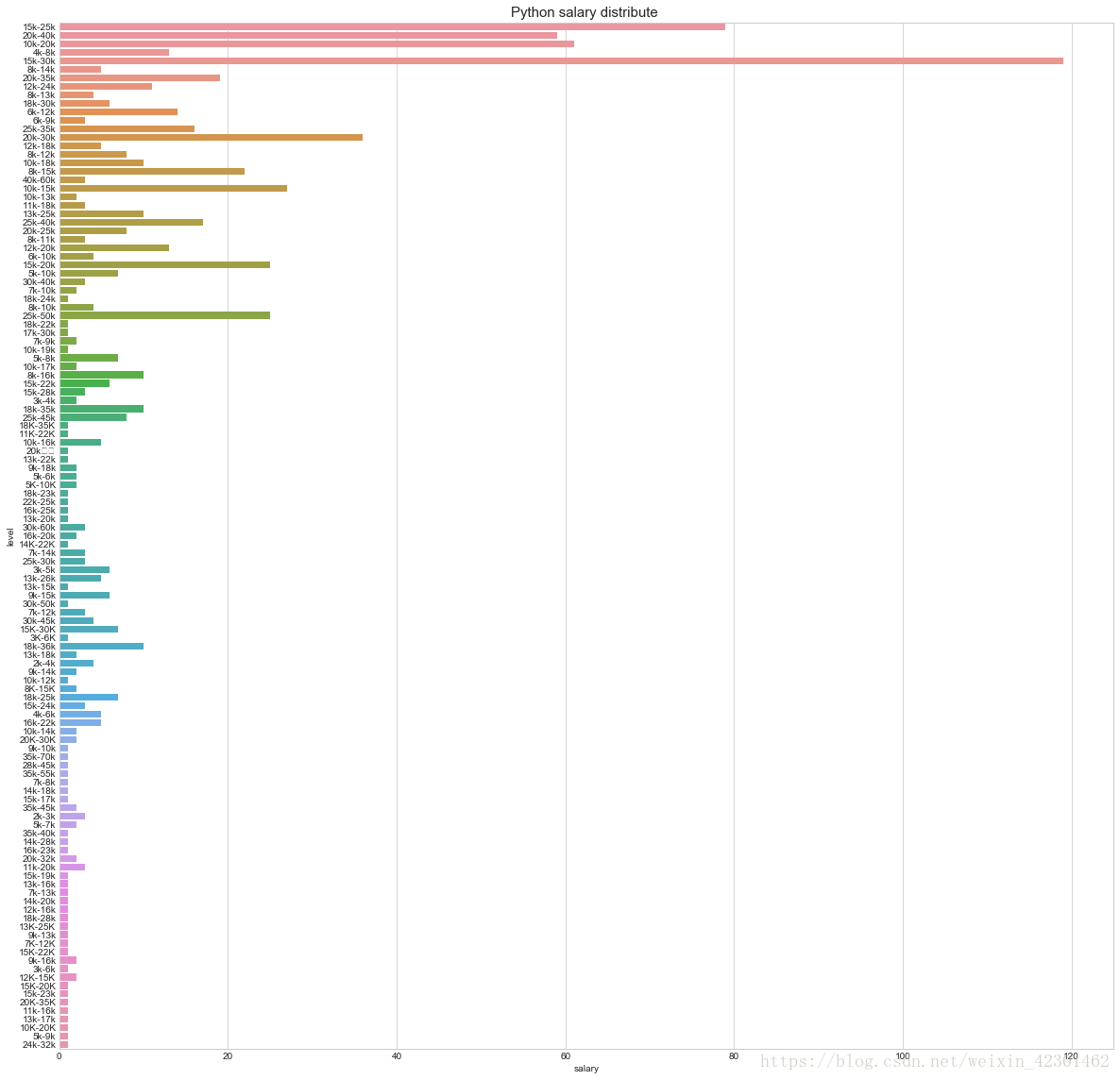
 sns.countplot(y='salary', data=lagou, ax=ax1)

 ax1.set_title('Python salary distribute ',fontsize=15)

 #薪资分布

 ax1.set_xlabel('salary')

 #薪资

 ax1.set_ylabel('level')

 plt.show()
同过下图可以看到拉勾网上的pyhong工程师薪资待遇,其中待遇重要分布在10-40K之间,其中给出15-30K工资待遇的企业最多
Python工程师还是很有前景的,
拉勾网爬取全国python职位并数据分析薪资,工作经验,学历等信息的更多相关文章
- 拉钩网爬取所有python职位信息
最近在找工作,所以爬取了拉钩网的全部python职位,以便给自己提供一个方向.拉钩网的数据还是比较容易爬取的,得到json数据直接解析就行,废话不多说, 直接贴代码: import json impo ...
- python爬虫学习之爬取全国各省市县级城市邮政编码
实例需求:运用python语言在http://www.ip138.com/post/网站爬取全国各个省市县级城市的邮政编码,并且保存在excel文件中 实例环境:python3.7 requests库 ...
- selelinum+PhantomJS 爬取拉钩网职位
使用selenium+PhantomJS爬取拉钩网职位信息,保存在csv文件至本地磁盘 拉钩网的职位页面,点击下一页,职位信息加载,但是浏览器的url的不变,说明数据不是发送get请求得到的. 我们不 ...
- 用webdriver模仿浏览器 爬取豆瓣python书单
用webdriver模仿浏览器 爬取豆瓣python书单 其中运用到os 模块 作用是生成文件夹 存储爬取的信息 etree 用于xpath解析内容 详细代码如下 可用我的上一篇博客存取到excel当 ...
- 爬虫黑科技,我是怎么爬取indeed的职位数据的
最近在学习nodejs爬虫技术,学了request模块,所以想着写一个自己的爬虫项目,研究了半天,最后选定indeed作为目标网站,通过爬取indeed的职位数据,然后开发一个自己的职位搜索引擎,目前 ...
- Python 爬取 热词并进行分类数据分析-[云图制作+数据导入]
日期:2020.01.28 博客期:136 星期二 [本博客的代码如若要使用,请在下方评论区留言,之后再用(就是跟我说一声)] 所有相关跳转: a.[简单准备] b.[云图制作+数据导入](本期博客) ...
- python爬虫实战之爬取智联职位信息和博客文章信息
1.python爬取招聘信息 简单爬取智联招聘职位信息 # !/usr/bin/env python # -*-coding:utf-8-*- """ @Author ...
- Python 爬取 热词并进行分类数据分析-[简单准备] (2020年寒假小目标05)
日期:2020.01.27 博客期:135 星期一 [本博客的代码如若要使用,请在下方评论区留言,之后再用(就是跟我说一声)] 所有相关跳转: a.[简单准备](本期博客) b.[云图制作+数据导入] ...
- Python 爬取 热词并进行分类数据分析-[数据修复]
日期:2020.02.01 博客期:140 星期六 [本博客的代码如若要使用,请在下方评论区留言,之后再用(就是跟我说一声)] 所有相关跳转: a.[简单准备] b.[云图制作+数据导入] c.[拓扑 ...
随机推荐
- Spring设计模式_工厂模式
先说下工厂模式的特性 1.对于调用者来说,影藏了复杂的逻辑处理过程,调用者只关心执行结果. 2.工厂要对结果负责,保证生产出符合规范的产品. Git代码地址 https://github.com/w ...
- 文本编辑器激活系列(一):Sublime 安装、激活、汉化教程
如您激活出现问题,请点击这里加入:软件激活问题解决群 前言 推荐几款文本编辑器: Sublime:内嵌python解释器.大量插件 EditPlus:语法着色.内嵌浏览器 Notepad++:所见即所 ...
- 9.Flask Cookie和Session
1.1.概念 cookie:在网站中,http请求是无状态的.也就是说即使第一次和服务器连接后并且登录成功后,第二次请求服务器依然不能知道当前请求是哪个用户.cookie的出现就是为了解决这个问题,第 ...
- jquery lazy load
LazyLoad是一个Js编写的Jq插件,它可以延迟加载页面中的图片,在浏览器可视范围中的图片会被加载.如何使用:LazyLoad依赖于Jquery,在html的结尾处 ,就是在</body&g ...
- Java基础12:深入理解Class类和Object类
更多内容请关注微信公众号[Java技术江湖] 这是一位阿里 Java 工程师的技术小站,作者黄小斜,专注 Java 相关技术:SSM.SpringBoot.MySQL.分布式.中间件.集群.Linux ...
- Chapter 5 Blood Type——14
"You're wrong." His voice was almost inaudible. “你错了.” 他的声音几乎听不见 He looked down, stealing ...
- 补习系列(7)-springboot 实现拦截的五种姿势
目录 简介 姿势一.使用 Filter 接口 1. 注册 FilterRegistrationBean 2. @WebFilter 注解 姿势二.HanlderInterceptor 姿势三.@Exc ...
- 再谈包访问权限 子类为何不能使用父类protected方法
可见范围 权限的含义应该理解为控制范围,要把它理解成一个限制范围的空间,更为准确的说叫做可见范围 访问控制的等级,从最大权限到最小权限依次为:public.protected.包访问权限(没有关键词) ...
- .NetCore2.1 WebAPI 根据swagger.json自动生成客户端代码
前言 上一篇博客中我们可以得知通过Swagger插件可以很方便的提供给接口开发者在线调试,但是实际上Swagger附带的功能还有很多, 比如使用NSwag生成客户端调用代码,进一步解放接口开发者. N ...
- spring学习(五) ———— 整合web项目(SSM)
一.SSM框架整合 1.1.整合思路 从底层整合起,也就是先整合mybatis与spring,然后在编写springmvc. 1.2.开发需求 查询商品列表(从数据库中查询) 1.3.创建web工程 ...