
spring-cloud-sleuth+zipkin源码探究
1. spring-cloud-sleuth+zipkin源码探究
1.1. 前言
粗略看了下spring cloud sleuth core源码,发现内容真的有点多,它支持了很多类型的链路追踪,我就找其中一个比较有代表性的深入剖析下源码结构和内容
1.2. spring-cloud-sleuth-core源码解析
1.2.1. 结构

- 可以看到源码中支持的追踪类型有很多,支持async,hystrix,websocket,rxjava,Spring mvc,servlet,spring restTemplate,feign,zuul等等,这里我着重探讨spring web mvc的链路追踪
- 打开web包,找到TraceWebAutoConfiguration,这里配置了主要的初始化类

1.2.2. 过滤器注册
- 当启动初始化程序时,跟踪代码如下
	@Bean

	public FilterRegistrationBean traceWebFilter(TraceFilter traceFilter) {

		FilterRegistrationBean filterRegistrationBean = new FilterRegistrationBean(

				traceFilter);

		filterRegistrationBean.setDispatcherTypes(ASYNC, ERROR, FORWARD, INCLUDE,

				REQUEST);

		filterRegistrationBean.setOrder(TraceFilter.ORDER);

		return filterRegistrationBean;

	}

	@Bean

	@ConditionalOnMissingBean

	public TraceFilter traceFilter(BeanFactory beanFactory,

			SkipPatternProvider skipPatternProvider) {

		return new TraceFilter(beanFactory, skipPatternProvider.skipPattern());

	}
- 初始化traceFilter,进行过滤器注册
1.2.3. 拦截器注册
- 然后看
TraceWebMvcConfigurer类,它会进行拦截器的注册
@Configuration

class TraceWebMvcConfigurer extends WebMvcConfigurerAdapter {

	@Autowired BeanFactory beanFactory;

	@Bean

	public TraceHandlerInterceptor traceHandlerInterceptor(BeanFactory beanFactory) {

		return new TraceHandlerInterceptor(beanFactory);

	}

	@Override

	public void addInterceptors(InterceptorRegistry registry) {

		registry.addInterceptor(this.beanFactory.getBean(TraceHandlerInterceptor.class));

	}

}
- 在
TraceHandlerInterceptor类中,preHandle,afterCompletion方法可以看出,这是对请求进行拦截进行span的包装
	@Override

	public boolean preHandle(HttpServletRequest request, HttpServletResponse response,

			Object handler) throws Exception {

		String spanName = spanName(handler);

		boolean continueSpan = getRootSpanFromAttribute(request) != null;

		Span span = continueSpan ? getRootSpanFromAttribute(request) : getTracer().createSpan(spanName);

		if (log.isDebugEnabled()) {

			log.debug("Handling span " + span);

		}

		addClassMethodTag(handler, span);

		addClassNameTag(handler, span);

		setSpanInAttribute(request, span);

		if (!continueSpan) {

			setNewSpanCreatedAttribute(request, span);

		}

		return true;

	}
	@Override

	public void afterCompletion(HttpServletRequest request, HttpServletResponse response,

			Object handler, Exception ex) throws Exception {

		if (isErrorControllerRelated(request)) {

			if (log.isDebugEnabled()) {

				log.debug("Skipping closing of a span for error controller processing");

			}

			return;

		}

		Span span = getRootSpanFromAttribute(request);

		if (ex != null) {

			getErrorParser().parseErrorTags(span, ex);

		}

		if (getNewSpanFromAttribute(request) != null) {

			if (log.isDebugEnabled()) {

				log.debug("Closing span " + span);

			}

			Span newSpan = getNewSpanFromAttribute(request);

			getTracer().continueSpan(newSpan);

			getTracer().close(newSpan);

			clearNewSpanCreatedAttribute(request);

		}

	}
1.2.4. zipkin端点提交
- 这里首先会初始化
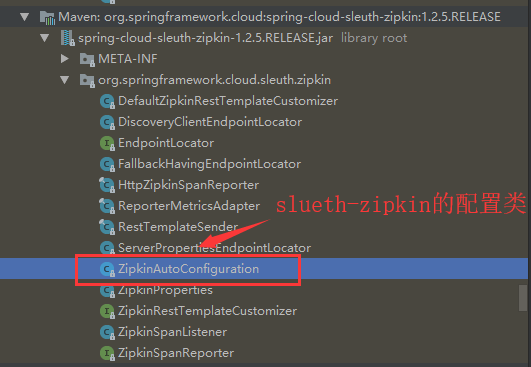
HttpZipkinSpanReporter类,,用来进行span端点提交,然后初始化ZipkinSpanListenerspan的监听器,用来监听并调用端点提交,以上配置再下图位置
1.2.5. 调用http接口时,进入过滤器
- 首先进入
TraceFilter中的过滤方法doFilter,这里会做span的创建
private Span createSpan(HttpServletRequest request,

			boolean skip, Span spanFromRequest, String name) {

		if (spanFromRequest != null) {

			if (log.isDebugEnabled()) {

				log.debug("Span has already been created - continuing with the previous one");

			}

			return spanFromRequest;

		}

		//加入调用链路ZipkinHttpSpanExtractor,此链路在TraceHttpAutoConfiguration中配置实例化,调用链还没有时,返回为空,作为头节点

		Span parent = spanExtractor().joinTrace(new HttpServletRequestTextMap(request));

		if (parent != null) {

			if (log.isDebugEnabled()) {

				log.debug("Found a parent span " + parent + " in the request");

			}

			addRequestTagsForParentSpan(request, parent);

			spanFromRequest = parent;

			tracer().continueSpan(spanFromRequest);

			if (parent.isRemote()) {

				parent.logEvent(Span.SERVER_RECV);

			}

			request.setAttribute(TRACE_REQUEST_ATTR, spanFromRequest);

			if (log.isDebugEnabled()) {

				log.debug("Parent span is " + parent + "");

			}

		} else {

			if (skip) {

				spanFromRequest = tracer().createSpan(name, NeverSampler.INSTANCE);

			}

			else {

				String header = request.getHeader(Span.SPAN_FLAGS);

				if (Span.SPAN_SAMPLED.equals(header)) {

					spanFromRequest = tracer().createSpan(name, new AlwaysSampler());

				} else {

				//创建span节点

					spanFromRequest = tracer().createSpan(name);

				}

			}

			spanFromRequest.logEvent(Span.SERVER_RECV);

			request.setAttribute(TRACE_REQUEST_ATTR, spanFromRequest);

			if (log.isDebugEnabled()) {

				log.debug("No parent span present - creating a new span");

			}

		}

		return spanFromRequest;

	}
1.2.6. 进入拦截器
- 在
preHandle方法中,对span进行包装,然后把span放入请求头header中 - 最后再
DefaultTracer中进行span的关闭和spanReporter的提交
参考:https://blog.csdn.net/zhllansezhilian/article/details/83001870
spring-cloud-sleuth+zipkin源码探究的更多相关文章
- 分布式链路追踪之Spring Cloud Sleuth+Zipkin最全教程!
大家好,我是不才陈某~ 这是<Spring Cloud 进阶>第九篇文章,往期文章如下: 五十五张图告诉你微服务的灵魂摆渡者Nacos究竟有多强? openFeign夺命连环9问,这谁受得 ...
- Spring Cloud Alibaba学习笔记(23) - 调用链监控工具Spring Cloud Sleuth + Zipkin
随着业务发展,系统拆分导致系统调用链路愈发复杂一个前端请求可能最终需要调用很多次后端服务才能完成,当整个请求陷入性能瓶颈或不可用时,我们是无法得知该请求是由某个或某些后端服务引起的,这时就需要解决如何 ...
- Spring Cloud 学习 之 Spring Cloud Eureka(源码分析)
Spring Cloud 学习 之 Spring Cloud Eureka(源码分析) Spring Boot版本:2.1.4.RELEASE Spring Cloud版本:Greenwich.SR1 ...
- Spring Cloud Sleuth + Zipkin 链路监控
原文:https://blog.csdn.net/hubo_88/article/details/80878632 在微服务系统中,随着业务的发展,系统会变得越来越大,那么各个服务之间的调用关系也就变 ...
- Spring Cloud 微服务六:调用链跟踪Spring cloud sleuth +zipkin
前言:随着微服务系统的增加,服务之间的调用关系变得会非常复杂,这给运维以及排查问题带来了很大的麻烦,这时服务调用监控就显得非常重要了.spring cloud sleuth实现了对分布式服务的监控解决 ...
- Spring Cloud Sleuth+ZipKin+ELK服务链路追踪(七)
序言 sleuth是spring cloud的分布式跟踪工具,主要记录链路调用数据,本身只支持内存存储,在业务量大的场景下,为拉提升系统性能也可通过http传输数据,也可换做rabbit或者kafka ...
- Spring Cloud Sleuth Zipkin - (2)
在上一节<spring-cloud-sleuth+zipkin追踪服务实现(一)>中,我们使用zipkin-server.provider.consumer三个程序实现了使用http方式进 ...
- Spring Cloud Sleuth Zipkin - (1)
最近在学习spring cloud构建微服务,很多大牛都提供很多入门的例子帮助我们学习,对于我们这种英语不好的码农来说,效率着实提高不少.这两天学习到追踪微服务rest服务调用链路的问题,接触到zip ...
- Spring Cloud Netflix Eureka源码导读与原理分析
Spring Cloud Netflix技术栈中,Eureka作为服务注册中心对整个微服务架构起着最核心的整合作用,因此对Eureka还是有很大的必要进行深入研究. 本文主要分为四部分,一是对项目构建 ...
随机推荐
- Hive 2.1.1 学习笔记
1.修改conf下的配置文件cp -a hive-default.xml.template hive-site.xml2.进入bin目录启动hive./hive 报错Exception in thre ...
- Springboot @Transactional Mysql事务 无效
JPA默认创建的表是MyISAM引擎,MyISAM引擎不支持事务操作 所以需要将将数据库引擎改为InnoDB 配置修改 spring.jpa.database-platform=org.hiberna ...
- MAC Undefined symbols for architecture x86_64 cv::imwrite
因为homebrew安装opencv时用的是clang,而CLion中使用的是gcc编译器. 将clion中的编译器改回默认的clang就行了.
- 重新拾取:TFS2017钉钉机器人源代码签入通知
http://www.cnblogs.com/79039535/p/9316791.html 现在很多公司办公都使用钉钉打卡签到,于是鉴于公司也使用钉钉就打算用钉钉来做一个源代码签入通知. 首先先去打 ...
- 给hive的metastore做JVM优化
最近在测试环境下,hive的metastore不稳定,于是做一次JVM优化 在hive-env.sh中 export HADOOP_HOME=/opt/cdh/hadoop-2.6.0-cdh5.14 ...
- Linux学习之文件系统权限及表示
三类人 用户主(user:u):文件的所有者 同组人(group:g):与文件主同组的用户 其他人(other:o):除用户主和同组人外的其他所有人 三种权限 读权限(r):指用户对文件或目录的读许可 ...
- 通过游戏来学习CSS的Flex布局
在复习Flex 布局的时候发现的了几个有趣的小游戏,在这里分享并记录几个有难度的答案 1. Flexbox Froggy 通过调整CSS样式来使各种青蛙回到对应的荷叶上,游戏默认难度为Beginner ...
- web应用、HTTP协议及web框架简介
1. web应用 1.1 web应用程序 Web应用程序是一种可以通过Web访问的应用程序,程序的最大好处是用户很容易访问应用程序,用户只需要有浏览器即可,不需要再安装其他软件 B/S模式(浏览器/服 ...
- linux crontab 执行mysqldump全局备份为空
今天遇到个问题,在定时备份时 去查看备份文件,发现大小竟然为0,执行 备份sh文件备份, 备份的sql文件大小正常.试了几种办法. 最终解决办法: 问题原因: 因为我设置的环境变量 就直接在sh中 使 ...
- iview修改tabbar实现小程序自定义中间圆形导航栏及多页面登录功能
emmm,用iview改了个自定义中间圆形的tabbar. 如下图所示, 重点,什么鬼是“多页面登录”? 例如:我现在要做一个功能,要说自己长得帅才能进去页面. 一个两个页面还好,但是我现在要每个页面 ...