
python&django 实现页面中关联查询小功能(基础篇)
效果
实现效果图如下,根据过滤条件查询相关信息。
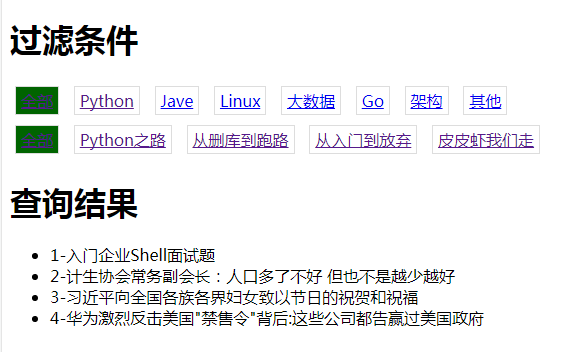
知识点
1.配置URL,在路由中使用正则表达式
2.过滤查询
代码
setting.py
 from django.contrib import admin

 from django.urls import path,re_path,include

 from app01 import views

 urlpatterns = [

     path('admin/', admin.site.urls),

     path('article-(\d+)-(\d+).html', views.article),

     re_path(r'article-(?P<article_type_id>\d+)-(?P<category_id>\d+).html', views.article,name="article"), #正则过滤

 ]
models.py
 from django.db import models

 # Create your models here.

 class Category(models.Model):

     caption = models.CharField(max_length=16)

 class ArticleType(models.Model):

     caption = models.CharField(max_length=16)

 class Article(models.Model):

     title = models.CharField(max_length=32)

     content = models.CharField(max_length=255)

     category = models.ForeignKey(Category,on_delete=models.CASCADE)

     article_type = models.ForeignKey(ArticleType,on_delete=models.CASCADE)
view.py
 from django.shortcuts import render

 from app01 import models

 # Create your views here.

 def article(request,*args,**kwargs):

     print(kwargs) # 打印所有参数

     contition = {} # 定义一个空集合,接收参数

     for k,v in kwargs.items():

         kwargs[k] = int(v) # 由于参数类型都为str类型,所以该处进行转换

         if v == '':

             pass

         else:

             contition[k] = v # 当参数为非0时 进行接收

     print(args)

     article_type_list = models.ArticleType.objects.all()

     category_list = models.Category.objects.all()

     result = models.Article.objects.filter(**contition) # 过滤查询

     return  render(request,

                    "article.html",

                    {

                        'result':result,

                        'article_type_list':article_type_list,

                        'category_list':category_list,

                        'arg_dict':kwargs,

                    }

                    )
article.html
 <!DOCTYPE html>

 <html lang="en">

 <head>

     <meta charset="UTF-8">

     <title>Title</title>

     <style>

         .condition a{

             display:inline-block;;

             padding: 3px 5px;

             border:1px solid #dddddd;

             margin:5px 5px;

         }

          .condition a.active{

             background-color: darkgreen;

         }

     </style>

 </head>

 <body>

 <h1>过滤条件</h1>

 <div class="condition">

     {% if arg_dict.article_type_id == 0 %}

          <a  class="active" href="/article-0-{{ arg_dict.category_id }}.html">全部</a>

     {% else %}

          <a href="/article-0-{{ arg_dict.category_id }}.html">全部</a>

     {% endif %}

     {% for row in article_type_list %}

         {% if row.id == arg_dict.article_type_id %}

         <a  class="active"  href="/article-{{ row.id }}-{{ arg_dict.category_id }}.html">{{ row.caption }}</a>

         {% else %}

         <a href="/article-{{ row.id }}-{{ arg_dict.category_id }}.html">{{ row.caption }}</a>

         {% endif %}

     {% endfor %}

 </div>

 <div class="condition">

     {% if arg_dict.category_id == 0 %}

         <a class="active" href="/article-{{ arg_dict.article_type_id }}-0.html">全部</a>

     {% else %}

         <a href="/article-{{ arg_dict.article_type_id }}-0.html">全部</a>

     {% endif %}

     {% for row in category_list %}

         {% if row.id == arg_dict.category_id %}

             <a class="active" href="/article-{{ arg_dict.article_type_id }}-{{ row.id }}.html">{{ row.caption }}</a>

         {% else %}

             <a href="/article-{{ arg_dict.article_type_id }}-{{ row.id }}.html">{{ row.caption }}</a>

         {% endif %}

     {% endfor %}

 </div>

 <h1>查询结果</h1>

 <ul>

 {% for row in result %}

     <li>{{ row.id }}-{{ row.title }}</li>

 {% endfor %}

 </ul>

 </body>

 </html>
python&django 实现页面中关联查询小功能(基础篇)的更多相关文章
- python&django 实现页面中关联查询小功能(中级篇)
目的 组合搜索实现如下图功能 知识点 1.使用自定义标签模板(templatetags) 实现 models.py 和 views.py和初级篇一样 重点如下:在app01目录下创建templatet ...
- Python抓取页面中超链接(URL)的三中方法比较(HTMLParser、pyquery、正则表达式) <转>
Python抓取页面中超链接(URL)的3中方法比较(HTMLParser.pyquery.正则表达式) HTMLParser版: #!/usr/bin/python # -*- coding: UT ...
- python Django注册页面显示头像
python Django注册页面显示头像(views) def register(request): ''' 注册 :param request: :return: ''' if request.m ...
- THINKPHP 中关联查询(多表查询)
THINKPHP 中关联查询(多表查询)可以使用 table() 方法或和join方法,请看示例: 1.Table方法:定义要操作的数据表名称,可以动态改变当前操作的数据表名称,需要写数据表的全名,包 ...
- OAF在打开的新页面中添加按钮,功能是关闭当前页面
OAF在打开的新页面中添加按钮,功能是关闭当前页面 javascript:close()
- SSM-MyBatis-15:Mybatis中关联查询(多表操作)
------------吾亦无他,唯手熟尔,谦卑若愚,好学若饥------------- 先简单提及一下关联查询的分类 1.一对多 1.1单条SQL操作的 1.2多条SQL操作的 2.多对一 2.1单 ...
- 关于python+django操作数据库中的表
数据库中的表示这样设计的 class C(models.Model): name = models.CharField(max_length=32) class B(models.Model): na ...
- Mongoose中关联查询populate的使用
MongoDB中没有join的特性,因此无法使用join进行表的连接和关联查询,在Mongoose中封装了populate方法,在定义一个 Schema 的时候可以指定了其中的字段(属性)是另一个Sc ...
- yii2中关联查询
yii2 ActiveRecord多表关联以及多表关联搜索的实现 一个老生常谈的问题.最近通过群里的反馈,觉得很多人还是没有去理解这个问题.今天把这个问题讲明白了,看看yii2 ActiveRecor ...
随机推荐
- SCOI2019酱油记
这玩意儿咕了--留坑待填
- Java设置session超时(失效)的时间
在一般系统登录后,都会设置一个当前session失效的时间,以确保在用户长时间不与服务器交互,自动退出登录,销毁session具体设置的方法有三种:1.在web容器中设置(以tomcat为例)在tom ...
- button样式篇一(ant Design React)
这篇来介绍button中elementUi.iview.ant中样式结构 ant Design react ant-react中button分两个文件less: mixins.less:根据butto ...
- 手动安装Package Control
手动下载一个package control的包:https://github.com/wbond/package_control 然后Download ZIP后,解压,将解压后的文件夹重命名为 Pac ...
- nodejs搭建web服务器
一.代码结构 //1.引入相关模块 var http=require("http") var url=require("url") var fs=require ...
- Jetson TX1安装pyTorch
https://www.ncnynl.com/archives/201705/1629.html https://blog.csdn.net/qq_36302589/article/details/8 ...
- Nginx LOG阶段里log模块
L68 log_format 指令 syntax : name [escape =default|josn|none] string "...."; default : combi ...
- luogu P2194 HXY烧情侣
残忍的题面 我们来看这一道题,其实冗长的题目告诉我们一个核心——用tarjan tarjan是用来干什么呢?是用来求强连通分量(代码中指sc) 求出来又有什么用呢?每当我们求出一个强连通分量时,就去计 ...
- 多线程threading
threading用于提供线程相关的操作,线程是应用程序中工作的最小单元.python当前版本的多线程库没有实现优先级.线程组,线程也不能被停止.暂停.恢复.中断. 1. threading模 ...
- TsinsenA1489 抽奖 【期望】
题目分析: 问题可以转化成将m个球放进n个盒子里,每个盒子的贡献为盒子中球数的平方. 第一问考虑增量. 对于一个原本有$x$个球的盒子,新加一个球的贡献是$2x+1$.期望条件下仍然满足. 第$i$个 ...