
JavaWeb总结(五)
使用Servlet接受服务器请求信息

HTTP请求示例
HttpServletRequest对象主要用于获取由客户端发送过来的请求头、参数、文件、数据等。Servlet存在的主要目的就是处理请求。Servlet规范中对此对象进行了增强,使其还可以与Web应用程序交互
GET/POST提交方法
- 浏览器向Web服务器发送HTTP请求
- 用户在网页上点击一个超连接
- 用户提交在网页上填写好的表单
- 用户在浏览器地址栏中输入URL地址并回车
- 默认情况下都是使用HTTP协议的GET方法提交请求
- 使用不同的HTTP请求定制浏览器行为
GET/POST提交方法区别
|
特征 |
GET方法 |
POST方法 |
|
提交数据类型 |
文本 |
文本、二进制文本 |
|
提交数据长度 |
不超过255个字符 |
没有限制 |
|
提交数据可见性 |
作为URL地址的一部分显示在浏览器地址栏 |
作为请求的消息体,不可见 |
|
提交数据缓存 |
缓存在浏览器URL历史状态中 |
不会被浏览器缓存 |
- 请求一个静态页面或图形文件时使用GET方法,因为仅仅需要发送文件名;
- 发送大数据的时候,使用POST方法;
- 上传文件时,使用POST方法;
- 发送用户名、密码或其他保密信息的时候使用POST方
HTTP请求方法与HttpServlet方法对应关系
|
HTTP请求方法类型 |
HttpServlet处理方法 |
|
GET |
doGet() |
|
HEAD |
doHead() |
|
POST |
doPost() |
|
PUT |
doPut() |
|
DELETE |
doDelete() |
|
OPTIONS |
doOptions() |
|
TRACE |
doTrace() |
public void doGet(HttpServletRequest request, HttpServletResponse response) throws ServletException, IOException {

    //your code

}

public void doPost(HttpServletRequest request, HttpServletResponse response) throws ServletException, IOException {

    //your code

}
根据生命周期,这些方法的调用过程
- 容器调用service(ServletRequest,ServletResponse)方法;
- service(ServletRequest,ServletResponse)该方法再调用同一个Servlet类中的service(ServletRequest,ServletResponse)方法。
- service(ServletRequest,ServletResponse)方法将分析HTTP请求,找到请求方法类型然后调用相应的处理方法
|
提示:如果在自定义的Servlet类中覆盖service方法,doXXX方法将不会自动调用。在绝大多数的情况下,我们只需要关心GET和POST方法就行了。 |
获取HTTP协议请求行
- getMethod():获取HTTP的请求方法,例如GET、POST等
- getRequestURI():获取请求的URI资源
- getRequestURL():获取请求的URL,包含协议名、服务器名或IP、端口号和请求资源但不包括查询字符串参数
- getQueryString():获取请求URL后面的查询字符串
- getProtocol():获取HTTP的协议名和版本号
- getContextPath():获取请求URI资源的上下文路径
- getServletPath():获取Servlet的映射路径
package test;

import java.io.IOException;

import javax.servlet.ServletException;

import javax.servlet.http.HttpServlet;

import javax.servlet.http.HttpServletRequest;

import javax.servlet.http.HttpServletResponse;

/**

 * Servlet implementation class Test

 */

public class Test extends HttpServlet {

    private static final long serialVersionUID = 1L;

    protected void doGet(HttpServletRequest request,HttpServletResponse response) throws ServletException, IOException {

        System.err.println("请求的方法:" + request.getMethod());

        System.err.println("请求的URL:" + request.getRequestURI());

        System.err.println("请求的URL:" + request.getRequestURL());

        System.err.println("请求的查询方法:" + request.getQueryString());

        System.err.println("请求的协议:" + request.getProtocol());

        System.err.println("请求的上下文:" + request.getContextPath());

        System.err.println("请求的Servlet的映射路径:" + request.getServletPath());

    }

    protected void doPost(HttpServletRequest request,

            HttpServletResponse response) throws ServletException, IOException {

        // TODO Auto-generated method stub

    }

}
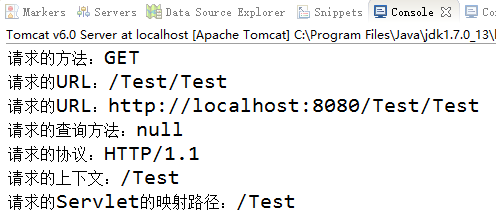
HttpServletRequest访问HTTP请求行
获取HTTP协议请求头
HTTP请求头用于告诉服务器客户端使用什么软件以及客户端想要服务器如何返回请求的信息
HttpServletRequest对象的如下方法访问
- getHeader(name):返回指定的请求头的值
- getHeaders(name) :返回一个Enumeration(枚举)包含请求头中的所有值
- getHeaderNames():特定请求中接受到的所有请求头的名称
- getIntHeader(name):获取特定请求头的值,并将其转化为int类型
- getDateHeader(name):获取特定请求头的值,并将其转化为Date类型
获取所有请求头
package test;

import java.io.IOException;

import javax.servlet.ServletException;

import javax.servlet.http.HttpServlet;

import javax.servlet.http.HttpServletRequest;

import javax.servlet.http.HttpServletResponse;

/**

 * Servlet implementation class Test

 */

public class Test extends HttpServlet {

    private static final long serialVersionUID = 1L;

    protected void doGet(HttpServletRequest request,HttpServletResponse response) throws ServletException, IOException {

        @SuppressWarnings("rawtypes")

        Enumeration $enum = request.getHeaderNames();

        //通过遍历取出请求头信息并打印

        while ($enum.hasMoreElements()) {

            String headerName = (String) $enum.nextElement();

           String headerValue = request.getHeader(headerName);

           System.out.println(headerName+":"+headerValue);

        }

    }

    protected void doPost(HttpServletRequest request,

            HttpServletResponse response) throws ServletException, IOException {

        // TODO Auto-generated method stub

    }

}

返回浏览器发送的所有请求头
检索浏览器
//获取请求头信息
String userAgent = request.getHeader("User-Agent");
// 判断正在使用的浏览器

if((userAgent != null) && (userAgent.indexOf("MSIE")!=-1) ){
// 您正在使用MicroSoft IE浏览器
}else if((userAgent != null) && (userAgent.indexOf("Firefox")!=-1)){
  // 您正在使用FireFox火狐浏览器
}
获取请求消息体
- 消息体可以是普通文本也可以是二进制数据
- HttpServletRequest对象可以使用通用的方法来获取表单数据
获取表单数据
HttpServletRequest对象用下列方法以访问请求参数
- getParameter(parameterName):获取表单参数的值,参数名区分大小写,与HTML表单中出现的参数名一致,GET请求还是POST请求都可以采用相同的方式
- getParameterValues(parameterName):获取同一个参数名的多个参数值,返回字符串数组对象
- getParameterNames():以Enumeration (枚举)的方式返回请求中所有的表单参数名列表
<--HTML文件--!>
<form action="Register" method="post">

用户名:<input type="text" name="userName" />

<br/>

密码:<input type="password" name="passWord" />

<br/>

学历:<select name="education">

<option>小学</option>

<option>初中</option>

<option>高中</option>

<option>大专</option>

<option>本科</option>

</select>

<br/>

性别:<input type="radio" name="gender" id="man" checked="checked"  value="男"/>

<label for="man">男</label>

<input type="radio" name="gender" id="woman"  value="女"/>

<label for="woman">女</label>

<br/>

爱好:<input type="checkbox" name="hobby" id="PE"  value="体育"/>

<label for="PE">体育</label>

<input type="checkbox" name="hobby" id="art" value="美术"/>

<label for="art">美术</label>

<input type="checkbox" name="hobby" id="music" value="音乐"/>

<label for="music">音乐</label>

<br/>

<button>提交</button>

</form>
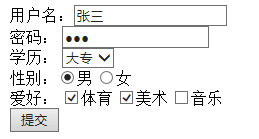
表单提交信息
//Java代码,提交是post,所以该代码重写doPost()方法
//设置字符编码

request.setCharacterEncoding("utf-8");

response.setCharacterEncoding("utf-8");

//获取表单信息

String userName = request.getParameter("userName");

String passWord = request.getParameter("passWord");

String education = request.getParameter("education");

String gender = request.getParameter("gender");

String[] hobbys = request.getParameterValues("hobby");

//打印获取的信息

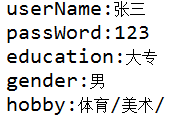
System.err.println("userName:"+userName);

System.err.println("passWord:"+passWord);

System.err.println("education:"+education);

System.err.println("gender:"+gender);

System.err.print("hobby:");

if(hobbys!=null){

    for(String hobby:hobbys){

        System.err.print(hobby+"/");

    }

}
JavaWeb总结(五)的更多相关文章
- JavaWeb 后端 <五> 之 JSP 学习笔记
一.JSP简介 1.也是SUN公司推出的开发动态web资源的技术,属于JavaEE技术之一.由于原理上是Servlet, 所以JSP/Servlet在一起. 二.HTML.Servlet和JSP 1. ...
- JavaWeb(五)之JSTL标签库
前言 前面介绍了EL表达式,其实EL表达式基本上是和JSTL核心标签库搭配一起使用才能发挥效果的.接下来让我们一起来认识一下吧! 在之前我们学过在JSP页面上为了不使用脚本,所以我们有了JSP内置的行 ...
- JavaWeb学习 (五)————Servlet(一)
一.Servlet简介 Servlet是sun公司提供的一门用于开发动态web资源的技术. Sun公司在其API中提供了一个servlet接口,用户若想用发一个动态web资源(即开发一个Java程序向 ...
- javaweb(十五)——JSP基础语法
任何语言都有自己的语法,JAVA中有,JSP虽然是在JAVA上的一种应用,但是依然有其自己扩充的语法,而且在JSP中,所有的JAVA语句都可以使用. 一.JSP模版元素 JSP页面中的HTML内容称之 ...
- JavaWeb【五、内置对象】
简介 Web容器创建的一组对象,不用new即可使用. 共有9种,out.request.response.session.application,五种比较常用,page.pageContent.exc ...
- javaweb实验五
product类: package com.lab;public class Product { private int id; // 商品编号 private S ...
- JavaWeb总结(五)—Cookie
一.会话 1.提出问题 HTTP协议是一种无状态的协议.Web服务器本身不能识别哪些请求是同一浏览器发出的,浏览器的每一次请求都是孤立的.即使HTTP1.1支持持续连接,但当用户有一段时间没有提交请求 ...
- JavaWeb(五)Filter过滤器
Filter过滤器 Fileter介绍 Filter也称之为过滤器,它是Servlet技术中最实用的技术,WEB开发人员通过Filter技术,对web服务器管理的所有web资源:例如Jsp, Serv ...
- javaweb笔记五
JSP:java server page服务器脚本语言.(脚本===插件),是一种在html代码中,嵌入java代码的方式.解决servlet产生动态页面缺陷而产生的一门技术.js:客户端脚本语言js ...
- JavaWeb中五种转发方式(转)
今天本来是想找一下在jsp中实现转发的方式的,无意中看到了一篇文章,然后稍微综合了把服务器端的转发也包括在内. 1. RequestDispatcher.forward() 是在服务器端起作用,当 ...
随机推荐
- BeautifulSoup爬虫基础知识
安装beautiful soup模块 Windows: pip install beautifulsoup4 Linux: apt-get install python-bs4 BS4解析器比较 BS ...
- .NET基础一
.NET FrameWork是用于Windows的新托管代码编程模型,它包含CLR(Common Language Runtime)以及BCL(Base CLass Library)构成. 一.CLR ...
- 不同服务器数据库之间的数据定时同步到sql server (支持mysql,oracle数据库同步到sql server)
1,在目标数据库新增服务器对象->连接到服务器->新建服务器连接 2,编写数据同步业务PROC ALTER PROC TestProc AS BEGIN --打开完全事物回滚 SET XA ...
- 初始Flask
一.Flask介绍(轻量级的框架,非常快速的就能把程序搭建起来) Flask 主要特点小而轻,原生组件几乎为0, 三方提供的组件请参考Django 非常全面,属于短小精悍型框架 Flask是一个基于P ...
- [翻译] JTCalendar
JTCalendar JTCalendar is a calendar control for iOS easily customizable. JTCalendar 是一个很容易定制的日历的控件. ...
- QuickBI助你成为分析师-数据建模(二)
摘要: 数据集编辑功能界面介绍以及常见问题总结. 在数据集编辑界面可以进行数据建模来更好的展示数据,创建数据集默认将数值类型字段作为度量,日期.字符串等类型作为维度,度量可以根据维度分组展示.下面来介 ...
- angularjs中URL中的#号问题,$locationProvider.html5Mode(true)刷新404
解决办法原文地址:https://blog.csdn.net/weixin_36185028/article/details/72179568 angularjs支持两种url模式,hash模式和ht ...
- 51nod 1444 破坏道路(bfs+枚举)
1444 破坏道路 题目来源: CodeForces 基准时间限制:1.5 秒 空间限制:131072 KB 分值: 80 难度:5级算法题 收藏 关注 在某一个国家,那儿有n个城市,他们通过m条双向 ...
- LA5713 秦始皇修路 (mst)
题意: 秦朝有n个城市,需要修路让每个城市都互相连通,现在可以免费修一条路,秦始皇希望他除了这条免费修的路外所需修的路的总和B最短,同时这条免费的路连接的人口之和A尽可能大,求最大的A/B是多少,城市 ...
- Undefined function or method 'deploywhich' for input arguments of type 'char'
在进行matlab和java混合编程的时候.由matlab打包,把m文件转换为jar文件.供java调用.有时在Tomcat中调用此类jar类会出现如题或者以下的错误: ??? Error using ...