
[Processing]在画布上写文本
- 准备工作
- 这一步只是我强迫症犯了哈,这个随意,画几根线而已。每一小格10个像素,中格50,大格100像素
 void setup()

 {

   size(,);

 }

 void draw()

 {

   background(,,);

   //translate(width/2,height/2);

   Aix(,,width,height,);

   Aix(,,width,height,);

   Aix(,,,,);

   Aix(,,,,);

   stroke();

   strokeWeight();

   line(-width,, width,);

   line(,-height, ,height);

   DrawText();

 }

 float weight = ;

 float del = ;

 float lonW = ;

 float lonH = ;

 void Aix(float w,float d,float lw,float lh,float st)

 {

   weight = w;

   del = d;

   lonW = lw;

   lonH = lh;

   stroke(st);

   strokeWeight(weight);

   for(int i = ;i <= width;i+=del)

   {

     line(i,-lonH, i,lonH);

   }

   for(int i = ;i >= -width;i-=del)

   {

     line(i,-lonH, i,lonH);

   }

   for(int i = ;i <= height;i+=del)

   {

     line(-lonW,i, lonW,i);

   }

   for(int i = ;i >= -height;i-=del)

   {

     line(-lonW,i, lonW,i);

   }

 }

 void DrawText()

 {

 }
- 打印文字
 text(String str,float x,float y[,float z]);//在某位置显示文本,默认为白色的文本,可用 fill() 方法填充颜色

 text(char[] chars,int start,int end,float x,float y[,float z]);

 text(String str,float x1,float y1,float x2,float y2);//在两个点决定的矩形内显示字符串

 text(float num,float x,float y[,float z]);
void DrawText()
{
String str = "Hello World";
text(str,,);
}
- 默认文字是白色的,所以如果一开始背景是浅色的话回看不清楚,这一点要注意。可用用 fill(); 方法改变颜色
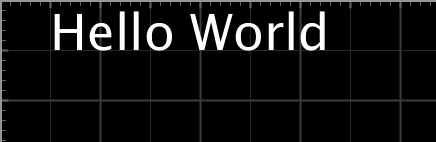
- 字体大小
 void DrawText()

 {

   String str = "Hello World";

   textSize();//修改字体大小

   text(str,,);

 }
- 对其方式
- textAlign(h[,o]); 其中,h表示水平对齐方式,o表示垂直对齐方式,可填入宏
- h
- RIGHT 右对齐
- CENTER
- LEFT
- o
- TOP
- CENTER
- BOTTOM
- BASELINE 基线对齐
- h
 void DrawText()

 {

   String str = "Hello World";

   noFill();

   stroke(#E0A000);

   rect(,, ,);//画矩形

   textSize();

   textAlign(RIGHT,BOTTOM);//右下对齐

   text(str,,, ,);//在一个矩形内显示

 }
- textAlign(h[,o]); 其中,h表示水平对齐方式,o表示垂直对齐方式,可填入宏
- 设置行高
 void DrawText()

 {

   String str = "Hello World\nWorld Hello";

   noFill();

   stroke(#E0A000);

   rect(,, ,);

   textSize();

   textLeading();

   text(str,,, ,);

   textLeading();

   text(str,,, ,);

   textLeading();

   text(str,,, ,);

 }
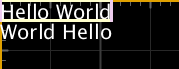
文本宽度
 void DrawText()

 {

   String str = "Hello World\nWorld Hello";

   noFill();

   stroke(#E0A000);

   rect(,, ,);

   textSize();

   textLeading();

   text(str,,, ,);

    //画一个框把一行文字框起来

   stroke(#FFFFCC);

   line(,, textWidth(str),);//用到了获取字符串宽度的方法 textWidth()

   line(,, textWidth(str),);

   stroke(#EECCEE);

   line(,, ,);

   line(textWidth(str),, textWidth(str),);

 }
[Processing]在画布上写文本的更多相关文章
- matlab 工具函数 —— axnote(在坐标轴上写文本内容)
function axnote(string) font_size = get(0, 'DefaultAxesFontSize'); if 1 h1 = text(0.99, 0.05, string ...
- 玩转html5(二)----用canvas结合脚本在画布上画简单的图(html5又一强大功能)
在html5中可以使用canvas标签在画布上画图,先直接上代码,这篇文章先简单介绍一下canvas的使用方法,简单画几个圆,矩形,三角形,写字. 在代码中均给出了注释,在这里特别强调的一点是:使用c ...
- 有趣html5(两)----使用canvas结合剧本画在画布上的简单图(html5另一个强大)
请珍惜劳动小编成果,这篇文章是原来小编,转载请注明出处. 于html5中能够使用canvas标签在画布上绘图,先直接上代码,这篇文章先简介一下canvas的用法.简单画几个圆,矩形,三角形,写字. 在 ...
- AsyncTask异步上传文本到服务器
服务器代码:用于接收客户端信息 package ches; import java.io.IOException; import java.io.PrintWriter; import javax.s ...
- C#从Image上读取文本
今天通过C#来实现一个读取Image上文本的功能. 1. 环境准备: 1). 下载 Microsoft Office SharePoint Designer 2007. 2). 安装请参考KB:htt ...
- 使用hexo在github上写blog
使用hexo在github上写blog 安装nodejs http://nodejs.org/ 安装hexo npm install -g hexo 创建bolg文件夹 安装完成后在自己的工作目录创建 ...
- 用Jekyll在github上写博客——《搭建一个免费的,无限流量的Blog》的注脚
本来打算买域名,买空间,用wordpress写博客的.后来问了一个师兄,他说他是用github的空间,用Jekyll写博客,说很多人都这么做.于是我就研究了一下. 比较有价值的文章有这么几篇: htt ...
- 当标签上写了runat="server" 后,<%%>就会无效
当标签上写了runat="server" 后,<%%>就会无效 //这是错误的写法 <input type="hidden" runat=&q ...
- USB系列之四:向U盘上写数据
在<USB系列之三>中,我们实现了一系列的SCSI命令,在这个系列中,我们要实现向U盘上写扇区的命令,所以,本文相对比较容易,更多地是给出一个实现的源程序. 在<USB系列之三> ...
随机推荐
- DNS Brand
1) You must add glue records (child nameservers) to your-domain.com from your domain's registrar con ...
- SOJ 4583 动态规划之分组背包
Description Sidney想去Gandtom家玩.但Sidney家和Gandtom家之间是高低不平.坑坑洼洼的土路.所以他需要用他的背包装几袋稀的泥,在路上铺平一些干的土,使路变成平整的泥土 ...
- virtualbox+vagrant学习-3-Vagrant Share-4-Vagrant Connect
Vagrant Connect vagrant可以共享到vagrant环境的任何或每个端口,而不仅仅是SSH和HTTP.“vagrant connect”命令为连接人员提供一个静态IP,他们可以使用该 ...
- django 模板关闭自动转义
Django的模板中会对HTML标签和JS等语法标签进行自动转义,原因显而易见,这样是为了安全.但是有的时候我们可能不希望这些HTML元素被转义,比如我们做一个内容管理系统,后台添加的文章中是经过修饰 ...
- django用户验证机制
django的验证机制 from django.contrib.auth.decorators import login_required 需要在要验证的界面添加`@login_required` 登 ...
- Python自动化之session反解案例
session反解案例 from django.contrib.sessions.models import Session sess = Session.objects.get(pk='a92d67 ...
- jenkins持续集成python cases
1. 官网2.7jenkins.war下载 http://mirrors.jenkins.io/war-stable/2.73.2/jenkins.war jdk-x86 linux 32bit适用 ...
- 移动端适配之sprite雪碧图背景定位
移动端适配一般我会使用rem进行适配,大致操作就是按照一定尺寸设计稿进行制作,最后将所有px值转换为rem,但是一些手机背景精灵图(cssSprite)就会出现一些误差(1px左右),如果公司要求不高 ...
- java学习笔记-基础篇
Java基础篇 1—12 常识 13 this关键字 14参数传递 16 继承 17 访问权限 28—31异常 1—12 常识 1.文件夹以列表展示,显示扩展名,在地址栏显示全路径 2.javac编译 ...
- [图解tensorflow源码] Graph 图模块 (UML视图)