
spring boot-13.数据访问
1.spring boot 的自动配置提供的方便快捷的数据库操作服务,只需要进行少量配置即可连接数据库。spring boot 在org.springframework.boot.autoconfigure.jdbc.DataSourceConfiguration 配置了多种数据源
(1)org.apache.tomcat.jdbc.pool.DataSource
(2)com.zaxxer.hikari.HikariDataSource
(3)org.apache.commons.dbcp.BasicDataSource
(4)org.apache.commons.dbcp2.BasicDataSource
默认使用的是org.apache.tomcat.jdbc.pool.DataSource,除了这几种数据源之外我们也可以添加其它的数据源。这几个数据源之间通过全局配置文件的spring.datasource.type配置进行切换。
2.我们使用默认的方式来访问数据库
(1)在全局配置文件中配置数据库相关信息,就可以完成数据源的简单配置
spring.datasource.url=jdbc:mysql://localhost:3306/stock

spring.datasource.username=root

spring.datasource.password=1q2w3e

spring.datasource.driver-class-name=com.mysql.jdbc.Driver
(2)接下来使用JdbcTemplate 来访问数据库
@Controller

public class EmpController {

    @Autowired

    JdbcTemplate jdbcTemplate;

    @GetMapping("/getEmp")

    @ResponseBody

    public List<Map<String, Object>> getEmp() {

        List<Map<String, Object>> list =jdbcTemplate.queryForList("select * from stock_code");

        return list;

    }

}
(3)输出结果

3.在实际项目开发中往往不会使用默认的方式连接数据库,我们需要的是一些高性能的连接池,下面我们就来将默认的方式切换为使用阿里的druid连接池工具。
(1)修改配置文件中的数据源类型,并添加druid的其他配置
spring:

  datasource:

    url: jdbc:mysql://localhost:3306/stock

    username: root

    password: 1q2w3e

    driver-class-name: com.mysql.jdbc.Driver

    type: com.alibaba.druid.pool.DruidDataSource


    initialSize: 5

    minIdle: 5

    maxActive: 20

    maxWait: 60000

    timeBetweenEvictionRunsMillis: 60000

    minEvictableIdleTimeMillis: 300000

    validationQuery: SELECT 1 FROM DUAL

    testWhileIdle: true

    testOnBorrow: false

    testOnReturn: false

    poolPreparedStatements: true

    #配置监控统计拦截的filters,去掉后监控界面sql无法统计,'wall'用于防火墙

    filters: stat,wall,log4j

    maxPoolPreparedStatementPerConnectionSize: 20

    useGlobalDataSourceStat: true

    connectionProperties: druid.stat.mergeSql=true;druid.stat.slowSqlMillis=500
(2)将druid数据源添加到容器中,并将配置属性值注入(关于配置属性注入可以参考第5篇的相关介绍)和配置druid的应用监控统计功能。
package com.springboot.config;

import java.util.Arrays;

import java.util.HashMap;

import java.util.Map;

import javax.sql.DataSource;

import org.springframework.boot.context.properties.ConfigurationProperties;

import org.springframework.boot.web.servlet.FilterRegistrationBean;

import org.springframework.boot.web.servlet.ServletRegistrationBean;

import org.springframework.context.annotation.Bean;

import org.springframework.context.annotation.Configuration;

import com.alibaba.druid.pool.DruidDataSource;

import com.alibaba.druid.support.http.StatViewServlet;

import com.alibaba.druid.support.http.WebStatFilter;

@Configuration

public class DruidConfig {

    @ConfigurationProperties(prefix="spring.datasource")

    @Bean

    public DataSource druid() {

        return new DruidDataSource();

    }

    //配置druid监控管理管理后台的Servlet

    @Bean

    public ServletRegistrationBean statViewServlet(){

        ServletRegistrationBean bean = new ServletRegistrationBean(new StatViewServlet(), "/druid/*");

        Map<String,String> initParams = new HashMap<String,String>();

        initParams.put("loginUsername","admin");

        initParams.put("loginPassword","123456");

        initParams.put("allow","");//默认就是允许所有访问

        initParams.put("deny","192.168.1.251");

        bean.setInitParameters(initParams);

        return bean;

    }

    //配置一个druid统计监控范围的filter

    @Bean

    public FilterRegistrationBean webStatFilter(){

        FilterRegistrationBean bean = new FilterRegistrationBean();

        bean.setFilter(new WebStatFilter());

        Map<String,String> initParams = new HashMap<>();

        initParams.put("exclusions","*.js,*.css,/druid/*");

        bean.setInitParameters(initParams);

        bean.setUrlPatterns(Arrays.asList("/*"));

        return  bean;

    }

}
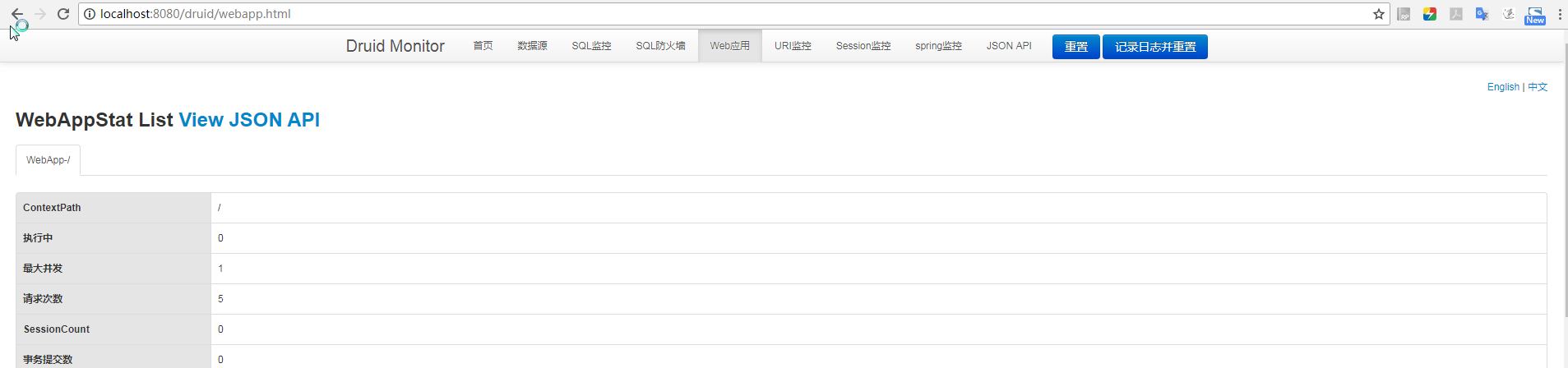
(3)运行结果

durid监控管理后台
spring boot-13.数据访问的更多相关文章
- Spring Boot的数据访问:CrudRepository接口的使用
示例 使用CrudRepository接口访问数据 创建一个新的Maven项目,命名为crudrepositorytest.按照Maven项目的规范,在src/main/下新建一个名为resource ...
- (8)Spring Boot 与数据访问
文章目录 简介 整合基本的JDBC与数据源 整合 druid 数据源 整合 mybatis 简介 对于数据访问层,无论是 SQL 还是 NOSQL ,Spring Boot 默认都采用整合 Sprin ...
- Spring Boot框架 - 数据访问 - 整合Mybatis
一.新建Spring Boot项目 注意:创建的时候勾选Mybatis依赖,pom文件如下 <dependency> <groupId>org.mybatis.spring.b ...
- Spring Boot实现数据访问计数器
1.数据访问计数器 在Spring Boot项目中,有时需要数据访问计数器.大致有下列三种情形: 1)纯计数:如登录的密码错误计数,超过门限N次,则表示计数器满,此时可进行下一步处理,如锁定该账户 ...
- Spring Boot的数据访问 之Spring Boot + jpa的demo
1. 快速地创建一个项目,pom中选择如下 <?xml version="1.0" encoding="UTF-8"?> <project x ...
- Spring Boot框架 - 数据访问 - JDBC&自动配置
一.新建Spring Boot 工程 特殊勾选数据库相关两个依赖 Mysql Driver — 数据库驱动 Spring Data JDBC 二.配置文件application.properties ...
- Spring MVC或Spring Boot配置默认访问页面不生效?
相信在开发项目过程中,设置默认访问页面应该都用过.但是有时候设置了却不起作用.你知道是什么原因吗?今天就来说说我遇到的问题. 首先说说配置默认访问页面有哪几种方式. 1.tomcat配置默认访问页面 ...
- Spring boot未授权访问造成的数据库外联
一.spring boot 日常测试或攻防演练中像shiro,fastjson等漏洞已经越来越少了,但是随着spring boot框架的广泛使用,spring boot带来的安全问题也越来越多,本文仅 ...
- Spring Boot与数据
SpringBoot 着眼于JavaEE! 不仅仅局限于 Mybatis .JDBC. Spring Data JPA Spring Data 项目的目的是为了简化构建基于 Spring 框架应用的数 ...
- Spring Boot 跨域访问
如何在 Spring Boot 中配置跨域访问呢? Spring Boot 提供了对 CORS 的支持,您可以实现WebMvcConfigurer 接口,重写addCorsMappings 方法来添加 ...
随机推荐
- eclipse导入tomcat时Unknown version of Tomcat was specified
Unknown version of Tomcat was specified 的原因有2种可能: 1 路径不是真正的路径,可能是其子路径,要找到bin路径. 2 安装目录没有访问权限. 我的就是第2 ...
- Java中截取字符串中小数点前面的字符
通过下标获取 String number = "2563.2154"; int index = number.indexOf("."); String intN ...
- poj 3662 Telephone Lines dijkstra+二分搜索
Telephone Lines Time Limit: 1000MS Memory Limit: 65536K Total Submissions: 5696 Accepted: 2071 D ...
- PyQT5堆叠布局:切换界面(QStackedLayout)
几乎所有的GUI界面都需要用到这个场景:在一个界面里面,点击不同的按钮显示不同的内容 在Qt设计师中没有堆叠布局,需要我们手动添加 在Qt设计师中,设计3个切换的页面,和一个主界面. 注意在主界面是两 ...
- 品 SpringBootApplication 注解源码
@SpringBootApplication 由以下三个注解构成: @SpringBootConfiguration@EnableAutoConfiguration@ComponentScan 一:@ ...
- 高效的js原生代码
1.遍历元素 //不推荐 var element = document.getElementsByTagName('div'); for(var i=0; i<element.length; i ...
- python中的实例方法、类方法、静态方法的区别
Python 除了拥有实例方法外,还拥有静态方法和类方法,跟Java相比需要理解这个类方法的含义. class Foo(object): def test(self)://定义了实例方法 print( ...
- 【转】一款开源免费跨浏览器的视频播放器--videojs使用介绍
特别提示:本人博客部分有参考网络其他博客,但均是本人亲手编写过并验证通过.如发现博客有错误,请及时提出以免误导其他人,谢谢!欢迎转载,但记得标明文章出处:http://www.cnblogs.com/ ...
- Java第09次实验(流与文件)
第一次实验 0. 字节流与二进制文件 1.使用DataOutputStream与FileOutputStream将Student对象写入二进制文件student.data 二进制文件与文本文件的区别 ...
- LeetCode 337. 打家劫舍 III(House Robber III)
题目描述 小偷又发现一个新的可行窃的地点. 这个地区只有一个入口,称为“根”. 除了根部之外,每栋房子有且只有一个父房子. 一番侦察之后,聪明的小偷意识到“这个地方的所有房屋形成了一棵二叉树”. 如果 ...