
测开之路五十一:代码实现MongoDB增删改查
初始化时连接、析构时断开连接
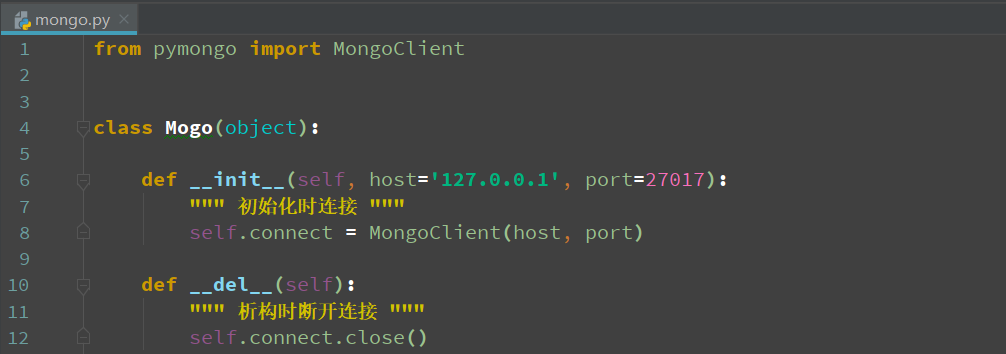
from pymongo import MongoClient

class Mogo(object):

    def __init__(self, host='127.0.0.1', port=27017):
        """ 初始化时连接 """
        self.connect = MongoClient(host, port)

    def __del__(self):
        """ 析构时断开连接 """
        self.connect.close()
插入:
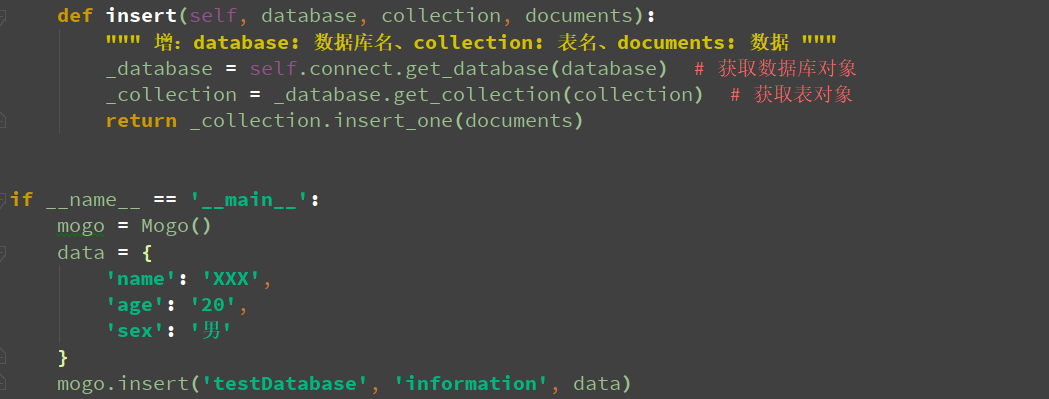

def insert(self, database, collection, documents):
    """ 增:database: 数据库名、collection: 表名、documents: 数据 """
    _database = self.connect.get_database(database)  # 获取数据库对象
    _collection = _database.get_collection(collection)  # 获取表对象
    return _collection.insert_one(documents)
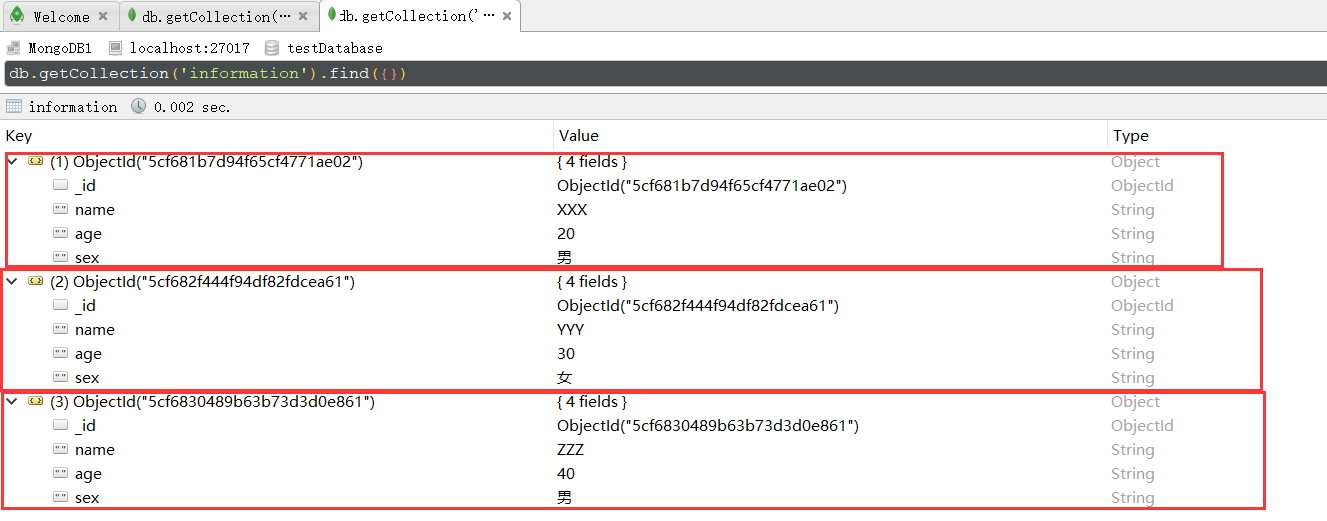
准备好几条数据
查找
如:查name为“XXX”的数据

def search(self, database, collection, filter):
    """ 查:database: 数据库名、collection: 表名、filter: 查找条件 """
    _database = self.connect.get_database(database)  # 获取数据库对象
    _collection = _database.get_collection(collection)  # 获取表对象
    return _collection.find(filter)
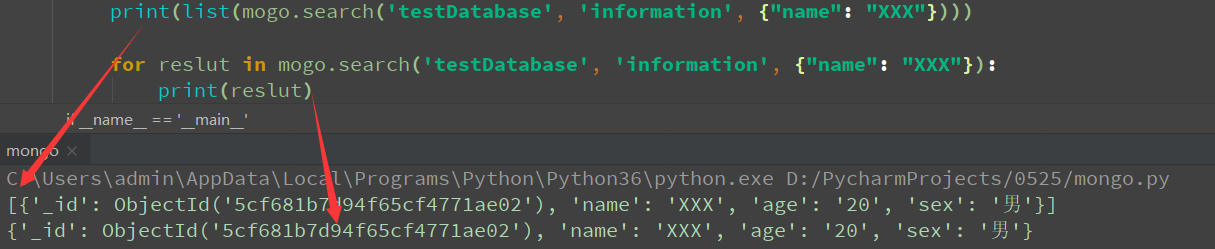
默认查出来是结果集
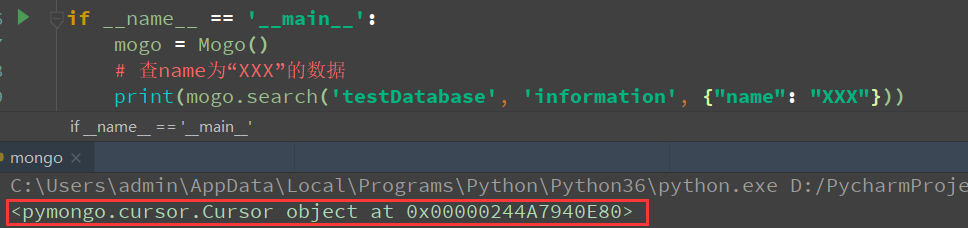
结果集可以转list,也可以用for循环取,取出来一个是list,一个是字典
增加过滤条件:使用projection
如:查sex=“男”的数据,且不返回id和sex

def search(self, database, collection, filter):
    """ 查:database: 数据库名、collection: 表名、filter: 查找条件 """
    projection = None
    if "projection" in filter:
        projection = filter.pop("projection")
    _database = self.connect.get_database(database)  # 获取数据库对象
    _collection = _database.get_collection(collection)  # 获取表对象
    return _collection.find(filter, projection)

删除:

def delet(self, database, collection, filter):
    """ 删:database: 数据库名、collection: 表名、filter: 查找条件 """
    _database = self.connect.get_database(database)  # 获取数据库对象
    _collection = _database.get_collection(collection)  # 获取表对象
    _collection.delete_one(filter)
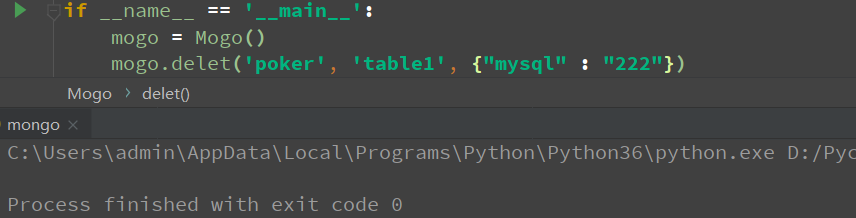
如:删除之前插入的数据

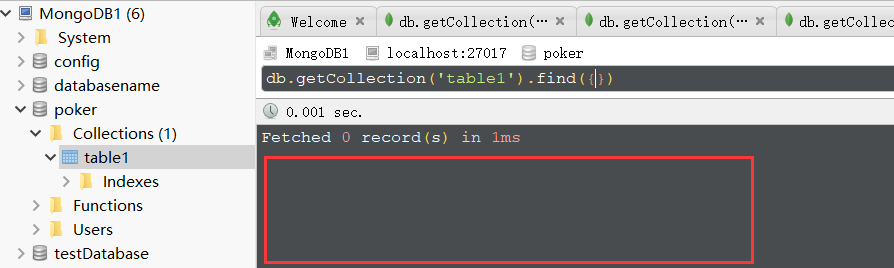
再刷新,表里面已经没有数据了
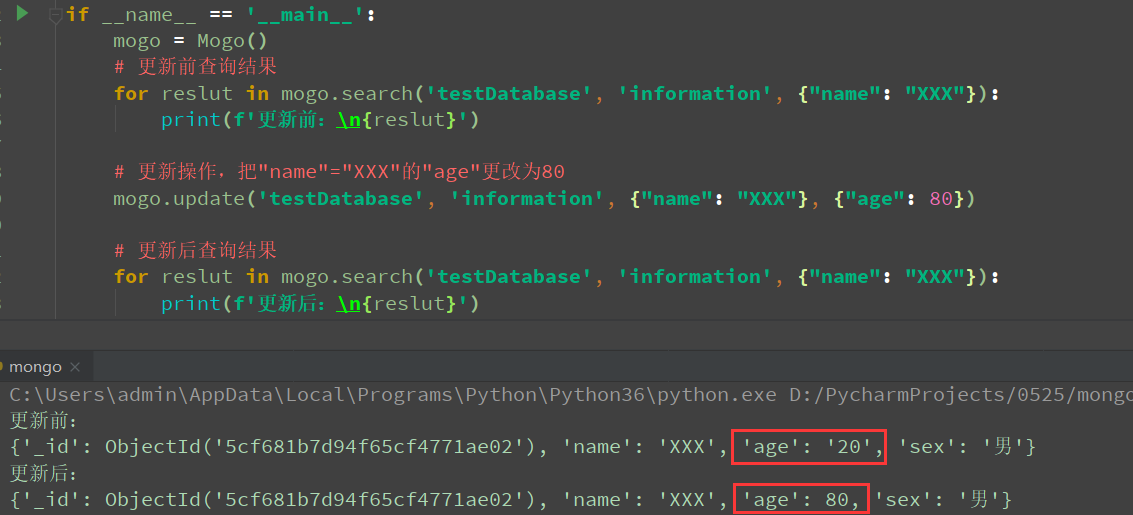
更新:

def update(self, database, collection, filter, documents):
    """ 改:database: 数据库名、collection: 表名、filter: 查找条件、documents: 数据 """
    _database = self.connect.get_database(database)  # 获取数据库对象
    _collection = _database.get_collection(collection)  # 获取表对象
    _collection.update_one(filter, {'$set': documents})
最后增查改删的代码
from pymongo import MongoClient

class Mogo(object):

    def __init__(self, host='127.0.0.1', port=27017):
        """ 初始化时连接 """
        self.connect = MongoClient(host, port)

    def __del__(self):
        """ 析构时断开连接 """
        self.connect.close()

    def insert(self, database, collection, documents):
        """ 增:database: 数据库名、collection: 表名、documents: 数据 """
        _database = self.connect.get_database(database)  # 获取数据库对象
        _collection = _database.get_collection(collection)  # 获取表对象
        return _collection.insert_one(documents)

    def search(self, database, collection, filter):
        """ 查:database: 数据库名、collection: 表名、filter: 查找条件 """
        projection = None
        if "projection" in filter:
            projection = filter.pop("projection")
        _database = self.connect.get_database(database)  # 获取数据库对象
        _collection = _database.get_collection(collection)  # 获取表对象
        return _collection.find(filter, projection)

    def update(self, database, collection, filter, documents):
        """ 改:database: 数据库名、collection: 表名、filter: 查找条件、documents: 数据 """
        _database = self.connect.get_database(database)  # 获取数据库对象
        _collection = _database.get_collection(collection)  # 获取表对象
        _collection.update_one(filter, {'$set': documents})

    def delet(self, database, collection, filter):
        """ 删:database: 数据库名、collection: 表名、filter: 查找条件 """
        _database = self.connect.get_database(database)  # 获取数据库对象
        _collection = _database.get_collection(collection)  # 获取表对象
        _collection.delete_one(filter)
测开之路五十一:代码实现MongoDB增删改查的更多相关文章
- springboot(十五):springboot+jpa+thymeleaf增删改查示例
这篇文章介绍如何使用jpa和thymeleaf做一个增删改查的示例. 先和大家聊聊我为什么喜欢写这种脚手架的项目,在我学习一门新技术的时候,总是想快速的搭建起一个demo来试试它的效果,越简单越容易上 ...
- spring boot(十五)spring boot+thymeleaf+jpa增删改查示例
快速上手 配置文件 pom包配置 pom包里面添加jpa和thymeleaf的相关包引用 <dependency> <groupId>org.springframework.b ...
- 测开之路五十:monggodb安装与初步使用
mongodb下载地址:https://www.mongodb.com/download-center Robo3T下载地址:https://robomongo.org/ 安装mongodb 双击无脑 ...
- 测开之路五十五:实现类似于unittest查找case
实现给一个路径,去查找test开头的测试用例文件 创建一个计算器的类,方便后面测试用 class Calculator(object): def add(self, x, y): return x + ...
- 测开之路六十一:接口测试平台之interface蓝图
create的js //添加header的函数function add_header() { // 这里是动态拼接html语句,带着样式,拼凑成页面的 "key [] value []&qu ...
- 测开之路五十六:实现类似unittest的断言
import inspect class Case(object): """ 实现断言 """ def __init__(self): se ...
- 测开之路五十三:unittest运行参数
Fixture:进行测试前的准备工作和测试后的清理操作.例如创建临时或是代理数据库,目录,服务进程等.用例(Case):最小的测试单元,检车特定输入的响应.TestCase作为所有用例的基类,测试ca ...
- 测开之路九十一:css常用的选择器
一:全局选择器:* 二:标签选择器,如给所有p标签加个背景色 三:id选择器:# ,如给id为id_01的元素加一个框 四:类选择器:. 如设置一个类选择器为blue,当有标签引用blue的时候,背景 ...
- 测开之路八十一:参数定义之*args和**kwargs
# *,不定长参数,*args# 定义函数参数def avg(score, *scores): return (score + sum(scores)) / (len(scores) + 1) ...
随机推荐
- Ioc和DI之间的关系(依赖注入的核心概念)
1.开篇闲话 由于之前做的很多项目都没接触到这个,后来到了另一个公司,他们的代码结构是基于领域驱动设计的,其中里面的对象都是通过依赖注入方式(Sprint.NET)实现的,也大致了解了哈,在网上搜了些 ...
- JavaScript——正则匹配、正则提取、正则替换
正则匹配 // 匹配日期 var dateStr = '2015-10-10'; var reg = /^\d{4}-\d{1,2}-\d{1,2}$/ console.log(reg.test(da ...
- socket - Linux 套接字
总览 #include <sys/socket.h> mysocket = socket(int socket_family, int socket_type, int protocol) ...
- poj 1845 Sumdiv (等比求和+逆元)
题目链接:http://poj.org/problem?id=1845 题目大意:给出两个自然数a,b,求a^b的所有自然数因子的和模上9901 (0 <= a,b <= 50000000 ...
- Sass-变量计算
在 Sass 中除了可以使用数值进行运算之外,还可以使用变量进行计算,其实在前面章节的示例中也或多或少的向大家展示了.在 Sass 中使用变量进行计算,这使得 Sass 的数学运算功能变得更加实用.一 ...
- [BZOJ4316]小C的独立集 仙人掌?
题目链接 因为xls让我每周模拟一次,然后学习模拟中没有学过的东西.所以就来学圆方树. 本来这道题用不着圆方树,但是圆方树是看yyb的博客学的,他在里面讲一下作为一个引子,所以也来写一下. 首先来Ta ...
- restful风格接口类型和优点
从事web开发工作有一小段时间,REST风格的接口,这样的词汇总是出现在耳边,然后又没有完全的理解,您是不是有和我相同的疑问呢?那我们一起来一探究竟吧! 就是用URL定位资源,用HTTP描述操作. 知 ...
- ExtJS5.0 菜鸟的第一天
1.新项目开始啦,后台用户管理页面涉及到表格数据添加,修改内容比较多.准备用EXTJS框架搞下,对于我这种JS不咋地的人来说,还真是个挑战.整了2天,才搞出一个Hello,world!我也是醉了.. ...
- Spring Security 安全认证
Spring Boot 使用 Mybatis 依赖 <dependency> <groupId>org.mybatis.spring.boot</groupId> ...
- vue项目中引入mui.poppicker.js文件时报错“Uncaught ReferenceError: mui is not defined”
解决:在mui.js的源文件后最后加上 window.mui = mui;