
redhat7.5 替换yum源
Redhat 7自带的yum源需要付费注册,未注册情况下会报如下错误,且用yum repolist all检查源数目为0。这时候需要将RedHat 7自带的yum源 替换成CentOS 7免费源
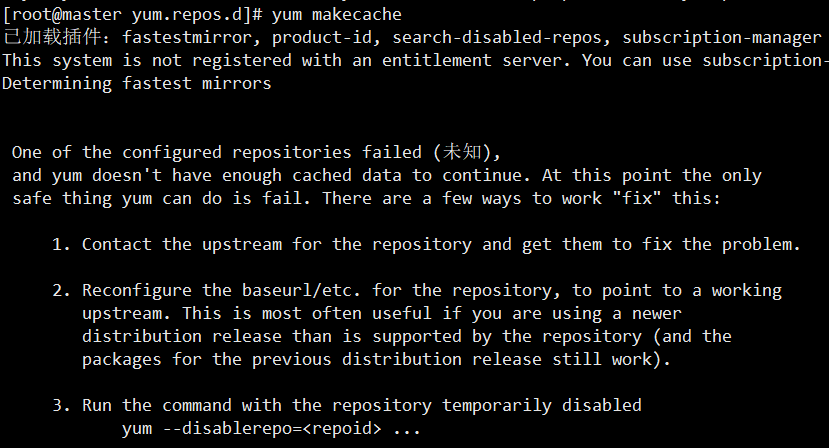
解决方法一:
一,使用网易163开源镜像站  http://mirrors.163.com/

#,查看原有yum包

rpm -qa|gerp yum

#,卸载yum包

rpm -qa|grep yum|xargs rpm -e --nodeps

rpm -qa|grep yum

#,创建下载路径,下载centos7. yum包

mkdir /tmp/pkg && cd /tmp/pkg

wget http://mirrors.163.com/centos/7.5.1804/os/x86_64/Packages/yum-3.4.3-158.el7.centos.noarch.rpm

wget http://mirrors.163.com/centos/7.5.1804/os/x86_64/Packages/yum-metadata-parser-1.1.4-10.el7.x86_64.rpm

wget http://mirrors.163.com/centos/7.5.1804/os/x86_64/Packages/yum-plugin-fastestmirror-1.1.31-45.el7.noarch.rpm

#,安装下载好的rpm包

rpm -ivh yum-*

rpm -qa|grep yum

#,替换原有源

cd /etc/yum.repos.d/ && rm -rfv *

#,下载163源

wget http://mirrors.163.com/.help/CentOS7-Base-163.repo

#,将下载好的文件中的 $releasever 全部修改为目标版本 7.5.

#为防止出错,以下为改好版本

[base]

name=CentOS-7.5. - Base - .com

#mirrorlist=http://mirrorlist.centos.org/?release=7.5.1804&arch=$basearch&repo=os

baseurl=http://mirrors.163.com/centos/7.5.1804/os/$basearch/

gpgcheck=

gpgkey=http://mirrors.163.com/centos/RPM-GPG-KEY-CentOS-7

#released updates

[updates]

name=CentOS-7.5. - Updates - .com

#mirrorlist=http://mirrorlist.centos.org/?release=7.5.1804&arch=$basearch&repo=updates

baseurl=http://mirrors.163.com/centos/7.5.1804/updates/$basearch/

gpgcheck=

gpgkey=http://mirrors.163.com/centos/RPM-GPG-KEY-CentOS-7

#additional packages that may be useful

[extras]

name=CentOS-7.5. - Extras - .com

#mirrorlist=http://mirrorlist.centos.org/?release=7.5.1804&arch=$basearch&repo=extras

baseurl=http://mirrors.163.com/centos/7.5.1804/extras/$basearch/

gpgcheck=

gpgkey=http://mirrors.163.com/centos/RPM-GPG-KEY-CentOS-7

#additional packages that extend functionality of existing packages

[centosplus]

name=CentOS-7.5. - Plus - .com

baseurl=http://mirrors.163.com/centos/7.5.1804/centosplus/$basearch/

gpgcheck=

enabled=

gpgkey=http://mirrors.163.com/centos/RPM-GPG-KEY-CentOS-7

#,更新

yum clean all && yum makecache

#,查看是否更新成功

yum repolist all

方法二:思路一样,此处只提供重要命令
,删除自带yum包

rpm -aq|grep yum|xargs rpm -e --nodeps

,下载阿里云rpm包

wget http://mirrors.aliyun.com/centos/7.2.1511/os/x86_64/Packages/yum-metadata-parser-1.1.4-10.el7.x86_64.rpm

wget http://mirrors.aliyun.com/centos/7.2.1511/os/x86_64/Packages/yum-3.4.3-132.el7.centos.0.1.noarch.rpm

wget http://mirrors.aliyun.com/centos/7.2.1511/os/x86_64/Packages/yum-plugin-fastestmirror-1.1.31-34.el7.noarch.rpm

,安装下载好的rpm包

rpm -ivh yum-*

,配置阿里云源文件

vim /etc/yum.repos.d/aliyun.repo

[base]

name=CentOS-$releasever - Base

baseurl=http://mirrors.aliyun.com/centos/7.2.1511/os/$basearch/

gpgcheck=

gpgkey=http://mirrors.aliyun.com/centos/7.2.1511/os/x86_64/RPM-GPG-KEY-CentOS-7

#released updates

[updates]

name=CentOS-$releasever - Updates

baseurl=http://mirrors.aliyun.com/centos/7.2.1511/updates/$basearch/

gpgcheck=

gpgkey=http://mirrors.aliyun.com/centos/7.2.1511/os/x86_64/RPM-GPG-KEY-CentOS-7

[extras]

name=CentOS-$releasever - Extras

baseurl=http://mirrors.aliyun.com/centos/7.2.1511/extras//$basearch/

gpgcheck=

gpgkey=http://mirrors.aliyun.com/centos/7.2.1511/os/x86_64/RPM-GPG-KEY-CentOS-7

[centosplus]

name=CentOS-$releasever - Plus

baseurl=http://mirrors.aliyun.com/centos/7.2.1511/centosplus//$basearch/

gpgcheck=

enabled=

,更新

yum clean all && yum makecache
补充:
阿里云 centos 的yum源

,切记先做好备份

,下载

CentOS

wget -O /etc/yum.repos.d/CentOS-Base.repo http://mirrors.aliyun.com/repo/Centos-6.repo

或者

curl -o /etc/yum.repos.d/CentOS-Base.repo http://mirrors.aliyun.com/repo/Centos-6.repo

CentOS

wget -O /etc/yum.repos.d/CentOS-Base.repo http://mirrors.aliyun.com/repo/Centos-7.repo

或者

curl -o /etc/yum.repos.d/CentOS-Base.repo http://mirrors.aliyun.com/repo/Centos-7.repo
redhat7.5 替换yum源的更多相关文章
- Linux之RedHat7如何更换yum源
目前,我们常见的系统大概就是Windows.Linux和Mac OS了.Windows系统应该是大部分人最早开始接触的系统,毕竟Windows系统使用起来相当方便,只需要点点鼠标,外加会简单的打字,一 ...
- redhat7.4切换yum源为免费源
1.redhat是Linux系统中付费的企业版,虽然安装什么是免费的,但是需要注册. 如果你有注册码,暂请出门左拐(我没有注册码,所以我也不会注册,不用往下看了). Linux系统收费版:RedHat ...
- [Linux]Redhat7配置CentOS7 YUM源
一.简介 安装Redhat7并配置了网卡之后,虽然可以直接ping www.baidu.com,但是执行yum install的命令时提示如下信息: [root@ansible ~]# yum ins ...
- linux替换yum源及配置本地源
linux系统安装后自带的bash源由于在国外,安装软件包的时候会非常慢,最好替换一下yum源. 关于yum源的简单介绍 yum的主要功能是更方便地添加,删除和更新rpmba ...
- RedHat6.9下替换yum源
因为RedHat的yum需要收费,且要注册后才能使用.因此想把Yum源更新为CentOS的.使用的RedHat版本为6.9,因此对应的CentOS版本也要为6.9 1. 检查并删除原有的yum源 rp ...
- redhat替换yum源时redhat.repo无法删除或禁用的问题
rhel7.3系统,在替换自带的repo源时发现无论是将redhat.repo重命名还是删除,在执行yum命令后总是自动又生成redhat.repo得问题,导致替换的CentOS-Base.repo, ...
- redhat7.3安装yum源
#检查rehat自带的yum源[root@localhost ~]# rpm -qa | grep yum -.el7.noarch -.el7.noarch -.el7.noarch -.el7.n ...
- redhat7.2配置yum源
版权声明:声明:本博客欢迎转发,但请保留原作者信息!本站文章皆基于公开来源信息,仅代表作者个人观点 https://blog.csdn.net/wylfengyujiancheng/article ...
- Centos下替换yum源为阿里云源
阿里云Linux安装镜像源地址:http://mirrors.aliyun.com/ 第一步:备份原镜像文件 mv /etc/yum.repos.d/CentOS-Base.repo /etc/yum ...
随机推荐
- hdu1864最大报销额 01
先把小数乘100变成整数然后处理每个发票里面可以报销的 最后自底向上DP #include <stdio.h> #include <algorithm> #include &l ...
- SP Flash Tool版本对应MTK处理器型号速查(SP Flash Tool Download)
SP Flash Tool For Windows Download https://monkey8.pipipan.com/dir/19250369-32189369-ac1637/ SP Flas ...
- Python CGI编程Ⅴ
通过CGI程序传递 Textarea 数据 Textarea 向服务器传递多行数据,HTML代码如下: textarea.py 脚本代https://www.xuanhe.net/码如下: 修改 te ...
- 2019春Python程序设计练习5(0416--0422)
6-1 6-1.使用函数求特殊a串数列和 (30 分) 给定两个均不超过9的正整数a和n,要求编写函数fn(a,n) 求a+aa+aaa++⋯+aa⋯aa(n个a)之和,fn须返回的是数列和 函数 ...
- .netcore mongodb 分页+模糊查询+多条件查询
.netcore MongoDB.Driver 版本才2.8 与aspnet差距太大,网上找很多资料没有现成的代码. public override async Task<PagerList&l ...
- Java多线程和并发(六),yield函数和中断线程
目录 1.yield函数 2.中断线程 六.yield函数和中断线程 1.yield函数 2.中断线程 (1)已经被抛弃的方法 (2)目前使用的方法
- c语言 - 关键字const的作用
const修饰的数据类型是指常类型,常类型的变量或对象的值是不能被更新的. 1.const char * p1; //表示p1指向了的字符串不可更改 2.char const ...
- 字符串之format整理
format 用法 本文根据官方文档及自己理解整理,只整理出自己可以理解的部分,h因个人水平有限,难免有所错误和纰漏,欢迎批评指正. 格式{ [field_name] ["!" c ...
- JavaWeb_(SSH论坛)_五、帖子模块
基于SSH框架的小型论坛项目 一.项目入门 传送门 二.框架整合 传送门 三.用户模块 传送门 四.页面显示 传送门 五.帖子模块 传送门 六.点赞模块 传送门 七.辅助模块 传送门 回复帖子 分析回 ...
- 14.多线程设计模式 - Master-Worker模式
多线程设计模式 - Master-Worker模式 并发设计模式属于设计优化的一部分,它对于一些常用的多线程结构的总结和抽象.与串行相比并行程序结构通常较为复杂,因此合理的使用并行模式在多线程并发中更 ...