
WPF Event 在 Command 中的应用初级篇,支持所有Event 展示松耦合设计的全部代码 - 解决TextBoxBase.TextChanged或者TextBox.TextChanged等类似事件绑定问题。
做过WPF开发的人,都知道做MVVM架构,最麻烦的是Event的绑定,因为Event是不能被绑定的,同时现有的条件下,命令是无法替代Event。而在开发过程中无法避免Event事件,这样MVVM的架构就不能完全实现了。
所以后来微软提供了一个折中的方案,使用Trigger触发器和System.Windows.Interactivity结合通过事件绑定事件,个人觉得这个方法也挺可以的。
还有Prism框架方法,我看过但是这个方法比较繁琐可用性不高。
后来通过搜索和自己研究知道了一个解决方案,可以绑定所有事件,这个是原始版本,我个人正在研究一个完全的版本,希望能完全支持Event属性。
对于编程学习喜欢的方式,我个人是这个看法,我做开发也有一年多了,WPF开发也有九个月了。从小白到现在入门略有深入。不再局限于实现效果,而是更喜欢实现功能的原汁原味的代码。很多效果也许我不能写出完整的代码,也没有那么多的时间,但是深入看了别人的设计代码,总是受益良多。
工作这么长时间,总算明白为什么Java那么受欢迎了。因为作为技术人员到了一定境界,更喜欢了解具体的实现过程,而对于直接使用SDK的兴趣淡了不少。打个比方微软提供了很多优秀的SDK,但是就像家庭一样,越是包办一切的好父母,往往不太招孩子们的喜欢,不是孩子们不懂得感恩,而是社会自然规律,你无法成长,你便很容易感觉到自己无能,无能的人哪有快乐而言。
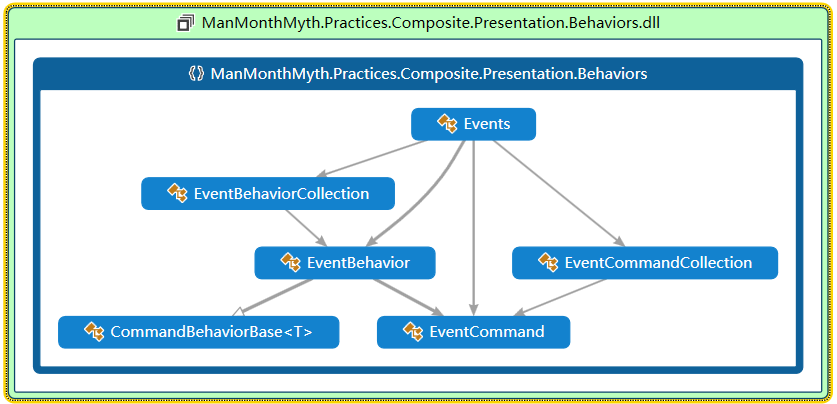
正文:具体的类图 通过类图可以看到结构相当清晰,它们的依赖关系是单向的。是属于低耦合的关系
using System;

using System.Windows;

using System.Windows.Controls;

using System.Windows.Data;

namespace ManMonthMyth.Practices.Composite.Presentation.Behaviors

{

    /// <summary>

    /// 这个类的作用是真正的绑定命令

    /// 将命令绑定到对应的控件上

    /// </summary>

    public class Events

    {

        /// <summary>

        /// 事件行为属性

        /// 注册属性名

        /// </summary>

        private static readonly DependencyProperty EventBehaviorsProperty = DependencyProperty.RegisterAttached("EventBehaviors",typeof(EventBehaviorCollection),typeof(Control),null);

        private static readonly DependencyProperty InternalDataContextProperty = DependencyProperty.RegisterAttached("InternalDataContext", typeof(Object), typeof(Control), new PropertyMetadata(null, DataContextChanged));

        public static readonly DependencyProperty CommandsProperty =

            DependencyProperty.RegisterAttached("Commands", typeof(EventCommandCollection), typeof(Events), new PropertyMetadata(null, CommandsChanged));

        private static void DataContextChanged(DependencyObject dependencyObject,DependencyPropertyChangedEventArgs e)

        {

            var target = dependencyObject as Control;

            if (target == null) return;

            foreach (var behavior in GetOrCreateBehavior(target))

            {

                behavior.Bind();

            }

        }

        public static EventCommandCollection GetCommands(DependencyObject dependencyObject)

        {

            return dependencyObject.GetValue(CommandsProperty) as EventCommandCollection;

        }

        public static void SetCommands(DependencyObject dependencyObject,EventCommandCollection eventCommands)

        {

            dependencyObject.SetValue(CommandsProperty,eventCommands);

        }

        private static void CommandsChanged(DependencyObject dependencyObject,DependencyPropertyChangedEventArgs e)

        {

            var target = dependencyObject as Control;

            if (target == null) return;

            var behaviors = GetOrCreateBehavior(target);

            foreach (var eventCommand in e.NewValue as EventCommandCollection)

            {

                var behavior = new EventBehavior(target);

                behavior.Bind(eventCommand);

                behaviors.Add(behavior);

            }

        }

        private static EventBehaviorCollection GetOrCreateBehavior(FrameworkElement target)

        {

            var behavior = target.GetValue(EventBehaviorsProperty) as EventBehaviorCollection;

            if (behavior == null)

            {

                behavior = new EventBehaviorCollection();

                target.SetValue(EventBehaviorsProperty,behavior);

                target.SetBinding(InternalDataContextProperty,new Binding());

            }

            return behavior;

        }

    }

}
EventBehaviorCollection
using System;

using System.Collections.Generic;

namespace ManMonthMyth.Practices.Composite.Presentation.Behaviors

{

    /// <summary>

    /// 事件名称集合

    /// </summary>

    public class EventCommandCollection : List<EventCommand>

    {

    }

}
EventBehavior
using System;

using System.ComponentModel;

using System.Reflection;

using System.Windows;

using System.Windows.Controls;

using System.Windows.Input;

using System.Windows.Media;

namespace ManMonthMyth.Practices.Composite.Presentation.Behaviors

{

    /// <summary>

    /// 事件行为

    /// 这个类的作用是将,通过反射将事件名,实例化一个真正的事件对象

    /// </summary>

    public class EventBehavior : CommandBehaviorBase<Control>

    {

        private EventCommand _bindingInfo;

        public EventBehavior(Control control) : base(control) { }

        public void Bind(EventCommand bindingInfo)

        {

            ValidateBindingInfo(bindingInfo);

            _bindingInfo = bindingInfo;

            Bind();

        }

        private void ValidateBindingInfo(EventCommand bindingInfo)

        {

            if (bindingInfo == null) throw new ArgumentException("bindingInfo is Null");

            if (string.IsNullOrEmpty(bindingInfo.CommandName)) throw new ArgumentException("bindingInfo.CommandName is Null");

            if (string.IsNullOrEmpty(bindingInfo.EventName)) throw new ArgumentException("bindingInfo.EventName is Null");

        }

        public void Bind() {

            ValidateBindingInfo(_bindingInfo);

            HookPropertyChanged();

            HookEvent();

            SetCommand();

        }

        public void HookPropertyChanged() {

            var dataContext = this.TargetObject.DataContext as INotifyPropertyChanged;

            if (dataContext == null) return;

            dataContext.PropertyChanged -= this.DataContextPropertyChanged;

            dataContext.PropertyChanged += this.DataContextPropertyChanged;

        }

        private void DataContextPropertyChanged(object sender,PropertyChangedEventArgs e)

        {

            if (e.PropertyName == _bindingInfo.CommandName)

                this.SetCommand();

        }

        private void SetCommand()

        {

            var dataContext = this.TargetObject.DataContext;

            if (dataContext == null) return;

            var propertyInfo = dataContext.GetType().GetProperty(_bindingInfo.CommandName);

            if (propertyInfo == null) throw new ArgumentException("propertyInfo is null,commandName is error");

            this.Command = propertyInfo.GetValue(dataContext,null) as ICommand;

        }

        /// <summary>

        /// 钩事件

        /// 有助于绑定AttachedProperty属性

        /// </summary>

        private void HookEvent()

        {

            var eventNames = _bindingInfo.EventName.Split('.');

            int length = eventNames.Length;

            //分开来,目的是为了提高效率

            if (length == )

                {

                    var eventInfo = this.TargetObject.GetType().GetEvent(_bindingInfo.EventName, BindingFlags.Public | BindingFlags.Instance);

                    if (eventInfo == null) throw new ArgumentException("eventInfo is Null,eventName is error");

                    eventInfo.RemoveEventHandler(this.TargetObject, this.GetEventMethod(eventInfo));

                    eventInfo.AddEventHandler(this.TargetObject, GetEventMethod(eventInfo));

                }

                else

                {

                    //TargetObject控件加载完成后触发执行

                    this.TargetObject.Initialized += (sender, e) =>

                    {

                        var tempObject = SelectVisual(eventNames, this.TargetObject);

                        var tempEventInfo = tempObject.GetType().GetEvent(eventNames[length-], BindingFlags.Public | BindingFlags.Instance);

                        if (tempEventInfo == null) throw new ArgumentException("eventInfo is Null,eventName is error");

                        tempEventInfo.RemoveEventHandler(tempObject, this.GetEventMethod(tempEventInfo));

                        tempEventInfo.AddEventHandler(tempObject, GetEventMethod(tempEventInfo));

                    };

                }

        }

        #region 筛选内部控件

        /// <summary>

        /// 筛选Visual

        /// </summary>

        /// <param name="names"></param>

        /// <param name="obj"></param>

        /// <returns></returns>

        private static Visual SelectVisual(string[] names, Control obj)

        {

            var assemblies = AppDomain.CurrentDomain.GetAssemblies();

            int act = assemblies.Length;

            for (int i = ; i < act; i++)

            {

                if (assemblies[i].FullName.Split(',')[] == "PresentationFramework")

                {

                    return SelectVisual(assemblies[i], names, , obj);

                }

            }

             return null;

        }

        /// <summary>

        /// 命名空间名称集合

        /// </summary>

        static string[] namespaceNames = {"System.Windows.Controls.Primitives","System.Windows.Controls" };

        /// <summary>

        /// 筛选Visual

        /// </summary>

        /// <param name="assembly"></param>

        /// <param name="names"></param>

        /// <param name="i"></param>

        /// <param name="obj"></param>

        /// <returns></returns>

        private static Visual SelectVisual(Assembly assembly, string[] names,int i,Visual obj)

        {

            Type type=null;

            int tempLength=namespaceNames.Length;

            for (int j = ; j < tempLength; j++)

            {

                type = assembly.GetType(string.Format("{0}.{1}",namespaceNames[j], names[i]));

                if(type!=null)

                {

                    break;

                }

            }

            if (type == null)

            {

                return null;

            }

            obj = GetDescendantByType(obj, type);

            if (names.Length == (i+))//判断是否到了数组有效的位置,因为为了偷懒没有对string[]进行去尾操作,因为string[]最后一个数据是事件名称,在这里是 无效的

            {

                return obj;

            }

           return  SelectVisual(assembly, names, i+, obj);

        }

        /// <summary>

        /// 通过Type获取包含的控件

        /// </summary>

        /// <param name="element"></param>

        /// <param name="type"></param>

        /// <returns></returns>

        private static Visual GetDescendantByType(Visual element, Type type)

        {

            if (element == null) return null;

            if (element.GetType() == type||element.GetType().BaseType==type) return element;

            Visual foundElement = null;

            if (element is FrameworkElement)

                (element as FrameworkElement).ApplyTemplate();

            int cnt = VisualTreeHelper.GetChildrenCount(element);

            for (int i = ; i < cnt; i++)

            {

                Visual visual = VisualTreeHelper.GetChild(element, i) as Visual;

                foundElement = GetDescendantByType(visual, type);

                if (foundElement != null)

                    break;

            }

            return foundElement;

        }

        #endregion

        private Delegate _method;

        private Delegate GetEventMethod(EventInfo eventInfo)

        {

            if (eventInfo == null) throw new ArgumentException("eventInfo is null");

            if (eventInfo.EventHandlerType == null) throw new ArgumentException("EventHandlerType is null");

            if (this._method == null)

            {

                this._method = Delegate.CreateDelegate(

                    eventInfo.EventHandlerType,this,GetType().GetMethod("OnEventRaised",BindingFlags.NonPublic|BindingFlags.Instance));

            }

            return _method;

        }

        private void OnEventRaised(object sender,EventArgs e)

        {

            this.ExecuteCommand();

        }

    }

}
EventCommandCollection
using System;

using System.Collections.Generic;

namespace ManMonthMyth.Practices.Composite.Presentation.Behaviors

{

    /// <summary>

    /// 事件名称集合

    /// </summary>

    public class EventCommandCollection : List<EventCommand>

    {

    }

}
CommandBehaviorBase
using System;

using System.Windows.Controls;

using System.Windows.Input;

namespace ManMonthMyth.Practices.Composite.Presentation.Behaviors

{

    /// <summary>

    /// 基于行为的处理连接的一个命令

    /// 这个类可以用来提供新的行为,比如按钮的Clik事件行为

    /// 鼠标进入控件的事件行为

    /// </summary>

    /// <typeparam name="T"></typeparam>

    public class CommandBehaviorBase<T> where T : Control

    {

        /// <summary>

        /// 定义的一个命令

        /// </summary>

        private ICommand command;

        /// <summary>

        /// 命令传值的内容

        /// </summary>

        private object commandParameter;

        /// <summary>

        /// 弱引用对象

        /// 即对象被引用的情况下,允许垃圾回收来回收对象

        /// </summary>

        private readonly WeakReference targetObject;

        /// <summary>

        /// 命令中允许事件发生的事件的方法,

        /// 即允许事件发生的条件

        /// </summary>

        private readonly EventHandler commandCanExecuteChangedHandler;

        #region 属性

        /// <summary>

        /// 相应的命令被执行和监控

        /// </summary>

        public ICommand Command

        {

            get { return this.command; }

            set {

                if (this.command != null)

                {

                    this.command.CanExecuteChanged -= this.commandCanExecuteChangedHandler;

                }

                this.command = value;

                if (this.command != null)

                {

                    this.command.CanExecuteChanged += this.commandCanExecuteChangedHandler;

                    this.UpdateEnabledState();

                }

            }

        }

        /// <summary>

        /// 命令中传值的内容

        /// </summary>

        public object CommandParameter

        {

            get { return this.commandParameter; }

            set { if (this.commandParameter != value) {

                this.commandParameter = value;

                this.UpdateEnabledState();

            } }

        }

        /// <summary>

        /// 一个弱引用的对象

        /// </summary>

        protected T TargetObject

        {

            get {

                return targetObject.Target as T;

            }

        }

        #endregion

        /// <summary>

        /// 构造函数

        /// </summary>

        /// <param name="targetObject">行为上的目标对象</param>

        public CommandBehaviorBase(T targetObject)

        {

            this.targetObject = new WeakReference(targetObject);

            this.commandCanExecuteChangedHandler = new EventHandler(this.CommandCanExecuteChanged);

        }

        /// <summary>

        ///

        /// </summary>

        /// <param name="sender"></param>

        /// <param name="e"></param>

        private void CommandCanExecuteChanged(object sender,EventArgs e)

        {

            this.UpdateEnabledState();

        }

        /// <summary>

        /// 基于属性的命令的执行,来更新的目标对象。

        /// </summary>

        protected virtual void UpdateEnabledState()

        {

            if (this.TargetObject == null)

            {

                this.Command = null;

                this.CommandParameter = null;

            }else if(this.Command!=null)

            {

                this.TargetObject.IsEnabled = this.Command.CanExecute(this.CommandParameter);

            }

        }

        /// <summary>

        /// 执行命令

        /// </summary>

        protected virtual void ExecuteCommand()

        {

            if (this.Command != null)

            {

                this.Command.Execute(this.CommandParameter);

            }

        }

    }

}
EventCommand
using System;

namespace ManMonthMyth.Practices.Composite.Presentation.Behaviors

{

    public class EventCommand

    {

        /// <summary>

        /// 命令名称

        /// 这个可以自定义,比如myCommandClick等

        /// </summary>

        public string CommandName { get; set; }

        /// <summary>

        /// 特定的事件名称

        /// 首先要确认绑定的控件支持这个事件

        /// 比如Click MouseOver 等

        /// </summary>

        public string EventName { get; set; }

    }

}
现在完整的框架已经搭建好了,现在就是做一个Demo就可以了。
用命令绑定事件,就要考虑到类似TextBoxBase.TextChanged命令的问题,理解这个的前提是了解Attached Property,Attached Property是DependencyObject的一种特殊形式,它利用DependencyProperty.RegisterAttached方法注册的。可以被有效的添加到任何继承自DependencyObject的对象中。同时要明白绑定控件中包含有TextBox这个控件,找到TextBox控件然后绑定它的事件问题就解决了。
说完思路现在提供以上绑事件命令类库如何使用:
  <ComboBox x:Name="cboBox" Margin="115,0,10,0" IsEditable="True" ItemsSource="{Binding ListCollection}" Text="{Binding UserName,Mode=TwoWay,UpdateSourceTrigger=PropertyChanged}"   FontSize="" Height="" HorizontalAlignment="Left"  VerticalAlignment="Center" Width="">

                    <Behaviors:Events.Commands>

                        <Behaviors:EventCommandCollection>

                            <!--<Behaviors:EventCommand  CommandName="cboTextBoxChangedCommand" EventName="TextBox.TextChanged" />-->

                            <Behaviors:EventCommand  CommandName="cboTextBoxBaseChangedCommand" EventName="TextBoxBase.TextChanged" />

                            <Behaviors:EventCommand CommandName="cboSelectionChangedCommand" EventName="SelectionChanged" />

                        </Behaviors:EventCommandCollection>

                    </Behaviors:Events.Commands>

                </ComboBox>
示例代码
运用示例代码来自于这个xaml文件中
MainWindow.xaml
<Window x:Class="EventCommandDemo.MainWindow"

        xmlns="http://schemas.microsoft.com/winfx/2006/xaml/presentation"

        xmlns:x="http://schemas.microsoft.com/winfx/2006/xaml"

         xmlns:local="clr-namespace:EventCommandDemo"

         xmlns:Behaviors="clr-namespace:ManMonthMyth.Practices.Composite.Presentation.Behaviors;assembly=ManMonthMyth.Practices.Composite.Presentation.Behaviors"

        Title="MainWindow"  Width="" Height="" WindowStyle="None" ResizeMode="NoResize" Background="LightPink" WindowStartupLocation="CenterScreen">

    <Window.Triggers>

        <EventTrigger SourceName="chkRememberPwd" RoutedEvent="CheckBox.Unchecked">

            <BeginStoryboard>

                <Storyboard>

                    <BooleanAnimationUsingKeyFrames  Storyboard.TargetName="chkLanding" Storyboard.TargetProperty="IsChecked">

                        <DiscreteBooleanKeyFrame KeyTime="0:0:0.01" Value="False" />

                    </BooleanAnimationUsingKeyFrames>

                </Storyboard>

            </BeginStoryboard>

        </EventTrigger>

        <EventTrigger SourceName="chkLanding" RoutedEvent="CheckBox.Checked">

            <BeginStoryboard>

                <Storyboard>

                    <BooleanAnimationUsingKeyFrames Storyboard.TargetName="chkRememberPwd" Storyboard.TargetProperty="IsChecked">

                        <DiscreteBooleanKeyFrame KeyTime="0:0:0.01" Value="True" />

                    </BooleanAnimationUsingKeyFrames>

                </Storyboard>

            </BeginStoryboard>

        </EventTrigger>

    </Window.Triggers>

    <Viewbox>

    <Grid  Width="" Height="">

        <Grid.RowDefinitions>

            <RowDefinition Height="" />

            <RowDefinition Height="" />

            <RowDefinition Height="" />

            <RowDefinition Height="" />

            <RowDefinition />

        </Grid.RowDefinitions>

        <StackPanel Grid.Row="" Orientation="Horizontal">

                <ComboBox x:Name="cboBox" Margin="115,0,10,0" IsEditable="True" ItemsSource="{Binding ListCollection}" Text="{Binding UserName,Mode=TwoWay,UpdateSourceTrigger=PropertyChanged}"   FontSize="" Height="" HorizontalAlignment="Left"  VerticalAlignment="Center" Width="">

                    <Behaviors:Events.Commands>

                        <Behaviors:EventCommandCollection>

                            <!--<Behaviors:EventCommand  CommandName="cboTextBoxChangedCommand" EventName="TextBox.TextChanged" />-->

                            <Behaviors:EventCommand  CommandName="cboTextBoxBaseChangedCommand" EventName="TextBoxBase.TextChanged" />

                            <Behaviors:EventCommand CommandName="cboSelectionChangedCommand" EventName="SelectionChanged" />

                        </Behaviors:EventCommandCollection>

                    </Behaviors:Events.Commands>

                </ComboBox>

            <TextBlock HorizontalAlignment="Left" VerticalAlignment="Center" Text="注册账号" >

                <Behaviors:Events.Commands>

                    <Behaviors:EventCommandCollection>

                        <Behaviors:EventCommand CommandName="TxTMouseEnterCommand" EventName="MouseEnter" />

                    </Behaviors:EventCommandCollection>

                </Behaviors:Events.Commands>

            </TextBlock>

        </StackPanel>

        <StackPanel Grid.Row="" Orientation="Horizontal">

                <PasswordBox Margin="115,0,10,0" local:PasswordBoxBindingHelper.IsPasswordBindingEnabled="True"  local:PasswordBoxBindingHelper.BindedPassword="{Binding Path=UserPassword,Mode=TwoWay,UpdateSourceTrigger=PropertyChanged}" FontSize="" Height="" HorizontalAlignment="Left" VerticalAlignment="Center" Width="" >

                    <Behaviors:Events.Commands>

                        <Behaviors:EventCommandCollection>

                            <Behaviors:EventCommand CommandName="pwdGotFocusCommand" EventName="GotFocus" />

                        </Behaviors:EventCommandCollection>

                    </Behaviors:Events.Commands>

                </PasswordBox>

                <TextBlock HorizontalAlignment="Left" VerticalAlignment="Center"  Name="textBlock2" Text="忘记密码" Style="{Binding ElementName=textBlock1,Path=Style}" />

        </StackPanel>

        <StackPanel Grid.Row="" Orientation="Horizontal">

                <CheckBox x:Name="chkRememberPwd"  Content="记住密码" IsThreeState="False" HorizontalAlignment="Left" Margin="115,0,0,0" VerticalAlignment="Top" >

                    <Behaviors:Events.Commands>

                        <Behaviors:EventCommandCollection>

                            <Behaviors:EventCommand CommandName="chkUncheckedCommand" EventName="Unchecked"/>

                            <Behaviors:EventCommand CommandName="chkCheckedCommand" EventName="Checked" />

                        </Behaviors:EventCommandCollection>

                    </Behaviors:Events.Commands>

                </CheckBox>

                <CheckBox x:Name="chkLanding" Content="自动登陆"  IsThreeState="False" HorizontalAlignment="Left" Margin="15,0,0,0" VerticalAlignment="Top" />

        </StackPanel>

            <StackPanel Grid.Row="" Orientation="Horizontal">

                <Button Margin="120,0,0,0" Height="" Width="" Name="btnLogin" VerticalAlignment="Top">

                    <TextBlock FontSize="" FontFamily="Consolas;Microsoft YaHei" Foreground="Blue" Text="登    录" />

                    <Behaviors:Events.Commands>

                        <Behaviors:EventCommandCollection>

                            <!--<Behaviors:EventCommand CommandName="btnMouseDoubleClickCommand" EventName="MouseDoubleClick" />-->

                            <Behaviors:EventCommand CommandName="btnClickCommand" EventName="Click" />

                        </Behaviors:EventCommandCollection>

                    </Behaviors:Events.Commands>

                </Button>

            </StackPanel>

    </Grid>

    </Viewbox>

</Window>
MainWindow.xaml
运行后的界面

MainWindow.xaml 后台代码 MainWindow.cs
using System;

using System.Collections.Generic;

using System.Linq;

using System.Reflection;

using System.Text;

using System.Threading.Tasks;

using System.Windows;

using System.Windows.Controls;

using System.Windows.Data;

using System.Windows.Documents;

using System.Windows.Input;

using System.Windows.Media;

using System.Windows.Media.Imaging;

using System.Windows.Navigation;

using System.Windows.Shapes;

namespace EventCommandDemo

{

    /// <summary>

    /// MainWindow.xaml 的交互逻辑

    /// </summary>

    public partial class MainWindow : Window

    {

        public MainWindow()

        {

            InitializeComponent();

            #region 绑定数据和命令

            MainViewModel _viewmodel = null;

            this.Loaded += (sender, e) =>

            {

                if (_viewmodel == null)

                {

                    _viewmodel = new MainViewModel();

                    this.DataContext = _viewmodel;

                }

            };

            #endregion

        }

      }

}
MainWindow.cs
Mainwindow.xaml辅助类 PasswordBoxBindingHelper.cs,提供PasswordBox绑定属性
using System;

using System.Collections.Generic;

using System.Linq;

using System.Text;

using System.Threading.Tasks;

using System.Windows;

namespace EventCommandDemo

{

    public static class PasswordBoxBindingHelper

    {

            public static bool GetIsPasswordBindingEnabled(DependencyObject obj)

            {

                return (bool)obj.GetValue(IsPasswordBindingEnabledProperty);

            }

            public static void SetIsPasswordBindingEnabled(DependencyObject obj, bool value)

            {

                obj.SetValue(IsPasswordBindingEnabledProperty, value);

            }

            public static readonly DependencyProperty IsPasswordBindingEnabledProperty = DependencyProperty.RegisterAttached("IsPasswordBindingEnabled", typeof(bool),

                typeof(PasswordBoxBindingHelper),new UIPropertyMetadata(false,OnIsPasswordBindingEnabledChanged));

            private static void OnIsPasswordBindingEnabledChanged(DependencyObject obj, DependencyPropertyChangedEventArgs e)

            {

                var passwordBox = obj as System.Windows.Controls.PasswordBox;

                if (passwordBox != null)

                {

                    passwordBox.PasswordChanged -= PasswordBoxPasswordChanged;

                    if ((bool)e.NewValue)

                    {

                        passwordBox.PasswordChanged += PasswordBoxPasswordChanged;

                    }

                }

            }

            static void PasswordBoxPasswordChanged(object sender, RoutedEventArgs e)

            {

                var passwordBox = (System.Windows.Controls.PasswordBox)sender;

                if (!String.Equals(GetBindedPassword(passwordBox), passwordBox.Password))

                {

                    SetBindedPassword(passwordBox, passwordBox.Password);

                    //目的是让打字的光标显示在最后

                    int length = passwordBox.Password.Length;

                    SetPasswordBoxSelection(passwordBox, length, length);

                }

            }

            public static string GetBindedPassword(DependencyObject obj)

            {

                return (string)obj.GetValue(BindedPasswordProperty);

            }

            public static void SetBindedPassword(DependencyObject obj, string value)

            {

                obj.SetValue(BindedPasswordProperty, value);

            }

            public static readonly DependencyProperty BindedPasswordProperty = DependencyProperty.RegisterAttached("BindedPassword", typeof(string),

                typeof(PasswordBoxBindingHelper),new UIPropertyMetadata(string.Empty, OnBindedPasswordChanged));

            private static void OnBindedPasswordChanged(DependencyObject obj, DependencyPropertyChangedEventArgs e)

            {

                var passwordBox = obj as System.Windows.Controls.PasswordBox;

                if (passwordBox != null)

                {

                    passwordBox.Password = e.NewValue == null ? string.Empty : e.NewValue.ToString();

                }

            }

            /// <summary>

            /// 在更改了密码框的密码后, 需要手动更新密码框插入符(CaretIndex)的位置, 可惜的是,

            /// 密码框并没有给我们提供这样的属性或方法(TextBox有, PasswordBox没有),

            /// 可以采用下面的方法来设置

            /// </summary>

            /// <param name="passwordBox"></param>

            /// <param name="start"></param>

            /// <param name="length"></param>

            private static void SetPasswordBoxSelection(System.Windows.Controls.PasswordBox passwordBox, int start, int length)

            {

                var select = passwordBox.GetType().GetMethod("Select",

                                System.Reflection.BindingFlags.Instance | System.Reflection.BindingFlags.NonPublic);

                select.Invoke(passwordBox, new object[] { start, length });

            }

        }

}
PasswordBoxBindingHelper.cs
MainWindow的ViewModel文件MainViewModel.cs 提供绑定数据和命令及命令实现方法
using System;

using System.Collections.Generic;

using System.Linq;

using System.Text;

using System.Threading.Tasks;

using System.Windows.Input;

using System.Windows;

namespace EventCommandDemo

{

    public class MainViewModel : ViewModelBase

    {

        public MainViewModel()

        {

            cboMouseEnterCommand = new ViewModelCommand((Object parameter) => { cboMouseEnterEvent(); });

            cboTextBoxChangedCommand = new ViewModelCommand((Object parameter) => { cboTextBoxChangedEvent(); });

            cboTextBoxBaseChangedCommand = new ViewModelCommand((Object parameter) => { cboTextBoxBaseChangedEvent(); });

            cboSelectionChangedCommand = new ViewModelCommand((Object parameter) => { cboSelectionChangedEvent(); });

            btnClickCommand = new ViewModelCommand((Object parameter) => { btnClickEvent(); });

            btnMouseDoubleClickCommand = new ViewModelCommand((Object paramenter) => { btnMouseDoubleClickEvent(); });

            pwdGotFocusCommand = new ViewModelCommand((Object paramenter) => { pwdGotFocusEvent(); });

            chkCheckedCommand = new ViewModelCommand((Object paramenter) => { chkCheckedEvent(); });

            chkUncheckedCommand = new ViewModelCommand((Object paramenter) => { chkUncheckedEvent(); });

            var tempList =new string[]{"一个","两个","三个"};

            ListCollection = tempList;

        }

        #region 事件命令

        /// <summary>

        /// 下拉框 鼠标进入事件命令

        /// </summary>

        public ICommand cboMouseEnterCommand { get; private set; }

        /// <summary>

        /// 下拉框文本改变事件命令,通过TextBox.TextChanged

        /// </summary>

        public ICommand cboTextBoxChangedCommand { get;private set; }

        /// <summary>

        /// 下拉框文本改变事件命令,通过TextBoxBase.TextChanged

        /// </summary>

        public ICommand cboTextBoxBaseChangedCommand { get; private set; }

        /// <summary>

        /// 下拉框,选中事件

        /// </summary>

        public ICommand cboSelectionChangedCommand { get; private set; }

        /// <summary>

        /// 登陆按钮单机事件命令

        /// </summary>

        public ICommand btnClickCommand { get; private set; }

        /// <summary>

        /// 登陆按钮双击事件命令

        /// </summary>

        public ICommand btnMouseDoubleClickCommand { get; private set; }

        /// <summary>

        /// 密码框获取焦点事件命令

        /// </summary>

        public ICommand pwdGotFocusCommand { get; private set; }

        /// <summary>

        /// 多选框非选中事件命令

        /// </summary>

        public ICommand chkUncheckedCommand { get;private set; }

        /// <summary>

        /// 多选框选中事件命令

        /// </summary>

        public ICommand chkCheckedCommand { get;private set; }

        #endregion

        #region 事件执行方法

        /// <summary>

        /// 下拉框 鼠标进入事件,执行方法。

        /// </summary>

        private void cboMouseEnterEvent()

        {

            MessageBox.Show("下拉框,鼠标进入事件被触发了");

        }

        /// <summary>

        /// 下拉框文本改变事件,执行方法

        /// </summary>

        private void cboTextBoxBaseChangedEvent()

        {

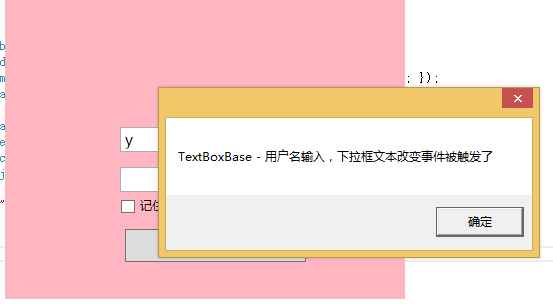
            MessageBox.Show("TextBoxBase - 用户名输入,下拉框文本改变事件被触发了");

        }

        private void cboTextBoxChangedEvent()

        {

            MessageBox.Show("TextBox - 用户名输入,下拉框文本改变事件被触发了");

        }

        /// <summary>

        /// 下拉框选中事件,执行方法

        /// </summary>

        private void cboSelectionChangedEvent()

        {

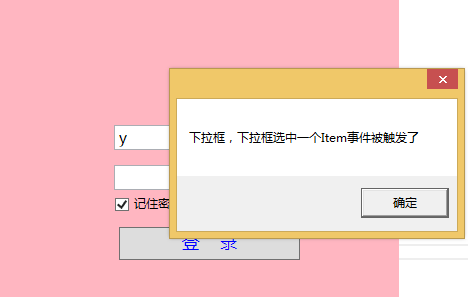
            MessageBox.Show("下拉框,下拉框选中一个Item事件被触发了");

        }

        /// <summary>

        /// 登陆按钮单机事件,执行方法

        /// </summary>

        private void btnClickEvent()

        {

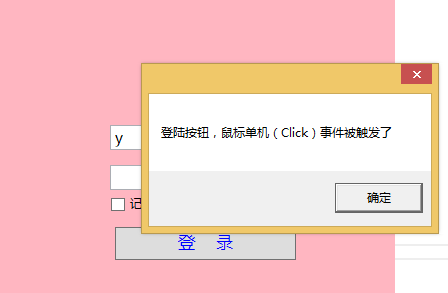
            MessageBox.Show("登陆按钮,鼠标单机(Click)事件被触发了");

        }

        /// <summary>

        /// 登陆按钮双击事件,执行方法

        /// </summary>

        private void btnMouseDoubleClickEvent()

        {

            MessageBox.Show("登陆按钮,鼠标双击事件被触发了");

        }

        /// <summary>

        /// 密码框获取焦点事件,执行方法

        /// </summary>

        private void pwdGotFocusEvent()

        {

            MessageBox.Show("密码框获取了焦点,事件被触发了");

        }

        /// <summary>

        /// 多选框,非选中状态事件,执行方法

        /// </summary>

        private void chkUncheckedEvent()

        {

            MessageBox.Show("多选框没选中,事件被触发了");

        }

        /// <summary>

        /// 多选框,选中状态事件,执行方法

        /// </summary>

        private void chkCheckedEvent()

        {

            MessageBox.Show("多选框选中,事件被触发了");

        }

        #endregion

        #region 成员

        private string[] listCollection;

        #endregion

        #region 属性

        public string[] ListCollection { get { return listCollection; } set { this.SetProperty(ref this.listCollection,value);} }

        #endregion

    }

}
MainViewModel.cs
ViewModel辅助类有ViewModelBase.cs,ViewModelCommand.cs 分别提供属性更改通知和Command命令接口ICommand实现类
using System;

using System.Collections.Generic;

using System.ComponentModel;

using System.Linq;

using System.Runtime.CompilerServices;

using System.Text;

namespace EventCommandDemo

{

    public class ViewModelBase : INotifyPropertyChanged

    {

        public event PropertyChangedEventHandler PropertyChanged;

        #region 支持.NET4.5

        protected bool SetProperty<T>(ref T storage, T value, [CallerMemberName] string propertyName = null)

        {

            if (object.Equals(storage, value)) { return false; }

            storage = value;

            this.OnPropertyChanged(propertyName);

            return true;

        }

        private void OnPropertyChanged([CallerMemberName] string propertyName = null)

        {

            var eventHandler = this.PropertyChanged;

            if (eventHandler != null)

            {

                eventHandler(this, new PropertyChangedEventArgs(propertyName));

            }

        }

        #endregion

        #region 支持.NET4.0

        //private static string GetProperyName(string methodName)

        //{

        //    if (methodName.StartsWith("get_") || methodName.StartsWith("set_") ||

        //        methodName.StartsWith("put_"))

        //    {

        //        return methodName.Substring("get_".Length);

        //    }

        //    throw new Exception(methodName + " not a method of Property");

        //}

        //protected bool SetProperty<T>(ref T storage, T value)

        //{

        //    if (object.Equals(storage, value)) { return false; }

        //    storage = value;

        //    string propertyName = GetProperyName(new System.Diagnostics.StackTrace(true).GetFrame(1).GetMethod().Name);

        //    this.OnPropertyChanged(propertyName);

        //    return true;

        //}

        //private void OnPropertyChanged(string propertyName)

        //{

        //    var eventHandler = this.PropertyChanged;

        //    if (eventHandler != null)

        //    {

        //        eventHandler(this, new PropertyChangedEventArgs(propertyName));

        //    }

        //}

        #endregion

    }

}
ViewModelBase.cs
using System;

using System.Collections.Generic;

using System.Linq;

using System.Text;

using System.Threading.Tasks;

namespace EventCommandDemo

{

   public class ViewModelCommand : System.Windows.Input.ICommand

    {

        private Action<Object> action;

        public Action<Object> ViewModelAction

        {

            get { return action; }

            set { action = value; }

        }

        public ViewModelCommand(Action<Object> act)

        {

            action = act;

        }

        public bool CanExecute(Object parameter)

        {

            return true;

        }

        public void Execute(Object parameter)

        {

            this.ViewModelAction(parameter);

        }

        public event EventHandler CanExecuteChanged

        {

            add { }

            remove { }

        }

    }

}
ViewModelCommand.cs
事件被绑定后触发相关事件界面:

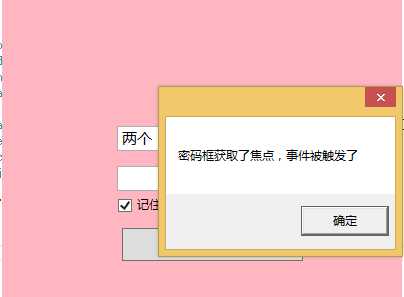
这里分享源码EventCommandDemo.zip文件下载地址,希望大家在技术的殿堂里都能快速成长。
源码下载:
本文作者夜神,首发博客园,转载请注明。
WPF Event 在 Command 中的应用初级篇,支持所有Event 展示松耦合设计的全部代码 - 解决TextBoxBase.TextChanged或者TextBox.TextChanged等类似事件绑定问题。的更多相关文章
- WPF编程,C#中对话框自动关闭的一种方法。
原文:WPF编程,C#中对话框自动关闭的一种方法. 版权声明:我不生产代码,我只是代码的搬运工. https://blog.csdn.net/qq_43307934/article/details/8 ...
- WPF中如何将ListViewItem双击事件绑定到Command
今天的博客将介绍如何实现ListViewItem双击事件绑定到ViewModel中的Command.实现方法借助了Style中的EventSetter,请看下面的详细代码: <ListView ...
- WPF MVVM 从Prism中学习设计模式之Event Aggregator 模式
Prism简介 Prism是由微软Patterns & Practices团队开发的项目,目的在于帮助开发人员构建松散耦合的.更灵活.更易于维护并且更易于测试的WPF应用或是Silverlig ...
- WPF自学入门(十一)WPF MVVM模式Command命令
在WPF自学入门(十)WPF MVVM简单介绍中的示例似乎运行起来没有什么问题,也可以进行更新.但是这并不是我们使用MVVM的正确方式.正如上一篇文章中在开始说的,MVVM的目的是为了最大限度地降低了 ...
- WPF自学入门(十一)WPF MVVM模式Command命令 WPF自学入门(十)WPF MVVM简单介绍
WPF自学入门(十一)WPF MVVM模式Command命令 在WPF自学入门(十)WPF MVVM简单介绍中的示例似乎运行起来没有什么问题,也可以进行更新.但是这并不是我们使用MVVM的正确方式 ...
- WPF EventSetter Handler Command
最近做一个工具,突然发现ListBox和ListView等列表控件的MouseDoubleClick事件有时候是获取不到当前双击的行对象数据的,比如这样写: <ListBox Grid.Row= ...
- WPF中MVVM模式下控件自有的事件绑定
1.原因 在WPF中单纯的命令绑定往往不能满足覆盖所有的事件,例如ComboBox的SelectionChanged事件,DataGrid的SelectionChanged事件等等,这时就可以用事件绑 ...
- 在WPF的MVVM框架中获取下拉选择列表中的选中项
文章概述: 本演示介绍怎样在WPF的MVVM框架中.通过数据绑定的方式获取下拉列表中的选中项.程序执行后的效果例如以下图所看到的: 相关下载(代码.屏幕录像):http://pan.baidu.com ...
- [转]WPF命令集 Command
在我们日常的应用程序操作中,经常要处理各种各样的命令和进行相关的事件处理,比如需要复制.粘贴文本框中的内容;上网查看网页时,可能需要返回上一网页查看相应内容;而当我们播放视频和多媒体时,我们可能要调节 ...
随机推荐
- c-windows-1
< Back 我使用的是<windows程序设计>和VS 首先看到的第一个代码是: /*----------------------------------------------- ...
- Can brain stimulation aid memory and brain health?
Can brain stimulation aid memory and brain health? Harvard Women’s Health Watch Image: Thinkstock Th ...
- Centos7 install Openstack - (第四节)添加计算服务(Nova)
Centos7 install Openstack - (第四节)添加计算服务(Nova) 我的blog地址:http://www.cnblogs.com/caoguo 该文根据openstack官方 ...
- 分段播放的flash播放器
效果: 视频分段好处显而易见,就是节省流量,因为看视频很多时候都不会看完,还有很多时候是跳着看的.还有的时候也许用户暂停视频出去买东西了... 本文不讨论flash rtmp直播流,例子用的是普通的h ...
- Flex Alert的匿名回调函数如何得到正确的this
Flex中经常使用Alert来弹出提示或确认窗口,为了方便省事,会直接用匿名函数作为回调,但有时如果要调用外部的this,你会发现匿名函数中的this无法指向外部父类,可以使用e.target获取pa ...
- django中时区设置
通过django中的models更新数据库的DateTimeField字段,发现有错误,于是更改了: TIME_ZONE = 'Asia/Shanghai' 结果,还是不正确,于是把: USE_TZ ...
- java中单例类
class Singleton { private static Singleton instance; private Singleton(){} public static ...
- def
a = 97,A = 65,z = 122,Z = 90 小写字母比大写字母整形数值高,upper->lower相差32 把小写字母转化成大写字母,将小写字母 - 32 1. typedef 数 ...
- 开发iOS应用程序需要的工具和编程技术
似乎每个iOS应用开发学习者都是从这篇文章开始写博客的,我也不例外,也从这里写吧,内容雷同,但绝对是原创.因为一直相信,通过自己的理解写出来,是掌握技术一个很好的途径. Xcode苹果最为优秀的集成开 ...
- Android开发教程 录音和播放
首先要了解andriod开发中andriod多媒体框架包含了什么,它包含了获取和编码多种音频格式的支持,因此你几耍轻松把音频合并到你的应用中,若设备支持,使用MediaRecorder APIs便可以 ...