
WPF EventSetter Handler Command
最近做一个工具,突然发现ListBox和ListView等列表控件的MouseDoubleClick事件有时候是获取不到当前双击的行对象数据的,比如这样写:
 <ListBox Grid.Row="" ItemsSource="{Binding DataList}"

                 MouseDoubleClick="ListBox_MouseDoubleClick"

                 SelectedItem="{Binding CurrentSelectItem}" Background="AliceBlue">

            <ListBox.ItemTemplate>

                <DataTemplate>

                    <DockPanel Height=""  Background="DarkGray" Width="">

                        <TextBox Text="{Binding Name}"  Height="" Width="" Background="DimGray"></TextBox>

                    </DockPanel>

                </DataTemplate>

            </ListBox.ItemTemplate>

        </ListBox>
 private void ListBox_MouseDoubleClick(object sender, MouseButtonEventArgs e)

        {

            ListBox listBox = sender as ListBox;

            if (listBox == null || listBox.SelectedItem == null)

            {

                MessageBox.Show("ListBox1双击对象为空...");

            }

            else

            {

                var model = listBox.SelectedItem as ListBoxModel;

                MessageBox.Show("当前对象为" + model.Name + "  " + model.Age);

            }

        }
双击行就会出现双击的对象为空。
上一篇文章中已经说明怎么解决这个问题:
http://www.cnblogs.com/ligl/p/5629802.html
使用Style中的EventSetter Handler这里就不在更多介绍。
但是今天想要解决的问题是怎么把EventSetter Handler使用Command绑定的方式把Handler事件进行解耦
要使用第三方类库CommandBehavior(AttachedCommandBehavior acb)进行解耦
代码如下:
引用 xmlns:localCommand="clr-namespace:AttachedCommandBehavior"
<Style x:Key="listBox2Item" TargetType="ListBoxItem">
<Style.Setters>
<Setter Property="localCommand:CommandBehavior.Event" Value="MouseDoubleClick"></Setter>
<Setter Property="localCommand:CommandBehavior.Command" Value="{Binding DataContext.DoubleCommand,RelativeSource={RelativeSource FindAncestor,AncestorType={x:Type local:WinTest}}}"></Setter>
<Setter Property="localCommand:CommandBehavior.CommandParameter" Value="{Binding RelativeSource={RelativeSource Self}}"></Setter>
</Style.Setters>
</Style>
ViewModel代码如下
  public class ViewModel : INotifyPropertyChanged

    {

        public ViewModel()

        {

            for (int i = ; i < ; i++)

            {

                DataList.Add(new ListBoxModel() { Name = "张三" + i.ToString(), Age =  + i });

                DataList2.Add(new ListBoxModel() { Name = "李四" + i.ToString(), Age =  + i });

            }

            doubleCommand = new SimpleCommand(obj =>

            {

                ListBoxItem listBoxItem = obj as ListBoxItem;

                if (listBoxItem != null)

                {

                    ListBoxModel model = listBoxItem.Content as ListBoxModel;

                    if (model != null)

                    {

                        CurrentSelectItem2 = model;

                        MessageBox.Show("Command Banding" + model.Name + "  " + model.Age);

                    }

                }

                //wpftest.ViewModel

                MessageBox.Show("Cmd...");

            }, o => true);

        }

        public SimpleCommand DoubleCommand

        {

            get

            {

                return doubleCommand;

            }

            set

            {

                doubleCommand = value;

                //OnPropertyChanged(new PropertyChangedEventArgs("DoubleCommand"));

            }

        }

        private ObservableCollection<ListBoxModel> dataList = new ObservableCollection<ListBoxModel>();

        private ObservableCollection<ListBoxModel> _dataList2 = new ObservableCollection<ListBoxModel>();

        private ListBoxModel _CurrentSelectItem;

        private ListBoxModel _CurrentSelectItem2;

        private SimpleCommand doubleCommand;

        public ObservableCollection<ListBoxModel> DataList

        {

            get

            {

                return dataList;

            }

            set

            {

                dataList = value;

            }

        }

        /// <summary>

        /// 当前双击的对象

        /// </summary>

        public ListBoxModel CurrentSelectItem

        {

            get

            {

                return _CurrentSelectItem;

            }

            set

            {

                _CurrentSelectItem = value;

                OnPropertyChanged(new PropertyChangedEventArgs("CurrentSelectItem"));

            }

        }

        /// <summary>

        /// ListBox2双击的对象

        /// </summary>

        public ListBoxModel CurrentSelectItem2

        {

            get

            {

                return _CurrentSelectItem2;

            }

            set

            {

                _CurrentSelectItem2 = value;

                OnPropertyChanged(new PropertyChangedEventArgs("CurrentSelectItem2"));

            }

        }

        public ObservableCollection<ListBoxModel> DataList2

        {

            get

            {

                return _dataList2;

            }

            set

            {

                _dataList2 = value;

            }

        }

        public event PropertyChangedEventHandler PropertyChanged;

        public void OnPropertyChanged(PropertyChangedEventArgs e)

        {

            if (PropertyChanged != null)

            {

                PropertyChanged(this, e);

            }

        }

    }
完整Xaml和CS代码如下:
<Window x:Class="WpfTest.WinTest"

        xmlns="http://schemas.microsoft.com/winfx/2006/xaml/presentation"

        xmlns:x="http://schemas.microsoft.com/winfx/2006/xaml"

        xmlns:d="http://schemas.microsoft.com/expression/blend/2008"

        xmlns:mc="http://schemas.openxmlformats.org/markup-compatibility/2006"

        xmlns:local="clr-namespace:WpfTest"

        xmlns:localCommand="clr-namespace:AttachedCommandBehavior"

        mc:Ignorable="d"

      Title="WinTest" Height="" Width="">

    <Window.Resources>

        <Style TargetType="TextBlock">

            <Style.Setters>

                <Setter Property="FontSize" Value=""></Setter>

            </Style.Setters>

        </Style>

        <Style  TargetType="Button">

            <Style.Setters>

                <Setter Property="localCommand:CommandBehavior.Event" Value="MouseDoubleClick"></Setter>

                <Setter Property="localCommand:CommandBehavior.Command" Value="{Binding DoubleCommand}"></Setter>

                <Setter Property="localCommand:CommandBehavior.CommandParameter" Value="{Binding Path=DataContext, RelativeSource={RelativeSource FindAncestor,AncestorType={x:Type local:WinTest}}}"></Setter>

            </Style.Setters>

        </Style>

        <Style x:Key="listBox2Item" TargetType="ListBoxItem">

            <Style.Setters>

                <Setter Property="localCommand:CommandBehavior.Event" Value="MouseDoubleClick"></Setter>

                <Setter Property="localCommand:CommandBehavior.Command" Value="{Binding DataContext.DoubleCommand,RelativeSource={RelativeSource FindAncestor,AncestorType={x:Type local:WinTest}}}"></Setter>

                <Setter Property="localCommand:CommandBehavior.CommandParameter" Value="{Binding RelativeSource={RelativeSource Self}}"></Setter>

            </Style.Setters>

        </Style>

        <!--<Style x:Key="listBox2Item" TargetType="ListBoxItem">

            <Style.Setters>

                <EventSetter Event="MouseDoubleClick" Handler="ListBox2_MouseDoubleClick"></EventSetter>

            </Style.Setters>

        </Style>-->

    </Window.Resources>

    <Grid>

        <Grid.RowDefinitions>

            <RowDefinition Height=""></RowDefinition>

            <RowDefinition></RowDefinition>

            <RowDefinition></RowDefinition>

        </Grid.RowDefinitions>

        <StackPanel Orientation="Horizontal">

            <StackPanel Margin="0 0 20 0">

                <TextBlock Text="{Binding CurrentSelectItem.Name}"></TextBlock>

                <TextBlock Text="{Binding CurrentSelectItem.Age}"></TextBlock>

            </StackPanel>

            <StackPanel>

                <TextBlock Text="{Binding CurrentSelectItem2.Name}">

                </TextBlock>

                <TextBlock Text="{Binding CurrentSelectItem2.Age}"></TextBlock>

            </StackPanel>

            <Button Content="DoubleClick" ></Button>

        </StackPanel>

        <ListBox Grid.Row="" ItemsSource="{Binding DataList}"

                 MouseDoubleClick="ListBox_MouseDoubleClick"

                 SelectedItem="{Binding CurrentSelectItem}" Background="AliceBlue">

            <ListBox.ItemTemplate>

                <DataTemplate>

                    <DockPanel Height=""  Background="DarkGray" Width="">

                        <TextBox Text="{Binding Name}"  Height="" Width="" Background="DimGray"></TextBox>

                    </DockPanel>

                </DataTemplate>

            </ListBox.ItemTemplate>

        </ListBox>

        <ListBox Grid.Row="" ItemsSource="{Binding DataList2}"

                 SelectedItem="{Binding CurrentSelectItem2}"

                 ItemContainerStyle="{StaticResource listBox2Item}"

                  Background="Silver">

            <ListBox.ItemTemplate>

                <DataTemplate>

                    <DockPanel Height=""  Background="DarkOrange" Width="">

                        <TextBox Text="{Binding Name}"  Height="" Width="" Background="DarkCyan"></TextBox>

                    </DockPanel>

                </DataTemplate>

            </ListBox.ItemTemplate>

        </ListBox>

    </Grid>

</Window>
using AttachedCommandBehavior;

using System;

using System.Collections.Generic;

using System.Collections.ObjectModel;

using System.ComponentModel;

using System.Linq;

using System.Text;

using System.Windows;

using System.Windows.Controls;

using System.Windows.Data;

using System.Windows.Documents;

using System.Windows.Input;

using System.Windows.Media;

using System.Windows.Media.Imaging;

using System.Windows.Shapes;

namespace WpfTest

{

    /// <summary>

    /// WinTest.xaml 的交互逻辑

    /// </summary>

    public partial class WinTest : Window

    {

        ViewModel VModel = new ViewModel();

        public WinTest()

        {

            InitializeComponent();

            this.DataContext = VModel;

        }

        private void ListBox_MouseDoubleClick(object sender, MouseButtonEventArgs e)

        {

            ListBox listBox = sender as ListBox;

            if (listBox == null || listBox.SelectedItem == null)

            {

                MessageBox.Show("ListBox1双击对象为空...");

            }

            else

            {

                var model = listBox.SelectedItem as ListBoxModel;

                MessageBox.Show("当前对象为" + model.Name + "  " + model.Age);

            }

        }

        private void ListBox2_MouseDoubleClick(object sender, MouseButtonEventArgs e)

        {

            ListBoxItem listBoxItem = sender as ListBoxItem;

            if (listBoxItem == null)

            {

                MessageBox.Show("ListBox2双击对象为空...");

            }

            else

            {

                ListBoxModel model = listBoxItem.Content as ListBoxModel;

                if (model != null)

                {

                    VModel.CurrentSelectItem2 = listBoxItem.Content as ListBoxModel;

                    MessageBox.Show(model.Name + "  " + model.Age);

                }

            }

        }

    }

    public class ViewModel : INotifyPropertyChanged

    {

        public ViewModel()

        {

            for (int i = ; i < ; i++)

            {

                DataList.Add(new ListBoxModel() { Name = "张三" + i.ToString(), Age =  + i });

                DataList2.Add(new ListBoxModel() { Name = "李四" + i.ToString(), Age =  + i });

            }

            doubleCommand = new SimpleCommand(obj =>

            {

                ListBoxItem listBoxItem = obj as ListBoxItem;

                if (listBoxItem != null)

                {

                    ListBoxModel model = listBoxItem.Content as ListBoxModel;

                    if (model != null)

                    {

                        CurrentSelectItem2 = model;

                        MessageBox.Show("Command Banding" + model.Name + "  " + model.Age);

                    }

                }

                //wpftest.ViewModel

                MessageBox.Show("Cmd...");

            }, o => true);

        }

        public SimpleCommand DoubleCommand

        {

            get

            {

                return doubleCommand;

            }

            set

            {

                doubleCommand = value;

                //OnPropertyChanged(new PropertyChangedEventArgs("DoubleCommand"));

            }

        }

        private ObservableCollection<ListBoxModel> dataList = new ObservableCollection<ListBoxModel>();

        private ObservableCollection<ListBoxModel> _dataList2 = new ObservableCollection<ListBoxModel>();

        private ListBoxModel _CurrentSelectItem;

        private ListBoxModel _CurrentSelectItem2;

        private SimpleCommand doubleCommand;

        public ObservableCollection<ListBoxModel> DataList

        {

            get

            {

                return dataList;

            }

            set

            {

                dataList = value;

            }

        }

        /// <summary>

        /// 当前双击的对象

        /// </summary>

        public ListBoxModel CurrentSelectItem

        {

            get

            {

                return _CurrentSelectItem;

            }

            set

            {

                _CurrentSelectItem = value;

                OnPropertyChanged(new PropertyChangedEventArgs("CurrentSelectItem"));

            }

        }

        /// <summary>

        /// ListBox2双击的对象

        /// </summary>

        public ListBoxModel CurrentSelectItem2

        {

            get

            {

                return _CurrentSelectItem2;

            }

            set

            {

                _CurrentSelectItem2 = value;

                OnPropertyChanged(new PropertyChangedEventArgs("CurrentSelectItem2"));

            }

        }

        public ObservableCollection<ListBoxModel> DataList2

        {

            get

            {

                return _dataList2;

            }

            set

            {

                _dataList2 = value;

            }

        }

        public event PropertyChangedEventHandler PropertyChanged;

        public void OnPropertyChanged(PropertyChangedEventArgs e)

        {

            if (PropertyChanged != null)

            {

                PropertyChanged(this, e);

            }

        }

    }

    public class ListBoxModel : INotifyPropertyChanged

    {

        /// <summary>

        /// 姓名

        /// </summary>

        private string _Name;

        /// <summary>

        /// 年龄

        /// </summary>

        private int _Age;

        public string Name

        {

            get

            {

                return _Name;

            }

            set

            {

                _Name = value;

                OnPropertyChanged(new PropertyChangedEventArgs("Name"));

            }

        }

        public int Age

        {

            get

            {

                return _Age;

            }

            set

            {

                _Age = value;

                OnPropertyChanged(new PropertyChangedEventArgs("Age"));

            }

        }

        public void OnPropertyChanged(PropertyChangedEventArgs e)

        {

            if (PropertyChanged != null)

            {

                PropertyChanged(this, e);

            }

        }

        public event PropertyChangedEventHandler PropertyChanged;

    }

}
<Setter Property="localCommand:CommandBehavior.Command" Value="{Binding DataContext.DoubleCommand,RelativeSource={RelativeSource FindAncestor,AncestorType={x:Type local:WinTest}}}"></Setter>
关于这个Command的Value绑定要使用FindAncestor进行查找才能解决,不然是绑定不到ViewModel中的DoubleCommand
发个图看看: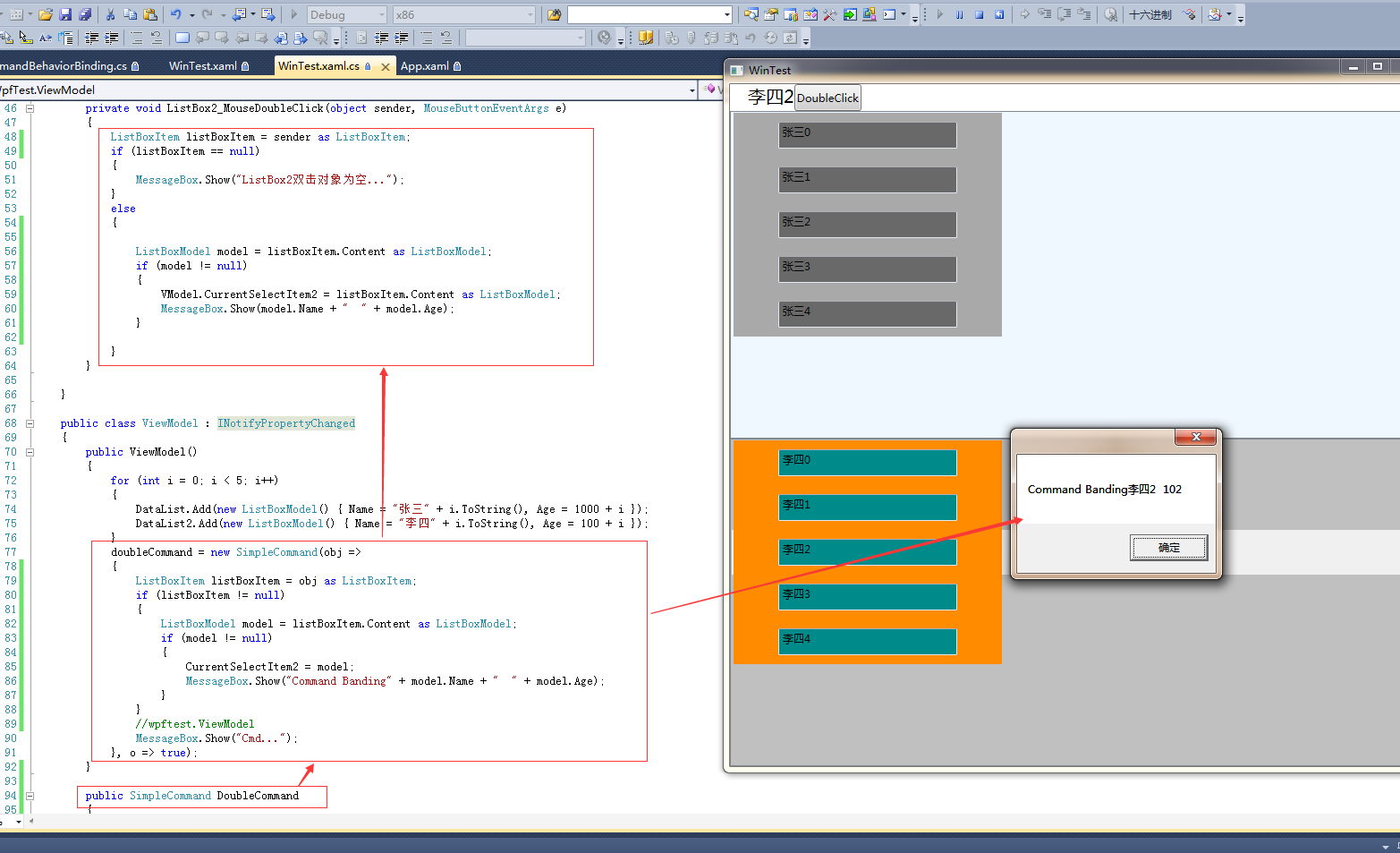
关于CommandBehavior代码可以在
http://download.csdn.net/download/doncle000/7029327 下载使用
国外博客http://marlongrech.wordpress.com/2008/12/04/attachedcommandbehavior-aka-acb/
对于SimpleCommad.cs的源文件我增加了两个参数的构造函数:
 public SimpleCommand(Action<object> execute, Predicate<object> canExecute)

        {

            if (execute == null)

                throw new ArgumentNullException("execute");

            CanExecuteDelegate = canExecute;

            ExecuteDelegate = execute;

        }
WPF EventSetter Handler Command的更多相关文章
- WPF DataTomplate中Command无效
问题:在DataTomplate中添加一个Button,Button添加Command,但是Command生效. 原因:ItemTemplate的DataContext指代不明,需要改为父类的Data ...
- WPF自学入门(十一)WPF MVVM模式Command命令 WPF自学入门(十)WPF MVVM简单介绍
WPF自学入门(十一)WPF MVVM模式Command命令 在WPF自学入门(十)WPF MVVM简单介绍中的示例似乎运行起来没有什么问题,也可以进行更新.但是这并不是我们使用MVVM的正确方式 ...
- WPF - EventSetter
WPF中添加Event 1. ListBox中添加Event <ListBox x:Name="itemsControl" BorderThickness="0&q ...
- WPF Event 在 Command 中的应用初级篇,支持所有Event 展示松耦合设计的全部代码 - 解决TextBoxBase.TextChanged或者TextBox.TextChanged等类似事件绑定问题。
做过WPF开发的人,都知道做MVVM架构,最麻烦的是Event的绑定,因为Event是不能被绑定的,同时现有的条件下,命令是无法替代Event.而在开发过程中无法避免Event事件,这样MVVM的架构 ...
- WPF自学入门(十一)WPF MVVM模式Command命令
在WPF自学入门(十)WPF MVVM简单介绍中的示例似乎运行起来没有什么问题,也可以进行更新.但是这并不是我们使用MVVM的正确方式.正如上一篇文章中在开始说的,MVVM的目的是为了最大限度地降低了 ...
- WPF命令(Command)介绍、命令和数据绑定集成应用
要开始使用命令,必须做三件事: 一:定义一个命令 二:定义命令的实现 三:为命令创建一个触发器 WPF中命令系统的基础是一个相对简单的ICommand的接口,代码如下: public interfac ...
- [转]WPF命令集 Command
在我们日常的应用程序操作中,经常要处理各种各样的命令和进行相关的事件处理,比如需要复制.粘贴文本框中的内容;上网查看网页时,可能需要返回上一网页查看相应内容;而当我们播放视频和多媒体时,我们可能要调节 ...
- WPF中的Command事件绑定
在项目中使用Command绑定能够使我们的代码更加的符合MVVM模式.不了解的同学可能不清楚,只有继承自ButtonBase类的元素才可以直接绑定Command(Button.CheckBox.Rad ...
- WPF ListBoxItem DataTempldate command 执行问题
今天用到MVVM,在listboxItem中做command处理.因为是要获取数据,修改ListBox模板,但是发现command无法正确执行,写在Item中可以正确执行. 网上也遇到类似问题,但是没 ...
随机推荐
- 每日Scrum(3)
冲刺第三天,团队重心还是在于把软件变得更加的高大上加上狂拽炫酷...内部功能呈现的多元化和吸引力是我们追求的目标: 问题出现的毫无疑问是创意,借鉴其他的类似软件和好的创意是最近的工作重心.
- Java Gradle入门指南之依赖管理(添加依赖、仓库、版本冲突)
开发任何软件,如何管理依赖是一道绕不过去的坎,软件开发过程中,我们往往会使用这样那样的第三方库,这个时候,一个好的依赖管理就显得尤为重要了.作为一个自动构建工作,Gradle对依赖管理有着很好 ...
- go sync.Mutex 设计思想与演化过程 (一)
go语言在云计算时代将会如日中天,还抱着.NET不放的人将会被淘汰.学习go语言和.NET完全不一样,它有非常简单的runtime 和 类库.最好的办法就是将整个源代码读一遍,这是我见过最简洁的系统类 ...
- HTML的基本代码第一课
打开DREAMWEAVER,新建HTML,如下图: 其中body的属性: bgcolor---页面背景颜色 text--文字颜色 topmargin--上页边距 leftmargin--左叶边距 ri ...
- SQL Server开发接口生成方法
为提高开发效率,生成固定格式的接口是必须的,以下以提供新增/修改/删除/读取接口为例: 以常见的表结构为例,特殊表结构可自己尝试去调整方法 主要通过系视图 sys.columns生成方法:为包含列的对 ...
- CentOS6.5搭建LNMP
1:查看环境: ? 1 2 [root@10-4-14-168 html]# cat /etc/redhat-release CentOS release 6.5 (Final) 2:关掉防火墙 ...
- 留念 C语言第一课简单的计算器制作
留念 C语言第一课简单的计算器制作 学C语言这么久了. /* 留念 C语言第一课简单的计算器制作 */ #include<stdio.h> #include<stdlib.h ...
- Hyper-V架构与VMware ESXi的差异
微软的Hyper-V与VMware的ESXi在架构上有众多不同,然而很多虚拟化管理员并未意识到这些差异.而且很多管理员同样对Hyper-V是在主机操作系统上运行感到困惑. 有关微软Hyper-V的一个 ...
- c++11 新特性之lambda表达式
写过c#之后,觉得c#里的lambda表达式和delegate配合使用,这样的机制用起来非常爽.c++11也有了lambda表达式,形式上有细小的差异.形式如下: c#:(input paramete ...
- Microsoft.Bcl.Build 1.0.10 稳定版发布
Microsoft.Bcl.Build 1.0.10 稳定版发布 解决了之前 1.0.8 在未下载相应的Nuget Package 的情况下项目无法加载的情况 但由于 Microsoft.Net.Ht ...