
网页热力图 heatmap js
HBuilder +js 实现网页热力图
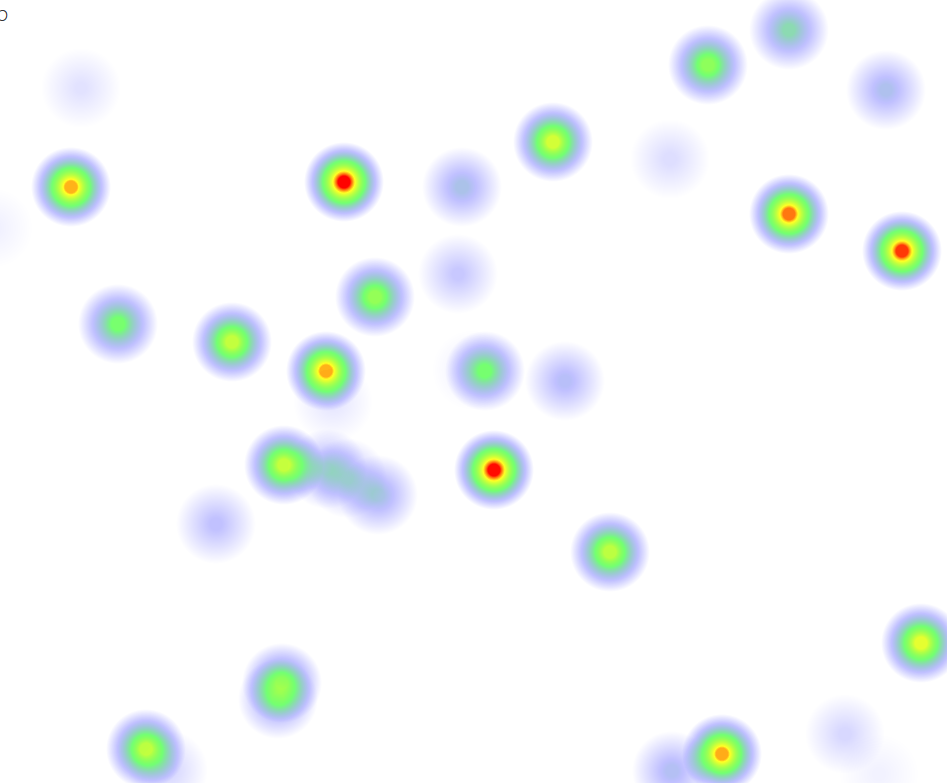
废话不多说,上代码
 <!DOCTYPE html>

 <html>

   <head>

     <title>111</title>

     <meta name="viewport" content="width=device-width, initial-scale=1.0">

     <meta charset="utf-8" />

     <link rel="stylesheet" href="css/commons.css" />

     <link rel="stylesheet" href="css/landingpage.css" />

   </head>

   <body>

  <div id="out"></div>

 <section class="example">

         <h2>A Quick Example</h2>

         With only a few lines of code you can create your own interactive web heatmap:<br style="clear:both" />

         <div class="example-1">heatmap </div>

 </section>

 <script src="js/heatmap.min.js"></script>

   <script>

 var writer = document.getElementById("out");

 function geoFindMe() {

   var output = document.getElementById("out");

   if (!navigator.geolocation){

     output.innerHTML = "<p>您的浏览器不支持地理位置</p>";

     return;

   }

   function success(position) {

     var latitude  = position.coords.latitude;

     var longitude = position.coords.longitude;

     output.innerHTML = '<p><Latitude is ' + latitude + '° <br>Longitude is ' + longitude + '°</p>';

     var img = new Image();

     img.src = "http://maps.googleapis.com/maps/api/staticmap?center=" + latitude + "," + longitude + "&zoom=13&size=300x300&sensor=false";

     output.appendChild(img);

   };

   function error() {

     output.innerHTML = "无法获取您的位置";

   };

   output.innerHTML = "<p>Locating…</p>";

   navigator.geolocation.getCurrentPosition(success, error);

 }

   </script>

     <script>

     // @TODO:

     // clean up.

     window.onload = function() {

         geoFindMe();

         var ex1el = document.querySelector('.example-1');

         var heatmap3 = h337.create({

           container: ex1el

         });

          var refreshHeatmap1 = function() {

           var data1 = {};

           var datap1 = [];

           var max1 = 0;

           var w = 1024;

           var h = 1024;

           var l = 50;

           while(l--) {

             var val = Math.random()*10;

             max1 = Math.max(max1, val);

             var d = {

               x: Math.floor(Math.random()*w),

               y: Math.floor(Math.random()*h),

               value: val

             };

             datap1.push(d);

           }

           data1["max"] = max1;

           data1["data"] = datap1;

           heatmap3.setData(data1);

         };

         refreshHeatmap1();

         ex1el.onclick = function() {

           refreshHeatmap1();

         };

 };

   </script>

 <div ></div>

 </body>

 </html>
代码中用到的 heatmap.min.js 请搜索 heatmap 下载
https://www.patrick-wied.at/static/heatmapjs/
/*
* heatmap.js v2.0.0 | JavaScript Heatmap Library
*
* Copyright 2008-2014 Patrick Wied <heatmapjs@patrick-wied.at> - All rights reserved.
* Dual licensed under MIT and Beerware license
*
* :: 2014-08-05 01:42
*/
网页热力图 heatmap js的更多相关文章
- 热力图heatmap.js使用中的思路解析
官网: https://www.patrick-wied.at/static/heatmapjs/ 需求:使用heatmap.js制作热力图,反映人群分布情况 问题:热力图需要的数据:坐标 + 人数 ...
- 热力图实现-heatmap.js 代码示例
Heatmap.js – 最强大的 Web 动态热图 最新公司项目需要用到热力图,在百度上搜下,了解到heatmap.js这款神器.然后搜了下例子,却很难搜到马上出效果的例子,特此写一篇heatma ...
- 热力图 vue 项目中使用热力图插件 “heatmap.js”(保姆式教程)
我现在写的这项目是用CDN引入 heatmap.js, 可根据自己项目情况使用哪种方式引入插件. 官网地址 "https://www.patrick-wied.at/static/heatm ...
- Heatmap.js v2.0 – 最强大的 Web 动态热图
Heatmap 是用来呈现一定区域内的统计度量,最常见的网站访问热力图就是以特殊高亮的形式显示访客热衷的页面区域和访客所在的地理区域的图示.Heatmap.js 这个 JavaScript 库可以实现 ...
- 【JS】heatmap.js v1.0 到 v2.0,详细总结一下:)
前段时间,项目要开发热力图插件,研究了heatmap.js,打算好好总结一下. 本文主要有以下几部分内容: 部分源码理解 如何迁移到v2.0 v2.0官方文档译文 关于heatmap.js介绍,请看这 ...
- 向网页中写入js和css
向网页中写入js和css 本函数由前辈所写 loadFile: function (url, ftype) { var fileref; if (ftype == "js") { ...
- 手机端网页返回顶部js代码
<!DOCTYPE html> <html> <head> <meta http-equiv="Content-Type" cont ...
- 热力图heatmap使用
参考:https://www.cnblogs.com/julinhuitianxia/p/7755246.html 1.首先到echarts官网下载应用实例:http://echarts.baidu. ...
- 网页上的JS call Unity3d里的function——SendMessage
注意: sendmessage只可以从网页发信息到unity游戏里,但是没有返回值 只可以发布三种类型的data,不可以其他复杂的强类型 发信息的时不会做编译检测 SendMessage Workfl ...
随机推荐
- spring错误<context:property-placeholder>:Could not resolve placeholder XXX in string value XXX
spring同时集成redis和mongodb时遇到多个资源文件加载的问题 这两天平台中集成redis和mongodb遇到一个问题 单独集成redis和单独集成mongodb时都可以正常启动程序,但是 ...
- How to get the date N days ago in Python
from datetime import datetime, timedelta N = 2 date_N_days_ago = datetime.now() - timedelta(days=N) ...
- 你可能不知道的 30 个 Python 语言的特点技巧
列表按难度排序,常用的语言特征和技巧放在前面. 1.1 分拆 >>> a, b, c = 1, 2, 3>>> a, b, c(1, 2, 3)> ...
- 开一个帖子,等有时间了写写如何用shapelib创建点线面等shp图层
开一个帖子,等有时间了写写如何用shapelib创建点线面等shp图层 C#操作shapelib的实例 http://files.cnblogs.com/yuxuetaoxp/Shapelib--D ...
- ELK+redis集群搭建
ELK版本: logstash-1.4.2 kibana-4.0.3 redis-3.0.0 elasticsearch-1.4.4(最低版本) 分别启动命令: redis-server redis. ...
- 安装 Python
Python安装.配置图文详解 一. Python简介: Python在Linux.windows.Mac os等操作系统下都有相应的版本,不管在什么操作系统下,它都能够正常工作.除非使用平台相关功能 ...
- Unity小厨房之-----背后视角摄像机
相信每一个接触过Unity的人,应该都认识Unity引擎自带的那个水管工,也一定知道那个小人模型上挂着3个脚本控制着小人的一切,今天我就来说一下关于Unity背后视角摄像机的实现,当然方法并不唯一,这 ...
- 将你的代码上传 Bintray 仓库
在 Android Studio 中,我们通常可以利用 gradle 来导入别人写的第三方库,通常可以简单得使用一句话就能搞定整个导包过程, 比如: compile 'net.cpacm.moneyt ...
- tip浮动提示框
今天工作中碰到要弹出tip浮动提示框,如服务器控件的ToolTip属性. 通过GOOGLE搜到了一个很好用的tip浮动提示框:TipTip jQuery Plugin. 例子如下: <!DOCT ...
- 【PL/SQL练习】复合变量: 可以一次传递多个值到变量中。
1.案例: 通过record类型处理一行多列的数据 复合变量--record 记录类型record:在一个变量中可以存储多个区域,每个区域可以是一个标量.记录或table (用于处理一行多列的信息) ...