
[转]How do I use software from a PPA
[转]How do I use software from a PPA?
https://launchpad.net/~mc3man/+archive/ubuntu/trusty-media
To start installing and using software from a Personal Package Archive, you first need to tell Ubuntu where to find the PPA.
Important: The contents of Personal Package Archives are not checked or monitored. You install software from them at your own risk.
If you're using the most recent version of Ubuntu (or any version from Ubuntu 9.10 onwards), you can add a PPA to your system with a single line in your terminal.
Step 1: On the PPA's overview page, look for the heading that reads Adding this PPA to your system. Make a note of the PPA's location, which looks like:
ppa:gwibber-daily/ppa
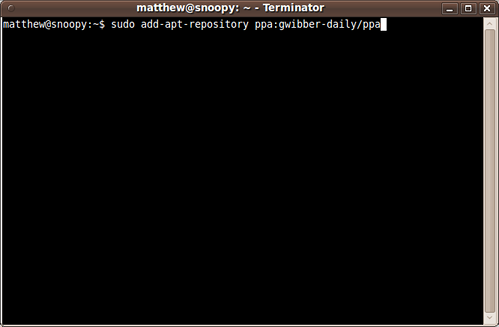
Step 2: Open a terminal and enter:
sudo add-apt-repository ppa:user/ppa-name
Replace ppa:user/ppa-name with the PPA's location that you noted above.
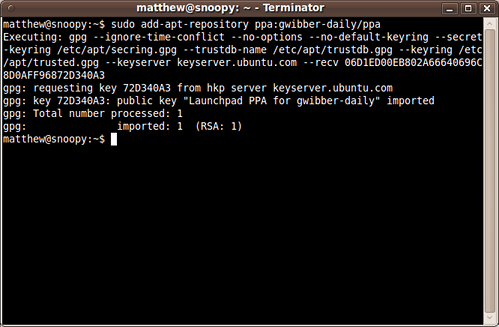
Your system will now fetch the PPA's key. This enables your Ubuntu system to verify that the packages in the PPA have not been interfered with since they were built.
Step 3: Now, as a one-off, you should tell your system to pull down the latest list of software from each archive it knows about, including the PPA you just added:
sudo apt-get update
Now you're ready to start installing software from the PPA!
Read more about Personal Package Archives in our help wiki.
[转]How do I use software from a PPA的更多相关文章
- Ros集成开发环境配置
参考资料: http://blog.csdn.net/yangziluomu/article/details/50848357 ROS使用IDE Eclipse http://blog.csdn.ne ...
- Ubuntu 之 Personal Package Archive (PPA)
How do I use software from a PPA? To start installing and using software from a Personal Package Arc ...
- What is the PPA and How to do with it ?
Part of the appeal of Ubuntu is its six-month release cycle. Every six months a new version of the f ...
- 如何在Ubuntu 13.04中升级到 GNOME 3.8
如何在Ubuntu 13.04中升级到 GNOME 3.8 添加 GNOME 3 PPA(Personal Package Archives) 在你进一步浏览之前,确认你正在运行的是Ubuntu 13 ...
- 【原】Ubuntu13.04安装、卸载Gnome3.8
添加 GNOME 3 PPA(Personal Package Archives) 我们先给Ubuntu的Software Sources增加GNOME 3 PPA.这可以不用命令行就做到,但出于简单 ...
- How to install Eclipse?
http://askubuntu.com/questions/26632/how-to-install-eclipse How to install Eclipse? up vote113down v ...
- Linux--add the PPA to your system
Add a PPA to your system with a single line in your terminal step1:on the PPA's overview page,look f ...
- Chart: Who pays the most in Seattle for software engineers
http://www.geekwire.com/2012/chart-pays-seattle-software-engineers/ Chart: Who pays the most in Seat ...
- CentOS / Redhat : Configure CentOS as a Software Router with two interfaces
CentOS / Redhat : Configure CentOS as a Software Router with two interfaces Linux can be easily co ...
随机推荐
- C/C++中产生随机数
可以使用srand()函数和rand()函数来产生随机数,其中srand()用来初始化随机数种子,rand()用来产生随机数.因为默认情况下随机数种子为1,而相同的随机数种子产生的随机数是一样的,失去 ...
- 使用NPOI操纵Excle,并输入到客户端
NPOI下载:http://files.cnblogs.com/files/gosky/NPOI_2.2.0.0.zip 导入以下5个引用: ICSharpCode.SharpZipLib.dll N ...
- 由后序遍历结果构造二叉查找树 && 二叉查找树链表化
二叉查找树通俗说就是左孩子比父亲小,右孩子比父亲大.构造这么一个树,树嘛,递归即可. 例如一棵树后序遍历是这样(下图的树):2 9 8 16 15 10 25 38 45 42 30 20.最后的20 ...
- Android中SearchView修改字体颜色
首先获取searchView控件,比如在actionbar上获取: SearchView searchView = (SearchView) menu.findItem(R.id.action_sea ...
- POJ C++程序设计 编程作业—类和对象 编程题 #2
编程题 #2 来源: POJ (Coursera声明:在POJ上完成的习题将不会计入Coursera的最后成绩.) 注意: 总时间限制: 1000ms 内存限制: 65536kB 描述 下面程序的输出 ...
- [leetcode]_Climbing Stairs
我敢保证这道题是在今早蹲厕所的时候突然冒出的解法.第一次接触DP题,我好伟大啊啊啊~ 题目:一个N阶的梯子,一次能够走1步或者2步,问有多少种走法. 解法:原始DP问题. 思路: 1.if N == ...
- SQL中如何检查死锁
SQL中如何检查死锁 编写人:CC阿爸 2014-6-15 在日常SQL数据库的操作中,SQL偶尔会出现表被死锁的问题.比如: 在执行事务时,突然中止事务.系统肯定会锁表. 大批量数据操作时,由于网络 ...
- 为php安装memcached扩展连接memcached服务器
首先必须完成必要的软件安装,memcached是php连接memcached服务器的php扩展 以前有个叫memcache也是php连接memcached服务器的扩展 php的memcache和mem ...
- 关于MySQL建表
规范一些常用字段. password:varchar name:varchar 时间存储全部存储时间戳,用bigint(20),拒绝使用 MySQL数据类型 mysql数据类型 含义 date 3字 ...
- Json 调用 天气API 实例
百度了一下,找了点别人的方法改进了一下. 获取天气网址:http://www.weather.com.cn/html/weather/101210701.shtml这里是温州的,当然其他城市自己搜索一 ...