
(转) Quick Guide to Build a Recommendation Engine in Python
本文转自:http://www.analyticsvidhya.com/blog/2016/06/quick-guide-build-recommendation-engine-python/
Introduction
This could help you in building your first project!
Be it a fresher or an experienced professional in data science, doing voluntary projects always adds to one’s candidature. My sole reason behind writing this article is to get your started with recommendation systems so that you can build one. If you struggle to get open data, write to me in comments.
Recommendation engines are nothing but an automated form of a “shop counter guy”. You ask him for a product. Not only he shows that product, but also the related ones which you could buy. They are well trained in cross selling and up selling. So, does our recommendation engines.
The ability of these engines to recommend personalized content, based on past behavior is incredible. It brings customer delight and gives them a reason to keep returning to the website.
In this post, I will cover the fundamentals of creating a recommendation system using GraphLab in Python. We will get some intuition into how recommendation work and create basic popularity model and a collaborative filtering model.

Topics Covered
- Type of Recommendation Engines
- The MovieLens DataSet
- A simple popularity model
- A Collaborative Filtering Model
- Evaluating Recommendation Engines
1. Type of Recommendation Engines
Before taking a look at the different types of recommendation engines, lets take a step back and see if we can make some intuitive recommendations. Consider the following cases:
Case 1: Recommend the most popular items
A simple approach could be to recommend the items which are liked by most number of users. This is a blazing fast and dirty approach and thus has a major drawback. The things is, there is no personalization involved with this approach.
Basically the most popular items would be same for each user since popularity is defined on the entire user pool. So everybody will see the same results. It sounds like, ‘a website recommends you to buy microwave just because it’s been liked by other users and doesn’t care if you are even interested in buying or not’.
Surprisingly, such approach still works in places like news portals. Whenever you login to say bbcnews, you’ll see a column of “Popular News” which is subdivided into sections and the most read articles of each sections are displayed. This approach can work in this case because:
- There is division by section so user can look at the section of his interest.
- At a time there are only a few hot topics and there is a high chance that a user wants to read the news which is being read by most others
Case 2: Using a classifier to make recommendation
We already know lots of classification algorithms. Let’s see how we can use the same technique to make recommendations. Classifiers are parametric solutions so we just need to define some parameters (features) of the user and the item. The outcome can be 1 if the user likes it or 0 otherwise. This might work out in some cases because of following advantages:
- Incorporates personalization
- It can work even if the user’s past history is short or not available
But has some major drawbacks as well because of which it is not used much in practice:
- The features might actually not be available or even if they are, they may not be sufficient to make a good classifier
- As the number of users and items grow, making a good classifier will become exponentially difficult
Case 3: Recommendation Algorithms
Now lets come to the special class of algorithms which are tailor-made for solving the recommendation problem. There are typically two types of algorithms – Content Based and Collaborative Filtering. You should refer to our previous article to get a complete sense of how they work. I’ll give a short recap here.
- Content based algorithms:
- Idea: If you like an item then you will also like a “similar” item
- Based on similarity of the items being recommended
- It generally works well when its easy to determine the context/properties of each item. For instance when we are recommending the same kind of item like a movie recommendation or song recommendation.
- Collaborative filtering algorithms:
- Idea: If a person A likes item 1, 2, 3 and B like 2,3,4 then they have similar interests and A should like item 4 and B should like item 1.
- This algorithm is entirely based on the past behavior and not on the context. This makes it one of the most commonly used algorithm as it is not dependent on any additional information.
- For instance: product recommendations by e-commerce player like Amazon and merchant recommendations by banks like American Express.
- Further, there are several types of collaborative filtering algorithms :
- User-User Collaborative filtering: Here we find look alike customers (based on similarity) and offer products which first customer’s look alike has chosen in past. This algorithm is very effective but takes a lot of time and resources. It requires to compute every customer pair information which takes time. Therefore, for big base platforms, this algorithm is hard to implement without a very strong parallelizable system.
- Item-Item Collaborative filtering: It is quite similar to previous algorithm, but instead of finding customer look alike, we try finding item look alike. Once we have item look alike matrix, we can easily recommend alike items to customer who have purchased any item from the store. This algorithm is far less resource consuming than user-user collaborative filtering. Hence, for a new customer the algorithm takes far lesser time than user-user collaborate as we don’t need all similarity scores between customers. And with fixed number of products, product-product look alike matrix is fixed over time.
- Other simpler algorithms: There are other approaches like market basket analysis, which generally do not have high predictive power than the algorithms described above.
2. The MovieLens DataSet
We will be using the MovieLens dataset for this purpose. It has been collected by the GroupLens Research Project at the University of Minnesota. MovieLens 100K dataset can be downloaded from here. It consists of:
- 100,000 ratings (1-5) from 943 users on 1682 movies.
- Each user has rated at least 20 movies.
- Simple demographic info for the users (age, gender, occupation, zip)
- Genre information of movies
Lets load this data into Python. There are many files in the ml-100k.zip file which we can use. Lets load the three most importance files to get a sense of the data. I also recommend you to read thereadme document which gives a lot of information about the difference files.
import pandas as pd

# pass in column names for each CSV and read them using pandas.

# Column names available in the readme file

#Reading users file:

u_cols = ['user_id', 'age', 'sex', 'occupation', 'zip_code']

users = pd.read_csv('ml-100k/u.user', sep='|', names=u_cols,

 encoding='latin-1')

#Reading ratings file:

r_cols = ['user_id', 'movie_id', 'rating', 'unix_timestamp']

ratings = pd.read_csv('ml-100k/u.data', sep='\t', names=r_cols,

 encoding='latin-1')

#Reading items file:

i_cols = ['movie id', 'movie title' ,'release date','video release date', 'IMDb URL', 'unknown', 'Action', 'Adventure',

 'Animation', 'Children\'s', 'Comedy', 'Crime', 'Documentary', 'Drama', 'Fantasy',

 'Film-Noir', 'Horror', 'Musical', 'Mystery', 'Romance', 'Sci-Fi', 'Thriller', 'War', 'Western']

items = pd.read_csv('ml-100k/u.item', sep='|', names=i_cols,

 encoding='latin-1')
Now lets take a peak into the content of each file to understand them better.
Users
print users.shape

users.head()
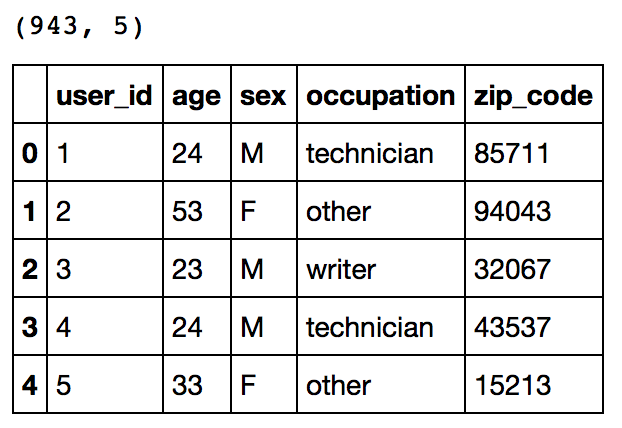
This reconfirms that there are 943 users and we have 5 features for each namely their unique ID, age, gender, occupation and the zip code they are living in.
Ratings
print ratings.shape

ratings.head()
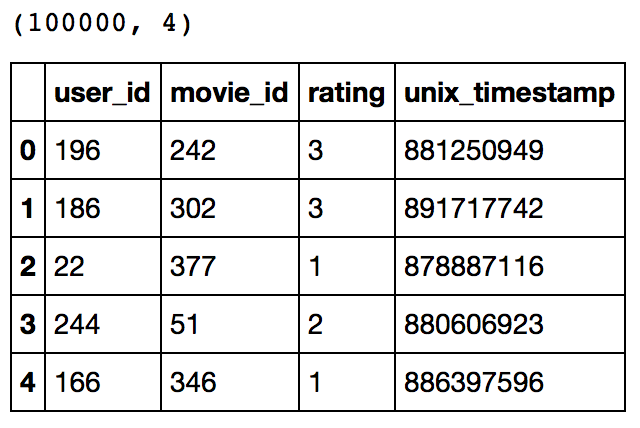
This confirms that there are 100K ratings for different user and movie combinations. Also notice that each rating has a timestamp associated with it.
Items
print items.shape

items.head()
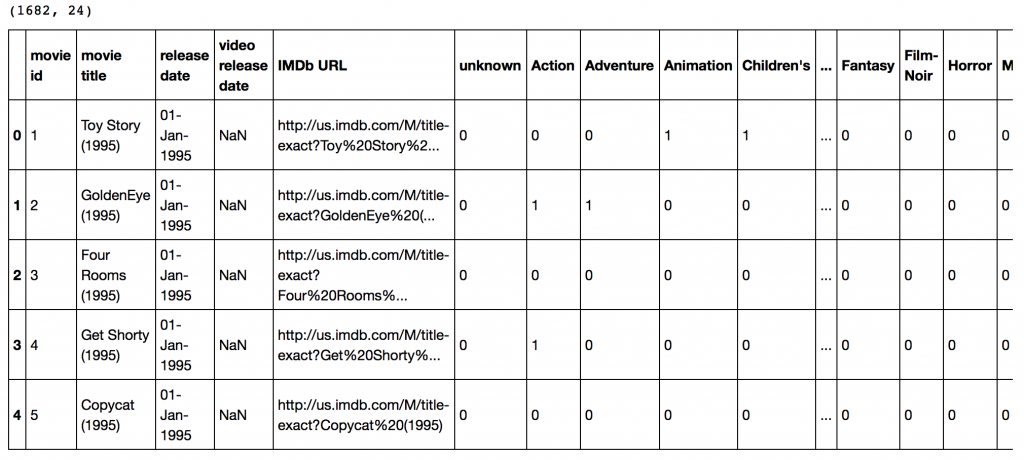 This dataset contains attributes of the 1682 movies. There are 24 columns out of which 19 specify the genre of a particular movie. The last 19 columns are for each genre and a value of 1 denotes movie belongs to that genre and 0 otherwise.
Now we have to divide the ratings data set into test and train data for making models. Luckily GroupLens provides pre-divided data wherein the test data has 10 ratings for each user, i.e. 9430 rows in total. Lets load that:
r_cols = ['user_id', 'movie_id', 'rating', 'unix_timestamp']

ratings_base = pd.read_csv('ml-100k/ua.base', sep='\t', names=r_cols, encoding='latin-1')

ratings_test = pd.read_csv('ml-100k/ua.test', sep='\t', names=r_cols, encoding='latin-1')

ratings_base.shape, ratings_test.shape
Output: ((90570, 4), (9430, 4))
Since we’ll be using GraphLab, lets convert these in SFrames.
import graphlab

train_data = graphlab.SFrame(ratings_base)

test_data = graphlab.SFrame(ratings_test)
We can use this data for training and testing. Now that we have gathered all the data available. Note that here we have user behaviour as well as attributes of the users and movies. So we can make content based as well as collaborative filtering algorithms.
3. A Simple Popularity Model
Lets start with making a popularity based model, i.e. the one where all the users have same recommendation based on the most popular choices. We’ll use the graphlab recommender functions popularity_recommender for this.
We can train a recommendation as:
popularity_model = graphlab.popularity_recommender.create(train_data, user_id='user_id', item_id='movie_id', target='rating')
Arguments:
- train_data: the SFrame which contains the required data
- user_id: the column name which represents each user ID
- item_id: the column name which represents each item to be recommended
- target: the column name representing scores/ratings given by the user
Lets use this model to make top 5 recommendations for first 5 users and see what comes out:
#Get recommendations for first 5 users and print them

#users = range(1,6) specifies user ID of first 5 users

#k=5 specifies top 5 recommendations to be given

popularity_recomm = popularity_model.recommend(users=range(1,6),k=5)

popularity_recomm.print_rows(num_rows=25)
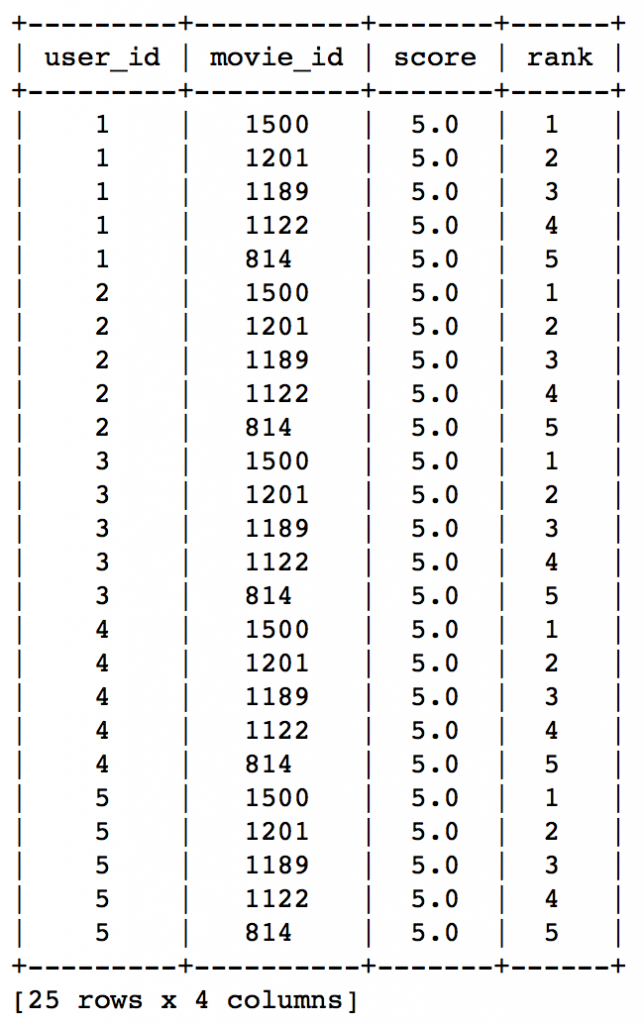
Did you notice something? The recommendations for all users are same – 1500,1201,1189,1122,814 in the same order. This can be verified by checking the movies with highest mean recommendations in our ratings_base data set:
ratings_base.groupby(by='movie_id')['rating'].mean().sort_values(ascending=False).head(20)
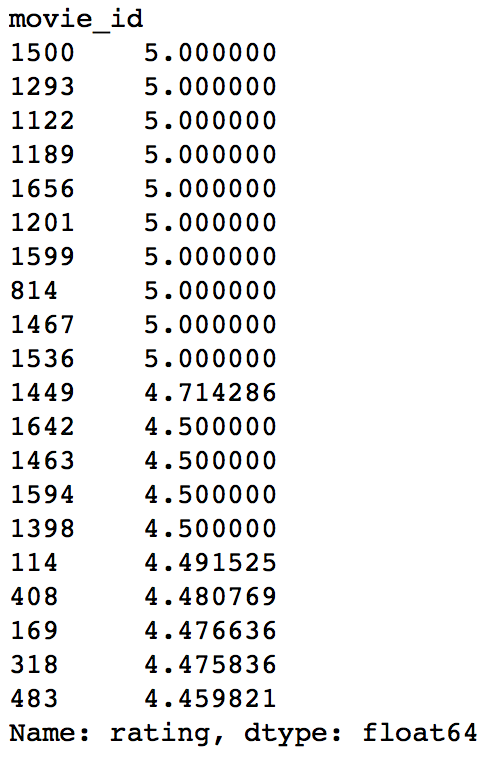
This confirms that all the recommended movies have an average rating of 5, i.e. all the users who watched the movie gave a top rating. Thus we can see that our popularity system works as expected. But it is good enough? We’ll analyze it in detail later.
4. A Collaborative Filtering Model
Lets start by understanding the basics of a collaborative filtering algorithm. The core idea works in 2 steps:
- Find similar items by using a similarity metric
- For a user, recommend the items most similar to the items (s)he already likes
To give you a high level overview, this is done by making an item-item matrix in which we keep a record of the pair of items which were rated together.
In this case, an item is a movie. Once we have the matrix, we use it to determine the best recommendations for a user based on the movies he has already rated. Note that there a few more things to take care in actual implementation which would require deeper mathematical introspection, which I’ll skip for now.
I would just like to mention that there are 3 types of item similarity metrics supported by graphlab. These are:
- Jaccard Similarity:
- Similarity is based on the number of users which have rated item A and B divided by the number of users who have rated either A or B
- It is typically used where we don’t have a numeric rating but just a boolean value like a product being bought or an add being clicked
- Cosine Similarity:
- Similarity is the cosine of the angle between the 2 vectors of the item vectors of A and B
- Closer the vectors, smaller will be the angle and larger the cosine
- Pearson Similarity
- Similarity is the pearson coefficient between the two vectors.
Lets create a model based on item similarity as follow:
#Train Model

item_sim_model = graphlab.item_similarity_recommender.create(train_data, user_id='user_id', item_id='movie_id', target='rating', similarity_type='pearson')

#Make Recommendations:

item_sim_recomm = item_sim_model.recommend(users=range(1,6),k=5)

item_sim_recomm.print_rows(num_rows=25)
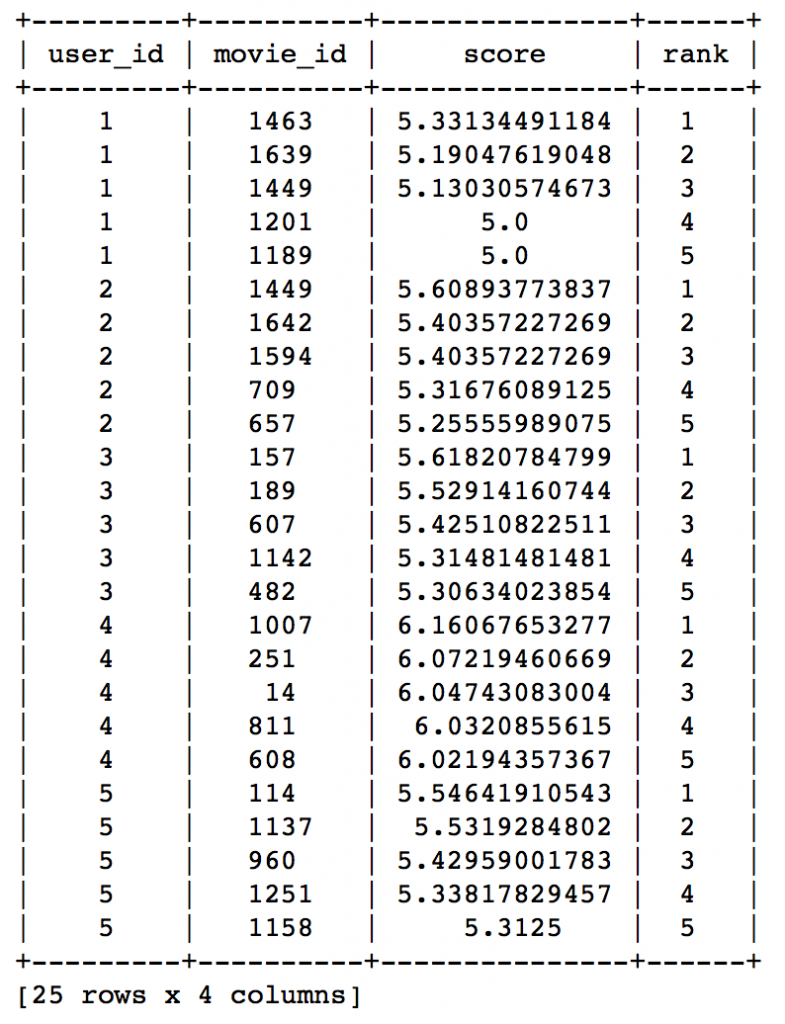
Here we can see that the recommendations are different for each user. So, personalization exists. But how good is this model? We need some means of evaluating a recommendation engine. Lets focus on that in the next section.
5. Evaluating Recommendation Engines
For evaluating recommendation engines, we can use the concept of precision-recall. You must be familiar with this in terms of classification and the idea is very similar. Let me define them in terms of recommendations.
- Recall:
- What ratio of items that a user likes were actually recommended.
- If a user likes say 5 items and the recommendation decided to show 3 of them, then the recall is 0.6
- Precision
- Out of all the recommended items, how many the user actually liked?
- If 5 items were recommended to the user out of which he liked say 4 of them, then precision is 0.8
Now if we think about recall, how can we maximize it? If we simply recommend all the items, they will definitely cover the items which the user likes. So we have 100% recall! But think about precision for a second. If we recommend say 1000 items and user like only say 10 of them then precision is 0.1%. This is really low. Our aim is to maximize both precision and recall.
An idea recommender system is the one which only recommends the items which user likes. So in this case precision=recall=1. This is an optimal recommender and we should try and get as close as possible.
Lets compare both the models we have built till now based on precision-recall characteristics:
model_performance = graphlab.compare(test_data, [popularity_model, item_sim_model])

graphlab.show_comparison(model_performance,[popularity_model, item_sim_model])
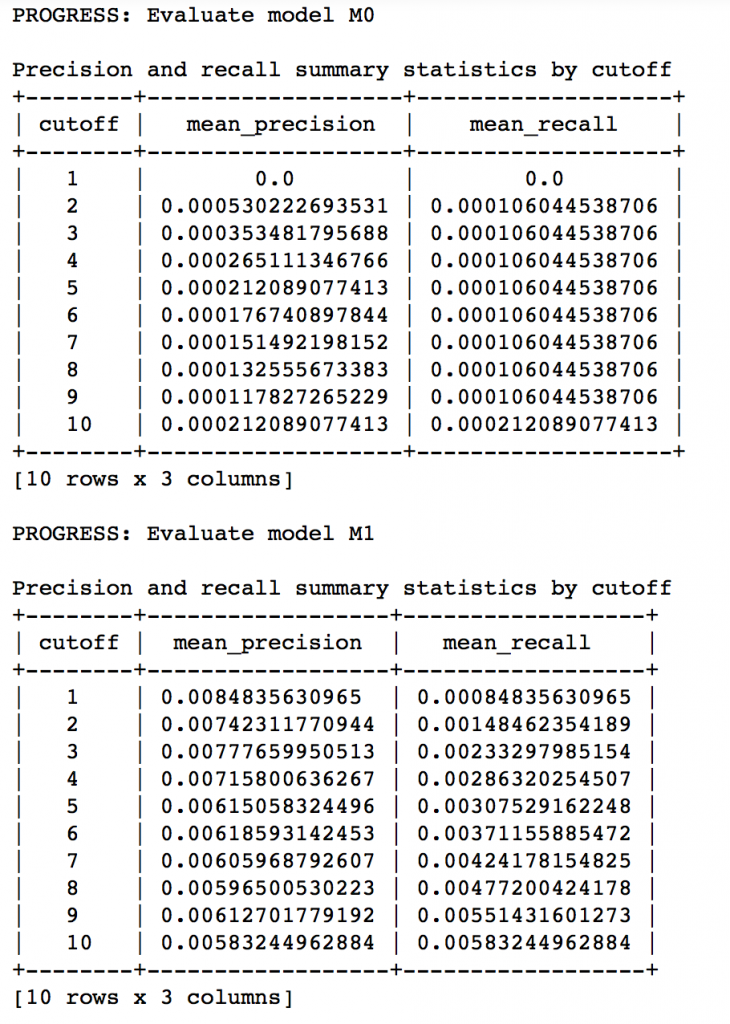
Here we can make 2 very quick observations:
- The item similarity model is definitely better than the popularity model (by atleast 10x)
- On an absolute level, even the item similarity model appears to have a poor performance. It is far from being a useful recommendation system.
There is a big scope of improvement here. But I leave it up to you to figure out how to improve this further. I would like to give a couple of tips:
- Try leveraging the additional context information which we have
- Explore more sophisticated algorithms like matrix factorization
In the end, I would like to mention that along with GraphLab, you can also use some other open source python packages like Crab. Crab is till under development and supports only basic collaborative filtering techniques for now. But this is something to watch out for in future for sure!
End Notes
In this article, we traversed through the process of making a basic recommendation engine in Python using GrpahLab. We started by understanding the fundamentals of recommendations. Then we went on to load the MovieLens 100K data set for the purpose of experimentation.
Subsequently we made a first model as a simple popularity model in which the most popular movies were recommended for each user. Since this lacked personalization, we made another model based on collaborative filtering and observed the impact of personalization.
Finally, we discussed precision-recall as evaluation metrics for recommendation systems and on comparison found the collaborative filtering model to be more than 10x better than the popularity model.
Did you like reading this article ? Do share your experience / suggestions in the comments section below.
(转) Quick Guide to Build a Recommendation Engine in Python的更多相关文章
- Comprehensive Guide to build a Recommendation Engine from scratch (in Python) / 从0开始搭建推荐系统
https://www.analyticsvidhya.com/blog/2018/06/comprehensive-guide-recommendation-engine-python/, 一篇详细 ...
- 29 A Quick Guide to Go's Assembler 快速指南汇编程序:使用go语言的汇编器简介
A Quick Guide to Go's Assembler 快速指南汇编程序:使用go语言的汇编器简介 A Quick Guide to Go's Assembler Constants Symb ...
- Nemerle Quick Guide
This is a quick guide covering nearly all of Nemerle's features. It should be especially useful to a ...
- Event Recommendation Engine Challenge分步解析第七步
一.请知晓 本文是基于: Event Recommendation Engine Challenge分步解析第一步 Event Recommendation Engine Challenge分步解析第 ...
- Event Recommendation Engine Challenge分步解析第六步
一.请知晓 本文是基于: Event Recommendation Engine Challenge分步解析第一步 Event Recommendation Engine Challenge分步解析第 ...
- Event Recommendation Engine Challenge分步解析第五步
一.请知晓 本文是基于: Event Recommendation Engine Challenge分步解析第一步 Event Recommendation Engine Challenge分步解析第 ...
- Event Recommendation Engine Challenge分步解析第四步
一.请知晓 本文是基于: Event Recommendation Engine Challenge分步解析第一步 Event Recommendation Engine Challenge分步解析第 ...
- Event Recommendation Engine Challenge分步解析第一步
一.简介 此项目来自kaggle:https://www.kaggle.com/c/event-recommendation-engine-challenge/ 数据集的下载需要账号,并且需要手机验证 ...
- Event Recommendation Engine Challenge分步解析第三步
一.请知晓 本文是基于: Event Recommendation Engine Challenge分步解析第一步 Event Recommendation Engine Challenge分步解析第 ...
随机推荐
- Screen对象
document.write("Screen-width:"+screen.width+"Screen-height:"+screen.height);docu ...
- 扩展jQuery easyui datagrid增加动态改变列编辑的类型
$.extend($.fn.datagrid.methods, { addEditor : function(jq, param) { if (param instanceof Array) { $. ...
- (转)phonegap 数据库详解
原文:http://firepix.iteye.com/blog/1618343 phonegap 数据库详解 博客分类: web App phonegap 今天就把之前使用pho ...
- Training little cats_矩阵快速幂
Description Facer's pet cat just gave birth to a brood of little cats. Having considered the health ...
- Java 集合深入理解(4):List<E> 接口
点击查看 Java 集合框架深入理解 系列, - ( ゜- ゜)つロ 乾杯~ 蓝瘦!香菇! 连着加班几天,醉了.学学 List 放松下! 在 Java 集合深入理解:Collection 中我们熟悉了 ...
- 根据存放位置数据的链表P打印链表L的元素
题目:给定一个链表L和另一个链表P,它们包含以升序排列的整数.操作printLots打印L中那些由P所指定的位置上的元素.写出过程printLots(L,P).只可以使用公有的STL容器操作.该过程的 ...
- linux下C语言中的flock函数用法 【转】
表头文件 #include<sys/file.h> 定义函数 int flock(int fd,int operation); 函数说明 flock()会依参数operation所指 ...
- html文字垂直居中
比如一个div 需设置height的高度和line-height一样. <div style="height:30px;line-height:30px;"> OK. ...
- Yii 中的createUrl和redirectUrl
Yii 这两个url表示方法容易混淆,区别如下: $this->CreateUrl('控制器/方法',get参数); $this->CreateUrl('方法'); ...
- Day01_JAVA语言基础第一天
1.计算机基础知识(理解) 1.计算机硬件 软件的基础设施,就是载体,计算机的硬件由五大组成部件:运算器,控制器,存储器,输入设备和输出设备 2.计算机软件 系统软件:windows,MAC,LINU ...