
vuxdemo1
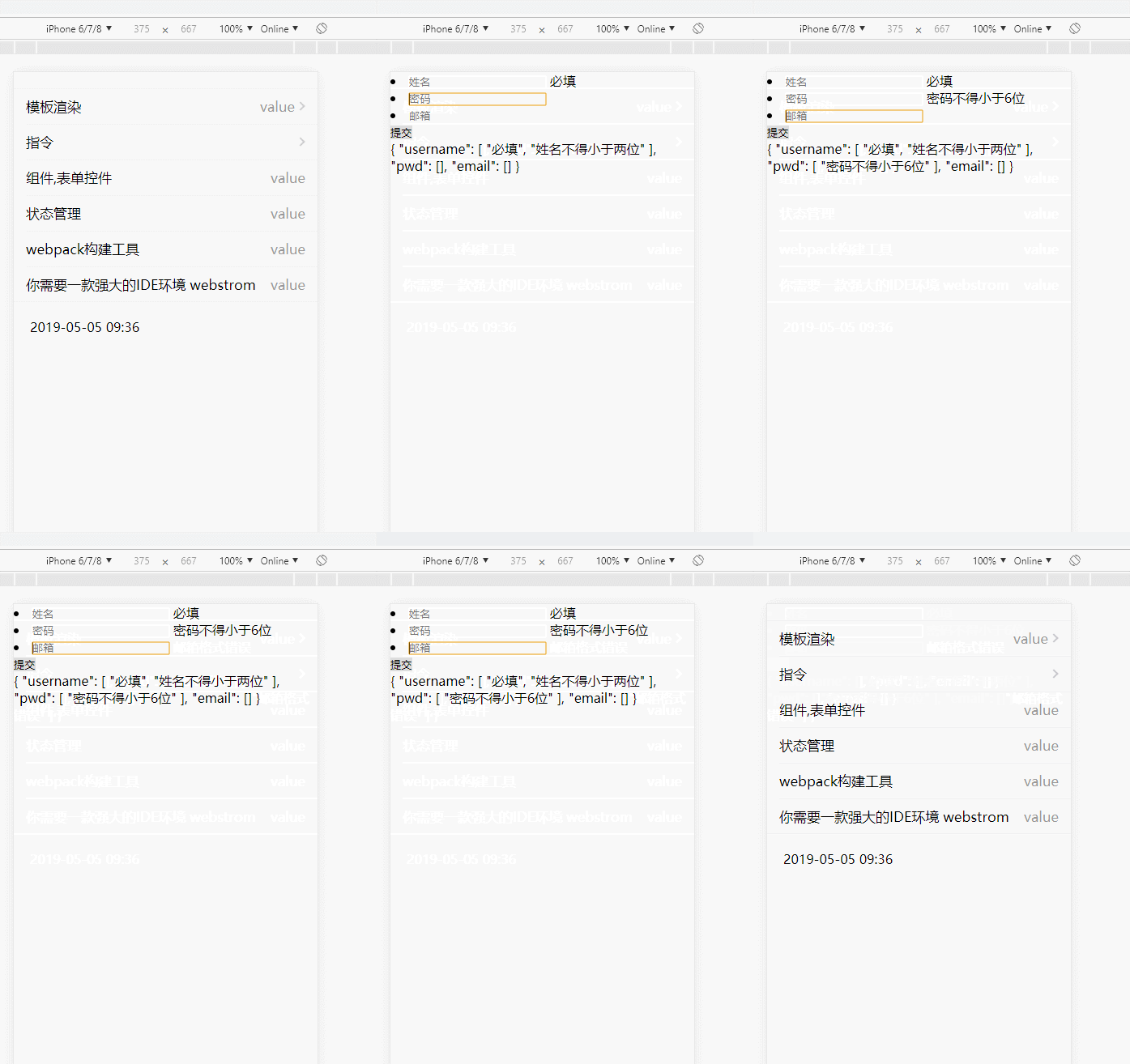
//main.js

import Vue from 'vue'

import router from './router'

import store from './store'

import axios from './components/axios'

import * as filters from './filters'

// 全局引入vux组件库

/*import Group from './components/Group'

Vue.component('Group', Group)

import Cell from './components/Cell'

Vue.component('Cell', Cell)*/

// 全局引入vux提供的插件

import {LoadingPlugin ,AlertPlugin, ToastPlugin} from 'vux'

Vue.use(LoadingPlugin)

Vue.use(AlertPlugin)

Vue.use(ToastPlugin)

// 表单验证插件,不需要请注释掉

import verify from "vue-verify-plugin";

var myRules = {

    phone: {

        test: /^1[34578]\d{9}$/,

        message: "电话号码格式不正确"

    }

}

Vue.use(verify, {

    blur: true,// 是否失去焦点后开始验证

    rules: myRules

});

const FastClick = require('fastclick')

FastClick.attach(document.body)

Object.keys(filters).forEach(key => {

  Vue.filter(key, filters[key])

})

// 在组件中可以直接使用this.$axios访问

Vue.prototype.$axios = axios;

// simple history management

const history = window.sessionStorage

history.clear()

let historyCount = history.getItem('count') * 1 || 0

history.setItem('/', 0)

router.beforeEach((to, from, next) => {

  const toIndex = history.getItem(to.path)

  const fromIndex = history.getItem(from.path)

  if (toIndex) {

    if (toIndex > fromIndex || !fromIndex || (toIndex === '0' && fromIndex === '0')) {

      store.commit('SET_DIRECTION', 'forward')

    } else {

      store.commit('SET_DIRECTION', 'reverse')

    }

  } else {

    ++historyCount

    history.setItem('count', historyCount)

    to.path !== '/' && history.setItem(to.path, historyCount)

    store.commit('SET_DIRECTION', 'forward')

  }

    next()

})

router.afterEach((to, from, next) => {

})

/* eslint-disable no-new */

new Vue({

  el: '#app',

  router,

  store

})
//ArticleDetail.vue

<template>

    <div class="article-box" >

        <div>

            <li>

                <input type="text" v-model.trim="username" v-verify="username" placeholder="姓名"/>

                <label v-verified="verifyError.username"></label>

            </li>

            <li>

                <input type="password" v-model="pwd" v-verify="pwd" placeholder="密码"/>

                <label v-verified="verifyError.pwd"></label>

            </li>

            <li>

                <input type="text" v-model="email" v-verify="email" placeholder="邮箱"/>

                <label v-verified="verifyError.email"></label>

            </li>

            <div>

                <button v-on:click="submit">提交</button>

            </div>

            <hr>

            <div><label v-show="$verify.$errors.username"

                        v-text="$verify.$errors"></label></div>

        </div>

    </div>

</template>

<script>

    export default{

        data () {

            return {

                username: "",

                pwd: "",

                email: "",

                a: {

                    b: {

                        c: "123"

                    }

                }

            }

        },

        verify: {

            username: [

                "required",

                {

                    minLength: 2,

                    message: "姓名不得小于两位"

                },

                {

                    maxLength: 15,

                    message: "姓名最多15位"

                }

            ],

            pwd: {

                minLength: 6,

                message: "密码不得小于6位"

            } ,

            email: "email"

        },

        computed: {

            verifyError: function () {

                return this.$verify.$errors;

            }

        },

        methods: {

            submit: function () {

                console.log(this.$verify.check());

            }

        }

    }

</script>

<style>

</style>
<template>

    <div>

      <group>

            <cell title="模板渲染" value="value" link="/detail"></cell>

            <cell title="指令" is-link link="/detail"></cell>

            <cell title="组件,表单控件" value="value"></cell>

            <cell title="状态管理" value="value"></cell>

            <cell title="webpack构建工具" value="value"></cell>

            <cell title="你需要一款强大的IDE环境 webstrom " value="value"></cell>

        </group>

        <div class="pad20">{{time | formatDate('yyyy-MM-dd hh:mm')}}</div>

    </div>

</template>

<script>

    import {Group,Cell} from 'vux'

    export default {

        components: {

            Group,

            Cell

        },

        data () {

            return {

                page: 1,

                limit: 20,

                time: new Date()

            }

        },

        mounted(){

            this.onRefresh()

        },

        methods: {

            onRefresh () {

                /*this.time = new Date();

                this.$loading.show()

                setTimeout(() => {

                    this.$loading.hide()

                }, 2000)*/

            },

        },

        computed: {

            minHeight: () => {

                return (document.body.clientHeight >= 400 && document.body.clientHeight <= 736) ? document.body.clientHeight : window.screen.height

            },

        },

    }

</script>

<style>

    *{margin: 0; padding: 0;border: 0}

</style>
//page404.vue

<template>

    <div class="pagemain page404">

        <div class="img"><img src="http://shequ-1251225286.cossh.myqcloud.com/static/imgs/404.png" alt=""></div>

        <div class="msg">{{errMsg}}</div>

        <router-link to="/">

            <div class="cen">

                <x-button plain type="primary" style="border-radius:99px;">返回首页</x-button>

            </div>

        </router-link>

    </div>

</template>

<script type="es6">

    import {XButton} from 'vux'

    export default {

        components:{

            XButton

        },

        data () {

            return {

                title: '皮皮虾我们走,吃炸鸡喝啤酒' ,

                errMsg:'错误代码:404,请求的页面木见了'

            }

        },

        beforeCreate(){

        },

        mounted(){

        },

        methods: {

        }

    }

</script>

<style>

    .page404{ overflow:hidden;}

    .page404 .img{ width:50%; margin:auto; margin-top:30%;}

    .page404 .img img{ width:100%;}

    .page404 .msg{ font-size:14px; margin-top:2%; color:#333333; text-align:center}

    .page404 .cen{ width:80%; margin:auto; margin-top:5%;}

</style>
//store/router.js

import Vue from 'vue'

import Vuex from 'vuex'

Vue.use(Vuex)

const store = new Vuex.Store({

  state: {

    loading: false,

    direction: 'forward',

  },

  actions: {

    FETCH_LOADING: ({commit, state}) => {

      return state.loading

    }

  },

  mutations: {

    SET_LOADING: (state, bool) => {

      state.loading = bool

    },

    SET_DIRECTION: (state, str) => {

      state.direction = str

    }

  },

  getters: {

    loading (state, getters) {

      return state.loading

    },

    direction (state, getters) {

      return state.direction

    }

  }

})

export default store
//router/index.js

import Vue from 'vue'

import Router from 'vue-router'

Vue.use(Router)

export default new Router({

    mode: 'history',

    base: __dirname,

    routes: [

        {

            path: '/',

            name: 'index',

            component: resolve => require(['../views/ArticleList'], resolve)

        },

        {

            path: '/detail',

            name: 'detail',

            component: resolve => require(['../views/ArticleDetail'], resolve)  ,

            meta: {

                scrollToTop: true

            }

        },

        {

            path: '*',

            name: 'page404',

            component: resolve => require(['../views/page404.vue'], resolve)

        }

    ]

})
//filters/index.js

function pluralize (time, label) {

  return time + label + '前'

}

export function timeAgo (time) {

  const between = (+Date.now() - +new Date(time)) / 1000

  if (between < 60) {

    return pluralize(~~(between), ' 秒')

  } else if (between < 3600) {

    return pluralize(~~(between / 60), ' 分钟')

  } else if (between < 86400) {

    return pluralize(~~(between / 3600), ' 小时')

  } else if (between < (86400 * 30)) {

    return pluralize(~~(between / 86400), ' 天')

  } else if (between < (86400 * 30 * 12)) {

    return pluralize(~~(between / (86400 * 30)), '个月')

  } else {

    return pluralize(~~(between / (86400 * 30 * 12)), '年')

  }

}

/* 日期格式化*/

export function formatDate (date, fmt) {

  date = new Date(date)

  fmt = fmt || 'yyyy-MM-dd hh:mm'

  let o = {

    'M+': date.getMonth() + 1, // 月份

    'd+': date.getDate(), // 日

    'h+': date.getHours(), // 小时

    'm+': date.getMinutes(), // 分

    's+': date.getSeconds(), // 秒

    'q+': Math.floor((date.getMonth() + 3) / 3), // 季度

    'S': date.getMilliseconds() // 毫秒

  }

  if (/(y+)/.test(fmt)) {

    fmt = fmt.replace(RegExp.$1, (date.getFullYear() + '').substr(4 - RegExp.$1.length))

  }

  for (let k in o) {

    if (new RegExp('(' + k + ')').test(fmt)) {

      fmt = fmt.replace(RegExp.$1, (RegExp.$1.length === 1) ? (o[k]) : (('00' + o[k]).substr(('' + o[k]).length)))

    }

  }

  return fmt

}

//axios/index.js

import axios from 'axios'

var PROD_URL = process.env.BASE_URL;//process.env.BASE_URL在webpack中配置。dev.env.js为测试环境,prod.env.js为发布环境

axios.defaults.baseURL = PROD_URL // 配置 apiURL

axios.defaults.timeout = 50000; // 超时

// http request interceptor

axios.interceptors.request.use(function (config) {

    // Do something before request is sent

    return config;

}, function (error) {

    // Do something with request error

    return Promise.reject(error);

});

// Add a response interceptor

axios.interceptors.response.use(function (response) {

    // 通过状态码来识别服务器提示信息

    switch (response.status) {

        case 200:

            break;

    }

    let code = response.data.code

    if (code == 401) {

        window.goLogin()

    }

    if (code == 402) {

        window.location.replace(window.location.origin)

    }

    return response;

}, function (error) {

    // 非状态码错误  在此通过正则处理

    console.log('捕获到一个错误,错误信息:' + error)

    if (/Network Error/i.test(error)) {

        alert('您当前无法上网,请检查你的移动数据开关或wifi是否正常')

    }

    if (/ms exceeded/i.test(error)) {

        alert('您的网络连接不稳定,请检查你的移动数据开关或wifi是否正常')

        $(".weui_loading_toast").hide()

    }

    if (/code 500/i.test(error)) {

        alert('网络异常,请稍后重试')

    }

    return Promise.reject(error);

});

export default axios;
vuxdemo1的更多相关文章
随机推荐
- s3fs 挂载minio为本地文件系统
https://github.com/s3fs-fuse/s3fs-fuse echo ACCESS_KEY_ID:SECRET_ACCESS_KEY > ${HOME}/.passwd-s3f ...
- Ajax.NET-Professional
https://github.com/michaelschwarz/Ajax.NET-Professional Ajax.NET Professional Ajax.NET Professional ...
- hibernate 一对一注解
bi如 用户的阅读历史和文章表是单向一对一关系, 阅读历史中通过deviceId外键关联文章表的主键 然后,再从getter setter上进行注解 @OneToOne(cascade = Casca ...
- python简单爬豆瓣电影排名
爬豆瓣电影 网站分析: 1 打开https://movie.douban.com,选择 [排行榜],然后随便选择一类型,我这里选择科幻 2 一直浏览网页,发现没有下一的标签,是下滑再加载的,可 ...
- Dockerfile镜像制作时间同步
1.问题描述 宿主机与容器时间相差8小时 2.原因 宿主机采用了CST时区,CST应该是指(China Shanghai Time,东八区时间)容器采用了UTC时区,UTC应该是指(Coordinat ...
- 2019-5-25-如何在-CMD-启动的软件传入带空格的路径
title author date CreateTime categories 如何在 CMD 启动的软件传入带空格的路径 lindexi 2019-05-25 09:31:46 +0800 2019 ...
- HDFS数据读写过程
- HDU6135 拓展KMP模板
emmm...模板,虽然每太搞懂 #include <iostream> #include <cstdio> #include <string.h> #pragma ...
- PHP学习1.5-预定义超全局数组变量
1.PHP 预定义的超全局变量数组 特性: a.特殊的数组,操作方式没有区别 b.不用声明,php脚本中默认存在,因为在php中不用定义,所以在自定义变量是应避免和预定的全局变量同名 c.在全局范围内 ...
- [转]深入理解定位父级offsetParent及偏移大小
偏移量(offset dimension)是javascript中的一个重要的概念.涉及到偏移量的主要是offsetLeft.offsetTop.offsetHeight.offsetWidth这四个 ...