
SpringBoot-2.1.1系列一:使用https
1.什么是https?
HTTPS中文名称:超文本传输安全协议,是以安全为目标的HTTP通道,简单讲是HTTP的安全版。即HTTP下加入SSL层,HTTPS的安全基础是SSL,因此加密的详细内容就需要SSL。
https=http+ssl
2.为什么需要使用https?
最初大家都使用http协议,HTTP协议以明文方式发送内容,不提供任何方式的数据加密,如果攻击者截取了Web浏览器和网站服务器之间的传输报文,就可以直接读懂其中的信息,因此,HTTP协议不适合传输一些敏感信息,比如:信用卡号、密码等支付信息。
为了解决HTTP协议的这一缺陷,需要使用另一种协议:安全套接字层超文本传输协议HTTPS,为了数据传输的安全,HTTPS在HTTP的基础上加入了SSL协议,SSL依靠证书来验证服务器的身份,并为浏览器和服务器之间的通信加密。
3.怎样使用https?
3.1.生成证书
keytool -genkey -alias tomcat -keyalg RSA -keystore /home/gzr/tomcat.keystore

将生成好的证书放在项目根目录即可
3.2.配置文件增加配置属性
server:
  #端口号
  port: 443
  ssl:
    #生成证书的名字
    key-store: https.keystore
    #密钥库密码
    key-store-password: 123456
    key-store-type: JKS
    key-alias: https
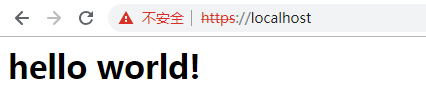
此时访问https://localhost即可(https默认端口号是443,所以无需加上端口号)
3.3.让http访问自动跳转到https
上面只有https协议,如果用http访问会报错

可是用户日常使用中,并不愿意加上https
以百度为例,当我们输入www.baidu.com时,它会自动加上https。这样用户体验较好。


下面增加http访问自动跳转到https:
首先增加一个自定义属性,用于http端口号
http:
  port: 80
编写配置类HttpsConfig
package com.chenyuwen.demo;

import org.apache.catalina.Context;
import org.apache.catalina.connector.Connector;
import org.apache.tomcat.util.descriptor.web.SecurityCollection;
import org.apache.tomcat.util.descriptor.web.SecurityConstraint;
import org.springframework.beans.factory.annotation.Value;
import org.springframework.boot.SpringApplication;
import org.springframework.boot.autoconfigure.SpringBootApplication;
import org.springframework.boot.web.embedded.tomcat.TomcatServletWebServerFactory;
import org.springframework.boot.web.servlet.server.ServletWebServerFactory;
import org.springframework.context.annotation.Bean;

@Configuration
public class HttpsConfig {
    @Value("${server.port}")
    private int httpsPort;
    @Value("${http.port}")
    private int httpPort;

    @Bean
    public ServletWebServerFactory servletContainer() {
        TomcatServletWebServerFactory tomcat = new TomcatServletWebServerFactory() {
            @Override
            protected void postProcessContext(Context context) {
                SecurityConstraint securityConstraint = new SecurityConstraint();
                securityConstraint.setUserConstraint("CONFIDENTIAL");
                SecurityCollection collection = new SecurityCollection();
                collection.addPattern("/*");
                securityConstraint.addCollection(collection);
                context.addConstraint(securityConstraint);
            }
        };
        tomcat.addAdditionalTomcatConnectors(initiateHttpConnector());
        return tomcat;
    }

    private Connector initiateHttpConnector() {
        Connector connector = new Connector("org.apache.coyote.http11.Http11NioProtocol");
        connector.setScheme("http");
        connector.setPort(httpPort);
        connector.setSecure(false);
        connector.setRedirectPort(httpsPort);
        return connector;
    }
}
此时再访问http://localhost会自动跳转到https://localhost
本次讲解到此结束!
SpringBoot-2.1.1系列一:使用https的更多相关文章
- Https系列之一:https的简单介绍及SSL证书的生成
Https系列会在下面几篇文章中分别作介绍: 一:https的简单介绍及SSL证书的生成二:https的SSL证书在服务器端的部署,基于tomcat,spring boot三:让服务器同时支持http ...
- SpringBoot源码学习系列之异常处理自动配置
SpringBoot源码学习系列之异常处理自动配置 1.源码学习 先给个SpringBoot中的异常例子,假如访问一个错误链接,让其返回404页面 在浏览器访问: 而在其它的客户端软件,比如postm ...
- SpringBoot源码学习系列之嵌入式Servlet容器
目录 1.博客前言简单介绍 2.定制servlet容器 3.变换servlet容器 4.servlet容器启动原理 SpringBoot源码学习系列之嵌入式Servlet容器启动原理 @ 1.博客前言 ...
- SpringBoot源码解析系列文章汇总
相信我,你会收藏这篇文章的 本篇文章是这段时间撸出来的SpringBoot源码解析系列文章的汇总,当你使用SpringBoot不仅仅满足于基本使用时.或者出去面试被面试官虐了时.或者说想要深入了解一下 ...
- SpringBoot源码学习系列之@PropertySource不支持yaml读取原因
然后,为什么@PropertySource注解默认不支持?可以简单跟一下源码 @PropertySource源码: 根据注释,默认使用DefaultPropertySourceFactory类作为资源 ...
- SpringBoot源码解读系列——开篇
什么是SpringBoot? 定义可以参考官网:SpringBoot官网,其定义通俗易懂,这里就不赘述. 官网也给出了一个通用的SpringBoot工程样例,其中包含了这么几个元素: 1.pom依赖 ...
- Https系列之四:https的SSL证书在Android端基于okhttp,Retrofit的使用
Https系列会在下面几篇文章中分别作介绍: 一:https的简单介绍及SSL证书的生成二:https的SSL证书在服务器端的部署,基于tomcat,spring boot三:让服务器同时支持http ...
- Springcloud/Springboot项目绑定域名,使用Nginx配置Https
https://blog.csdn.net/a_squirrel/article/details/79729690 一.Https 简介(百度百科) HTTPS(全称:Hyper Text Trans ...
- SpringBoot源码学习系列之SpringMVC自动配置
目录 1.ContentNegotiatingViewResolver 2.静态资源 3.自动注册 Converter, GenericConverter, and Formatter beans. ...
- SpringBoot源码学习系列之Locale自动配置
目录 1.spring.messages.cache-duration 2.LocaleResolver 的方法名必须为localeResolver 3.默认LocaleResolver 4.指定默认 ...
随机推荐
- Laravel5.2 发送邮件(smtp方式最简单的讲解!)-邮件部分
https://blog.csdn.net/wulove52/article/details/71172842 Laravel集成了SwiftMailer库进行邮件发送,邮件配置文件位于config/ ...
- Python--day72--ajax简介
ajax的基本结构: <script> $("#b1").on("click", function () { $.ajax({ url: " ...
- Linux中ifcfg-eth0配置参数说明
ifcfg-eth0在/etc/sysconfig/network-scripts下, 其配置如下: DEVICE=物理设备名IPADDR=IP地址NETMASK=掩码值NETWORK=网络地址BRO ...
- 3-7 彻底搞清楚unicode和utf8编码
- 无限调用函数add(1)(2)(3)......
无限调用函数,并且累计结果 其实这也算一道面试题吧,笔者曾经被提问过,可惜当时没能答上来...
- win10下,cmd,power shell设置默认编码为‘UTF-8’?
这个问题可以终结了,最新版 Windows 10 支持 UTF-8 了.打开这个选项,cmd 和 powershell 默认就是 UTF-8 了.在控制面板-时钟和区域-区域-管理-更改系统区域设置( ...
- H3C 环路避免机制三:毒性逆转
- SpringMVC 非注解配置
web.xml配置: <servlet> <servlet-name>springmvc</servlet-name> <servlet-class>o ...
- Linux内存页大小
当使用内存时, 记住一个内存页是 PAGE_SIZE 字节, 不是 4KB. 假定页大小是 4KB 并且 硬编码这个值是一个 PC 程序员常见的错误, 相反, 被支持的平台显示页大小从 4 KB 到 ...
- jquery超级简单的后台系统自适应框架
系统后台自适应简单框架 <!DOCTYPE HTML> <html lang="zh-CN"> <head> <meta http-equ ...