
opencv编译:The CXX compiler identification is unknown The C compiler identification is unknown
opencv编译:The CXX compiler identification is unknown The C compiler identification is unknown
解决方法:
Found this on Google... I would assume that in your case you would copy rc.exe and rcdll.dllto visual studio 2012\vc\bin or wherever you have installed:
Part 2: FIX LINK : fatal error LNK1158: cannot run ‘rc.exe’
Add this toyour PATH environment variables:
C:\Program Files (x86)\WindowsKits\8.0\bin\x86
Copy thesefiles:
rc.exe
rcdll.dll
From
C:\Program Files (x86)\WindowsKits\8.0\bin\x86
To
C:\Program Files (x86)\MicrosoftVisual Studio 11.0\VC\bin
Or I alsofound this:
Microsoft left a few things out of their MSVT package. Since no one knowswhether they were left out by mistake or for license reasons, no one with MSVCis too interested in giving them out. A few Google searches turn up some trickysources. Fortunately, Microsoft has finally wised up and solved this problemand many more.
http://msdn.microsoft.com/vstudio/express/support/faq/default.aspx#pricing
http://msdn.microsoft.com/vstudio/express/support/install/
A good amountof MSVT missing files are there but the missing SDK files aren't.
and this:
I had the same problem which I solved by doing this:
1. Installing the Microsoft .NetFramework 2.0
2. Adding the path of the .NET Frameworkfiles (for me "C:\WINDOWS\Microsoft.NET\Framework\v2.0.50727") toGlobal compiler settings > Programs > Additional Paths withinCode::Blocks.
第二个错误
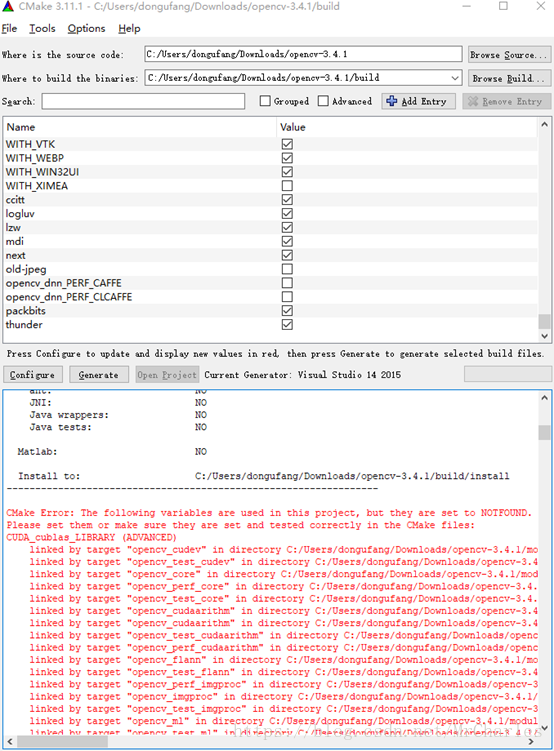
`CMake Error: The following variables are used in this project, but they are set to NOTFOUND.
Please set them or make sure they are set and tested correctly in the CMake files:
CUDA_cublas_LIBRARY (ADVANCED)
Try selecting "Visual Studio 12 2013 Win64" as your generator, and your problem should be solved.
选择64位 解决问题
opencv编译:The CXX compiler identification is unknown The C compiler identification is unknown的更多相关文章
- 记录opencv编译过程
准备学习opencv,参考了几个网页终于完成.编辑器和opencv版本都选择最新的版本. 记录过程如下 1. 下载准备: 1) Opencv源码, 下载地址: https://sour ...
- OpenCV编译以及QT Creator配置
OpenCV编译以及QT Creator配置 在进行编译前,需下载以下工具和源码: CMake ---- 用于编译: 下载地址; https://cmake.org/ 安装在D:\Program Fi ...
- OpenCV编译 Make出错 recipe for target 'modules/imgproc/CMakeFiles/opencv_test_imgproc.dir/all' failed
OpenCV编译 Make出错 recipe for target 'modules/imgproc/CMakeFiles/opencv_test_imgproc.dir/all' failed 添 ...
- qt+opencv编译环境的配置
第一步:安装与配置Qt 从https://account.qt.io/downloads下载Qt,并注册账户.开始安装.首先下载qt-opensource-windows-x86-mingw482_o ...
- 我的复杂的OpenCV编译之路(OpenCV3.1.0 + VS2010 + Win7)
教程:www.cnblogs.com/jliangqiu2016/p/5597501.html 这里主要记载我编译遇到的错误及解决方法. OpenCV3.1软件下载:https://sourcefor ...
- 如何输出opencv编译信息
本文链接:https://mangoroom.cn/opencv/how-to-print-compile-info-of-opencv.html opencv提供了一个函数,利用这个函数可以输出当前 ...
- Ubuntu 下安装opencv 编译后执行找不到库
在ubuntu下编译opencv程序后,执行报下面到错误:error while loading shared libraries: libopencv_core.so.2.4: cannot ope ...
- 机器学习笔记之三-yolov3+win7+vs2017+gpu+opencv编译
1.环境安装 1.1 vs2017+cuda9.1+cudnn7.0可以和tensorflow一起安装网上教程多,不多说. 唯一需要注意的是vs2017要安装好2015版本的工具集v140 ...
- Windows10 + Visual Studio 2017 + CMake +OpenCV编译、开发环境配置及测试
由于最近需要使用OpenCV,本人需要在自己的PC上使用OpenCV,因此最近一直在研究如何使用Visual Studio编译OpenCV源代码并搭建开发环境,折腾了很长时间,查阅了很多相关资料,终于 ...
随机推荐
- jQuery 快捷操作
快捷操作 1. class属性值操作 $().attr(‘class’,值); $().attr(‘class’); $().removeAttr(‘class’); //删除class的所有属性 ...
- 6、 restful API
RESTful 一种软件架构风格.设计风格,而不是标准,只是提供了一组设计原则和约束条件.它主要用于客户端和服务器交互类的软件.基于这个风格设计的软件可以更简洁,更有层次,更易于实现缓存等机制. RE ...
- 解决jqGrid中,当前页一直显示为0的问题
项目中,经常会见到使用 jqGrid 进行一些数据的列表展示,而且使用起来也比较方便.但是有时会遇到一些奇怪的问题,比如前几天我就遇到了在使用 jqGrid 时,当前页一直显示为 0 的问题.下图就是 ...
- AT指令集之Call
1.//unsolicited result code,URC表示BP->AP+ESIPCPI:<call_id>,<dir>,<sip_msg_type>, ...
- 20140315 模板类pair的用法 2、visual 2010调整代码格式是ctrl+k+
1.模板类pair的用法 包含头文件#include<utility> http://blog.csdn.net/laixingjun/article/details/9005200 ...
- python学习2—python3特性与各种运算符
python学习2—python3特性与各种运算符 python3与python2相比具有的新特性 在python2中可以使用__future__模块调用python3的特性 print()函数必须带 ...
- java-day17
软件结构:C/S客户端和服务器结构,B/S浏览器和服务器结构 网络通信协议 TCP:传输控制协议,面向连接的通信协议,即传输数据之前,发送端和接收端建立逻辑连接,然后再传输数据. 三次握手 UDP:用 ...
- MVC 传递数据 从前台到后台,包括单个对象,多个对象,集合
MVC 传递数据 从前台到后台,包括单个对象,多个对象,集合 1.基本数据类型 我们常见有传递 int, string, bool, double, decimal 等类型. 需要注意的是前台传递的参 ...
- 【bug】vue同一组件使用
vue使用同一个组件渲染,进行切换过程中会存在数据保存的情况. 比如路由切换,进行渲染的页面来自同一个组件,这个时候,要在监听路由的时候,将数据重新初始化
- leetcood学习笔记-2-两数相加
题目描述: 方法一: # Definition for singly-linked list. # class ListNode: # def __init__(self, x): # self.va ...