
vnpy源码阅读学习(4):自己写一个类似vnpy的UI框架
自己写一个类似vnpy的界面框架
概述
通过之前3次对vnpy的界面代码的研究,我们去模仿做一个vn.py的大框架。巩固一下PyQt5的学习。
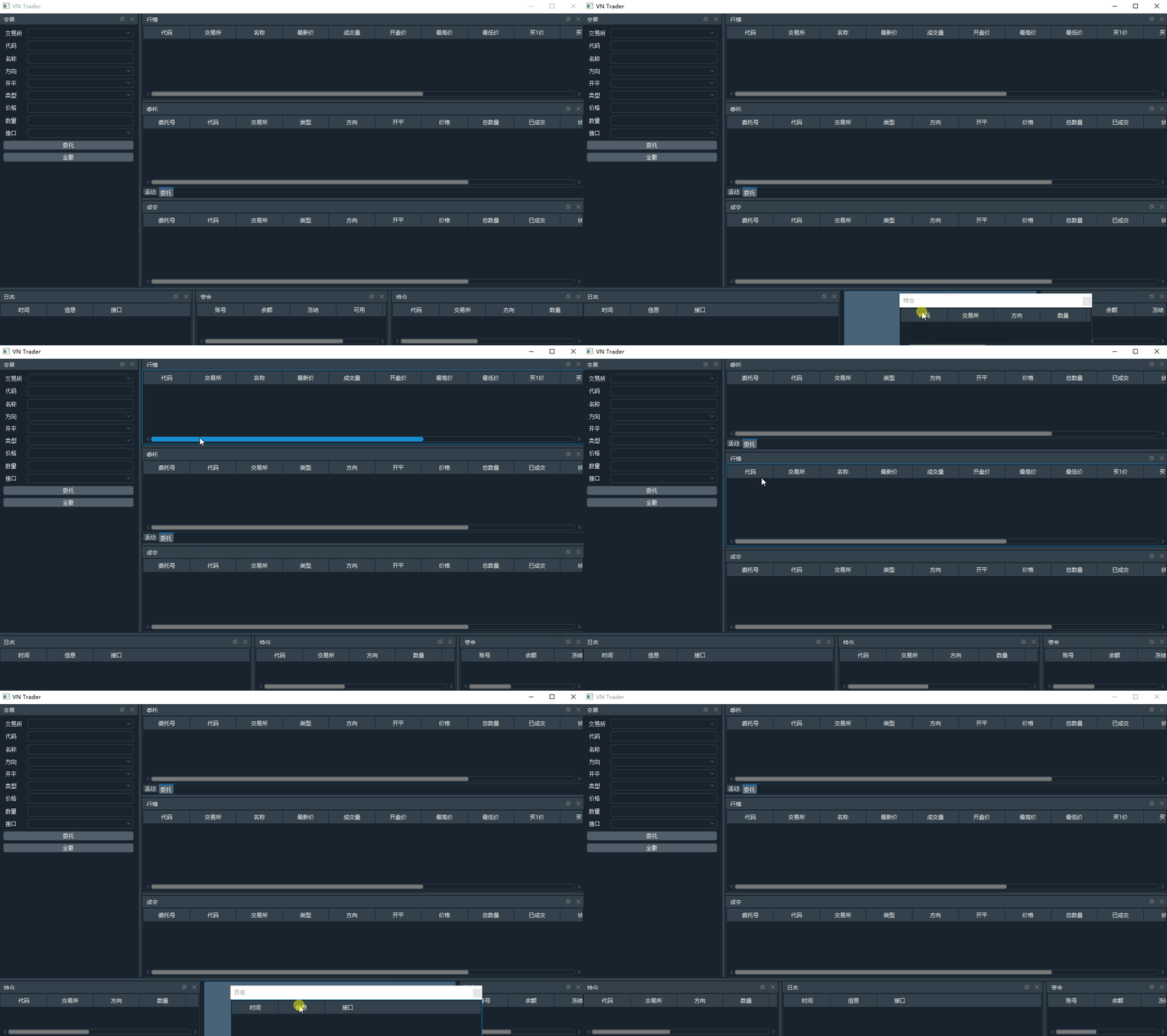
这部分的代码相对来说没有难度和深度,基本上就是把PyQt5的组件进行了使用。主要应用了QVBoxLayout布局在交易下单的窗体tradingWidget上使用,其他的窗体都大多数用了QTableWidget
关于QTableWidget的教程我找到了一篇:PyQt5高级界面控件之QTableWidget(四)
在vnpy中值得自己学习的是:
- vnpy抽象了所有的QTableWidget的对象,因为交易类的系统用到了大量的列表。所以建立了一个BaseMonitor的对象
- 不同的列显示的方式不太一样,有的部分可能是直接显示出来vaule,而有的列表显示的可能是多空,所以定义了Cell对象。
class BaseCell(QtWidgets.QTableWidgetItem):

    """

    General cell used in tablewidgets.

    """

    def __init__(self, content: Any, data: Any):

        """"""

        super(BaseCell, self).__init__()

        self.setTextAlignment(QtCore.Qt.AlignCenter)

        self.set_content(content, data)

    def set_content(self, content: Any, data: Any):

        """

        Set text content.

        """

        self.setText(str(content))

        self._data = data

    def get_data(self):

        """

        Get data object.

        """

        return self._data
class EnumCell(BaseCell):

    """

    Cell used for showing enum data.

    """

    def __init__(self, content: str, data: Any):

        """"""

        super(EnumCell, self).__init__(content, data)

    def set_content(self, content: Any, data: Any):

        """

        Set text using enum.constant.value.

        """

        if content:

            super(EnumCell, self).set_content(content.value, data)
根据方向不一样,显示不同的颜色
class DirectionCell(EnumCell):

    """

    Cell used for showing direction data.

    """

    def __init__(self, content: str, data: Any):

        """"""

        super(DirectionCell, self).__init__(content, data)

    def set_content(self, content: Any, data: Any):

        """

        Cell color is set according to direction.

        """

        super(DirectionCell, self).set_content(content, data)

        if content is Direction.SHORT:

            self.setForeground(COLOR_SHORT)

        else:

            self.setForeground(COLOR_LONG)
class TimeCell(BaseCell):

    """

    Cell used for showing time string from datetime object.

    """

    def __init__(self, content: Any, data: Any):

        """"""

        super(TimeCell, self).__init__(content, data)

    def set_content(self, content: Any, data: Any):

        """

        Time format is 12:12:12.5

        """

        if content is None:

            return

        timestamp = content.strftime("%H:%M:%S")

        millisecond = int(content.microsecond / 1000)

        if millisecond:

            timestamp = f"{timestamp}.{millisecond}"

        self.setText(timestamp)

        self._data = data
界面部分大同小异。接下来研究下MainEngine部分。看看引擎是如何把所有的界面和数据接口穿插起来的。
vnpy源码阅读学习(4):自己写一个类似vnpy的UI框架的更多相关文章
- vnpy源码阅读学习(1):准备工作
vnpy源码阅读学习 目标 通过阅读vnpy,学习量化交易系统的一些设计思路和理念. 通过阅读vnpy学习python项目开发的一些技巧和范式 通过vnpy的设计,可以用python复现一个小型简单的 ...
- vnpy源码阅读学习(5):关于MainEngine的代码阅读
关于MainEngine的代码阅读 在入口文件中,我们看到了除了窗体界面的产生,还有关于MainEngine和EventEngin部分.今天来学习下MainEngine的代码. 首先在run代码中,我 ...
- vnpy源码阅读学习(8):关于app
关于app 在入口程序中,我们看到了把 gateway,app, 各类的engine都添加到mainEngine中来.不难猜测gateway主要是处理跟外部的行情,接口各方面的代码,通过别人的文章也不 ...
- vnpy源码阅读学习(7):串在一起
串在一起 我们已经分析了UI.MainEngine.EventEngine.然后他们几个是如何发挥作用的呢?我总结了一张图: 我们来具体的看看UI部分是如何跟EventEngine穿插起来的 \exa ...
- vnpy源码阅读学习(3):学习vnpy的界面的实现
学习vnpy的界面的实现 通过简单的学习了PyQt5的一些代码以后,我们基本上可以理解PyQt的一些用法,下面让我们来先研究下vnpy的UI部分的代码. 首先回到上一节看到的run.py(/vnpy/ ...
- vnpy源码阅读学习(2):学习PyQt5
PyQt5的学习 花费了一个下午把PyQt5大概的学习了下.找了一个教程 PyQt5教程 跟着挨着把上面的案例做了一遍,大概知道PyQt5是如何生成窗体,以及控件的.基本上做到如果有需求要实现,查查手 ...
- vnpy源码阅读学习(9)回到OptionMaster
回到OptionMaster 根据我们对APP调用的代码阅读,我们基本上知道了一个APP是如何被调用,那么我们回到OptionMaster学习下这个APP的实现. 看看结构 class OptionM ...
- Spring源码阅读学习一
昨天抽时间阅读Spring源码,先从spring 4.x的core包开始吧,除了core和util里,首当其冲的就是asm和cglib. 要实现两个类实例之间的字段的复制功能: 多年之前用C#,因为阅 ...
- 12.源码分析—如何为SOFARPC写一个序列化?
SOFARPC源码解析系列: 1. 源码分析---SOFARPC可扩展的机制SPI 2. 源码分析---SOFARPC客户端服务引用 3. 源码分析---SOFARPC客户端服务调用 4. 源码分析- ...
随机推荐
- H3C ACL的标识
- H3C 显示OSPF的链路状态数据库
- WPF 解决弹出模态窗口关闭后,主窗口不在最前
本文告诉大家如何解决这个问题,在 WPF 的软件,弹出一个模态窗口.使用另一个窗口在模态窗口前面.从任务栏打开模态窗口.关闭模态窗口.这时发现,主窗口会在刚才使用的另一个窗口下面 这是 Windows ...
- linux /proc 接口和共享中断
在系统中安装共享处理者不影响 /proc/stat, 它甚至不知道处理者. 但是, /proc/interrupts 稍稍变化. 所有同一个中断号的安装的处理者出现在 /proc/interrupts ...
- WPF 一个性能比较好的 gif 解析库
本文介绍 Magick.NET ,这是 ImageMagick 的 .Net 封装,他支持 100 多种格式的图片,而 gif 也是他支持的.本文告诉大家如何使用这个库播放 gif 图 先给大家看一下 ...
- PowerShell 通过 WMI 获取系统安装的驱动
本文告诉大家如何通过 WMI 获取用户已经安装的驱动程序 通过下面代码可以获取用户已经安装的驱动程序 Get-WmiObject Win32_SystemDriver | Format-List Ca ...
- LeekCode解题记录
昨天晚上有个LeekCode的比赛,两个半小时解五题,轻松解决前两题后,卡在第三题,还剩半小时时放弃,开始解第五题,解完但未验证通过,第四题只看了下题目. 排名第一的大佬只用了36分钟全部写完. 差距 ...
- PHP常用函数拾遗
PHP中常用过滤函数addslashes().mysql_real_escape_string().mysql_escape_string() 如addslashes().mysql_real_es ...
- 38.CSS
转载:https://www.cnblogs.com/yuanchenqi/articles/5977825.html css概述 CSS是Cascading Style Sheets的简称,中文称为 ...
- MyISAM与InnoDB的索引实现区别
一 MyISAM索引实现 1. 主键索引 MyISAM引擎使用B+树作为索引结果,叶节点的data域存放的是数据记录的地址.下图为MyISAM表的主索引,Col1为主键. 2. 辅助索引 在MyISA ...