
docker创建本地主机实例Virtualbox 驱动出错
宿主机系统:Centos7 64位
创建主机实例Virtualbox 命令:docker-machine create -d virtualbox test
连接centos工具:Finalshell 3.9.2.2
(docke疑难杂症,自学笔记)
错误点1:Error with pre-create check: "VBoxManage not found. Make sure VirtualBox is installed and VBoxManage is in the path"(如图所示)

解决方法:
1.在/etc/yum.repos.d/目录下新建virtualbox.repo并写入如下内容
[virtualbox]
name=Oracle Linux / RHEL / CentOS-$releasever / $basearch - VirtualBox
baseurl=http://download.virtualbox.org/virtualbox/rpm/el/$releasever/$basearch
enabled=1
gpgcheck=1
repo_gpgcheck=1
gpgkey=https://www.virtualbox.org/download/oracle_vbox.asc

2.更新yum缓存
yum clean all
yum makecache
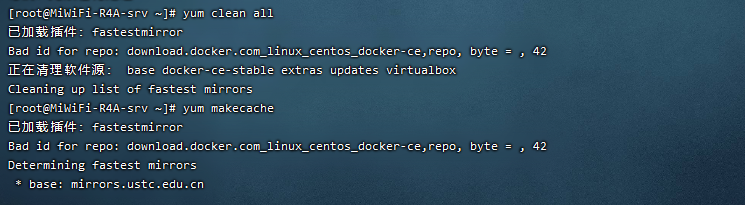
3.安装virtualbox
yum install VirtualBox-5.1

此时再次运行创建主机实例Virtualbox 命令:docker-machine create -d virtualbox manager,新的错误出现:
错误点2:
Error with pre-create check: "We support Virtualbox starting with version 5. Your VirtualBox install is \"WARNING: The vboxdrv kernel module is not loaded. Either there is no module\\n available for the current kernel (3.10.0-1160.31.1.el7.x86_64) or it failed to\\n load. Please recompile the kernel module and install it by\\n\\n sudo /sbin/vboxconfig\\n\\n You will not be able to start VMs until this problem is fixed.\\n5.1.38r122592\". Please upgrade at https://www.virtualbox.org"

解决方法:
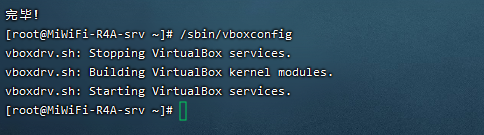
1.检查virtualbox安装配置
输入/sbin/vboxconfig,出现提示:

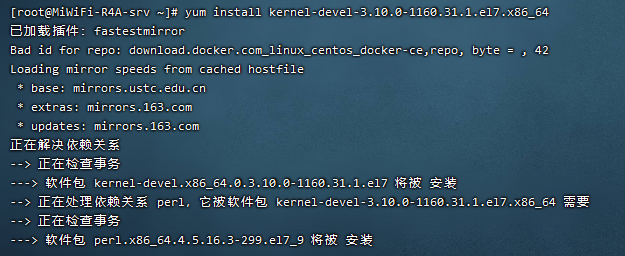
2.按提示安装核心模块(系统扩展):
yum install gcc make
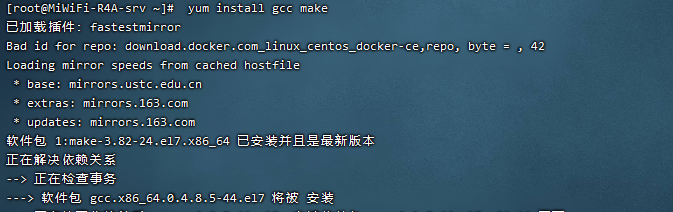
yum install kernel-devel-3.10.0-1160.31.1.e17.x86_64
3.安装完成,验证效果:
错误点3:Error with pre-create check: "This computer doesn't have VT-X/AMD-v enabled. Enabling it in the BIOS is mandatory"
解决方法:
1.poweroff关机后配置虚拟机:
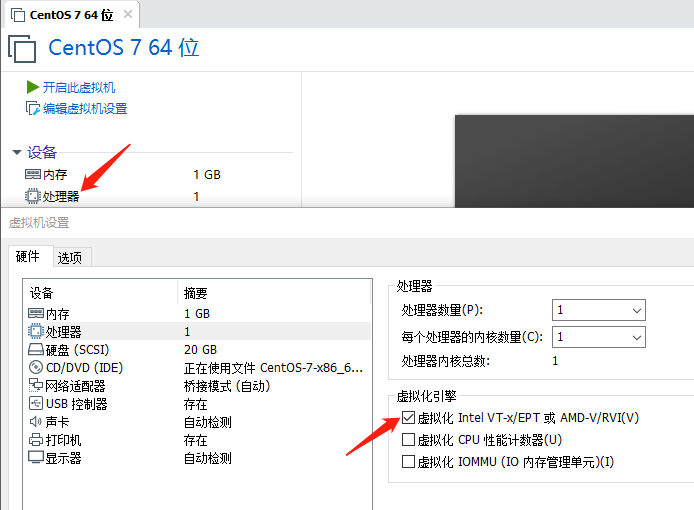
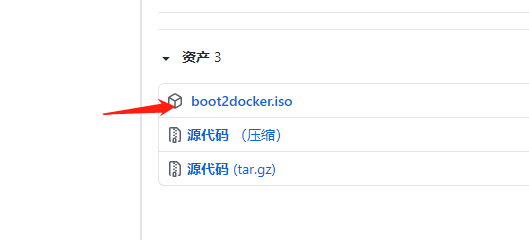
2.开机后,下载boot2docker.iso放在/root/.docker/machine/cache目录下
(boot2docker.iso下载网址https://github.com/boot2docker/boot2docker/releases/)

3.执行docker-machine create -d virtualbox manager命令:
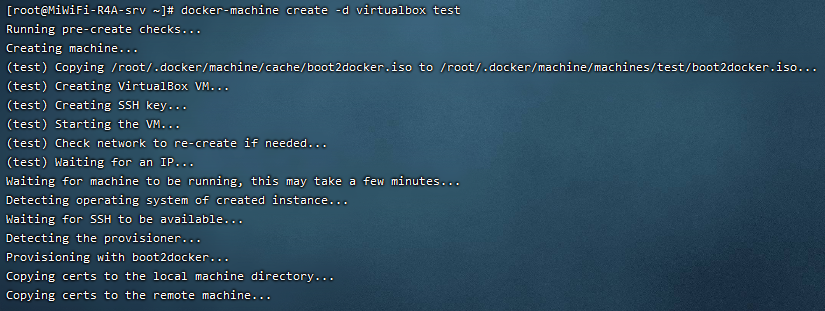
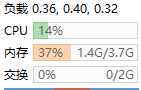
(此时虚拟机内存设置为4G,实际用量达1.4G,刚开始设置1G时运行不起来)
4.创建主机成功后, 可以通过 env 命令来让后续操作对象都是⽬标主机
docker-machine env test
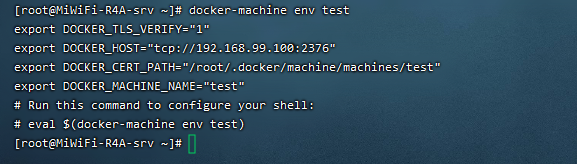
5.SSH 登录到主机
docker-machine ssh test

docker创建本地主机实例Virtualbox 驱动出错的更多相关文章
- openstack命令创建云主机实例
@ 目录 前言 上传centos镜像 创建实例 创建外网卡 修改安全组规则 创建云主机实例 前言 简单创建云主机实例只需要上传一个测试镜像.创建一张外网卡.创建一个实例类型.修改安全组规则即可 注:这 ...
- docker 创建本地镜像服务器
1.docker pull registry //下载registry 镜像,registry 为docker 官方提供的一个镜像, 我们可以用它来创建本地的docker私有仓库. docker:/r ...
- 创建本地yum源及grouplist 出错
RHEL有时候使用自定义的YUM源是很方便的事情. yum install createrepo createrepo /your/repo/directory/ 不过由于粗心,本人在使用时遇到很郁闷 ...
- docker基本概念,创建、起动实例,保存自定义镜像等常用操作
14年docker火了一阵,当时自学整理了一份文档,后来冷落了. 现在发现很多同事还是想学习docker,但无从下手,所以重新整理了这篇分享,10分钟就可以带你彻底理解docker,并能够创建属于自己 ...
- 自己挖的坑自己填--docker创建实例出现Waiting for SSH to be available…
在之前使用Docker for Windows Installer.exe直接安装,通过docker-machine-driver-vmwareworkstation.exe实现docker和VM的共 ...
- 从Docker容器内部,如何连接到本机的本地主机?
原文 从Docker容器内部,如何连接到本机的本地主机? 编辑:如果您使用的是Docker-for-mac或Docker-for-Windows 18.03+,只需使用主机连接到您的mysql服务即可 ...
- 用ssh-key-gen 在本地主机上创建公钥和密钥
用ssh-key-gen 在本地主机上创建公钥和密钥 ligh@local-host$ ssh-keygen -t rsa
- docker 创建实例
docker创建mysql实例要注意表名大小写和端口号映射的问题.下面是使用文件挂载解决表名大小写问题. docker run --name mysql-1 -e MYSQL_ROOT_PASSWOR ...
- virtualbox虚拟机之连接本地主机同时可以连接外部网络
如果主机需要通过ssh,ftp等方式访问linux虚拟机,是无法实现的.这个时候要实现端口互通,我们要用到VirtualBox的端口转发功能.所谓的端口转发功能,就是借助主机上虚拟出来的Virtual ...
随机推荐
- TP5数据库数据变动日志记录设计
根据网友的设计进行了部分调整: 用户分为管理员admin表和用户user表 记录操作表数据 增删改: insert/delete/update <?php /** * OperateLog.ph ...
- DEDECMS首页循环调用一级栏目和二级栏目的实现方法
调用方法: {dede:channelartlist typeid='2'} <li class="First"><a href="{dede:fiel ...
- 『GoLang』结构体与方法
结构体 结构体类型 Go 通过结构体的形式支持用户自定义类型,或者叫定制类型. Go 语言结构体是实现自定义类型的一种重要数据类型. 结构体是复合类型(composite types),它由一系列属性 ...
- python3.7+flask+alipay 支付宝付款功能
文档参考github:https://github.com/fzlee/alipay/blob/master/docs/init.md 沙箱环境配置:https://opendocs.alipay.c ...
- 鸿蒙内核源码分析(信号消费篇) | 谁让CPU连续四次换栈运行 | 百篇博客分析OpenHarmony源码 | v49.04
百篇博客系列篇.本篇为: v49.xx 鸿蒙内核源码分析(信号消费篇) | 谁让CPU连续四次换栈运行 | 51.c.h .o 进程管理相关篇为: v02.xx 鸿蒙内核源码分析(进程管理篇) | 谁 ...
- 看动画学算法之:doublyLinkedList
目录 简介 doublyLinkedList的构建 doublyLinkedList的操作 头部插入 尾部插入 插入给定的位置 删除指定位置的节点 简介 今天我们来学习一下复杂一点的LinkedLis ...
- Go语言之结构体与方法
一.结构体 结构体是一系列属性的集合(类似于 Python 中的类) 1.结构体的定义与使用 // 定义 type Person struct { Name string Age int Sex st ...
- PHP审计之class_exists与任意实例化漏洞
PHP审计之class_exists与任意实例化漏洞 前言 发现PHP的一些漏洞函数挺有意思,跟着七月火师傅的文章来学习. class_exists函数 函数说明 class_exists:(PHP ...
- Ysoserial Commons Collections2分析
Ysoserial Commons Collections2分析 About Commons Collections2 CC2与CC1不同在于CC2用的是Commons Collections4.0; ...
- centos无法建立ssl连接
在centos下使用wget安装mysql5.7时,提示无法建立ssl连接 查阅资料,在命令wget后加上 --no-check-certificate也还是无法建立SSL连接. 后来,觉得可能是由于 ...