
利用 Scrapy 爬取知乎用户信息
思路:通过获取知乎某个大V的关注列表和被关注列表,查看该大V和其关注用户和被关注用户的详细信息,然后通过层层递归调用,实现获取关注用户和被关注用户的关注列表和被关注列表,最终实现获取大量用户信息。
一、新建一个scrapy项目
scrapy startproject zhihuuser
移动到新建目录下:
cd zhihuuser
新建spider项目:
scrapy genspider zhihu zhihu.com
二、这里以爬取知乎大V轮子哥的用户信息来实现爬取知乎大量用户信息。
a) 定义 spdier.py 文件(定义爬取网址,爬取规则等):
# -*- coding: utf-8 -*-

import json

from scrapy import Spider, Request

from zhihuuser.items import UserItem

class ZhihuSpider(Spider):

    name = 'zhihu'

    allowed_domains = ['zhihu.com']

    start_urls = ['http://zhihu.com/']

#自定义爬取网址

    start_user = 'excited-vczh'

    user_url = 'https://www.zhihu.com/api/v4/members/{user}?include={include}'

    user_query = 'allow_message,is_followed,is_following,is_org,is_blocking,employments,answer_count,follower_count,articles_count,gender,badge[?(type=best_answerer)].topics'

    follows_url = 'https://www.zhihu.com/api/v4/members/{user}/followees?include={include}&offset={offset}&limit={limit}'

    follows_query = 'data[*].answer_count,articles_count,gender,follower_count,is_followed,is_following,badge[?(type=best_answerer)].topics'

    followers_url = 'https://www.zhihu.com/api/v4/members/{user}/followees?include={include}&offset={offset}&limit={limit}'

    followers_query = 'data[*].answer_count,articles_count,gender,follower_count,is_followed,is_following,badge[?(type=best_answerer)].topics'

#定义请求爬取用户信息、关注用户和被关注用户的函数

    def start_requests(self):

        yield Request(self.user_url.format(user=self.start_user, include=self.user_query), callback=self.parseUser)

        yield Request(self.follows_url.format(user=self.start_user, include=self.follows_query, offset=0, limit=20), callback=self.parseFollows)

        yield Request(self.followers_url.format(user=self.start_user, include=self.followers_query, offset=0, limit=20), callback=self.parseFollowers)

#请求爬取用户详细信息

    def parseUser(self, response):

        result = json.loads(response.text)

        item = UserItem()

        for field in item.fields:

            if field in result.keys():

                item[field] = result.get(field)

        yield item

#定义回调函数,爬取关注用户与被关注用户的详细信息,实现层层迭代

        yield Request(self.follows_url.format(user=result.get('url_token'), include=self.follows_query, offset=0, limit=20), callback=self.parseFollows)

        yield Request(self.followers_url.format(user=result.get('url_token'), include=self.followers_query, offset=0, limit=20), callback=self.parseFollowers)

#爬取关注者列表

    def parseFollows(self, response):

        results = json.loads(response.text)

        if 'data' in results.keys():

            for result in results.get('data'):

                yield Request(self.user_url.format(user=result.get('url_token'), include=self.user_query), callback=self.parseUser)

        if 'paging' in results.keys() and results.get('paging').get('is_end') == False:

            next_page = results.get('paging').get('next')

            yield Request(next_page, callback=self.parseFollows)

#爬取被关注者列表

    def parseFollowers(self, response):

        results = json.loads(response.text)

        if 'data' in results.keys():

            for result in results.get('data'):

                yield Request(self.user_url.format(user=result.get('url_token'), include=self.user_query), callback=self.parseUser)

        if 'paging' in results.keys() and results.get('paging').get('is_end')    == False:

            next_page = results.get('paging').get('next')

            yield Request(next_page, callback=self.parseFollowers)
b) 定义 items.py 文件(定义爬取数据的信息,使其规整等):
# -*- coding: utf-8 -*-

# Define here the models for your scraped items

#

# See documentation in:

# https://doc.scrapy.org/en/latest/topics/items.html

from scrapy import Field, Item

class UserItem(Item):

    # define the fields for your item here like:

    # name = scrapy.Field()

    allow_message = Field()

    answer_count = Field()

    articles_count = Field()

    avatar_url = Field()

    avatar_url_template = Field()

    badge = Field()

    employments = Field()

    follower_count = Field()

    gender = Field()

    headline = Field()

    id = Field()

    name = Field()

    type = Field()

    url = Field()

    url_token = Field()

    user_type = Field()
c) 定义 pipelines.py 文件(存储数据到MongoDB):
# -*- coding: utf-8 -*-

# Define your item pipelines here

#

# Don't forget to add your pipeline to the ITEM_PIPELINES setting

# See: https://doc.scrapy.org/en/latest/topics/item-pipeline.html

import pymongo

#存储到MongoDB

class MongoPipeline(object):

    collection_name = 'users'

    def __init__(self, mongo_uri, mongo_db):

        self.mongo_uri = mongo_uri

        self.mongo_db = mongo_db

    @classmethod

    def from_crawler(cls, crawler):

        return cls(

            mongo_uri=crawler.settings.get('MONGO_URI'),

            mongo_db=crawler.settings.get('MONGO_DATABASE')

        )

    def open_spider(self, spider):

        self.client = pymongo.MongoClient(self.mongo_uri)

        self.db = self.client[self.mongo_db]

    def close_spider(self, spider):

        self.client.close()

    def process_item(self, item, spider):

        self.db[self.collection_name].update({'url_token': item['url_token']}, dict(item), True)        #执行去重操作

        return item
d) 定义settings.py 文件(开启MongoDB、定义请求头、不遵循 robotstxt 规则):
# -*- coding: utf-8 -*-

BOT_NAME = 'zhihuuser'

SPIDER_MODULES = ['zhihuuser.spiders']

# Obey robots.txt rules

ROBOTSTXT_OBEY = False  #是否遵守robotstxt规则,限制爬取内容。

# Override the default request headers(加载请求头):

DEFAULT_REQUEST_HEADERS = {

  'Accept': 'text/html,application/xhtml+xml,application/xml;q=0.9,*/*;q=0.8',

  'Accept-Language': 'en',

  'User-agent': 'Mozilla/5.0 (Macintosh; Intel Mac OS X 10_11_6) AppleWebKit/537.36 (KHTML, like Gecko) Chrome/64.0.3282.140 Safari/537.36',

  'authorization': 'oauth c3cef7c66a1843f8b3a9e6a1e3160e20'

}

# Configure item pipelines

# See https://doc.scrapy.org/en/latest/topics/item-pipeline.html

ITEM_PIPELINES = {

   'zhihuuser.pipelines.MongoPipeline': 300,

}

MONGO_URI = 'localhost'

MONGO_DATABASE = 'zhihu'
三、开启爬取:
scrapy crawl zhihu
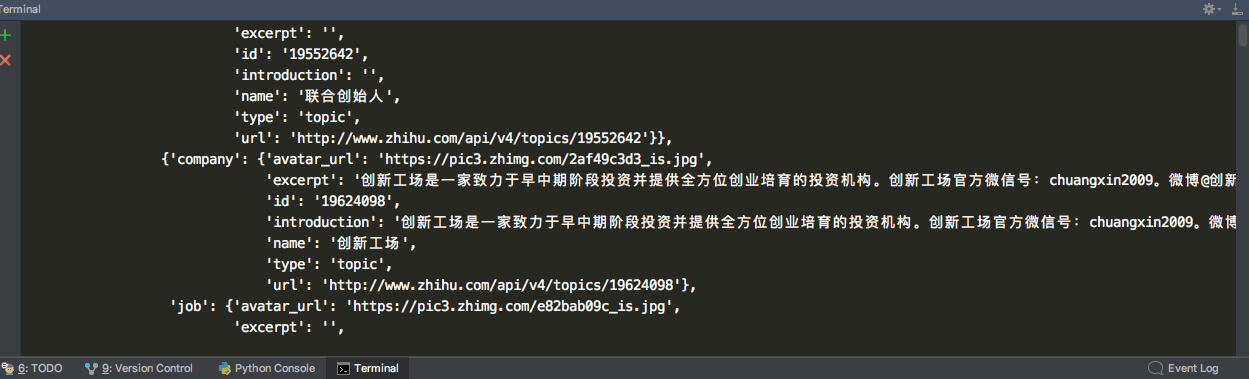
部分爬取过程中的信息
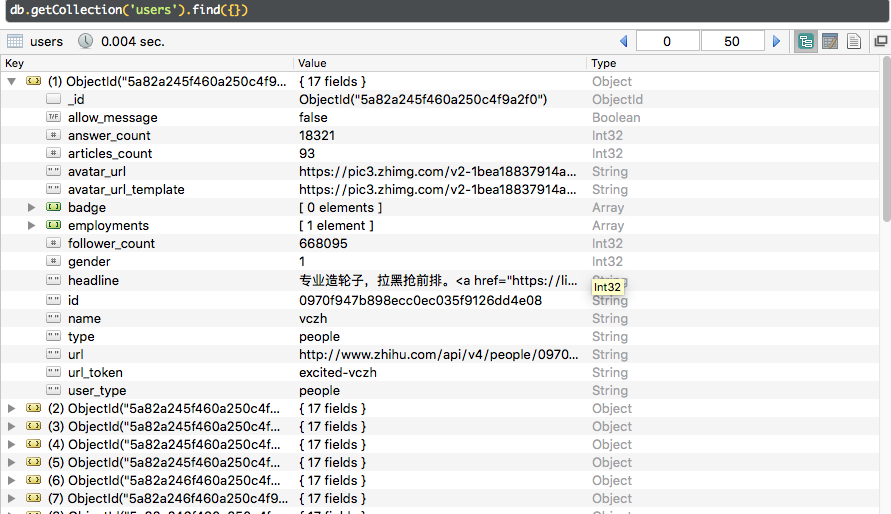
存储到MongoDB的部分信息:
利用 Scrapy 爬取知乎用户信息的更多相关文章
- 爬虫实战--利用Scrapy爬取知乎用户信息
思路: 主要逻辑图:
- 爬虫(十六):scrapy爬取知乎用户信息
一:爬取思路 首先我们应该找到一个账号,这个账号被关注的人和关注的人都相对比较多的,就是下图中金字塔顶端的人,然后通过爬取这个账号的信息后,再爬取他关注的人和被关注的人的账号信息,然后爬取被关注人的账 ...
- 基于webmagic的爬虫小应用--爬取知乎用户信息
听到“爬虫”,是不是第一时间想到Python/php ? 多少想玩爬虫的Java学习者就因为语言不通而止步.Java是真的不能做爬虫吗? 当然不是. 只不过python的3行代码能解决的问题,而Jav ...
- 使用python scrapy爬取知乎提问信息
前文介绍了python的scrapy爬虫框架和登录知乎的方法. 这里介绍如何爬取知乎的问题信息,并保存到mysql数据库中. 首先,看一下我要爬取哪些内容: 如下图所示,我要爬取一个问题的6个信息: ...
- Srapy 爬取知乎用户信息
今天用scrapy框架爬取一下所有知乎用户的信息.道理很简单,找一个知乎大V(就是粉丝和关注量都很多的那种),找到他的粉丝和他关注的人的信息,然后分别再找这些人的粉丝和关注的人的信息,层层递进,这样下 ...
- 利用Selenium爬取淘宝商品信息
一. Selenium和PhantomJS介绍 Selenium是一个用于Web应用程序测试的工具,Selenium直接运行在浏览器中,就像真正的用户在操作一样.由于这个性质,Selenium也是一 ...
- python scrapy爬取知乎问题和收藏夹下所有答案的内容和图片
上文介绍了爬取知乎问题信息的整个过程,这里介绍下爬取问题下所有答案的内容和图片,大致过程相同,部分核心代码不同. 爬取一个问题的所有内容流程大致如下: 一个问题url 请求url,获取问题下的答案个数 ...
- 利用Scrapy爬取所有知乎用户详细信息并存至MongoDB
欢迎大家关注腾讯云技术社区-博客园官方主页,我们将持续在博客园为大家推荐技术精品文章哦~ 作者 :崔庆才 本节分享一下爬取知乎用户所有用户信息的 Scrapy 爬虫实战. 本节目标 本节要实现的内容有 ...
- scrapy 爬取知乎问题、答案 ,并异步写入数据库(mysql)
python版本 python2.7 爬取知乎流程: 一 .分析 在访问知乎首页的时候(https://www.zhihu.com),在没有登录的情况下,会进行重定向到(https://www. ...
随机推荐
- SIMD---AVX系列
AVX全称Advanced Vcetor Extension,是对SSE的后续扩展,主要分为AVX.AVX2.AVX512三种.在目前常见的机器上,大多只支持到AVX系列,因此其他SIMD扩展指令我们 ...
- 指令-arContentedit-可编辑的高度自适应的div
<div ar-contentedit="true" contenteditable="true" contenteditable="pla ...
- Python 双向链表
操作 is_empty() 链表是否为空 length() 链表长度 travel() 遍历链表 add(item) 链表头部添加 append(item) 链表尾部添加 insert(pos, it ...
- 第四十三条:返回零长度的数组或者集合,而不是null
如果一个方法的返回值类型是集合或者数组 ,如果在方法内部需要返回的集合或者数组是零长度的,也就是没有实际对象在里面, 我们也应该放回一个零长度的数组或者集合,而不是返回null.如果返回了null,客 ...
- thinkphp框架的大D方法应用
大D方法中需要传递一个模型,比如UserModer,就传递D('User'),而数据库中存在一个表比如think_user,其中think就是前缀. 在UserModel里面存在自动验证.自动完成可以 ...
- 基于RNN的音频降噪算法 (附完整C代码)
前几天无意间看到一个项目rnnoise. 项目地址: https://github.com/xiph/rnnoise 基于RNN的音频降噪算法. 采用的是 GRU/LSTM 模型. 阅读下训练代码,可 ...
- 返回到前台的String出现乱码问题
使用springmvc给前天返回String类型的数据出现乱码问题可以在配置环境Spring-mvc.xml中添加如下代码 <mvc:annotation-driven> <mvc: ...
- CentOS7.4下的 JDK1.8 安装
一.卸载老的JDK 如果需要卸载OpenJDK,执行以下操作: [root@localhost ~]# rpm -e --nodeps tzdata-java-2014i-1.el7.noarch[r ...
- ELK学习总结(2-2)单模式CRUD操作
------------------------------------------------------ 1.查看索引信息 请求命令: GET /library/_settings GET /li ...
- Apache命令
参考于:http://www.jinbuguo.com/apache/menu22/programs/apxs.html 安装httpd-devel才有apxs