
npm 安装 react-devtools
由于不能科学的上网。网上看资料装上了这个插件,装的过程有点坑。记录一下,希望能帮到和我一样的新手。
1.第一步,克隆下远程仓库的东西。
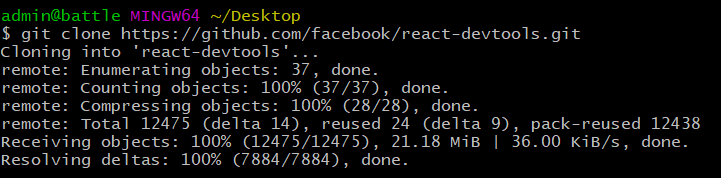
桌面右键,git-bash。然后输入:
git clone https://github.com/facebook/react-devtools.git
这个过程耗时比较长。
结果:
2.第二步, 进入到react-devtools目录,安装依赖
cd react-devtools

npm install
过程耗时长。安装碰上的情况。如下:
admin@battle MINGW64 ~/Desktop

$ cd react-devtools

admin@battle MINGW64 ~/Desktop/react-devtools (master)

$ npm install

npm WARN deprecated clipboard-js@0.3.: Please migrate to https://github.com/lgarron/clipboard-polyfill

npm WARN deprecated core-js@1.2.: core-js@<2.6. is no longer maintained. Please, upgrade to core-js@ or at least to actual version of core-js@.

npm WARN deprecated gulp-util@3.0.: gulp-util is deprecated - replace it, following the guidelines at https://medium.com/gulpjs/gulp-util-ca3b1f9f9ac5

npm WARN deprecated cross-spawn-async@2.2.: cross-spawn no longer requires a build toolchain, use it instead

npm WARN deprecated firefox-client@0.3.: Package no longer supported. Contact support@npmjs.com for more info.

npm WARN deprecated circular-json@0.3.: CircularJSON is in maintenance only, flatted is its successor.

npm WARN deprecated js-select@0.6.: Package no longer supported. Contact support@npmjs.com for more info.

npm WARN deprecated hawk@3.1.: This module moved to @hapi/hawk. Please make sure to switch over as this distribution is no longer supported and may contain bugs and critical security issues.

npm WARN deprecated left-pad@1.3.: use String.prototype.padStart()

npm WARN deprecated joi@6.10.: This version has been deprecated in accordance with the hapi support policy (hapi.im/support). Please upgrade to the latest version to get the best features, bug fixes, and security patches. If you are unable to upgrade at this time, paid support is available for older versions (hapi.im/commercial).

npm WARN deprecated sntp@1.0.: This module moved to @hapi/sntp. Please make sure to switch over as this distribution is no longer supported and may contain bugs and critical security issues.

npm WARN deprecated cryptiles@2.0.: This version has been deprecated in accordance with the hapi support policy (hapi.im/support). Please upgrade to the latest version to get the best features, bug fixes, and security patches. If you are unable to upgrade at this time, paid support is available for older versions (hapi.im/commercial).

npm WARN deprecated topo@1.1.: This version has been deprecated in accordance with the hapi support policy (hapi.im/support). Please upgrade to the latest version to get the best features, bug fixes, and security patches. If you are unable to upgrade at this time, paid support is available for older versions (hapi.im/commercial).

npm WARN deprecated hoek@2.16.: This version has been deprecated in accordance with the hapi support policy (hapi.im/support). Please upgrade to the latest version to get the best features, bug fixes, and security patches. If you are unable to upgrade at this time, paid support is available for older versions (hapi.im/commercial).

npm WARN deprecated boom@2.10.: This version has been deprecated in accordance with the hapi support policy (hapi.im/support). Please upgrade to the latest version to get the best features, bug fixes, and security patches. If you are unable to upgrade at this time, paid support is available for older versions (hapi.im/commercial).

> dtrace-provider@0.8. install C:\Users\admin\Desktop\react-devtools\node_modules\dtrace-provider

> node-gyp rebuild || node suppress-error.js

C:\Users\admin\Desktop\react-devtools\node_modules\dtrace-provider>if not defined npm_config_node_gyp (node "C:\Program Files\nodejs\node_modules\npm\node_modules\npm-lifecycle\node-gyp-bin\\..\..\node_modules\node-gyp\bin\node-gyp.js" rebuild )  else (node "C:\Program Files\nodejs\node_modules\npm\node_modules\node-gyp\bin\node-gyp.js" rebuild )

gyp ERR! configure error

gyp ERR! stack Error: Can't find Python executable "python", you can set the PYTHON env variable.

gyp ERR! stack     at PythonFinder.failNoPython (C:\Program Files\nodejs\node_modules\npm\node_modules\node-gyp\lib\configure.js::)

gyp ERR! stack     at PythonFinder.<anonymous> (C:\Program Files\nodejs\node_modules\npm\node_modules\node-gyp\lib\configure.js::)

gyp ERR! stack     at C:\Program Files\nodejs\node_modules\npm\node_modules\graceful-fs\polyfills.js::

gyp ERR! stack     at FSReqWrap.oncomplete (fs.js::)

gyp ERR! System Windows_NT 10.0.

gyp ERR! command "C:\\Program Files\\nodejs\\node.exe" "C:\\Program Files\\nodejs\\node_modules\\npm\\node_modules\\node-gyp\\bin\\node-gyp.js" "rebuild"

gyp ERR! cwd C:\Users\admin\Desktop\react-devtools\node_modules\dtrace-provider

gyp ERR! node -v v10.15.3

gyp ERR! node-gyp -v v3.8.0

gyp ERR! not ok

> command-join@2.0. postinstall C:\Users\admin\Desktop\react-devtools\node_modules\command-join

> npx -p @seangenabe/tnx tnx || exit

npx:  安装成功,用时 3.104 秒

    Thanks for installing command-join!

    If you like this package, be sure to star its repo,

    and please consider donating:

        https://seangenabe.netlify.com/donate

> core-js@2.6. postinstall C:\Users\admin\Desktop\react-devtools\node_modules\core-js

> node scripts/postinstall || echo "ignore"

Thank you for using core-js ( https://github.com/zloirock/core-js ) for polyfilling JavaScript standard library!

The project needs your help! Please consider supporting of core-js on Open Collective or Patreon:

> https://opencollective.com/core-js

> https://www.patreon.com/zloirock

Also, the author of core-js ( https://github.com/zloirock ) is looking for a good job -)

> core-js-pure@3.1. postinstall C:\Users\admin\Desktop\react-devtools\node_modules\core-js-pure

> node scripts/postinstall || echo "ignore"

Thank you for using core-js ( https://github.com/zloirock/core-js ) for polyfilling JavaScript standard library!

The project needs your help! Please consider supporting of core-js on Open Collective or Patreon:

> https://opencollective.com/core-js

> https://www.patreon.com/zloirock

Also, the author of core-js ( https://github.com/zloirock ) is looking for a good job -)

> spawn-sync@1.0. postinstall C:\Users\admin\Desktop\react-devtools\node_modules\spawn-sync

> node postinstall

npm notice created a lockfile as package-lock.json. You should commit this file.

npm WARN ajv-errors@1.0. requires a peer of ajv@>=5.0. but none is installed. You must install peer dependencies yourself.

npm WARN optional SKIPPING OPTIONAL DEPENDENCY: fsevents@1.2. (node_modules\fsevents):

npm WARN notsup SKIPPING OPTIONAL DEPENDENCY: Unsupported platform for fsevents@1.2.: wanted {"os":"darwin","arch":"any"} (current: {"os":"win32","arch":"x64"})

added  packages from  contributors and audited  packages in .133s

found  vulnerabilities ( low,  moderate,  high,  critical)

  run `npm audit fix` to fix them, or `npm audit` for details
直接忽略了。。继续下一步。
3.打包一份扩展程序。如下:
npm run build:extension:chrome
结果:
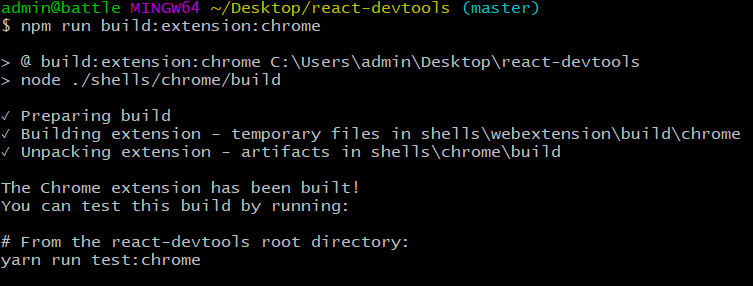
这个时候就可以在react-devtools目录下找到shells--chrome--build--unpacked文件夹。
4.打开chrome,地址栏输出:chrome://extensions/。 左上角点击加载已解压的扩展程序。把unpacked文件夹放进去了。
大功告成,右上角多了个react图标。

npm 安装 react-devtools的更多相关文章
- npm 安装React Devtools调试工具
有时候没有***工具时,怎么安装React DevTool, 其一直接搜索到Chrome的插件安装即可. 其二, 可以通过下载github上的react-devtools, 然后打包,最后导入chro ...
- React安装React Devtools调试工具
在运行一个React项目的时候浏览器控制台会提醒你去安装react devtools调试工具. Download the React DevTools for a better development ...
- 【问题与解决】Mac OS通过 npm 安装 React Native 报错(checkPermissions Missing write access to /usr/local/lib/node_modules)
报错情况: 当Mac OS通过 npm 安装 React Native 报错,警告文字为:checkPermissions Missing write access to /usr/local/lib ...
- npm安装cnpm、vue、react
安装cnpmnpm install -g cnpm --registry=https://registry.npm.taobao.org 安装vuecnpm install --global vue- ...
- MacOS安装react。问题 -- npm全局包的权限问题
网上的教程有好多,在这里不一一列举,我只介绍我今天安装成功的步骤 首先,在安装react之前要先配置好node 1.安装node 在这里下载node的安装包https://nodejs.org/en/ ...
- 史上最全Windows版本搭建安装React Native环境配置
史上最全Windows版本搭建安装React Native环境配置 配置过React Native 环境的都知道,在Windows React Native环境配置有很多坑要跳,为了帮助新手快速无误的 ...
- 史上最详细Windows版本搭建安装React Native环境配置 转载,比官网的靠谱亲测可用
史上最详细Windows版本搭建安装React Native环境配置 2016/01/29 | React Native技术文章 | Sky丶清| 95条评论 | 33530 views ...
- 利用npm安装/删除/发布/更新/撤销发布包 --社会我npm哥,好用话不多
一.什么是npm? npm是javascript的包管理工具,是前端模块化下的一个标志性产物 简单地地说,就是通过npm下载模块,复用已有的代码,提高工作效率 1.从社区的角度:把针对某一特定 ...
- React DevTools
[React DevTools] 在应用商店搜索安装.F12可打开.如果是react应用,在最右排会显示react标签. 参考:https://github.com/facebook/react-de ...
- 【npm】利用npm安装/删除/发布/更新/撤销发布包
什么是npm? npm是javascript的包管理工具,是前端模块化下的一个标志性产物 简单地地说,就是通过npm下载模块,复用已有的代码,提高工作效率 1.从社区的角度:把针对某一特定问题 ...
随机推荐
- GIT生成SSH-KEY公钥放到服务器免密登录
在使用git时老是碰到在push的时候提示没有权限的问题,那么现在咱们就来创建ssh-key来免密登录.我们来看看如何配置服务器端的 SSH 访问. 本例中,我们将使用 authorized_keys ...
- NGINX Cache Management (.imh nginx)
In this article, we will explore the various NGINX cache configuration options, and tips on tweaking ...
- mysql 5.6配置
简洁版: [client] port = 3306 socket = /weyeedata/mysql/run/mysql.sock [mysqld] innodb_buffer_pool_size ...
- ISO/IEC 9899:2011 条款6.10——预处理指示符
6.10 预处理指示符 语法 1.preprocessing-file: groupopt group: group-part group group-part group-part: if-s ...
- python路径相关技巧
在文件C:\work\python\rqalpha\rqalpha\utils\config.py 找文件:C:\work\python\rqalpha\rqalpha\config.yml 则通过下 ...
- Python 初级 6 循环 (三)
一.复习 1 计算循环(for循环) for looper in [1, 2, 3, 4, 5]: print("hello") 1) looper的值从第0个数1开始 2) 对应 ...
- iOS UILabel文字自适应高度自适应
第一步:创建UILabel对象,并设置一些基本设置 UILabel *label = [[UILabel alloc] init]; label.text = @"8月29日,在雅加达亚运会 ...
- SQL Server导入Excel文件报错
目录 文本被截断,或者一个或多个字符在目标代码页中没有匹配项 原因 解决方法 该值违反了该列的完整性约束 空行 没有设置为允许为NULL 我以前也导入过数据,也没报错,今天再次导入数据的时候,发现了两 ...
- 【linux基础err】NVIDIA-SMI has failed because it could't communicate with the NVIDIA driver.
问题 安装nvidia driver和cuda关机重启之后出现不能进入系统的问题,进入命令行模式使用nvidia-smi检查驱动的问题. nvidia-smi NVIDIA-SMI has faile ...
- win运行canal
1.mysql开启log_bin 用命令查看是否开启 SHOW VARIABLES LIKE 'log_bin'; OFF为未开启,ON为开启 Win环境的话找到my.ini,Linux环境的话找到m ...