
Spring Cloud @RefreshScope 原理是什么?
要清楚RefreshScope,先要了解Scope
Scope(org.springframework.beans.factory.config.Scope)是Spring 2.0开始就有的核心的概念
RefreshScope(org.springframework.cloud.context.scope.refresh)是spring cloud提供的一种特殊的scope实现,用来实现配置、实例热加载。
Scope -> GenericScope -> RefreshScope
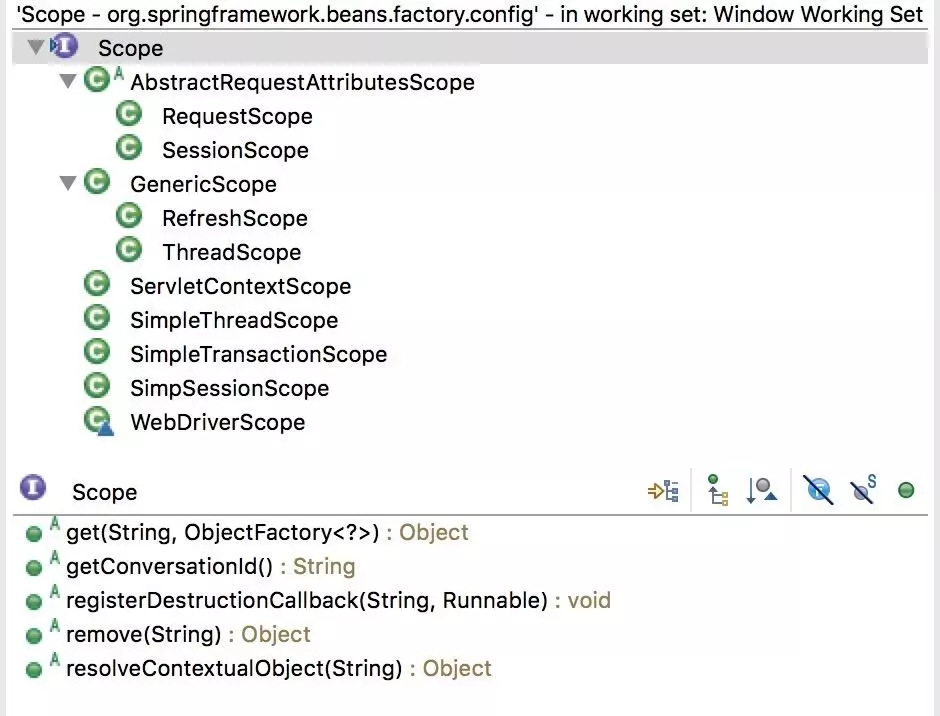
Scope与ApplicationContext生命周期
AbstractBeanFactory#doGetBean创建Bean实例
protected <T> T doGetBean(...){

    final RootBeanDefinition mbd = ...

    if (mbd.isSingleton()) {

        ...

    } else if (mbd.isPrototype())

       ...

    } else {

          String scopeName = mbd.getScope();

          final Scope scope = this.scopes.get(scopeName);

          Object scopedInstance = scope.get(beanName, new ObjectFactory<Object>() {...});

          ...

    }

    ...

}
Singleton和Prototype是硬编码的,并不是Scope子类。
Scope实际上是自定义扩展的接口,Scope Bean实例交由Scope自己创建,例如SessionScope是从Session中获取实例的,ThreadScope是从ThreadLocal中获取的,而RefreshScope是在内建缓存中获取的。
@Scope 对象的实例化
@RefreshScope 是scopeName="refresh"的 @Scope
...

@Scope("refresh")

public @interface RefreshScope {

  ...

}
@Scope 的注册 AnnotatedBeanDefinitionReader#registerBean
public void registerBean(...){

...

ScopeMetadata scopeMetadata = this.scopeMetadataResolver.resolveScopeMetadata(abd);

  abd.setScope(scopeMetadata.getScopeName());

  ...

  definitionHolder = AnnotationConfigUtils.applyScopedProxyMode(scopeMetadata, definitionHolder, this.registry);

}
读取@Scope元数据, AnnotationScopeMetadataResolver#resolveScopeMetadata
public ScopeMetadata resolveScopeMetadata(BeanDefinition definition) {

  AnnotationAttributes attributes = AnnotationConfigUtils.attributesFor(

  annDef.getMetadata(), Scope.class);

  if (attributes != null) {

      metadata.setScopeName(attributes.getString("value"));

      ScopedProxyMode proxyMode = attributes.getEnum("proxyMode");

      if (proxyMode == null || proxyMode == ScopedProxyMode.DEFAULT) {

          proxyMode = this.defaultProxyMode;

      }

      metadata.setScopedProxyMode(proxyMode);

  }

}
Scope实例对象通过ScopedProxyFactoryBean创建,其中通过AOP使其实现ScopedObject接口,这里不再展开。
说RefreshScope是如何实现配置和实例刷新的
RefreshScope注册
RefreshAutoConfiguration#RefreshScopeConfiguration
@Component

@ConditionalOnMissingBean(RefreshScope.class)

protected static class RefreshScopeConfiguration implements BeanDefinitionRegistryPostProcessor{

...

  registry.registerBeanDefinition("refreshScope",

  BeanDefinitionBuilder.genericBeanDefinition(RefreshScope.class)

                      .setRole(BeanDefinition.ROLE_INFRASTRUCTURE)

                      .getBeanDefinition());

...

}
RefreshScope extends GenericScope, 大部分逻辑在 GenericScope 中。
GenericScope#postProcessBeanFactory 中向AbstractBeanFactory注册自己
public class GenericScope implements Scope, BeanFactoryPostProcessor...{

  @Override

  public void postProcessBeanFactory(ConfigurableListableBeanFactory beanFactory)

      throws BeansException {

      beanFactory.registerScope(this.name/*refresh*/, this/*RefreshScope*/);

      ...

  }

}
RefreshScope 刷新过程
入口在ContextRefresher#refresh
refresh() {

  Map<String, Object> before = ①extract(

          this.context.getEnvironment().getPropertySources());

  ②addConfigFilesToEnvironment();

  Set<String> keys = ④changes(before,

          ③extract(this.context.getEnvironment().getPropertySources())).keySet();

  this.context.⑤publishEvent(new EnvironmentChangeEvent(keys));

  this.scope.⑥refreshAll();

 }
①提取标准参数(SYSTEM,JNDI,SERVLET)之外所有参数变量
②把原来的Environment里的参数放到一个新建的Spring Context容器下重新加载,完事之后关闭新容器
③提起更新过的参数(排除标准参数)
④比较出变更项
⑤发布环境变更事件,接收:EnvironmentChangeListener/LoggingRebinder
⑥RefreshScope用新的环境参数重新生成Bean,重新生成的过程很简单,清除refreshscope缓存幷销毁Bean,下次就会重新从BeanFactory获取一个新的实例(该实例使用新的配置)
RefreshScope#refreshAll
public void refreshAll() {

      <b>super.destroy();</b>

      this.context.publishEvent(new RefreshScopeRefreshedEvent());

}
GenericScope#destroy
public void destroy() {

  ...

  Collection<BeanLifecycleWrapper> wrappers = <b>this.cache.clear()</b>;

  for (BeanLifecycleWrapper wrapper : wrappers) {

      <b>wrapper.destroy();</b>

  }

}
Spring Cloud Bus 如何触发 Refresh
BusAutoConfiguration#BusRefreshConfiguration 发布一个RefreshBusEndpoint
@Configuration

@ConditionalOnClass({ Endpoint.class, RefreshScope.class })

protected static class BusRefreshConfiguration {

  @Configuration

  @ConditionalOnBean(ContextRefresher.class)

  @ConditionalOnProperty(value = "endpoints.spring.cloud.bus.refresh.enabled", matchIfMissing = true)

  protected static class BusRefreshEndpointConfiguration {

      @Bean

      public RefreshBusEndpoint refreshBusEndpoint(ApplicationContext context,

              BusProperties bus) {

          return new RefreshBusEndpoint(context, bus.getId());

      }

  }

}
RefreshBusEndpoint 会从http端口触发广播RefreshRemoteApplicationEvent事件
@Endpoint(id = "bus-refresh")

public class RefreshBusEndpoint extends AbstractBusEndpoint {

   public void busRefresh() {

      publish(new RefreshRemoteApplicationEvent(this, getInstanceId(), null));

  }

}
BusAutoConfiguration#refreshListener 负责接收事件(所有配置bus的节点)
@Bean

@ConditionalOnProperty(value = "spring.cloud.bus.refresh.enabled", matchIfMissing = true)

@ConditionalOnBean(ContextRefresher.class)

public RefreshListener refreshListener(ContextRefresher contextRefresher) {

  return new RefreshListener(contextRefresher);

}
RefreshListener#onApplicationEvent 触发 ContextRefresher
public void onApplicationEvent(RefreshRemoteApplicationEvent event) {

  Set<String> keys = contextRefresher.refresh();

}
大部分需要更新的服务需要打上@RefreshScope, EurekaClient是如何配置更新的
EurekaClientAutoConfiguration#RefreshableEurekaClientConfiguration
@Configuration

@ConditionalOnRefreshScope

protected static class RefreshableEurekaClientConfiguration{

  @Bean

  @RefreshScope

  public EurekaClient eurekaClient(...) {

      return new CloudEurekaClient(manager, config, this.optionalArgs,

              this.context);

  }

  @Bean

  @RefreshScope

  public ApplicationInfoManager eurekaApplicationInfoManager(...) {

      ...

      return new ApplicationInfoManager(config, instanceInfo);

  }

}
Spring Cloud @RefreshScope 原理是什么?的更多相关文章
- 拜托!面试请不要再问我Spring Cloud底层原理[z]
[z]https://juejin.im/post/5be13b83f265da6116393fc7 拜托!面试请不要再问我Spring Cloud底层原理 欢迎关注微信公众号:石杉的架构笔记(id: ...
- Spring Cloud底层原理(转载 石杉的架构笔记)
拜托!面试请不要再问我Spring Cloud底层原理 原创: 中华石杉 石杉的架构笔记 目录 一.业务场景介绍 二.Spring Cloud核心组件:Eureka 三.Spring Cloud核 ...
- [转帖]Spring Cloud底层原理
拜托!面试不要再问我Spring Cloud底层原理 https://mp.weixin.qq.com/s/ZH-3JK90mhnJPfdsYH2yDA 毫无疑问,Spring Cloud 是目前微服 ...
- 拜托!面试请不要再问我Spring Cloud底层原理
概述 毫无疑问,Spring Cloud是目前微服务架构领域的翘楚,无数的书籍博客都在讲解这个技术.不过大多数讲解还停留在对Spring Cloud功能使用的层面,其底层的很多原理,很多人可能并不知晓 ...
- spring cloud bus原理总结
1.spring cloud bus spring cloud是按照spring的配置对一系列微服务框架的集成,spring cloud bus是其中一个微服务框架,用于实现微服务之间的通信. spr ...
- 【转载】Spring Cloud底层原理
概述 毫无疑问,Spring Cloud是目前微服务架构领域的翘楚,无数的书籍博客都在讲解这个技术.不过大多数讲解还停留在对Spring Cloud功能使用的层面,其底层的很多原理,很多人可能并不知晓 ...
- Spring Cloud底层原理
目录 一.业务场景介绍 二.Spring Cloud核心组件:Eureka 三.Spring Cloud核心组件:Feign 四.Spring Cloud核心组件:Ribbon 五.Spring Cl ...
- Spring Cloud Gateway原理
1.使用 compile 'org.springframework.cloud:spring-cloud-starter-gateway' 2.包结构 actuate中定义了一个叫GatewayCon ...
- Spring Cloud底层原理解析
概述 毫无疑问,Spring Cloud是目前微服务架构领域的翘楚,无数的书籍博客都在讲解这个技术.不过大多数讲解还停留在对Spring Cloud功能使用的层面,其底层的很多原理,很多人可能并不知晓 ...
随机推荐
- Prometheus 监控Mysql服务器及Grafana可视化
Prometheus 监控Mysql服务器及Grafana可视化. mysql_exporter:用于收集MySQL性能信息. 使用版本 mysqld_exporter 0.11.0 官方地址 使用文 ...
- [跨域问题]ssm+vue前后台分离跨域问题解决方法
跨域未解决时: Access to XMLHttpRequest at 'http://localhost:8080/vue/findall from origin 'http://localhost ...
- K8S的DNS服务
k8s集群部署完后第一件事就是要配置DNS服务,目前可选的方案有skydns, kube-dns, coredns kube-dns是k8s中的一个内置插件,目前作为一个独立的开源项目维护,见http ...
- 开源分布式追踪系统 — Jaeger介绍
目录 一.Jaeger是什么 二.Jaeger架构 1. 术语 2. 架构图 三.关于采样率 四.部署与实践 一.Jaeger是什么 Uber开发的一个受Dapper和Zipkin启发的分布式跟踪系统 ...
- VS报错,Metadata file 'xxx.dll' could not be found
错误提示“Metadata file 'xxx.dll' could not be found”步骤如下:1.右键单击解决方案,然后单击“属性”.2.单击左侧的配置.3.确保选中了它找不到的项目的“生 ...
- MTSC2019-腾讯WeTest独家揭秘移动游戏测试和质量保障 QA 黑科技
WeTest 导读 TesterHome 联合腾讯 WeTest 出品 MTSC2019 重磅游戏测试 Topic ,首次公开揭秘腾讯亿级用户游戏背后的质量保障 QA 黑科技. 2019 年,中国游戏 ...
- 关于Git的用法
关于Git Git 是一个分布式版本控制软件,与CVS.Subversion一类的集中式版本控制工具不同,它采用了分布式版本库的作法,不需要服务器端软件,就可以运作版本控制,使得源代码的发布和交流极其 ...
- vue+element打印页面功能
项目中遇到了要打印页面的功能,我感之前使用的是一个第三方的插件,但是不兼容IE,后来发现直接调用window的API就可以了,MMP // 打印表单 printBtn() { window.print ...
- 使用 Spring 配置动态数据源实现读写分离
关键词:DataSource .AbstractRoutingDataSource.AOP 首先是配置数据源 <!--读数据源配置--><bean id="readData ...
- angular6 导出Excel文件
1.安装file-saver.@types/file-saver和xlsx npm install file-saver --save npm install @types/file-saver -- ...