
Nginx - 安装并启动Nginx
1 - 安装Nginx
官网步骤:http://nginx.org/en/linux_packages.html#RHEL-CentOS
[Anliven@h202 ~]$ sudo vim /etc/yum.repos.d/nginx.repo

[Anliven@h202 ~]$

[Anliven@h202 ~]$ cat /etc/yum.repos.d/nginx.repo

[nginx-stable]

name=nginx stable repo

baseurl=http://nginx.org/packages/centos/$releasever/$basearch/

gpgcheck=1

enabled=1

gpgkey=https://nginx.org/keys/nginx_signing.key

module_hotfixes=true

[nginx-mainline]

name=nginx mainline repo

baseurl=http://nginx.org/packages/mainline/centos/$releasever/$basearch/

gpgcheck=1

enabled=0

gpgkey=https://nginx.org/keys/nginx_signing.key

module_hotfixes=true

[Anliven@h202 ~]$

[Anliven@h202 ~]$ sudo yum -y install nginx

Loaded plugins: fastestmirror, langpacks

Determining fastest mirrors

 * base: mirrors.aliyun.com

 * extras: mirrors.163.com

 * updates: mirror.bit.edu.cn

......

......

......

  Verifying  : 1:nginx-1.16.1-1.el7.ngx.x86_64                                           1/1

Installed:

  nginx.x86_64 1:1.16.1-1.el7.ngx

Complete!

[Anliven@h202 ~]$
2 - 配置Nginx
2.1 修改默认配置
配置文件: /etc/nginx/conf.d/default.conf
[Anliven@h202 ~]$ cd /etc/nginx/conf.d/

[Anliven@h202 conf.d]$ pwd

/etc/nginx/conf.d

[Anliven@h202 conf.d]$ ll

total 4

-rw-r--r-- 1 root root 1093 Aug 13 23:02 default.conf

[Anliven@h202 conf.d]$

[Anliven@h202 conf.d]$ sudo vim default.conf

[Anliven@h202 conf.d]$ cat default.conf |grep -v "#" |grep -Ev "^$"

server {

    listen       80;

    server_name  192.168.16.202;

    location / {

        root   /usr/share/nginx/html;

        index  index.html index.htm;

    }

    location = /favicon.ico {

        log_not_found off;

        access_log off;

    }

    error_page   500 502 503 504  /50x.html;

    location = /50x.html {

        root   /usr/share/nginx/html;

    }

}

[Anliven@h202 conf.d]$
2.2 修改Nginx配置文件
/etc/nginx/nginx.conf中user参数,修改为root
[Anliven@h202 ~]$ sudo vim /etc/nginx/nginx.conf

[Anliven@h202 ~]$

[Anliven@h202 ~]$ cat /etc/nginx/nginx.conf  |grep -v "#" |grep -Ev "^$"

user  root;

worker_processes  1;

error_log  /var/log/nginx/error.log warn;

pid        /var/run/nginx.pid;

events {

    worker_connections  1024;

}

http {

    include       /etc/nginx/mime.types;

    default_type  application/octet-stream;

    log_format  main  '$remote_addr - $remote_user [$time_local] "$request" '

                      '$status $body_bytes_sent "$http_referer" '

                      '"$http_user_agent" "$http_x_forwarded_for"';

    access_log  /var/log/nginx/access.log  main;

    sendfile        on;

    keepalive_timeout  65;

    include /etc/nginx/conf.d/*.conf;

}

[Anliven@h202 ~]$
2.3 确认防火墙状态并重启服务
[Anliven@h202 ~]$ sudo firewall-cmd --zone=public --permanent --add-port=80/tcp

success

[Anliven@h202 ~]$ sudo firewall-cmd --reload

success

[Anliven@h202 ~]$ sudo firewall-cmd --list-all

public (active)

  target: default

  icmp-block-inversion: no

  interfaces: enp0s3 enp0s8

  sources:

  services: ssh dhcpv6-client

  ports: 80/tcp

  protocols:

  masquerade: no

  forward-ports:

  source-ports:

  icmp-blocks:

  rich rules:

[Anliven@h202 ~]$

[Anliven@h202 ~]$ cat /etc/selinux/config |grep "SELINUX=" |grep -v "#"

SELINUX=disabled

[Anliven@h202 ~]$

[Anliven@h202 ~]$ sudo service nginx restart

Redirecting to /bin/systemctl restart nginx.service

[Anliven@h202 ~]$
3 - 访问页面
在/usr/share/nginx/目录下的index.html文件,就是关于nginx介绍的页面
3.1 访问Nginx介绍页面

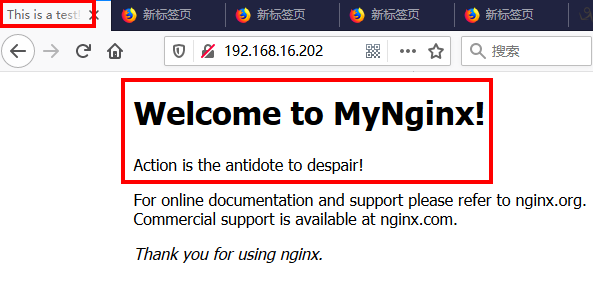
3.2 修改Nginx介绍页面
[Anliven@h202 html]$ pwd

/usr/share/nginx/html

[Anliven@h202 html]$

[Anliven@h202 html]$ sudo vim index.html

[Anliven@h202 html]$ cat index.html

<!DOCTYPE html>

<html>

<head>

<title>This is a test!</title>

<style>

    body {

        width: 35em;

        margin: 0 auto;

        font-family: Tahoma, Verdana, Arial, sans-serif;

    }

</style>

</head>

<body>

<h1>Welcome to MyNginx!</h1>

<p>Action is the antidote to despair!</p>

<p>For online documentation and support please refer to

<a href="http://nginx.org/">nginx.org</a>.<br/>

Commercial support is available at

<a href="http://nginx.com/">nginx.com</a>.</p>

<p><em>Thank you for using nginx.</em></p>

</body>

</html>

[Anliven@h202 html]$
刷新浏览器页面
Nginx - 安装并启动Nginx的更多相关文章
- linux系统下nginx安装目录和nginx.conf配置文件目录
linux系统下nginx安装目录和nginx.conf配置文件目录 1.查看nginx安装目录 输入命令 # ps -ef | grep nginx 返回结果包含安装目录 root 26 ...
- linux 安装与启动nginx
linux系统为Centos 64位 一.去http://nginx.org/download/上下载相应的版本下载nginx-1.8.0.tar.gz(注:还有更高版本的). 二.解压 tar -z ...
- linux centos-7.2-64bit 安装配置启动nginx
1.安装依赖包yum -y install openssl openssl-develyum install pcre*yum install openssl*yum install zlib yum ...
- nginx 安装、启动、重启、关闭 (linux系统命令行)
前言: 最近在部署我的hexo静态博客到腾讯云服务器上,用到了很多nginx的知识,在此做下总结: 刚接触的linux服务器上,nginx配置乱的有点令人发指,就把老的卸载了重新装一下. 1.卸载 y ...
- Nginx 安装与启动
安装 第一种安装方式:CentOS 7下配置 yum 安装 Nginx. 按照官方的安装实例:https://www.nginx.com/resources/admin-guide/ 第一步,在/et ...
- mac系统下安装和启动nginx
1.在线安装 localhost:nginx-1.17.1 mhx$ sudo brew install nginx 2.查看是否安装成功 localhost:nginx-1.17.1 mhx$ ng ...
- 002.Nginx安装及启动
一 Nginx yum安装 1.1 前置准备 1 [root@nginx01 ~]# systemctl status firewalld.service #检查防火墙 2 [root@nginx01 ...
- Nginx安装及配置文件nginx.conf详解
1.安装Nginx 在安装Nginx之前,需确保系统已经安装了gcc. openssl-devel. pcre-devel和zlib-devel软件库. 下面是Nginx安装过程: wget http ...
- Nginx安装与配置文件nginx.conf详解
引用“http://ixdba.blog.51cto.com/2895551/790611” 1.安装Nginx在安装Nginx之前,需确保系统已经安装了gcc. openssl-devel. pcr ...
随机推荐
- Log4j 日志输出学习(Eclipse)
学习网址1:http://www.cnblogs.com/licheng/archive/2008/08/23/1274566.html 一.快速入手 1.官网下载log4j压缩包,本地加压 2.Ec ...
- 安装GO
1.中文社区 下载地址 https://studygolang.com/dl 选择自己操作系统版本 2.找到适合你系统的版本下载,本人下载的是windows版本.也可以下载Source自己更 ...
- isa objc_msgSend
https://developer.apple.com/library/content/documentation/Cocoa/Conceptual/ObjCRuntimeGuide/Articles ...
- 【每天学一点linux】后台进程不打印日志
command > out.file 2>&1 & 将文件输出到指定的文件中
- P4211 [LNOI2014]LCA LCT
P4211 [LNOI2014]LCA 链接 loj luogu 思路 多次询问\(\sum\limits_{l \leq i \leq r}dep[LCA(i,z)]\) 可以转化成l到r上的点到根 ...
- .NET 爬虫总结
前言 技术本身并无罪,罪恶本质在于人心,好比厨师手中的菜刀用来创造美味佳肴,而杀手手上的刀却用来创造无限的罪恶. 环境 win7 IIS 6.0 SQLserver2012 .NET 4.0 win ...
- 一起学Makefile(六)
命令的回显: 通常,make在执行命令之前都会把执行的命令进行输出,例如: 关闭命令回显有以下几种方式: 每个需要关闭回显的命令行之前加上”@”符号: 执行make时机上参数-s 或 –slient进 ...
- 【POJ3087】Shuffle'm Up
本题传送门 本题知识点:宽度优先搜索 模拟 + map 本题题意有点懵.就是单纯的把S1像例子那样插到S2里,根本不是什么宽搜题,因为只是一个方向就可以了.说是搜索题倒是有点意思,因为要查重. 不过c ...
- proxmox之cloud-init
Cloud-Init支持 Cloud-Init是事实上的多分发包,它处理虚拟机实例的早期初始化.使用Cloud-Init,可以在虚拟机管理程序端配置网络设备和ssh密钥.当VM首次启动时,VM内的Cl ...
- GlusterFS 安装
一.简介 GlusterFS 是近年兴起的一个高性能开源分布式文件系统,其目标是全局命名空间.分布式前端的高性能文件系统,目前已被 RedHat 看中,GlusterFS 具有高扩展.高可性.高性能. ...