
How to Build MySQL from Source Code on Windows & compile MySQL on win7+vs2010
Not counting obtaining the source code, and once you have the prerequisites satisfied, [Windows] users can build from source code in 5 easy steps.
Prerequisites – Install & ensure they are in the $PATH:
- CMake <-- Download
- C++ compiler <-- Visual Studio 2008 Express - Free Download
- Bison <-- Download (ensure m4.exe is also included, which it should be)
Optional (but most likely you’ll want):
- Perl <-- For Test Suite/Scripts. Strawberry Perl is a great option.
- Bazaar <-- If want latest source tree
Tip: Install these in locations where spaces are not in the path. Specifically, watch for the Bison/m4 as there is a known bug with regards to that.
..
Now that that’s out of the way, we can begin. You just need to decide if you want to build from source code you download or from the latest development tree.
This will walk through building from the latest development tree (since the downloaded version requires no extra steps – just grab it from any mirror).
Also, this post assumes you can connect to the Launchpad repository via Bazaar and download the source (i.e., you’ll have to create SSH keys to connect to Launchpad – see this write-up for more details. You might also need Pageant too, if you don’t already have it.)
I. Prerequisite Checks:
C:\>cmake --version

cmake version 2.6-patch 4

C:\>bison --version

bison (GNU Bison) 2.4.1

C:\>m4 --version

m4 (GNU M4) 1.4.13

C:\>perl --version

This is perl 5, version 12, subversion 3

C:\>bzr --version

Bazaar (bzr) 2.4.1
..
II. Obtain Source Code (skip this if you download the source directly from a mirror):
- Open Pageant -> Add Key -> Select your SSH Key (for Launchpad)
- cd C:\
- bzr init-repo –trees mysql-5.5
- cd mysql-5.5
- bzr branch lp:mysql-server/5.5 mysql-5.5
..
III. Build/Compile Source Code:
- cd mysql-5.5
- cmake . -DBUILD_CONFIG=mysql_release -G “Visual Studio 9 2008″
- Copy m4.exe to $basedir/sql <-- this avoids any m4.exe errors (or fix this permanently if this affects you)
- Open Solution in VS: File -> Open -> Project/Solution -> C:\mysql-5.5\mysql-5.5\MySQL.sln
- Now build in VS: Build -> Build Solution (or F7)
========== Build: 93 succeeded, 0 failed, 5 up-to-date, 10 skipped ==========
There you have it! (Assuming you have “0 failed”, otherwise, you’ve got some debugging to do.)
..
For those interested, I have full outputs, and common errors (with their solutions) from the entire process here:
MySQL 5.5 Windows Build Appendix : Full Outputs and Common Errors from Building MySQL 5.5 on Windows
..
Build Notes (step #2 above):
The -DBUILD_CONFIG=mysql_release flag uses the same build options used for official releases, which are stored in cmake/build_configurations/mysql_release.cmake.
The simplest you could use is: cmake . -G “Visual Studio 9 2008″
Or you could specify a number of options: cmake . -DMYSQL_SERVER_SUFFIX=-chris -DWITHOUT_FEDERATED_STORAGE_ENGINE=1 -DWITHOUT_BLACKHOLE_STORAGE_ENGINE=1 -G “Visual Studio 9 2008″
The -G lets know which compiler will be used. In this case, I’m using VS 2008 Express. If you were using VS 2005, it’d be “Visual Studio 8 2005″, but I’m not sure if VS 2005 will even work.
This command should end with something like “– Build files have been written to: C:/…” or you’ll need to debug.
Lastly, the cmake command creates the MySQL.sln file and all .vcproj files.
..
IV. Kicking the tires …
Creating a “package” in Visual Studio is quite simple:
In the “Solution Explorer” view (far right-hand side of page), right-click on “PACKAGE” -> then “Build”.
If you have problems with this, it can be pieced together easily enough:
- Make main dir mysql-5.5.xx
- Make subdir bin/ – copy in all .exe files (from client/debug, sql/debug, */debug, etc.)*
- Make subdir data/ – copy from sql/data/
- Make subdir scripts/ – copy from scripts/ (at least all perl, sql, and sh scripts)
- Make subdir share/ – copy from sql/share/
- Create my.ini
* Notes re: .exe files: mysqld.exe is located in /sql/debug/ and mysql.exe is located in /client/debug/. The remaining .exe files are located in /client/debug/, /sql/debug/, /extra/debug/, /libmysql/debug/, /mysys/debug/, /scripts/debug/, /storage/myisam/debug/, /storage/heap/debug/, and /tests/debug/.
Now start mysqld:
mysql> select version();

+------------------+

| version()        |

+------------------+

| 5.5.21-debug-log |

+------------------+
Of course you should test it a bit more than that, but I’ll leave that to you.
..
Related Build Links:
- Building MySQL and MariaDB on Windows using Visual Studio 2012 Express versus Visual Studio 2010 Express:
http://www.chriscalender.com/?p=1245 - How to Build MySQL 5.7 on Windows from Source Code:
http://www.chriscalender.com/?p=1273 - How to Build MySQL 5.6 on Windows from Source Code:
http://www.chriscalender.com/?p=1233 - How to Build MySQL 5.5 on Windows from Source Code:
http://www.chriscalender.com/?p=689 - How to Build MariaDB 10.0 on Windows from Source Code:
http://www.chriscalender.com/?p=1224 - How to Build MariaDB 5.5 on Windows from Source Code:
http://www.chriscalender.com/?p=1087 - Building MariaDB 5.3 on Windows:
http://www.chriscalender.com/?p=864 - Building MariaDB 5.1 on Windows:
http://www.chriscalender.com/?p=736 - Building MariaDB 5.1 on Windows Revisited:
http://www.chriscalender.com/?p=1256 - Troubleshooting Building MariaDB 5.1 on Windows:
http://www.chriscalender.com/?p=1259 - MySQL 5.5 Windows Build Appendix : Full Outputs and Common Errors from Building MySQL 5.5 on Windows:
http://www.chriscalender.com/?p=720 - Maintaining (and Building) your MySQL Source Tree on Windows:
http://www.chriscalender.com/?p=759 - Resolving the bison.exe m4 Invalid argument Error when building MySQL/MariaDB/XtraDB on Windows:
http://www.chriscalender.com/?p=798 - Resolving sasl/sasl.h Not Found during CMake when Building MySQL on Windows:
http://www.chriscalender.com/?p=1302 - Resolving Missing ‘sys’ Include Files: devpoll.h, epoll.h, event.h, and queue.h during CMake when Building MySQL on Windows:
http://www.chriscalender.com/?p=1317 - Building XtraDB on Windows:
http://www.chriscalender.com/?p=820
win7+vs2010源码编译mysql
最近由于在实习,工作重点在于一些数据库的开发,为了更好的理解数据库的实现机制,目前萌生了要研究一下mysql数据库源码的想法。那么好吧,说干就干,首先我们需要实现对源码的编译,这里我们选择win7+VS2010来实现,但是试了很多次都失败了。这是我多次配置环境时遇到的问题,各种博客文章总是不太完全,或者说没有说明一些遇到的问题的解决方案,这可能跟具体的操作系统和环境有关。本文就说说我安装的情况。
1. 准备工作
(1)OS:win7 旗舰版 64位 + VS2010 (2013也试过了)
(2)mysql 源码(windows版):mysql-5.6.19.zip (下来框选择source code)
(3)perl tool:ActivePerl-5.16.3.1604-MSWin32-x64-298023.msi
(4)Cmake:cmake-3.0.0-win32-x86 .exe
(5)Bison:bison-2.4.1-setup.exe
安装需要注意的几点,一般安装在根目录下,如C:\Cmake C:\GnuWin32 C:\Perl64 ,当然也可以是其他目录,一般路径不要出现中文字符,空格及特殊字符(这个貌似很重要)。具体安装见下面博客:Windows+VS2012环境下编译调试MySQL源码
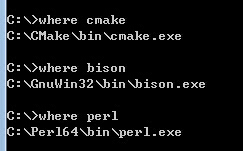
除了Bison安装需要注意意外,其他几乎都是默认安装,这些细节最好遵守,以免后续出错。Perl, Cmake, Bison安装完事之后,将他们安装目录下的bin所在路径加入环境变量中(windows环境变量添加),如C:\Cmake\bin.好了至此基本ok。保险起见我们需要验证一下安装是否成功:

2. 开始安装
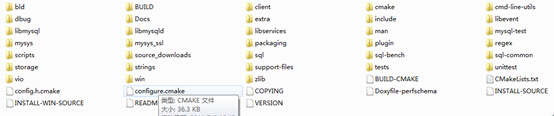
在任意你喜欢的盘里面创建一个用于安装的目录:如在D盘创建mysql然后将mysql-5.6.19.zip解压到该目录下,然后在cmd中切换到安装目录,此处即为D:\mysql\mysql-5.6.19,记({install}=D:\mysql\mysql-5.6.19),其下包含如下文件目录:
然后在{install}下执行以下命令:
>mkdir bld
>cd bld
>cmake ..
这样你可看到类似如下的输出:
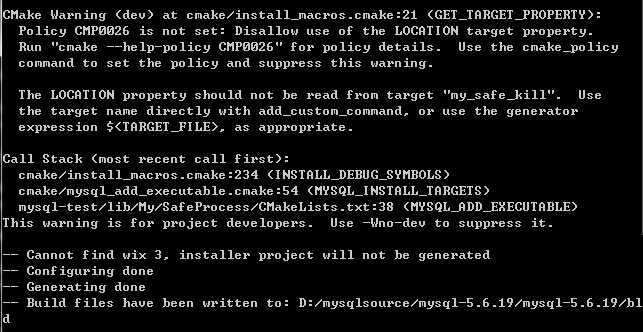
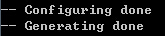
有一些错误,目前也没有解决,但其实这并不影响我们生成VS下MySQL.sln 工程文件。事实上只要看到下面这个就可以了,各种not found也不要紧。如果采用Cmake 图形界面,其实也差不多了。这里不再赘述。
下一步我们就可以在VS2010中build solution了(对应生成解决方案),但为了尽可能减少警告或错误,我们首先需要对下述文件进行修改:

修改的方法很简单,就是将这些文件以UTF-8(带BOM头的)格式保存。一般使用Nodepad++工具等。
最后一步就是找到{install}\mysql-5.6.19\sql\mysqld.cc中的test_lc_time_sz()函数,将其中的DBUG_ASSERT(0)改为DBUG_ASSERT(1)即可。
至此我们就完成了将源码转换成VS中工程文件的目的。之后我们就可以build solution了。如果没有错误说明就已经没有问题了,一些小的警告可能是因为C++编译器比C编译器严格的缘故。下一步我们开始调试。
3. 调试
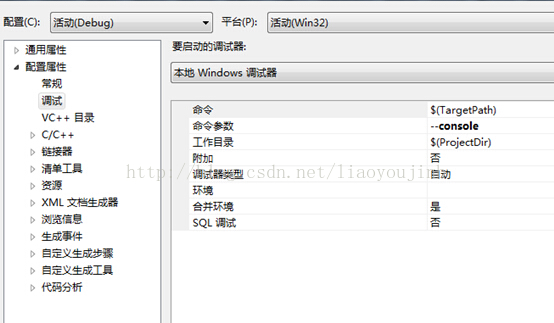
然后将mysqld工程的Debug的:属性->调试->命令参数,设为--console,如下:
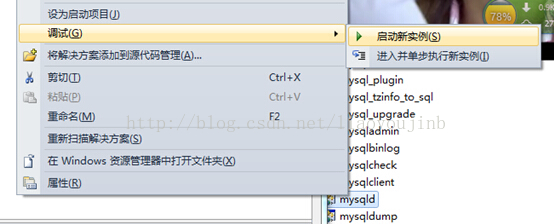
然后启动实例,
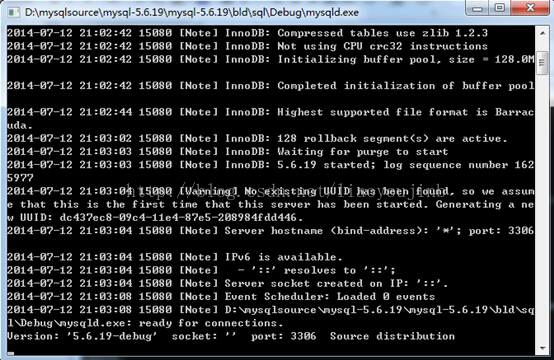
这样就可以看到下面的命令行界面:
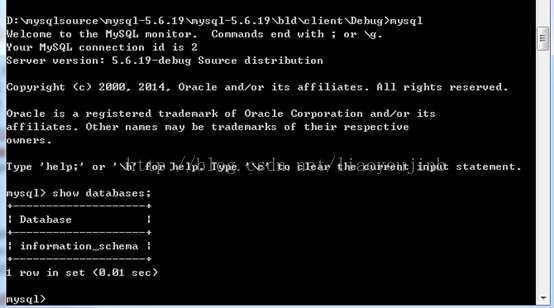
cmd下进入到目录{install}\client,然后执行如下命令,就可以开始连接到刚刚开启的mysql服务了。这说明mysql服务已经启动,下一步就是启动mysql客服端,这里我是采用命令行的启动方式。
好了至此,我们基本完成了在win7下实现在vs下编译调试mysql数据库的目的,下面就可以开始研究源码了。4 .新增问题
(1)vs2010:
12LINK : fatal error LNK1123: 转换到 COFF 期间失败: 文件无效或损坏 [F:\mysql\bld\CMakeFiles\CMakeTmp\cmTryCompileExec2556624813.vcxproj]解决办法:这是由于.NET中的cvtres.exe 与 VS2010中的有冲突,删掉VS2010中的cvtres.exe就可以了(目录F:\Install\VS2010\VC\bin),注意install是你安装VS2010的目录。为了更好地为后来者指明方向,也为了今后便于自己查询,故做了这个简单的指南。也希望按照这篇文档安装的朋友遇到任何问题可以一起探讨,然后不断完善该文档,以便后来者能够因此而受用,同时营造一个负责人写稿的氛围。
+++++++++++++++++++++++++++++++++++++++++++++++++++++++++++++++++++++++++++++++++++++++++++C:\Program Files (x86)\MSBuild\Microsoft.Cpp\v4.0\Microsoft.CppCommon.targets(108,5): error MSB3073: 命令“setlocal
4>C:\Program Files (x86)\MSBuild\Microsoft.Cpp\v4.0\Microsoft.CppCommon.targets(108,5): error MSB3073: cd D:\mysql-5.6.19\sql
4>C:\Program Files (x86)\MSBuild\Microsoft.Cpp\v4.0\Microsoft.CppCommon.targets(108,5): error MSB3073: if %errorlevel% neq 0 goto :cmEnd
4>C:\Program Files (x86)\MSBuild\Microsoft.Cpp\v4.0\Microsoft.CppCommon.targets(108,5): error MSB3073: D:
4>C:\Program Files (x86)\MSBuild\Microsoft.Cpp\v4.0\Microsoft.CppCommon.targets(108,5): error MSB3073: if %errorlevel% neq 0 goto :cmEnd
4>C:\Program Files (x86)\MSBuild\Microsoft.Cpp\v4.0\Microsoft.CppCommon.targets(108,5): error MSB3073: D:\mysql-5.6.19\client\Debug\echo.exe x64 && cscript //nologo D:/mysql-5.6.19/win/create_def_file.js x64 D:\mysql-5.6.19\sql\Debug\sql.lib D:\mysql-5.6.19\mysys\Debug\mysys.lib D:\mysql-5.6.19\mysys_ssl\Debug\mysys_ssl.lib D:\mysql-5.6.19\dbug\Debug\dbug.lib D:\mysql-5.6.19\strings\Debug\strings.lib > mysqld.def
4>C:\Program Files (x86)\MSBuild\Microsoft.Cpp\v4.0\Microsoft.CppCommon.targets(108,5): error MSB3073: if %errorlevel% neq 0 goto :cmEnd
4>C:\Program Files (x86)\MSBuild\Microsoft.Cpp\v4.0\Microsoft.CppCommon.targets(108,5): error MSB3073: :cmEnd
4>C:\Program Files (x86)\MSBuild\Microsoft.Cpp\v4.0\Microsoft.CppCommon.targets(108,5): error MSB3073: endlocal & call :cmErrorLevel %errorlevel% & goto :cmDone
4>C:\Program Files (x86)\MSBuild\Microsoft.Cpp\v4.0\Microsoft.CppCommon.targets(108,5): error MSB3073: :cmErrorLevel
4>C:\Program Files (x86)\MSBuild\Microsoft.Cpp\v4.0\Microsoft.CppCommon.targets(108,5): error MSB3073: exit /b %1
4>C:\Program Files (x86)\MSBuild\Microsoft.Cpp\v4.0\Microsoft.CppCommon.targets(108,5): error MSB3073: :cmDone
4>C:\Program Files (x86)\MSBuild\Microsoft.Cpp\v4.0\Microsoft.CppCommon.targets(108,5): error MSB3073: if %errorlevel% neq 0 goto :VCEnd
4>C:\Program Files (x86)\MSBuild\Microsoft.Cpp\v4.0\Microsoft.CppCommon.targets(108,5): error MSB3073: :VCEnd”已退出,代码为 1。_______________________________________________问题找到了,发现输出日志里有一行 “输入错误: 没有文件扩展“.js”的脚本引擎。”
按照网上的方法:系统安装Dreamwear、UltraEdit、EditPlus后修改了.js文件的默认打开方式。当想直接执行js脚本时就会出现此错误。http://blog.csdn.net/clever101/article/details/8757740
解决办法如下:
打开注册表编辑器,定位"HKEY_CLASSES_ROOT" > ".js" 这一项,双击默认值将数值数据改为"JSFile"即可,具体如下图:
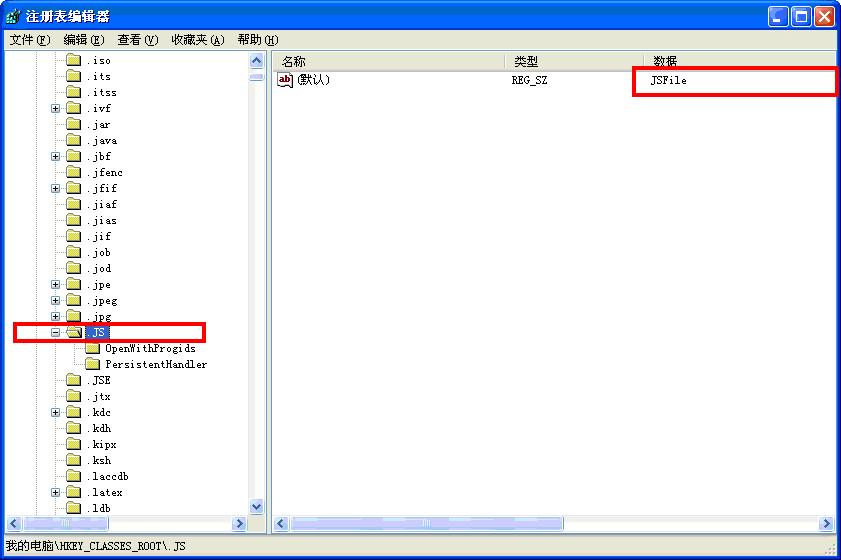
后来分析这个主要是由于改变了JScript文件的默认打开方式(不再是由Windows Script Host打开)。
How to Build MySQL from Source Code on Windows & compile MySQL on win7+vs2010的更多相关文章
- How to build the Robotics Library from source code on Windows
The Robotics Library is an open source C++ library for robot kinematics, motion planning and control ...
- how to build jdk 9 source code
http://hg.openjdk.java.net/build-infra/jdk9/raw-file/tip/README-builds.html#vs2013 http://royvanrijn ...
- How to build windows azure PowerShell Source Code
Download any version source code of Windows Azure Powershell from https://github.com/Azure/azure-sdk ...
- How to compile and install Snort from source code on Ubuntu
http://www.tuicool.com/articles/v6j2Ab Snort is by far the most popular open-source network intrusio ...
- windows下mysql和linux下mysql主从配置
1. linux下mysql安装版本5.6 windows下mysql版本5.7 不要问我为什么版本不一致 就是想这么搞 2. linux为主服务器 windows为从服务器 3.找到li ...
- 退役笔记一#MySQL = lambda sql : sql + ' Source Code 4 Explain Plan '
Mysql 查询运行过程 大致分为4个阶段吧: 语法分析(sql_parse.cc<词法分析, 语法分析, 语义检查 >) >>sql_resolver.cc # JOIN.p ...
- Visual Studio 2012,创建工程Build Driver,基于纯Source Code.
拿到一堆纯代码,怎么去Create Project,设置Include路径,lib路径,要不要Pre-compile技术,配置Project之间的依赖关系. SourcesConverter Bas ...
- MySQL在linux上(cmake)的source code安装方法
1.安装前准备: 1)必备的包和工具 gcc/g++ :MySQL 5.6开始,需要使用g++进行编译. cmake :MySQL 5.5开始,使用cmake进行工程管理,cmake需要2.8以 ...
- mysql-5.6.34 Installation from Source code
Took me a while to suffer from the first successful souce code installation of mysql-5.6.34. Just pu ...
随机推荐
- LOJ565. 「LibreOJ Round #10」mathematican 的二进制(NTT)
题目链接 https://loj.ac/problem/565 题解 首先,若进行所有操作之后成功执行的操作数为 \(m\),最终得到的数为 \(w\),那么发生改变的二进制位的数量之和(即代价之和) ...
- TP5.1 查看具体版本
https://blog.csdn.net/haibo0668/article/details/80865785 echo \think\facade\App::version(); composer ...
- ifconfig无输出的原因及解决办法
问题 执行 ifconfig 命令无任何报错,也无任何输出信息 [root@linuxprobe ~]# ifconfig[root@linuxprobe ~]# 排错 1. 检查PATH变量 [r ...
- 916. Word Subsets
We are given two arrays A and B of words. Each word is a string of lowercase letters. Now, say that ...
- python+selenium打开浏览器报错问题
报关键字,升级selenium版本 若打开IE浏览器,停在IE界面,无法跳转对应的地址,设置一下IE的页面缩放,设置为100%
- HttpClient登陆后获取并携带cookies发起请求
最近项目中,用到了登陆后获取并携带cookies发起请求的业务场景,现总结写出来备忘一下. 1.定义存取cookies信息的全局变量 public class HttpUtil { /** * 用来存 ...
- (转)Linux-HA开源软件Heartbeat(配置篇)
原文:http://ixdba.blog.51cto.com/2895551/548625 http://gzsamlee.blog.51cto.com/9976612/1828870 Linux-H ...
- light table 添加行号 更新
在上一个笔记修改完字体后.再添加上行号
- Hibernate 一对多自身关联(同一表中子父目录树形结构)
- 译:Java局部变量类型推断(Var类型)的26条细则
原文链接:https://dzone.com/articles/var-work-in-progress 作者:Anghel Leonard 译者:沈歌 Java局部变量类型推断(LVTI),简称va ...