
shiro密码的比对,密码的MD5加密,MD5盐值加密,多个Relme
有具体问题的可以参考之前的关于shiro的博文,关于shiro的博文均是一次工程的内容
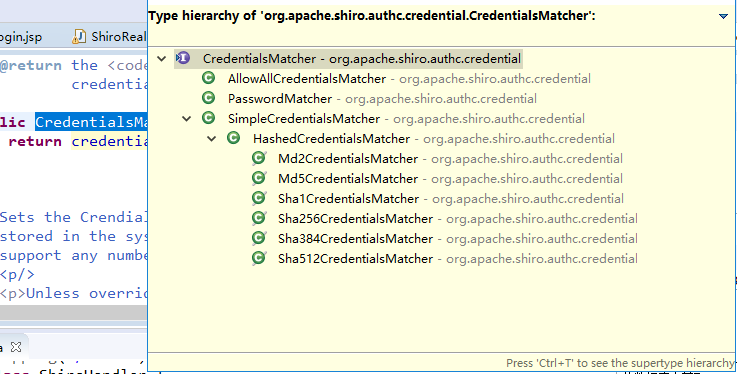
使用其提供的接口实现
    <!--

            .配置Realm

            .1直接实现Realm接口的bean

          -->

    <bean id="jdbcRealm"  class="com.MrChengs.shiro.realms.ShiroRealm">

        <property name="credentialsMatcher">

            <bean  class="org.apache.shiro.authc.credential.HashedCredentialsMatcher">

                 <!-- 加密的方法 -->

                 <property name="hashAlgorithmName"  value="MD5"></property>

                 <!-- 指定加密的次数 -->

                 <property name="hashIterations"  value=""></property>

            </bean>

        </property>

    </bean>
看源码:
public SimpleHash(String algorithmName, Object source, Object  salt, int hashIterations)

            throws CodecException, UnknownAlgorithmException {

        if (!StringUtils.hasText(algorithmName)) {

            throw new NullPointerException("algorithmName  argument cannot be null or empty.");

        }

        this.algorithmName = algorithmName;

        this.iterations = Math.max(DEFAULT_ITERATIONS,  hashIterations);

        ByteSource saltBytes = null;

        if (salt != null) {

            saltBytes = convertSaltToBytes(salt);

            this.salt = saltBytes;

        }

        ByteSource sourceBytes = convertSourceToBytes(source);

        hash(sourceBytes, saltBytes, hashIterations);

    }
测试加密:
     public static void main(String[] args) {

           String hash="MD5";

           Object cred = "";

           Object salt = null;

           int hashInter = ;

           //加密的类

           System.out.println(new SimpleHash(hash, cred, salt,  hashInter));

     }
fc1709d0a95a6be30bc5926fdb7f22f4
MD5盐值加密
      //盐值

           ByteSource credentialsSalt =  ByteSource.Util.bytes(username);
此时放置的不在是明文的密码
ShiroRealm.java
 //6.根据用户的情况来构建AuthenticationInfo并且返回

           //以下信息是从数据库中获取的

           //principal:认证的实体信息,可以是username,也可以是数据表对应的实体对象

           Object principal = username;

           //credentials:密码

           Object credentials = null;

           if("user".equals(username)){

                //计算后user密码为123456的盐值

                credentials =  "2044dc18864ca3bc408359a0fb13c2a7";

           }else if("admin".equals(username)){

                //计算和admin密码为123456的盐值

                credentials =  "30beaf2a87d54ebe889cfccc076247ad";

           }

           //realmName:当前realm对象为name,调用父类的getName()方法即可

           String realmName = getName();

           //盐值

           ByteSource credentialsSalt =  ByteSource.Util.bytes(username);

           SimpleAuthenticationInfo info = null;//new  SimpleAuthenticationInfo(principal, credentials, realmName);

           info = new SimpleAuthenticationInfo(principal,  credentials, credentialsSalt, realmName);

           return info;

     }
盐值的计算:
public static void main(String[] args) {

           String hash="MD5";

           Object cred = "";

           Object salt = "admin";

           int hashInter = ;

           //加密的类

           System.out.println(new SimpleHash(hash, cred, salt,  hashInter));

           //new SimpleHash(algorithmName, source, salt,  hashIterations)

     }
在测试中,只有用户名为user/admin 密码为123456才能成功登陆
多Realm
创建新的类
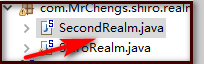
SecondRealm。java
public class SecondRealm extends AuthenticatingRealm {

     @Override

     protected AuthenticationInfo  doGetAuthenticationInfo(AuthenticationToken arg0) throws  AuthenticationException {

           System.out.println("SecondRealm-->");

           //1.把AuthenticationToken转为UsernamePasswordToken

           UsernamePasswordToken  upToken =  (UsernamePasswordToken) arg0;

           //2.从UsernamePasswordToken获取username

           String username = upToken.getUsername();

           //3.调用数据库的方法,从数据库查询username对应的用户记录

           System.out.println("从数据库中获取username:" +  username);

           //4.若用户不存在可以抛出异常 UnKnownAccountException异常

           if("unknow".equals(username)){

                throw new UnknownAccountException("username 不存在");

           }

           //5.根据用户信息的清空决定是否需要抛出其他的异常

           if("monster".equals(username)){

                throw new LockedAccountException("用户被锁定");

           }

           //6.根据用户的情况来构建AuthenticationInfo并且返回

           //以下信息是从数据库中获取的

           //principal:认证的实体信息,可以是username,也可以是数据表对应的实体对象

           Object principal = username;

           //credentials:密码

           Object credentials = null;

           if("user".equals(username)){

                credentials =  "6e3be0247455b9298f47eac8e57a07214ef84115";

           }else if("admin".equals(username)){

                credentials =  "ff9633d047eaaf9861984ed86e5f73f904647716";

           }

           //realmName:当前realm对象为name,调用父类的getName()方法即可

           String realmName = getName();

           //盐值

           ByteSource credentialsSalt =  ByteSource.Util.bytes(username);

           SimpleAuthenticationInfo info = null;//new  SimpleAuthenticationInfo(principal, credentials, realmName);

           info = new SimpleAuthenticationInfo(principal,  credentials, credentialsSalt, realmName);

           return info;

     }

     public static void main(String[] args) {

           String hash="SHA1";

           Object cred = "";

           Object salt = "user";

           int hashInter = ;

           //加密的类

           System.out.println(new SimpleHash(hash, cred, salt,  hashInter));

           //new SimpleHash(algorithmName, source, salt,  hashIterations)

     }

}
加密方式是SHA1
     <!--

      .配置SecurityManager

      -->

    <bean id="securityManager"  class="org.apache.shiro.web.mgt.DefaultWebSecurityManager">

        <property name="cacheManager" ref="cacheManager"/>

      <!--  此时这个属性需要注释使用下面的属性配置

        <property name="realm" ref="jdbcRealm"/>

      -->

        <property name="authenticator"  ref="autheniicator"></property>

    </bean>
     <!-- 认证器 -->

         <bean id="autheniicator"  class="org.apache.shiro.authc.pam.ModularRealmAuthenticator">

            <property name="realms">

                 <list>

                      <ref bean="jdbcRealm"/>

                      <ref bean="SecondRealm"/>

                 </list>

            </property>

         </bean>

         <!--

            .配置Realm

            .1直接实现Realm接口的bean

          -->

    <bean id="jdbcRealm"  class="com.MrChengs.shiro.realms.ShiroRealm">

        <property name="credentialsMatcher">

            <bean  class="org.apache.shiro.authc.credential.HashedCredentialsMatcher">

                 <!-- 加密的方法 -->

                 <property name="hashAlgorithmName"  value="MD5"></property>

                 <!-- 指定加密的次数 -->

                 <property name="hashIterations"  value=""></property>

            </bean>

        </property>

    </bean>

    <bean id="SecondRealm"  class="com.MrChengs.shiro.realms.SecondRealm">

        <property name="credentialsMatcher">

            <bean  class="org.apache.shiro.authc.credential.HashedCredentialsMatcher">

                 <!-- 加密的方法 -->

                 <property name="hashAlgorithmName"  value="SHA1"></property>

                 <!-- 指定加密的次数 -->

                 <property name="hashIterations"  value=""></property>

            </bean>

        </property>

    </bean>
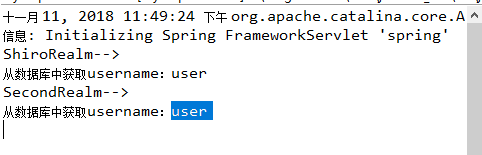
执行的顺序和list的顺序有关
<bean id="autheniicator"  class="org.apache.shiro.authc.pam.ModularRealmAuthenticator">

            <property name="realms">

                 <list>

                      <ref bean="jdbcRealm"/>

                      <ref bean="SecondRealm"/>

                 </list>

            </property>

         </bean>
shiro密码的比对,密码的MD5加密,MD5盐值加密,多个Relme的更多相关文章
- Java和JS MD5加密-附盐值加密demo
JAVA和JS的MD5加密 经过测试:字母和数据好使,中文不好使. 源码如下: ** * 类MD5Util.java的实现描述: * */public class MD5Util { // 获得MD5 ...
- Spring Security中的MD5盐值加密
在 spring Security 文档中有这么一句话: "盐值的原理非常简单,就是先把密码和盐值指定的内容合并在一起,再使用md5对合并后的内容进行演算,这样一来,就算密码是一个很常见的字 ...
- c# MD5及盐值加密
using System;using System.Collections.Generic;using System.Linq;using System.Security.Cryptography;u ...
- c# MD5盐值加密
using System; using System.Collections.Generic; using System.Linq; using System.Security.Cryptograph ...
- shiro盐值加密并验证
在数据表中存的密码不应该是123456,而应该是123456加密之后的字符串,而且还要求这个加密算法是不可逆的,即由加密后的字符串不能反推回来原来的密码,如果能反推回来那这个加密是没有意义的.著名的加 ...
- MD5盐值加密
加密思路 思路解析:(数据解析过程基于16进制来处理的,加密后为16进制字符串) 加密阶段: 对一个字符串进行MD5加密,我们需要使用到MessageDigest(消息摘要对象),需要一个盐值(sal ...
- shiro 密码的MD5盐值加密
- hashlib 文件校验,MD5动态加盐返回加密后字符
hashlib 文件校验 # for循环校验 import hashlib def check_md5(file): ret = hashlib.md5() with open(file, mode= ...
- 给MD5加上salt随机盐值加密算法实现密码安全的php实现
给MD5加上salt随机盐值加密算法实现密码安全的php实现 如果直接对密码进行散列,那么黑客可以对通过获得这个密码散列值,然后通过查散列值字典(例如MD5密码破解网站),得到某用户的密码.加上sal ...
随机推荐
- [转]Using MVC 6 And AngularJS 2 With .NET Core
本文转自:http://www.c-sharpcorner.com/article/using-mvc-6-and-angularjs-2-with-net-core/ CoreMVCAngular2 ...
- 那些年的Java学习笔记
1.1L是什么意思??L表示long ,long占用8个字节,表示范围:-9223372036854775808 ~ 9223372036854775807 1l就是1. 2.alt+shift+j ...
- 使用多说评论&加网分享
多说评论: <div data-thread-key=" class="ds-thread"></div><script>var du ...
- mac安装rz,sz文件操作指令包
安装需要具备什么样的环境? 1.安装item2 iterm2是一个与terminal一样的指令窗口 item2 下载地址,http://iterm2.com/downloads.html,下载后解 ...
- Collatz 序列、逗号代码、字符图网格
1.collatz序列 编写一个名为 collatz()的函数,它有一个名为 number 的参数.如果参数是偶数, 那么 collatz()就打印出 number // 2,并返回该值.如果 num ...
- Error:All flavors must now belong to a named flavor dimension.
环境 android studio 3.0 错误 Error:All flavors must now belong to a named flavor dimension. 解决 在build.gr ...
- PAT 1082. Read Number in Chinese
#include <cstdio> #include <cstdlib> #include <string> #include <vector> #in ...
- sql:日期操作注意的,如果以字符串转日期时的函数,因为数据量大,会出问题
---1.以日期字符操作转换日期 如果是VIP1生日不对,可以以上传的数据日期为生日 begin declare @NowBirthday datetime, @birthday datetime,@ ...
- 申请微信小程序步骤
一.注册 注册网址:https://mp.weixin.qq.com/ 选择账号类型:选择 小程序 注册账号 填写邮箱密码并激活:未注册过公众平台.开放平台.企业号.未绑定个人号的邮箱. 填写主体信息 ...
- Docker 简单运用
Docker 帮助系统管理员和程序员在容器中开发应用程序,并且可以扩展到成千上万的节点,容器和 VM(虚拟机)的主要区别是,容器提供了基于进程的隔离,而虚拟机提供了资源的完全隔离.虚拟机可能需要一分钟 ...