
实验四 Android程序设计 实验报告 20162305李昱兴
实验四 Android程序设计 实验报告 20162305李昱兴
一、Android Studio的安装测试
1、有关该软件
- Android Studio,是基于Itellij IDEA的一款流行的IDE。该软件包包含了Android SDK。SDK中包含了各种工具,包括一个不需要物理设备就能测试应用程序的模拟器。而Android Studio则提供了一个集成开发环境。
2、Android Studio的安装
- 程序的安装可以参考Java For Android 2nd版教材的第24章教程指导,也可以按照娄老师的博客教程去做。
- Android Studio安装教程
3、有关res
- 当我们建立好了一个新的项目的时候,在APP中我们会发现有一个叫res的文件夹,res是resource的简写,这个文件夹当中包含着整个app的layout文件(布局),menu文件(菜单),mipmap(图像)文件,values(资源)文件,drawable(图片状态列表资源)文件。我们可以通过修改其中的一些代码,从而实现对app界面和其显示内容的修改。
- HelloWorld显示截图


二、Activity测试
1、什么是活动
- 活动是Android.app.Activity类的一个实例。启动一个活动就意味着显示一个窗口。应用程序所创建的第一个窗口,叫作主窗口,它充当应用程序的入口点。Android应用程序可以包含多个活动,并且通过在应用程序清单文件中声明来指定主活动。
2、有关活动的一些代码
<LinearLayout xmlns:android="http://schemas.android.com/apk/res/android"

    xmlns:tools="http://schemas.android.com/tools"

    android:layout_width="match_parent"

    android:layout_height="match_parent"

    android:paddingBottom="@dimen/activity_vertical_margin"

    android:paddingLeft="@dimen/activity_horizontal_margin"

    android:paddingRight="@dimen/activity_horizontal_margin"

    android:paddingTop="@dimen/activity_vertical_margin"

    tools:context=".SecondActivity">

    <TextView

        android:id="@+id/textView1"

        android:layout_width="wrap_content"

        android:layout_height="wrap_content" />

</LinearLayout>
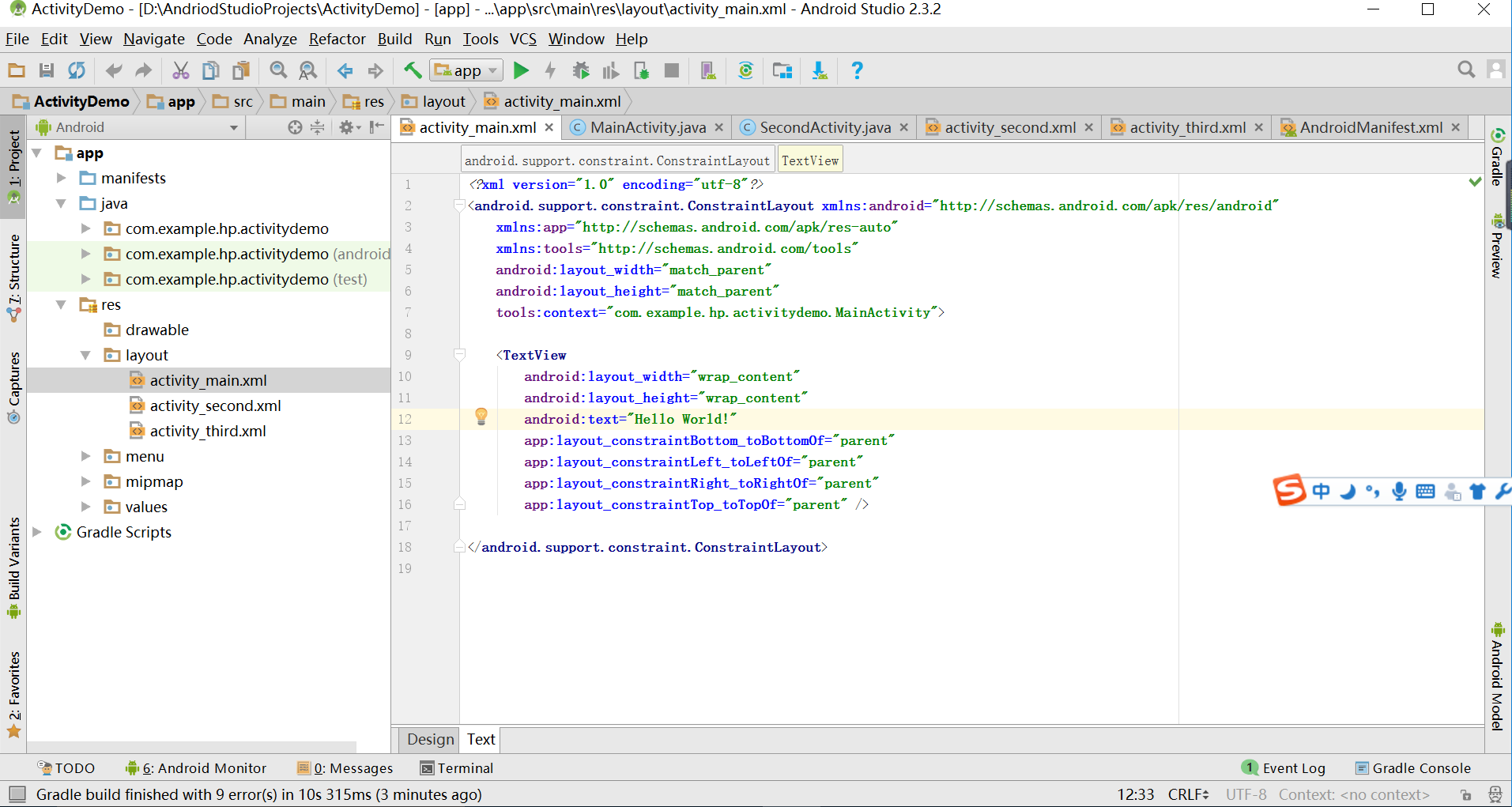
3、代码和活动截图

三、UI测试
1、有关UI
- UI即User Interface(用户界面)的简称。泛指用户的操作界面,包含移动APP,网页,智能穿戴设备等。UI设计主要指界面的样式,美观程度。而使用上,对软件的人机交互、操作逻辑、界面美观的整体设计则是同样重要的另一个门道。好的UI不仅是让软件变得有个性有品味,还要让软件的操作变得舒适、简单、自由,充分体现软件的定位和特点。使用UI工具所做的事情都会反应到布局当中文件当中,以XML元素的形式体现出来。要查看你生成了什么,单击UI工具底部的XML视图即可。
2、有关Toast
- Toast是一个小的弹出对话框,用于显示一条消息作为给用户的反馈。Toast并不会替代当前的活动,并且只是占据了一条消息那么大的空间。
- 如何在一个活动类中创建并显示一个Toast
Toast.makeText(this, "Downloading...", Toast.LENGTH_LONG).show();
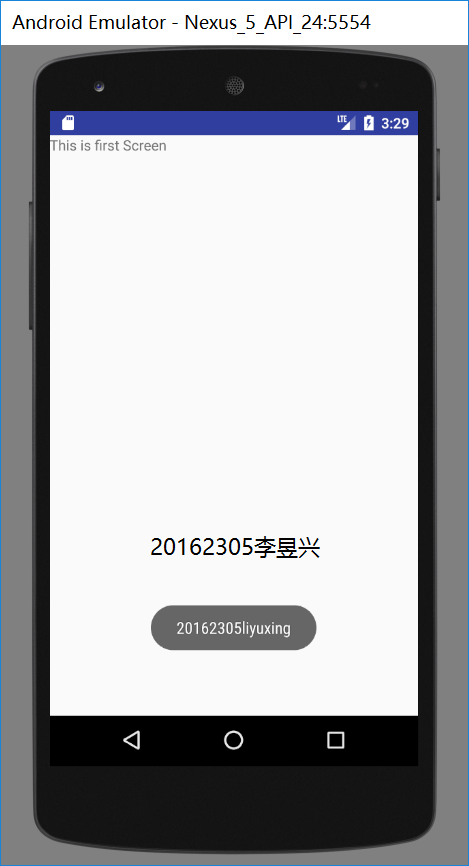
3、实验结果测试截图
(实验截图)
四、布局测试
1、有关LinearLayout
- LinearLayout是根据orientation的属性,将子视图水平地或垂直地排列的一种布局。LinearLayout是最容易使用的布局。
- 水平的LinearLayout
<LinearLayout

xmlns:android="http://schemas.android.com/apk/res/android"

xmlns:tools="http://schemas.android.com/tools"

android:orientation="horizontal"

android:layout_width="match_parent"

android:layout_height="match_parent">

<ImageButton

android:src="@android:drawable/btn_star_big_on"

android:layout_width="wrap_content"

android:layout_height="wrap_content"/>

<TextView

android:layout_width="wrap_content"

android:layout_height="wrap_content"

android:text="@string/hello_world" />

<Button

android:text="Button1"

android:layout_width="wrap_content"

android:layout_height="wrap_content"/>

</LinearLayout>
- 垂直的LinaerLayout
<LinearLayout

xmlns:android="http://schemas.android.com/apk/res/android"

    xmlns:tools="http://schemas.android.com/tools"

android:orientation="vertical"

android:layout_width="match_parent"

android:layout_height="match_parent">

<ImageButton

android:src="@android:drawable/btn_star_big_on"

android:layout_gravity="center"

android:layout_width="wrap_content"

android:layout_height="wrap_content"/>

<TextView

android:layout_gravity="center"

android:layout_width="wrap_content"

android:layout_height="wrap_content"

android:layout_marginLeft="15dp"

android:text="@string/hello_world"/>

<Button

android:text="Button1"

android:layout_gravity="center"

android:layout_width="wrap_content"

android:layout_height="wrap_content"/>

</LinearLayout>
- RelativeLayout
<RelativeLayout

xmlns:android="http://schemas.android.com/apk/res/android"

 xmlns:tools="http://schemas.android.com/tools"

android:layout_width="match_parent"

android:layout_height="match_parent"

android:paddingLeft="2dp"

android:paddingRight="2dp">

<Button

android:id="@+id/cancelButton"

android:layout_width="wrap_content"

android:layout_height="wrap_content"

android:text="Cancel" />

<Button

android:id="@+id/saveButton"

android:layout_width="wrap_content"

android:layout_height="wrap_content"

android:layout_toRightOf="@id/cancelButton"

android:text="Save" />

<ImageView

android:layout_width="150dp"

android:layout_height="150dp"

android:layout_marginTop="230dp"

android:padding="4dp"

android:layout_below="@id/cancelButton"

android:layout_centerHorizontal="true"

android:src="@android:drawable/ic_btn_speak_now" />

<LinearLayout

android:id="@+id/filter_button_container"

android:layout_width="match_parent"

android:layout_height="wrap_content"

android:layout_alignParentBottom="true"

android:gravity="center|bottom"

android:background="@android:color/white"

android:orientation="horizontal" >

<Button

android:id="@+id/filterButton"

android:layout_width="wrap_content"

android:layout_height="fill_parent"

android:text="Filter" />

<Button

android:id="@+id/shareButton"

android:layout_width="wrap_content"

android:layout_height="fill_parent"

android:text="Share" />

<Button

android:id="@+id/deleteButton"

android:layout_width="wrap_content"

android:layout_height="fill_parent"

android:text="Delete" />

</LinearLayout>

</RelativeLayout>
2、运行截图

五、监听器
1、有关监听器
- 大多数Android程序都是可交互的。通过Android框架所提供的事件驱动的编程泛型,用户可以很容易地与应用交互。要让程序响应某一个事件,需要为该事件编写一个监听器。
2、相关方法
OnClickListener  ——  onClick()

OnLongClickListner  ——   OnLongClick()

OnFocusChangeListener  ——  OnFocusChange()

OnKeyListener  ——  OnKey()

OnTouchListener  —— OnTouch()
3、实验成果截图
(实验截图)

六、代码托管
七、其他
- 本次实验,我学习到了有关Android的一些知识,了解了Android Studio这个全新的集成开发环境。通过这部分的实验学习,我明白了Java的主要用途和用法,以Java为基础的集成环境的Android Studio也随着Android的广泛应用而变得十分重要在日后的学习中也要重视这部分的学习。
实验四 Android程序设计 实验报告 20162305李昱兴的更多相关文章
- 实验四 Android程序设计 实验报告
实验四 Android程序设计 实验报告 目录 代码托管地址 Android程序设计-1 Android程序设计-2 Android程序设计-3 Android程序设计-4 Android程序设计-5 ...
- 20155326 实验四 Android程序设计实验报告
20155326 实验四 Android程序设计实验报告 实验内容 1.基于Android Studio开发简单的Android应用并部署测试; 2.了解Android.组件.布局管理器的使用: 3. ...
- 20165230 《Java程序设计》实验四 Android程序设计实验报告
20165230 <Java程序设计>实验四 Android程序设计实验报告 一.实验报告封面 课程:Java程序设计 班级:1652班 姓名:田坤烨 学号:20165230 成绩: 指导 ...
- 20162325金立清 实验四 Android程序设计 实验报告
实验四 Android程序设计 实验报告 代码托管地址 码云链接 实验内容 安装使用Android Stuidio Activity测试 UI测试 布局测试 事件处理测试 Android程序设计-1 ...
- 20172302《程序设计与数据结构》实验四Android程序设计实验报告
课程:<程序设计与数据结构> 班级: 1723 姓名: 侯泽洋 学号:20172302 实验教师:王志强老师 实验日期:2018年5月30日 必修/选修: 必修 1.实验内容 (1)And ...
- 20155328 实验四 Android程序设计 实验报告
20155328 实验四 Android程序设计 第24章 初识Android 提交点1:完成HelloWorld并显示自己的学号 安装Android Studio后,创建了属于自己的Project( ...
- 2016-2017-2 20155312 实验四Android程序设计实验报告
遇到的问题及解决过程 「问题1」Android Studio-R文件出错 解决:参考Android Studio-R文件错误的解决办法步骤如下: 第一步:检查xml文件,R文件错误通常是由于我们的xm ...
- 第十四周实验报告:实验四 Android程序设计
20162317袁逸灏 第十四周实验报告:实验四 Android程序设计 实验内容 Android Studio 实验要求 学会使用Android Studio 学习 活动 以及相关知识内容 学习 U ...
- 实验四 Android程序设计
20155224 实验四 Android程序设计 实验报告 实验报告封面: 课程:Java程序设计 班级:1652班 姓名:王高源 学号:20165225 指导教师:娄嘉鹏 实验日期:2018年5月1 ...
随机推荐
- 1、手把手教React Native实战之环境搭建
React Native 的宗旨是,学习一次,高效编写跨平台原生应用. 在Windows下搭建React Native Android开发环境 1.安装jdk 2.安装sdk 在墙的环境下,为了 ...
- Echoprint系列--编译
近期要做一个音乐相关的client.当中一个功能是音乐识别.搜索了一些资料选择Echoprint来开发.Echoprint是开源免费的,并且多种client都支持能节约非常多时间,今天主要下载和编译源 ...
- Linux中buffer/cache,swap,虚拟内存和page ++
1.Buffer 和 cache Free 命令相对于top 提供了更简洁的查看系统内存使用情况: [apptest@vs022 ~]$ free -m ——以MB为单位 ...
- 第七篇:使用 fcntl 函数 获取,设置文件的状态标志
前言 当打开一个文件的时候,我们需要指定打开文件的模式( 只读,只写等 ).那么在程序中如何获取,修改这个文件的状态标志呢? 本文将告诉你如何用 fcntl函数 获取指定文件的状态标志. 解决思路 1 ...
- 面试题思考:Cookie 和 Session的区别
面试回答: 1.cookie数据存放在客户的浏览器上,session数据放在服务器上. 2.cookie不是很安全,别人可以分析存放在本地的cookie并进行cookie欺骗,考虑到安全应当使用ses ...
- poj万人题
poj提交数量过万的题,除了水爆了的题就是无比经典的,不得不刷的题. 准备将poj上提交次数过万的题刷个遍. 持续更新中... poj 2828(线段树) 此题乃是Zhu, Zeyuan神牛出的,拿到 ...
- java导出简单写法
List<SaleOrderExportDTO> list = TransferUtil.transferList(queryList, SaleOrderExportDTO.class) ...
- C++名人的网站 转
正如我们可以通过计算机历史上的重要人物了解计算机史的发展,C++相关人物的网站也可以使我们得到最有价值的参考与借鉴. 正如我们可以通过计算机历史上的重要人物了解计算机史的发展,C++相关人物的网站也可 ...
- 品友推广的投放原理 RTB:Real Time Bidding(实时竞价) DSP:Demand-Side Platform(需求方平台) 广告交易平台:AD Exchange
总结: 1.实时竞价 0.1秒出价各个广告主出价,投放价高者: RTB(Real Time Bidding)实时竞价,是一种利用第三方技术在数以百万计的网站或移动端针对每一个用户展示行为进行评估以及出 ...
- macro-name replacement-text 宏 调试开关可以使用一个宏来实现
C++ 预处理器_w3cschool https://www.w3cschool.cn/cpp/cpp-preprocessor.html C++ 预处理器 预处理器是一些指令,指示编译器在实际编译之 ...