
python3爬取百度图片(2018年11月3日有效)
最终目的:能通过输入关键字进行搜索,爬取相应的图片存储到本地或者数据库
首先打开百度图片的网站,搜索任意一个关键字,比如说:水果,得到如下的界面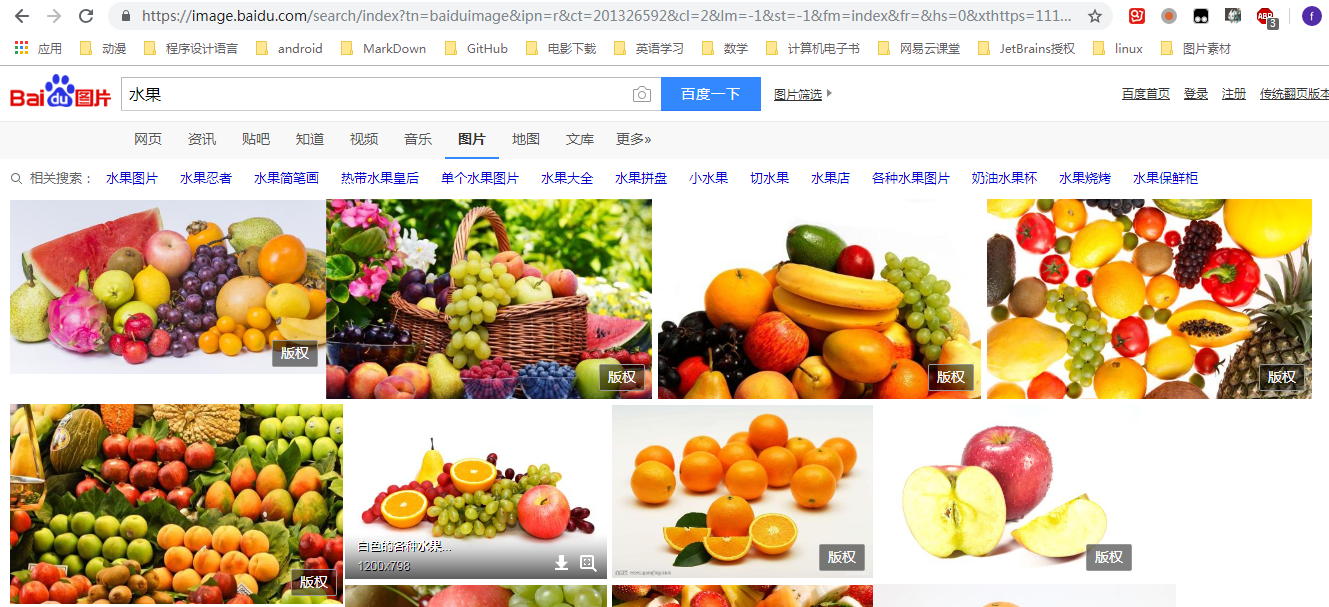
分析:
1、百度图片搜索结果的页面源代码不包含需要提取的图片信息,需要借助Chrome调试工具(F12调出)分析请求的URL地址
2、图片显示页面没有翻页按钮,但是页面一直往下拉会生成新的图片,这是典型的AJAX数据
F12打开调试工具,刷新网页,点击选中Network选项卡中的XHR标签(这个标签加载的就是AJAX请求),此时只能看到一条loginfo开头的信息,字面上可以理解为和登录相关的内容,先不管它

把网页往下拖动,可以看到有新的信息加载出来

这些加载出来的都是以acjson开头的信息,点击之后查看Headers、Preview、Response标签,可以看出来这里面包含了我们需要的图片信息
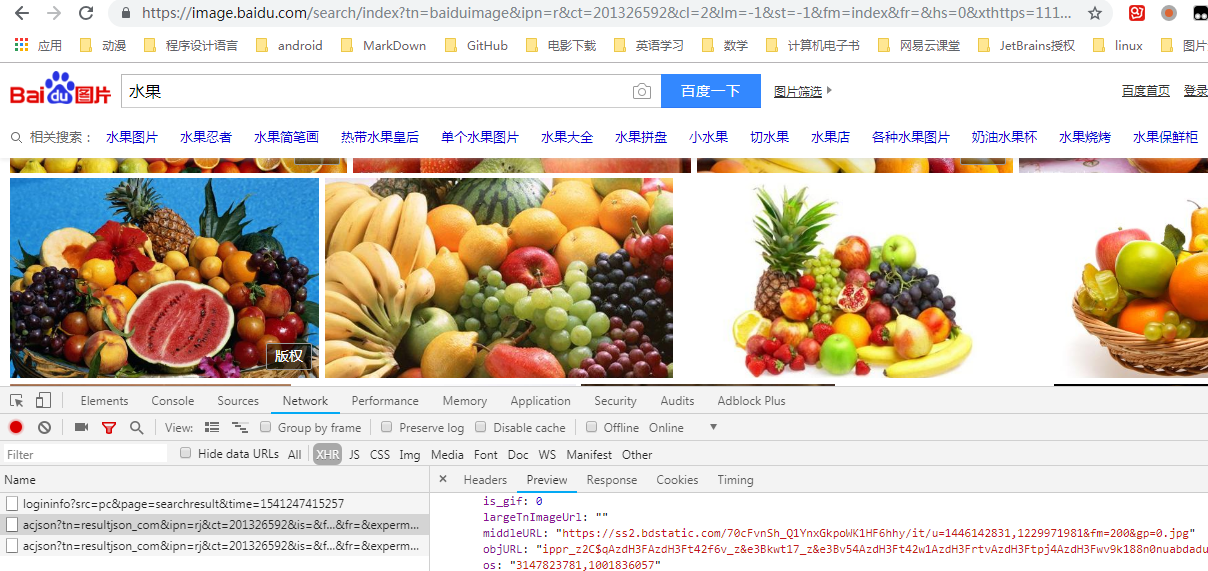
对比一下这几条信息的headers中Request URL可以得出参数中有三个值在变化,一个psm,一个pn,还有一个14。。。开头的数字,经过测试可以发现,实际上pn的值是最关键的,它影响翻页,其他两个可有可无。(对比url建议用一些在线代码对比工具,要不然眼睛要瞎)
下面开始写代码:
一、请求网页,获取html文本(百度图片有防盗链,加个Referer)
# 获取动态页面返回的文本

def get_page_html(page_url):

    headers = {

        'Referer': 'https://image.baidu.com/search/index?tn=baiduimage',

        'User-Agent': 'Mozilla/5.0 (Windows NT 6.1; Win64; x64) AppleWebKit/537.36 (KHTML, like Gecko) Chrome/70.0.3538.77 Safari/537.36'

    }

    try:

        r = requests.get(page_url, headers=headers)

        if r.status_code == 200:

            r.encoding = r.apparent_encoding

            return r.text

        else:

            print('请求失败')

    except Exception as e:

        print(e)
二、使用正则表达式提取真实图片的地址(选的是小图,大图在objURL里,需要经过简单的解密)
# 从文本中提取出真实图片地址

def parse_result(text):

    url_real = re.findall('"thumbURL":"(.*?)",', text)

    return url_real
三、请求图片的url,返回content(图片信息需要以二进制写入)
# 获取图片的content

def get_image_content(url_real):

    headers = {

        'Referer': url_real,

        'User-Agent': 'Mozilla/5.0 (Windows NT 6.1; Win64; x64) AppleWebKit/537.36 (KHTML, like Gecko) Chrome/70.0.3538.77 Safari/537.36'

    }

    try:

        r = requests.get(url_real, headers=headers)

        if r.status_code == 200:

            r.encoding = r.apparent_encoding

            return r.content

        else:

            print('请求失败')

    except Exception as e:

        print(e)
四、保存图片(因为是测试,我写的是绝对地址,正常需要用相对地址)
# 将图片的content写入文件

def save_pic(url_real, content):

    root = 'D://baiduimage//'

    path = root + url_real.split('/')[-1]

    if not os.path.exists(root):

        os.mkdir(root)

    if not os.path.exists(path):

        with open(path, 'wb') as f:

            f.write(content)

            print('图片{}保存成功,地址在{}'.format(url_real, path))

    else:

        pass
五、定义一个主函数(百度图片每次最多请求30张,即使改了其他请求参数也最多60张)
# 主函数

def main():

    keyword = input('请输入你要查询的关键字: ')
  '''
   按照标准, URL 只允许一部分 ASCII 字符(数字字母和部分符号),其他的字符(如汉字)是不符合 URL 标准的。
    所以 URL 中使用其他字符就需要进行 URL 编码。python3中使用urllib.parse.quote进行编码
  '''

    keyword_quote = urllib.parse.quote(keyword)

    depth = int(input("请输入要爬取的页数(每页30张图): "))

    for i in range(depth):

        url = 'https://image.baidu.com/search/acjson?tn=resultjson_com&ipn=rj&ct=201326592&is=&fp=result&queryWord+=&cl=2&lm=-1&ie=utf-8&oe=utf-8&adpicid=&st=-1&word={}&z=&ic=0&s=&se=&tab=&width=&height=&face=0&istype=2&qc=&nc=1&fr=&step_word={}&pn={}&rn=30&gsm=1e&1541136876386='.format(

            keyword_quote, keyword_quote, i * 30)

        html = get_page_html(url)

        real_urls = parse_result(html)

        for real_url in real_urls:

            content = get_image_content(real_url)

            save_pic(real_url, content)
六、最后写一个函数入口
# 函数入口

if __name__ == '__main__':

    main()
当然,实现整个过程最好是先把整体的框架写好,那样思路最清晰。
关于百度图片的爬取就到这里,源代码地址:传送门
python3爬取百度图片(2018年11月3日有效)的更多相关文章
- 百度图片爬虫-python版-如何爬取百度图片?
上一篇我写了如何爬取百度网盘的爬虫,在这里还是重温一下,把链接附上: http://www.cnblogs.com/huangxie/p/5473273.html 这一篇我想写写如何爬取百度图片的爬虫 ...
- python爬虫-爬取百度图片
python爬虫-爬取百度图片(转) #!/usr/bin/python# coding=utf-8# 作者 :Y0010026# 创建时间 :2018/12/16 16:16# 文件 :spider ...
- python3爬取女神图片,破解盗链问题
title: python3爬取女神图片,破解盗链问题 date: 2018-04-22 08:26:00 tags: [python3,美女,图片抓取,爬虫, 盗链] comments: true ...
- python 3 爬取百度图片
python 3 爬取百度图片 学习了:https://blog.csdn.net/X_JS612/article/details/78149627
- Python 爬虫实例(1)—— 爬取百度图片
爬取百度图片 在Python 2.7上运行 #!/usr/bin/env python # -*- coding: utf-8 -*- # @Author: loveNight import jso ...
- selenium+chrome浏览器驱动-爬取百度图片
百度图片网页中中,当页面滚动到底部,页面会加载新的内容. 我们通过selenium和谷歌浏览器驱动,执行js,是浏览器不断加载页面,通过抓取页面的图片路径来下载图片. from selenium im ...
- Apache Struts最新漏洞 远程代码执行漏洞预警 2018年11月08日
2018年11月8日,SINE安全监控检测中心,检测到Apache Struts官方更新了一个Struts漏洞补丁,这个漏洞是Apache Struts目前最新的漏洞,影响范围较广,低于Apache ...
- CocoaPods管理iOS项目 2018年11月06日
一.创建Test工程项目 二.打开终端 当前pod版本(1.6.0.beta.2最新版本2018年11月06日)和gem源路径(https://gems.ruby-china.com): 1.cd+当 ...
- python3爬取1024图片
这两年python特别火,火到博客园现在也是隔三差五的出现一些python的文章.各种开源软件.各种爬虫算法纷纷开路,作为互联网行业的IT狗自然看的我也是心痒痒,于是趁着这个雾霾横行的周末瞅了两眼,作 ...
随机推荐
- 周记【距gdoi:96天】
倒计时从三位数变成了两位数. 然后这周还是很不知道怎么说,经常写一道题写两天.但是总算把后缀数组写完了,也整理完了. 然后周末都不知道干了什么周末就过去了.无聊看了两道省选题发现都是不会做系列,看了以 ...
- [Leetcode] Linked list cycle 判断链表是否有环
Given a linked list, determine if it has a cycle in it. Follow up:Can you solve it without using ext ...
- 【CF MEMSQL 3.0 C. Pie Rules】
time limit per test 2 seconds memory limit per test 256 megabytes input standard input output standa ...
- 如何使用Navicat备份数据库脚本
Navicat是一个实用的工具,可以用来备份数据库(Oracle.MySQL.SQLServer)脚本. 备份步骤如下: 1.打开已建立的数据库连接,鼠标右键点击,选择[转储SQL文件]->[结 ...
- Android 对Layout_weight属性完全解析以及使用ListView来实现表格
用在linearlayout 如果我们想要按照权重比例来分配LinearLayout,我们需要将其宽度设置为0dip http://blog.csdn.net/xiaanming/article/de ...
- centos的网络设置问题
遭遇了多次centos的网络连接问题,现将正确配置总结下: 这里是使用vmware虚拟平台,因为涉及到中间这层,所以需要设置下: 保证centos也能连上网,首先物理机连上网,接着物理机的vmware ...
- Cannot read property 'resetFields' of undefined 问题及引申
问题描述: 使用element开发我的后台系统,编辑和新增使用了同一个弹出框<el-dialog><el-form></el-form></el-dialog ...
- NET面试题 (四)
1, 面向对象的思想主要包括什么? 封装.继承.多态. TLW: 封装:用抽象的数据类型将数据和基于数据的操作封装在一起,数据被保护在抽象数据类型内部. 继承:子类拥有父类的所有数据和操作. 多态:一 ...
- [Leetcode Week8]Subsets
Subsets 题解 原创文章,拒绝转载 题目来源:https://leetcode.com/problems/subsets/description/ Description Given a set ...
- Crontab无法自动执行,直接运行脚本却能执行
Crontab无法自动执行,直接运行脚本却能执行 http://bbs.chinaunix.net/thread-1926428-1-1.html crontab -e crontab内容为* * * ...