
Android——Intent,Bundle
- Intent——切换activity
intent.setClass(first.this,second.class);

startActivity(intent);
- Bundle——切换时数据传递
//跳转

Intent intent = new Intent();

//跳转时数据传输

Bundle bundle = new Bundle();

intent.setClass(MainActivity.this, SecondActivity.class);

bundle.putString("message", str);

intent.putExtras(bundle);

startActivity(intent);
Bundle bundle = this.getIntent().getExtras();
String message = bundle.getString("message");
Source Code:
package com.example.intent;

import android.os.Bundle;

import android.R.string;

import android.app.Activity;

import android.content.Intent;

import android.view.Menu;

import android.view.View;

import android.view.View.OnClickListener;

import android.widget.Button;

import android.widget.EditText;

public class MainActivity extends Activity {

    private EditText myText;

    @Override

    protected void onCreate(Bundle savedInstanceState) {

        super.onCreate(savedInstanceState);

        setContentView(R.layout.activity_main);

        Button button = (Button)findViewById(R.id.button1);

        myText = (EditText)findViewById(R.id.editText1);

        button.setOnClickListener(new OnClickListener() {

            @Override

            public void onClick(View v) {

                String str = myText.getText().toString();

                //跳转

                Intent intent = new Intent();

                //跳转时数据传输

                Bundle bundle = new Bundle();

                intent.setClass(MainActivity.this, SecondActivity.class);

                bundle.putString("message", str);

                intent.putExtras(bundle);

                startActivity(intent);

            }

        });

    }

}
MainActiviy.java
package com.example.intent;

import android.app.Activity;

import android.os.Bundle;

import android.view.TextureView;

import android.widget.TextView;

public class SecondActivity extends Activity{

    @Override

    public void onCreate(Bundle savedInstanceState) {

        super.onCreate(savedInstanceState);

        setContentView(R.layout.second);

        Bundle bundle = this.getIntent().getExtras();

        String message = bundle.getString("message");

        TextView myText = (TextView)findViewById(R.id.textView2);

        myText.setText(message);

    }

}
SecondAcitivity.java
<?xml version="1.0" encoding="utf-8"?>

<resources>

    <string name="app_name">Intent</string>

    <string name="action_settings">Settings</string>

    <string name="hello_world">Hello world!</string>

    <string name="Tree">TreeDream</string>

</resources>
strings.xml
<?xml version="1.0" encoding="utf-8"?>

<LinearLayout xmlns:android="http://schemas.android.com/apk/res/android"

    android:layout_width="match_parent"

    android:layout_height="match_parent"

    android:orientation="vertical" >

    <TextView

        android:id="@+id/textView1"

        android:layout_width="wrap_content"

        android:layout_height="wrap_content"

        android:text="@string/Tree" />

    <TextView

           android:id="@+id/textView2"

        android:layout_width="wrap_content"

        android:layout_height="wrap_content"

        android:text="TextView" />

    <ImageView

        android:id="@+id/imageView1"

        android:layout_width="wrap_content"

        android:layout_height="wrap_content"

        android:src="@drawable/x" />

</LinearLayout>
second.xml
<RelativeLayout xmlns:android="http://schemas.android.com/apk/res/android"

    xmlns:tools="http://schemas.android.com/tools"

    android:layout_width="match_parent"

    android:layout_height="match_parent"

    android:paddingBottom="@dimen/activity_vertical_margin"

    android:paddingLeft="@dimen/activity_horizontal_margin"

    android:paddingRight="@dimen/activity_horizontal_margin"

    android:paddingTop="@dimen/activity_vertical_margin"

    tools:context=".MainActivity" >

    <TextView

        android:id="@+id/textView1"

        android:layout_width="wrap_content"

        android:layout_height="wrap_content"

        android:text="@string/hello_world" />

    <Button

        android:id="@+id/button1"

        android:layout_width="wrap_content"

        android:layout_height="wrap_content"

        android:layout_alignLeft="@+id/textView1"

        android:layout_below="@+id/textView1"

        android:layout_marginTop="51dp"

        android:text="Turn to the secondActivity." />

    <EditText

        android:id="@+id/editText1"

        android:layout_width="wrap_content"

        android:layout_height="wrap_content"

        android:layout_alignParentLeft="true"

        android:layout_below="@+id/textView1"

        android:ems="10" >

        <requestFocus />

    </EditText>

    <ImageView

        android:id="@+id/imageView1"

        android:layout_width="wrap_content"

        android:layout_height="wrap_content"

        android:layout_centerVertical="true"

        android:layout_toRightOf="@+id/textView1"

        android:src="@drawable/y" />

</RelativeLayout>
activity_main.xml
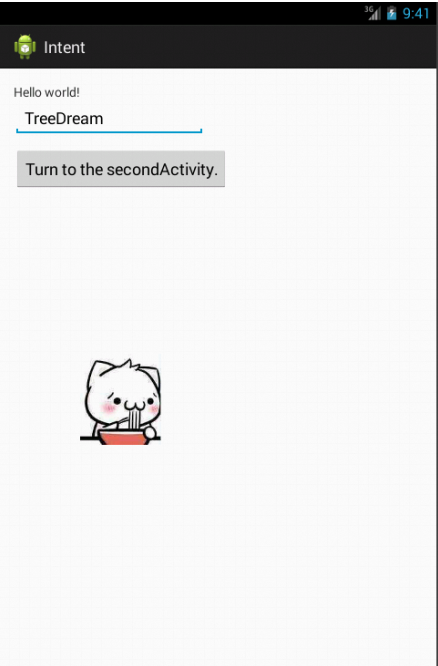
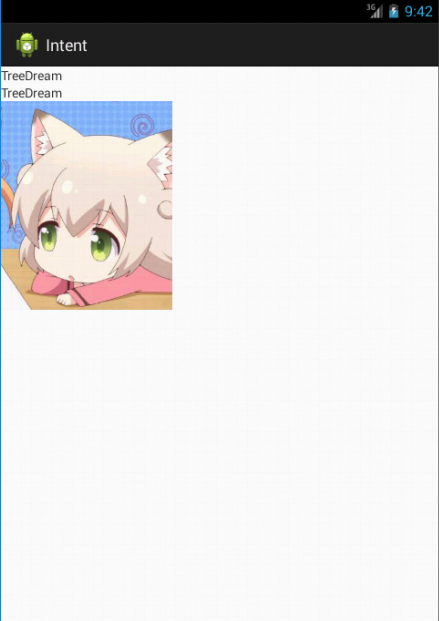
Android——Intent,Bundle的更多相关文章
- Android中Bundle和Intent的区别
Bundle的作用,以及和Intent的区别: 一.Bundle: A mapping from String values to various Parcelable types 键值对的集合 类继 ...
- android Intent介绍
Android中提供了Intent机制来协助应用间的交互与通讯,Intent负责对应用中一次操作的动作.动作涉及数据.附加数据进行描述,Android则根据此Intent的描述,负责找到对应的组件,将 ...
- Android Intent (可通过URL启动 Activity)
Intent分为两大类: (1)显性的(Explicit) (2)隐性的(Implicit) 对于隐性意图,在某些时候, 应用程序只是想启动具有某种特征的组件, 并不想和某个特定的组件耦合. 使用In ...
- Android之Bundle类
API文档说明 1.介绍 用于不同Activity之间的数据传递 1.重要方法 clear():清除此Bundle映射中的所有保存的数据. clone():克隆当前Bundle containsKey ...
- android Intent.ACTION_SEND
ACTION_SEND intent 可以把自己的应用添加到系统的发送(分享)列表中. <intent-filter> <action android:name="andr ...
- [Android] Intent详解
[转]http://www.cnblogs.com/engine1984/p/4146621.html [正文] Intent组件虽然不是四大组件,但却是连接四大组件的桥梁,学习好这个知识,也非常的重 ...
- 关于android中Bundle的使用
1.Android using Bundle for sharing variables 注:android中使用Bundle来共享变量,下例中Activity1和Activity2通过bundl ...
- Android Intent 用法全面总结
[代码全屏查看]-Android Intent 用法全面总结 // [1].[代码] 调用拨号程序 跳至 [1] [2] [3] [4] [5] [6] [7] [8] [9] [10] [11] / ...
- 【转】Android Intent Action 大全
String ADD_SHORTCUT_ACTION 动作:在系统中添加一个快捷方式.. “android.intent.action.ADD_SHORTCUT” String ALL_APPS_AC ...
随机推荐
- Source Insight 4.0的使用(转)
原作者地址:https://blog.csdn.net/qq_39660930/article/details/77499455 一.项目管理 1.新建一个项目 快捷键Alt+Shift+N可以打开新 ...
- nginx 服务器配置文件指令
localtion 配置 语法结构: location [ = ~ ~* ^~ ] uri{ ... } uri 变量是带匹配的请求字符, 可以是不含正则表达的字符串, ...
- linux命令之find
find find命令的格式:find [-path……] -options [-print -exec -ok] path:要查找的目录路径. ~ 表示$HOME目录 . 表 ...
- HashMap和Hashtable的实现原理
HashMap和Hashtable的底层实现都是数组+链表结构实现的,这点上完全一致 添加.删除.获取元素时都是先计算hash,根据hash和table.length计算index也就是table数组 ...
- Charts in Ionic
Chart对于任何应用来说都是不可或缺的一部分,hybrid app也是如此. 先罗列一下有哪些可用的Chart library: D3.JS -- Data-Driven Documents,BSD ...
- 案例36-商品添加页面类别ajax显示
1 add.jsp代码 <%@ page language="java" pageEncoding="UTF-8"%> <HTML> & ...
- TerraBuilder创建地形之去除影像黑边,填充影像
最近在Skyline项目中使用TerraBuilder创建地形,由于地形比较大,分块下载卫星影像,然后再TerraBuilder中合并,由于合并.图形等等问题,导致创建处理出来的地形中存在严重的缝隙和 ...
- topN问题
topN问题:给出一个数组,找出前N个最大的元素. topN问题可以用分治法解决,这个问题与快速排序类似,快速排序是用一个数对数组进行划分,topN问题则不需完成排序,只需划分出前n个最大的数字即可. ...
- Javascript 5种设计风格
1.过程式的程序设计 <script> /*Start and Stop animations using functions.*/ function startAnimation() { ...
- 使用mermain用Markdown的语法画流程图和UML图
博客搬到了fresky.github.io - Dawei XU,请各位看官挪步.最新的一篇是:使用mermain用Markdown的语法画流程图和UML图.