
C# Winform小程序:局域网设置NTP服务器、实现时间同步
- 设置NTP服务器:
NTP是网络时间协议(Network Time Protocol),它是用来同步网络中各个计算机的时间的协议。
局域网不能连接Internet,可以设置一台计算机为NTP服务器。
- 依次点击:开始---运行---regedit,进入注册表;
- 依次展开:HKEY_LOCAL_MACHINE\SYSTEM\CurrentControlSet\Services\W32Time\TimeProviders\NtpServer,在NtpServer项右侧键值Enablied,默认值0改为1,1为启动NTP服务器;

- 依次展开:HKEY_LOCAL_MACHINE\SYSTEM\CurrentControlSet\Services\W32Time\Config,在Config项右侧键值AnnounceFlags,默认值10改为5,5代表自身为可靠时间源;
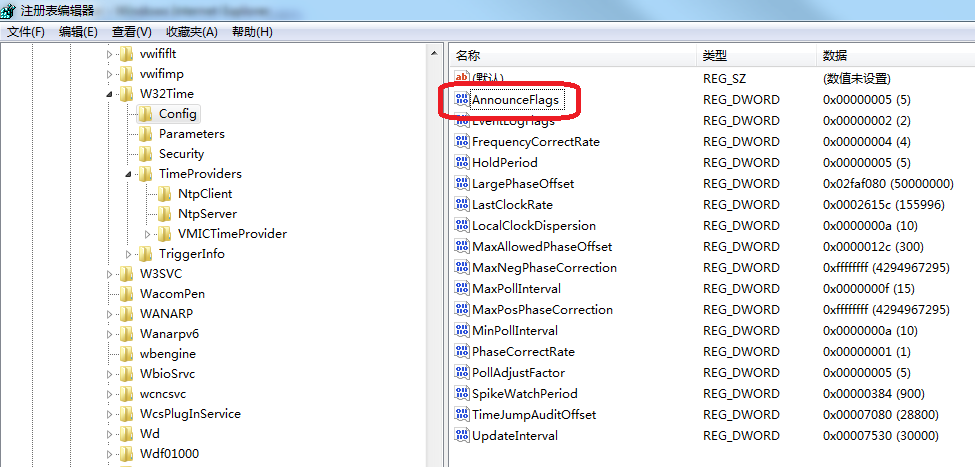
- 修改完成以上关闭注册表;
- 命令行输入:net stop w32Time,回车,停止NTP服务;
- 命令行输入:net start w32Time,回车,启动NTP服务;
- 当前计算机设置NTP服务器完成。
- 局域网内其他电脑命令行输入:net time \\10.30.100.119 /set /yes,实现时间同步,其中10.30.100.119代表NTP服务器地址。
- C# Winform实现局域网时间同步demo:
全局变量:
//Timer

System.Timers.Timer timer = new System.Timers.Timer();

//IP

private string ipAddress;

//时间间隔

private int timeInterval;

//创建bat文件路径,如果存在,直接覆盖

private string filePath = System.Environment.CurrentDirectory + @"\timesync.bat";
页面Load方法:
private void FrmMain_Load(object sender,EventArgs e)

{

      //运行标志隐藏

      picRun.Visible = false;

}
Run/Abort按钮点击事件:
private void btnRunAbort_Click(object sender,EventArgs e)

{

      //IP

      ipAddress = txtIP.Text.Trim();

      //Time Interval

      timeInterval = Convert.ToInt32(txtTimeInterval.Text);

      if (btnRunAbort.Text.Equals("开始同步"))

      {

            this.RunTimer();

      }

      else if (btnRunAbort.Text.Equals("停止同步"))

      {

            //定时器停止

            timer.Stop();

            timer = new System.Timers.Timer();

            MessageBox.Show("停止同步成功","提示");

            //运行标志隐藏

            picRun.Visible = false;

            btnRunAbort.Text = "开始同步";

      }

}
开始同步执行方法:
public void RunTimer()

{

      //创建bat文件

      FileStream fs = new FileStream(filePath, FileMode.Create,FileAccess.Write);

      StreamWriter sw = new StreamWriter(fs);

      sw.WriteLine(string.Format(@"net time \\{0} /set /yes",ipAddress));

      sw.Close();

      fs.Close();

      try

      {

            //执行时间超过10秒,强制结束

            if (!CallWithTimeOut(CommonRun,))

            {

                  MessageBox.Show("服务器异常!","提示");

                  return;

            }

            //服务器地址异常

            if (StringRun().EndsWith(@"/yes"))

            {

                  MessageBox.Show("服务器异常!","提示");

                  return;

            }

            MessageBox.Show("开始同步成功!","提示");

            //BeginInvoke

            SetPBState(true , "停止同步");

      }

      catch (Exception ex)

      {

            MessageBox.Show("服务器异常!","提示");

            return;

      }

      //timer定时器执行时间同步

      timer.Elapsed += new System.ElapsedEventHandle(TimerRun);

      timer.Enabled = true;

      timer.Interval = Convert.ToInt32(txtTimeInterval.Text) * ;

      timer.Start();

}
时间同步,返回执行bat输出:
private string StringRun()

{

      ProcessStartInfo pro = new ProcessStartInfo("cmd.exe");

      pro.UseShellExecute = false;

      pro.RedirectStandardOutput = true;

      pro.RedirectStandardError = true;

      pro.CreateNoWindow = true;

      pro.FileName = filePath;

      pro.WorkingDirectory = System.Environment.CurrentDirectory;

      Process proc = new Process.Start(pro);

      StreamReader sOutput = proc.StandardOutput;

      proc.Close();

      string sJudge = sOutput.ReadToEnd().Trim();

      sOutput.Close();

      return sJudge;

}
时间同步:
private void CommonRun()

{

      ProcessStartInfo pro = new ProcessStartInfo("cmd.exe");

      pro.UseShellExecute = false;

      pro.RedirectStandardOutput = true;

      pro.RedirectStandardError = true;

      pro.CreateNoWindow = true;

      pro.FileName = filePath;

      pro.WorkingDirectory = System.Environment.CurrentDirectory;

      Process proc = new Process.Start(pro);

      StreamReader sOutput = proc.StandardOutput;

      proc.Close();

      string sJudge = sOutput.ReadToEnd().Trim();

      sOutput.Close();

}
timer定时器时间同步:
private void TimerRun(object source , System.Timers.ElapsedEventArgs e)

{

      ProcessStartInfo pro = new ProcessStartInfo("cmd.exe");

      pro.UseShellExecute = false;

      pro.RedirectStandardOutput = true;

      pro.RedirectStandardError = true;

      pro.CreateNoWindow = true;

      pro.FileName = filePath;

      pro.WorkingDirectory = System.Environment.CurrentDirectory;

      Process proc = new Process.Start(pro);

      StreamReader sOutput = proc.StandardOutput;

      proc.Close();

      string sJudge = sOutput.ReadToEnd().Trim();

      sOutput.Close();

}
deletegate InvokeRequired:
delegate void DelegatePBUpdate(bool b , string btnText);

public void SetPBState(bool b , string btnText)

{

      if (this.InvokeRequired)

      {

            this.BeginInvoke(new DelegatePBUpdate(SetPBState), new object[] {b , btnText});

      }

      else

      {

            picRun.Visible = true;

            btnRunAbort.Text = "停止同步";

      }

}
方法执行时间超过设定值,强制结束:
static bool CallWithTimeout(Action action, int timeoutMilliseconds)

{

      Thread threadToKill = null;

      Action wrappedAction = () =>

      {

            threadToKill = Thread.CurrentThread;

            action();

      }

      IAsyncResult result = wrappedAction.BeginInvoke(null, null);

      if (result.AsyncWaitHandle.WaitOne(timeoutMilliseconds))

      [

            wrappedAction.EndInvoke(result);

            return true;

      ]

      else

      {

            threadToKill.Abort();

            return false;

      }

}
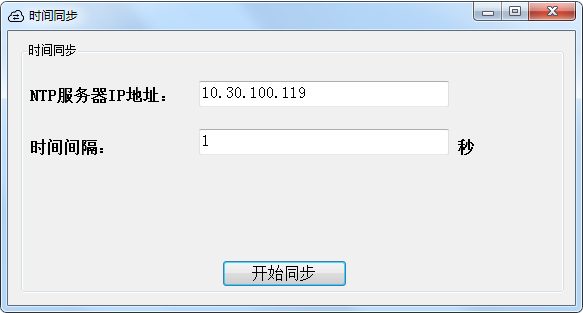
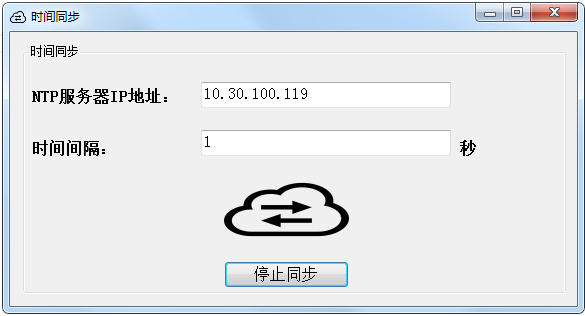
- 运行结果:
C# Winform小程序:局域网设置NTP服务器、实现时间同步的更多相关文章
- visual studio 设计第一个WinForm小程序
WinForm小程序之消息框 首先打开visual studio 软件,然后[文件]-[新建]-[项目]-[Visual C#]-[Windows],选择Windows窗体应用程序,根据自己的需要修改 ...
- 如何在 CentOS 中设置 NTP 服务器
网络时间协议(NTP)用来同步网络上不同主机的系统时间.你管理的所有主机都可以和一个指定的被称为 NTP 服务器的时间服务器同步它们的时间.而另一方面,一个 NTP 服务器会将它的时间和任意公共 NT ...
- 微信小程序wxss设置样式
微信小程序wxss设置样式 对于以前搞客户端开发的来说,有着客户端的逻辑,就是不知道怎么设置样式,把对应的控件显示出来 一.wxml 界面结构wxmL比较容易理解,主要是由八大类基础组件构成: 一.视 ...
- C# WinForm小程序(技术改变世界-cnblog)
WinForm小程序(技术改变世界-cnblog) 需求: 1.点击按钮 更新 当前时间 2.输入 身份证,必须身份证 排序(类似银行卡那样的空格),自动生成空格排序 3.实现 必须按 第一个按 ...
- 微信小程序警告设置 enable-flex 属性以使 flexbox 布局生效的解决办法
微信小程序警告设置 enable-flex 属性以使 flexbox 布局生效的解决办法 具体情况: scroll-view 滚动,设置 display:flex 不生效并警告设置 enable-fl ...
- CentOS 7.2部署NTP服务器实现时间同步
CentOS 7.2部署NTP服务器实现时间同步 [日期:2017-12-18] 来源:Linux社区 作者:梁明远 [字体:大 中 小] 1. 前言 对于容器编排系统,前段时间主要研究kube ...
- 部署NTP服务器进行时间同步
NTP服务端:linl_S IP:10.0.0.15 NTP客户端:lin_C IP:10.0.0.16 NTP服务概述 1.原理 NTP(Network TimeProtocol,网络时 ...
- 微信小程序如何设置服务器配置
最近微信小程序在it界火了起来,公司也要求我们开始接触微信小程序,废话不多说直接从配置微信小程序开始 1,首先,登录 https://mp.weixin.qq.com,(这里默认你已经获取到微信小程序 ...
- 微信小程序-关于post 过来服务器没有获取到数据问题
查看一下服务器接收的post 参数是以什么形式接收的 微信给出得demo 请求的方式是Json 参数传递的 所以如果服务器使用的from 表单形式接收数据需要更改微信小程序中的 header 将 he ...
随机推荐
- dos窗口运行java文件需要jar依赖
执行java文件时候,有些里面依赖了java之外的jar,这是识别不到的,运行java命令的时候,带上jar路径: java -cp .;jar路径(加上jar名字) java文件名 例:java ...
- Udp 网络字节序
1.网络上的数据是一个字节一个字节的串行传递的. 2.字节序,规定,在内存里存储时,低字节在前称为小端,高字节在前称为大端,(现在主流系统都是小端的) 3.网络字节序,如果先传高字节,则是大端传输:如 ...
- 在StoryBoard对UICollectionViewCell 进行Autolayout是遇到的Xcode6.01的BUG
使用Sb对UICollectionViewCell 的内容进行Autolayout约束时候,发现了一个Xcode6.01的BUG,就是你对UICollectionCell约束完了之后,在模拟器上现实的 ...
- 0.jQuery选择器
左边的是jQuery用法 右边是js用法 $("tag") == document.getElementsByTagName("tag"); $(". ...
- 导出table为Excel
1.HTML <!DOCTYPE html> <html lang="zh-CN"> <head> <meta charset=" ...
- [NOI2010]能量采集 BZOJ2005 数学(反演)&&欧拉函数,分块除法
题目描述 栋栋有一块长方形的地,他在地上种了一种能量植物,这种植物可以采集太阳光的能量.在这些植物采集能量后,栋栋再使用一个能量汇集机器把这些植物采集到的能量汇集到一起. 栋栋的植物种得非常整齐,一共 ...
- JSONP原理及简单实现 可做简单插件使用
JSONP实现跨域通信的解决方案. 在jquery中,我们可以通过$.ajax的dataType设置为jsonp来调用jsonp,但是jsonp和ajax的实现原理一个关系都木有.jsonp主要是通过 ...
- scrapy 请求和响应
scrapy Request类的一些参数意义 url: 就是需要请求,并进行下一步处理的url callback: 指定该请求返回的Response,由那个函数来处理. method: 一般不需要指定 ...
- flask中的蓝图 Blueprint
模块化 随着flask程序越来越复杂,我们需要对程序进行模块化的处理,之前学习过python的模块化管理,于是针对一个简单的flask程序进行模块化处理 简单来说,Blueprint 是一个存储操作方 ...
- paraview显示指定时间段的时均图(两种方法)
方法一: 首先计算以后会得到每个时刻的网格数据,如下图: 但是我们只想要比如最后2s的数据,如果直接导入,paraview会把从0s时刻的数据全部加载,做时均图的时候也就是对整个时间段做时均,不是我们 ...