
Node.Js and Mongoose
Mongoose官方API,我做完之后整理出来的心得。
ONE· Getting Started
First be sure you have MongoDB and Node.js installed.
Next install Mongoose from the command line using npm:
$ npm install mongoose

项目中添加 mongoose模块
Now say we like fuzzy kittens and want to record every kitten we ever meet in MongoDB. The first thing we need to do is include mongoose in our project and open a connection to the test database on our locally running instance of MongoDB.
// getting-started.js

var mongoose = require('mongoose');

mongoose.connect('mongodb://localhost/test');
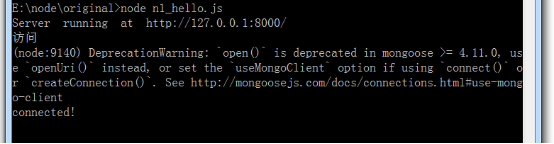
这里面运行官方的代码会有警告,查看原因之后,我进行了如下修改
var mongoose = require('mongoose');
mongoose.Promise = global.Promise;

mongoose.connect('mongodb://localhost/test',{useMongoClient:true});
We have a pending connection to the test database running on localhost. We now need to get notified if we connect successfully or if a connection error occurs:
var db = mongoose.connection;

db.on('error', console.error.bind(console, 'connection error:'));

db.once('open', function() {

  // we're connected!

});
这里要注意,必须先开通mongodb的服务,node才能通过mongoose联通db
With Mongoose, everything is derived from a Schema. Let's get a reference to it and define our kittens.
var kittySchema = mongoose.Schema({

    name: String

});
So far so good. We've got a schema with one property, name, which will be a String. The next step is compiling our schema into a Model.
var Kitten = mongoose.model('Kitten', kittySchema);
A model is a class with which we construct documents. In this case, each document will be a kitten with properties and behaviors as declared in our schema. Let's create a kitten document representing the little guy we just met on the sidewalk outside:
var silence = new Kitten({ name: 'Silence' });

console.log(silence.name); // 'Silence'
Kittens can meow, so let's take a look at how to add "speak" functionality to our documents:
// NOTE: methods must be added to the schema before compiling it with mongoose.model()

kittySchema.methods.speak = function () {

  var greeting = this.name

    ? "Meow name is " + this.name

    : "I don't have a name";

  console.log(greeting);

}

var Kitten = mongoose.model('Kitten', kittySchema);
Functions added to the methods property of a schema get compiled into the Model prototype and exposed on each document instance:
var fluffy = new Kitten({ name: 'fluffy' });

fluffy.speak(); // "Meow name is fluffy"
We have talking kittens! But we still haven't saved anything to MongoDB. Each document can be saved to the database by calling its save method. The first argument to the callback will be an error if any occured.
fluffy.save(function (err, fluffy) {

  if (err) return console.error(err);

  fluffy.speak();

});
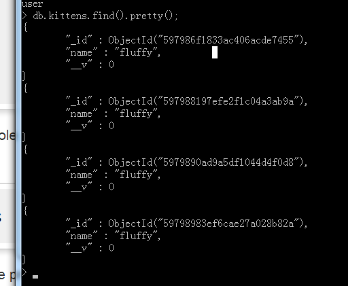
已经存进去了!
Say time goes by and we want to display all the kittens we've seen. We can access all of the kitten documents through our Kitten model.
Kitten.find(function (err, kittens) {

  if (err) return console.error(err);

  console.log(kittens);

})
We just logged all of the kittens in our db to the console. If we want to filter our kittens by name, Mongoose supports MongoDBs rich querying syntax.
Kitten.find({ name: /^fluff/ }, callback);
这里面用的是正则,也可以使用指定字段!
This performs a search for all documents with a name property that begins with "Fluff" and returns the result as an array of kittens to the callback.
Congratulations
That's the end of our quick start. We created a schema, added a custom document method, saved and queried kittens in MongoDB using Mongoose. Head over to the guide, or API docs for more.
TWO· 这个例子最新版本出现的警告和解决方案
第一个
https://segmentfault.com/q/1010000010061553/a-1020000010070929
mongoose.connect('mongodb://localhost/test',{useMongoClient:true});
第二个
http://blog.csdn.net/fd214333890/article/details/53486862
mongoose.Promise = global.Promise;
Node.Js and Mongoose的更多相关文章
- [js高手之路]Node.js+jade+mongoose实战todolist(分页,ajax编辑,删除)
该系列文章索引: [js高手之路]node js系列课程-创建简易web服务器与文件读写 [js高手之路]node js系列课程-图解express+supervisor+ejs用法 [js高手之路] ...
- 基于Node.js + jade + Mongoose 模仿gokk.tv
原文摘自我的前端博客,欢迎大家来访问 http://www.hacke2.cn 关于gokk 大学的娱乐活动基本就是在寝室看电影了→_→,一般都会选择去goxiazai.cc上看,里面的资源多,质量高 ...
- Practical Node.js (2018版) 第7章:Boosting Node.js and Mongoose
参考:博客 https://www.cnblogs.com/chentianwei/p/10268346.html 参考: mongoose官网(https://mongoosejs.com/docs ...
- [node.js]express+mongoose+mongodb的开发笔记
时间过得很快,6月和7月忙的不可开交,糟心的事儿也是不少,杭州大连来回飞,也是呵呵. 希望下个阶段能沉浸下来,接着学自己想学的.记一下上几周用了几天时间写的课设.因为课设的缘故,所以在短时间里了解下e ...
- Node.js 常用Mongoose方法
Node.js 手册查询-Mongoose 方法 一.Schema 一种以文件形式存储的数据库模型骨架,无法直接通往数据库端,也就是说它不具备对数据库的操作能力.可以说是数据属性模型(传统意义的表结构 ...
- node.js+express+mongoose实现用户增删查改案例
node.js+express+mongodb对用户进行增删查改 一.用到的相关技术 使用 Node.js 的 express 框架搭建web服务 使用 express 中间件 body-parse ...
- Node.js使用Mongoose包操作MongoDB数据库
1. 安装Mongoose npm install mongoose 2. 使用 2.1 创建连接 var mongoose = require('mongoose'); mongoose.conne ...
- node.js下mongoose简单操作实例
Mongoose API : http://mongoosejs.com/docs/api.html // mongoose 链接var mongoose = require('mongoose'); ...
- [转] node.js下mongoose简单操作实例
Mongoose API : http://mongoosejs.com/docs/api.html // mongoose 链接 var mongoose = require('mongoose') ...
随机推荐
- Python框架之Tornado(二)预备知识epoll最好的讲解
问:epoll 或者 kqueue 的原理是什么?为什么 epoll 和 kqueue 可以用基于事件的方式,单线程的实现并发?我没看过 linux 内核,对这方面一直有疑问…… 必须从很多基础的概念 ...
- HTML系列(3)基本的HTML标签(二)
本节继续介绍HTML的常用标签. (1)input标签之文本域(text和textarea).密码域(password): <!DOCTYPE html> <html ...
- VM上安装苹果虚拟机
用了太久的Windows系统,看着Mac OS X的惊艳,相信很多朋友也和我一样,总想着能把玩一把Mac OS X系统吧?如果只是为了体验一下Mac OS X系统而购买一套Mac电脑,那是土豪做的事. ...
- libstdc和glibc的一些共享库问题
1./usr/lib/libstdc++.so.6: version `GLIBCXX_3.4.15' not found错误的解决 原因是没有GLIBCXX_3.4.15版本,或是更高的版本输入命令 ...
- 离乡与理想 Demo
离乡与理想---理想不分黑白 踏上了火车,离开家乡背着幻梦,站累了有人叫我幸福,叫我快乐而我是没有名字的流浪的日子,已数不清有多少带着理想,一路飞翔路上遇见困难,一定要坚强因为理想已离乡 我为理想而离 ...
- [Android]开源中国源码分析之二---DrawerLayout
从启动界面到主界面之后的效果如图所示,采用的是v4包下的DrawerLayout, activity_main.xml文件如下: <!-- A DrawerLayout is intended ...
- FreeMarker缓存处理
FreeMarker 的缓存处理主要用于模版文件的缓存,一般来讲,模版文件改动不会很频繁,在一个流量非常大的网站中,如果频繁的读取模版文件对系统的负担还是很重的,因此 FreeMarker 通过将模版 ...
- java定时任务Quartz Demo(2.X)
直接上代码 public class HelloQuartz implements Job{ @Override public void execute(JobExecutionContext Jec ...
- webpack 从0 手动配置
1. npm init 2. npm install -D webpack webpack-cli 3. 创建webpack入口文件( 默认 webpack.config.js 可以通过 webpac ...
- java多线程(内附实例:窗口售票问题、人和叉子的问题)
java多线程的开发有两种方法: (1)实现Runnable接口: (2)继承Thread类: 区别: (1)由于java中一个类只能继承一个父类,但是可以实现多个接口,所以实现Runnable接口比 ...