
[Android]开源中国源码分析之二---DrawerLayout
从启动界面到主界面之后的效果如图所示,采用的是v4包下的DrawerLayout, activity_main.xml文件如下:
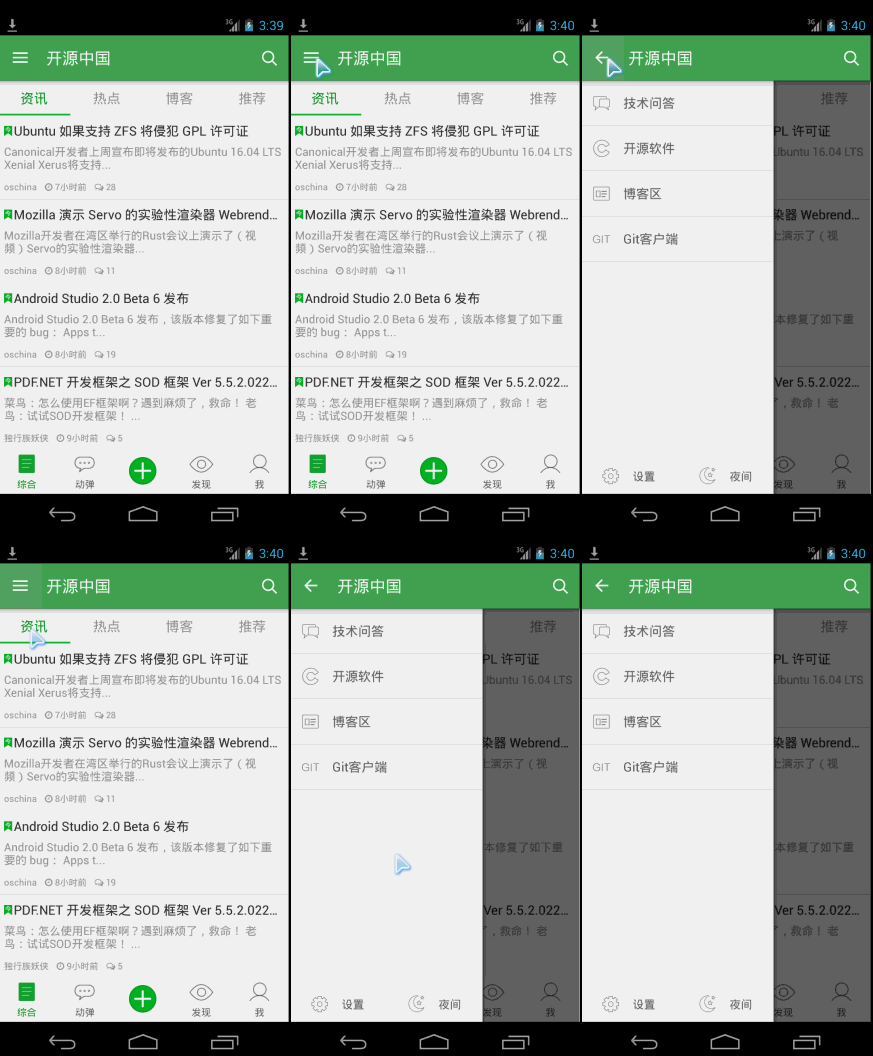
<!-- A DrawerLayout is intended to be used as the top-level content view using match_parent for both width and height to consume the full space available. --><android.support.v4.widget.DrawerLayoutandroid:id="@+id/drawer_layout"xmlns:android="http://schemas.android.com/apk/res/android"xmlns:tools="http://schemas.android.com/tools"android:layout_width="match_parent"android:layout_height="match_parent"tools:context="net.oschina.app.ui.MainActivity"><LinearLayoutandroid:layout_width="match_parent"android:layout_height="match_parent"android:orientation="vertical"><FrameLayoutandroid:id="@+id/realtabcontent"android:layout_width="match_parent"android:layout_height="0dip"android:layout_weight="1"/><FrameLayoutandroid:layout_width="match_parent"android:layout_height="wrap_content"android:background="?attr/windows_bg"><RelativeLayoutandroid:layout_width="match_parent"android:layout_height="wrap_content"android:layout_marginBottom="4dip"><net.oschina.app.widget.MyFragmentTabHostandroid:id="@android:id/tabhost"android:layout_width="match_parent"android:layout_height="wrap_content"android:layout_marginTop="4dip"/><Viewandroid:layout_width="match_parent"android:layout_height="1px"android:background="?attr/lineColor"/></RelativeLayout><!-- 快速操作按钮 --><ImageViewandroid:id="@+id/quick_option_iv"android:layout_width="wrap_content"android:layout_height="wrap_content"android:layout_gravity="center"android:contentDescription="@null"android:src="@drawable/btn_quickoption_selector"/></FrameLayout></LinearLayout><!-- 左侧侧滑菜单 --><fragmentandroid:id="@+id/navigation_drawer"android:name="net.oschina.app.ui.NavigationDrawerFragment"android:layout_width="@dimen/navigation_drawer_width"android:layout_height="match_parent"android:layout_gravity="start"tools:layout="@layout/fragment_navigation_drawer"/></android.support.v4.widget.DrawerLayout>
侧边栏布局fragment_navigation_drawer.xml的定义:
<LinearLayout xmlns:android="http://schemas.android.com/apk/res/android"android:layout_width="match_parent"android:layout_height="match_parent"android:orientation="vertical"android:background="?attr/layout_bg_normal" ><net.oschina.app.widget.CustomerScrollViewandroid:layout_width="match_parent"android:layout_height="0dip"android:layout_weight="1"><include layout="@layout/fragment_navigation_drawer_items"/></net.oschina.app.widget.CustomerScrollView ><include layout="@layout/fragment_navigation_drawer_foot"/></LinearLayout>
fragment_navigation_drawer_items.xml和fragment_navigation_drawer_foot.xml的布局比较简单,不再赘述。
主要介绍自定义控件CustomerScollView,继承了ScrollView:
package net.oschina.app.widget;import android.annotation.SuppressLint;import android.content.Context;import android.graphics.Rect;import android.util.AttributeSet;import android.view.MotionEvent;import android.view.View;import android.view.animation.TranslateAnimation;import android.widget.ScrollView;/*** 可以拖动的ScrollView**/public class CustomerScrollView extends ScrollView {private static final int size = 4;private View inner;private float y;private Rect normal = new Rect();public CustomerScrollView(Context context) {super(context);}public CustomerScrollView(Context context, AttributeSet attrs) {super(context, attrs);}@Overrideprotected void onFinishInflate() {if (getChildCount() > 0) {inner = getChildAt(0);}}@SuppressLint("ClickableViewAccessibility")@Overridepublic boolean onTouchEvent(MotionEvent ev) {if (inner == null) {return super.onTouchEvent(ev);} else {commOnTouchEvent(ev);}return super.onTouchEvent(ev);}public void commOnTouchEvent(MotionEvent ev) {int action = ev.getAction();switch (action) {case MotionEvent.ACTION_DOWN:y = ev.getY();break;case MotionEvent.ACTION_UP:if (isNeedAnimation()) {// Log.v("mlguitar", "will up and animation");animation();}break;case MotionEvent.ACTION_MOVE:final float preY = y;float nowY = ev.getY();/*** size=4 表示 拖动的距离为屏幕的高度的1/4*/int deltaY = (int) (preY - nowY) / size;// 滚动// scrollBy(0, deltaY);y = nowY;if (isNeedMove()) {if (normal.isEmpty()) {normal.set(inner.getLeft(), inner.getTop(),inner.getRight(), inner.getBottom());return;}int yy = inner.getTop() - deltaY;// 移动布局inner.layout(inner.getLeft(), yy, inner.getRight(),inner.getBottom() - deltaY);}break;default:break;}}public void animation() {TranslateAnimation ta = new TranslateAnimation(0, 0, inner.getTop(),normal.top);ta.setDuration(200);inner.startAnimation(ta);inner.layout(normal.left, normal.top, normal.right, normal.bottom);normal.setEmpty();}public boolean isNeedAnimation() {return !normal.isEmpty();}public boolean isNeedMove() {int offset = inner.getMeasuredHeight() - getHeight();int scrollY = getScrollY();if (scrollY == 0 || scrollY == offset) {return true;}return false;}}
再来看看效果:
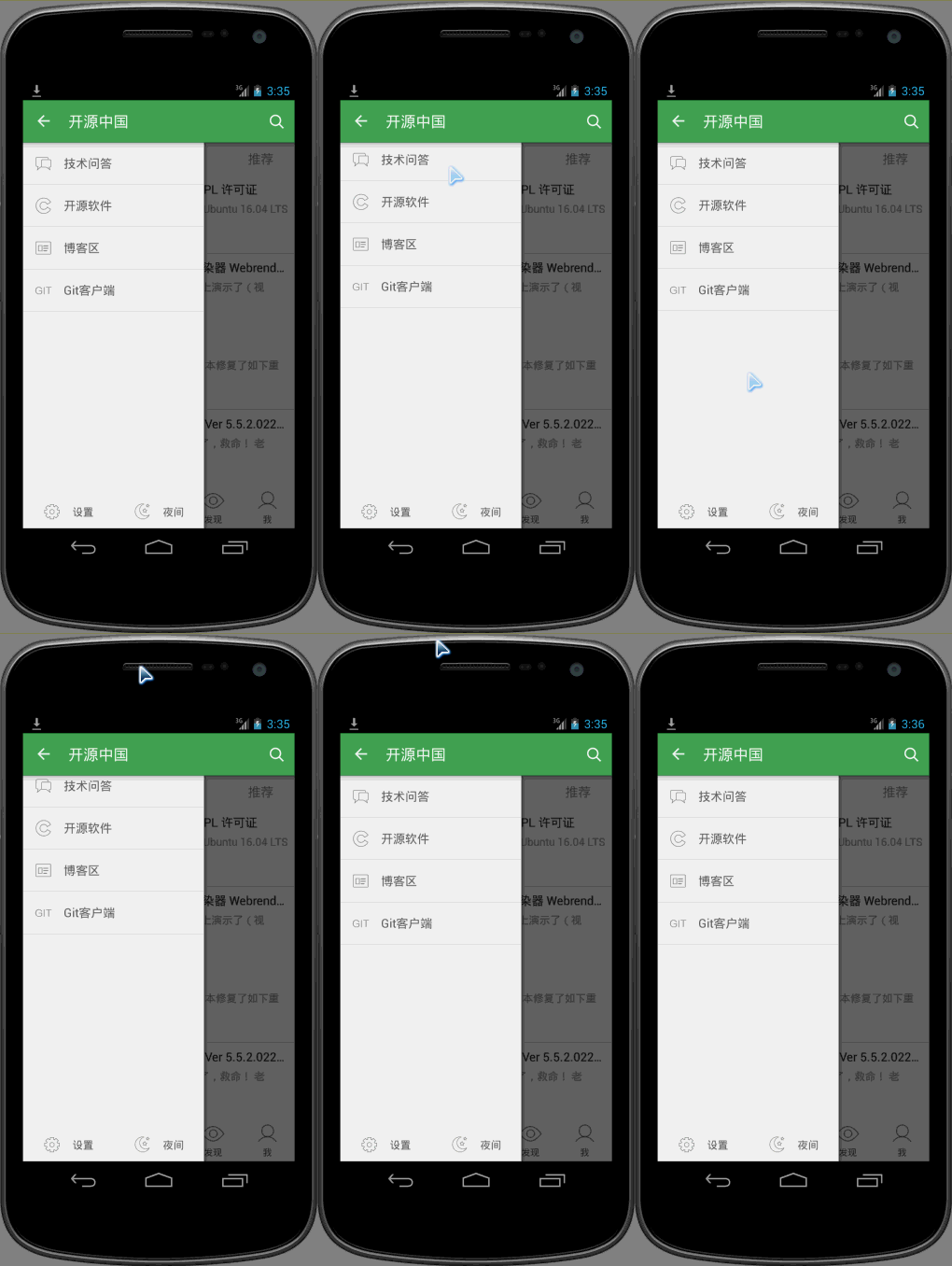
可以看到向上滑动的时候,会有明显回弹的效果。
oschina客户端滑动菜单的View的布局使用了可以拖拽的ScrollView,类文件为CustomerScrollView。
- 拖拽的目标是ScrollView内的菜单的布局View,所以在CustomerScrollView内的onFinishInflate()函数中首先通过getChildAt(0)来获取菜单布局的View,这就是第一步的目标是获取要拖拽的对象。onFinishInflate()加载完view,这里的View指的就是源码中<include layout="@layout/fragment_navigation_drawer_items"/>加载的布局文件。
- 拖拽的过程实际上是一个“按下-移动-抬起”的过程,因此要重写onTouchEvent(MotionEvent ev),其中移动过程实际上是将菜单view按照移动的方向和距离,怎么实现这个功能呢?源码中最关键的就是这行代码inner.layout(inner.getLeft(), yy, inner.getRight(),inner.getBottom() - deltaY);这个方法四个参数都是inner相对其父控件ScrollView的坐标原点而言的。不是很了解的,可以专门查查坐标的相关知识。
- 当手指抬起也就是MotionEvent.ACTION_UP事件发生时,将拖拽后的view恢复移动到原来位置,移动过程附加了一个动画,由于移动实际上是位置发生了变化,因此用到了TranslateAnimation,因为是上下拖拽,所以X的起始和终止坐标都是0,Y的起始和终止坐标至于为什么那么写,相信看完博客应该就会明白了。那么问题来了,要自动移动回去,那么触发的时机在MotionEvent.ACTION_UP中,原来的位置怎么保存,因为移动时需要左上右下四个参数,因此在CustomerScrollView中我们看到了这样一个变量private Rect normal = new Rect();通过normal.set(inner.getLeft(), inner.getTop(),inner.getRight(), inner.getBottom());方法记录菜单view的初始化位置。
- 经过仔细揣摩发现scrollY == 0这个条件实际上是滚动到了最顶部的时候,而scrollY == offset是滚动到最底部的时候,两个条件满足其中一个都可以实现拖拽的效果。int offset = inner.getMeasuredHeight() - getHeight();相当于本身的身高减去实际能看到的身高就等于没有看到的身高部分。
//是否需要移动public boolean isNeedMove() {int offset = inner.getMeasuredHeight() - getHeight();int scrollY = getScrollY();if (scrollY == 0 || scrollY == offset) {return true;}return false;}
- 为什么源码中需要isNeedAnimation()这个函数呢?因为恢复到原来位置也用到了inner.layout(normal.left, normal.top, normal.right, normal.bottom);,因此normal首先必须要有四个参数值。而这个normal只有满足上面的条件后才有值的。
- 为什么在拖拽发生又恢复到原来位置后,要把这个normal.setEmpty();置空呢?它的意图是什么?仔细想来,发现这个normal的set左上右下四个值时,是在满足2.4两种条件之一就会有具体值的。因此这个normal就会有两种不同的Rect.顶部的时候左上右下四个值分别为(0,0,实际菜单的宽度240dp,菜单的实际测量高度)而滚动到最底部的时候左上右下四个值分别为(0,负的【菜单的实际高度减去屏幕的高度】,实际菜单的宽度240dp,屏幕的高度),因此需要清空。
[Android]开源中国源码分析之二---DrawerLayout的更多相关文章
- [Android]开源中国源码分析之一---启动界面
开源中国android端版本号:2.4 启动界面: 在AndroidManifest.xml中找到程序的入口, <activity android:name=".AppStart&qu ...
- Android开源框架源码分析:Okhttp
一 请求与响应流程 1.1 请求的封装 1.2 请求的发送 1.3 请求的调度 二 拦截器 2.1 RetryAndFollowUpInterceptor 2.2 BridgeInterceptor ...
- Android 开源项目源码解析(第二期)
Android 开源项目源码解析(第二期) 阅读目录 android-Ultra-Pull-To-Refresh 源码解析 DynamicLoadApk 源码解析 NineOldAnimations ...
- 一个普通的 Zepto 源码分析(二) - ajax 模块
一个普通的 Zepto 源码分析(二) - ajax 模块 普通的路人,普通地瞧.分析时使用的是目前最新 1.2.0 版本. Zepto 可以由许多模块组成,默认包含的模块有 zepto 核心模块,以 ...
- Zepto源码分析(二)奇淫技巧总结
Zepto源码分析(一)核心代码分析 Zepto源码分析(二)奇淫技巧总结 目录 * 前言 * 短路操作符 * 参数重载(参数个数重载) * 参数重载(参数类型重载) * CSS操作 * 获取属性值的 ...
- 插件开发之360 DroidPlugin源码分析(二)Hook机制
转载请注明出处:http://blog.csdn.net/hejjunlin/article/details/52124397 前言:新插件的开发,可以说是为插件开发者带来了福音,虽然还很多坑要填补, ...
- DataTable源码分析(二)
DataTable源码分析(二) ===================== DataTable函数分析 ---------------- DataTable作为整个插件的入口,完成了整个表格的数据初 ...
- Koa源码分析(二) -- co的实现
Abstract 本系列是关于Koa框架的文章,目前关注版本是Koa v1.主要分为以下几个方面: Koa源码分析(一) -- generator Koa源码分析(二) -- co的实现 Koa源码分 ...
- Unity时钟定时器插件——Vision Timer源码分析之二
Unity时钟定时器插件——Vision Timer源码分析之二 By D.S.Qiu 尊重他人的劳动,支持原创,转载请注明出处:http.dsqiu.iteye.com 前面的已经介绍了vp_T ...
随机推荐
- 杂项收集,包括-发邮件、二维码生成、文件下载、压缩、导出excel
本篇就最近工作解决的问题做个代码收集.包括以下几个方面:发邮件.二维码生成.文件下载.压缩.导出excel.有一种可用的解决方法就好,不求全面,不求原理. 1.发邮件: 命名空间:System.Net ...
- python3----strip lstrip rstrip
Python中的strip用于去除字符串的首位字符,同理,lstrip用于去除左边的字符,rstrip用于去除右边的字符.这三个函数都可传入一个参数,指定要去除的首尾字符.注意的是,传入的是一个字符数 ...
- 怎么把顶部的Django administration去掉!!
/Library/Frameworks/Python.framework/Versions/3.4/lib/python3.4/site-packages/django/contrib/admin/t ...
- DHCP动态主机配置协议
1.DHCP简述 某组织一旦获得了一个地址,它就可以为本组织内的主机与路由器接口逐个分配IP地址.系统管理通常可以手工配置路由器中的IP地址(静态分配).但这项任务目前通常更多是使用动态主机配置协议( ...
- 七个迹象说明你可能受到APT 攻击
watermark/2/text/aHR0cDovL2Jsb2cuY3Nkbi5uZXQvaXF1c2hp/font/5a6L5L2T/fontsize/400/fill/I0JBQkFCMA==/d ...
- 谈抽象1——无脑copy等于自杀
近期被外派帮助国内某公司做政府某部门OA系统.听说他们那有个成熟的java框架,使用了非常长时间,抱着学习的态度,我进入这个公司.当我熟悉了一周后,留下了非常多疑问,而这些疑问,也诱发了这次关于&qu ...
- Android WebView-应用内嵌入浏览器
移动应用开发,web app.Native app的讨论已经很久了,纯粹的web app还很少,多少能见到Native + web混合的app,混合的app是在Native app中写一个浏览器加载 ...
- Python 模块相对引用
文件结构如下 python_directory/ ├── __init__.py └── app ├── __init__.py ├── sub1 │ ├── __init__.py │ └─ ...
- 进程 query foreach
http://php.net/manual/en/pdo.query.php PDO::query() executes an SQL statement in a single function c ...
- 我的Android进阶之旅------>HTTP Content-type 对照表
HTTP Content-type 对照表 文件扩展名 Content-Type(Mime-Type) 文件扩展名 Content-Type(Mime-Type) .*( 二进制流, 不知道下载文件类 ...