
How and when: ridge regression with glmnet
@drsimonj here to show you how to conduct ridge regression (linear regression with L2 regularization) in R using the glmnet package, and use simulations to demonstrate its relative advantages over ordinary least squares regression.
Ridge regression
Ridge regression uses L2 regularisation to weight/penalise residuals when the parameters of a regression model are being learned. In the context of linear regression, it can be compared to Ordinary Least Square (OLS). OLS defines the function by which parameter estimates (intercepts and slopes) are calculated. It involves minimising the sum of squared residuals. L2 regularisation is a small addition to the OLS function that weights residuals in a particular way to make the parameters more stable. The outcome is typically a model that fits the training data less well than OLS but generalises better because it is less sensitive to extreme variance in the data such as outliers.
Packages
We’ll make use of the following packages in this post:
library(tidyverse)

library(broom)

library(glmnet)
Ridge regression with glmnet
The glmnet package provides the functionality for ridge regression viaglmnet(). Important things to know:
- Rather than accepting a formula and data frame, it requires a vector input and matrix of predictors.
- You must specify
alpha = 0for ridge regression. - Ridge regression involves tuning a hyperparameter, lambda.
glmnet()will generate default values for you. Alternatively, it is common practice to define your own with thelambdaargument (which we’ll do).
Here’s an example using the mtcars data set:
y <- mtcars$hp

x <- mtcars %>% select(mpg, wt, drat) %>% data.matrix()

lambdas <- 10^seq(3, -2, by = -.1)

fit <- glmnet(x, y, alpha = 0, lambda = lambdas)

summary(fit)

#>           Length Class     Mode

#> a0         51    -none-    numeric

#> beta      153    dgCMatrix S4

#> df         51    -none-    numeric

#> dim         2    -none-    numeric

#> lambda     51    -none-    numeric

#> dev.ratio  51    -none-    numeric

#> nulldev     1    -none-    numeric

#> npasses     1    -none-    numeric

#> jerr        1    -none-    numeric

#> offset      1    -none-    logical

#> call        5    -none-    call

#> nobs        1    -none-    numeric
Because, unlike OLS regression done with lm(), ridge regression involves tuning a hyperparameter, lambda, glmnet() runs the model many times for different values of lambda. We can automatically find a value for lambda that is optimal by using cv.glmnet() as follows:
cv_fit <- cv.glmnet(x, y, alpha = 0, lambda = lambdas)
cv.glmnet() uses cross-validation to work out how well each model generalises, which we can visualise as:
plot(cv_fit)
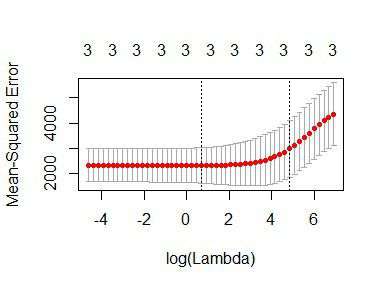
The lowest point in the curve indicates the optimal lambda: the log value of lambda that best minimised the error in cross-validation. We can extract this values as:
opt_lambda <- cv_fit$lambda.min

opt_lambda

#> [1] 3.162278
And we can extract all of the fitted models (like the object returned byglmnet()) via:
fit <- cv_fit$glmnet.fit

summary(fit)

#>           Length Class     Mode

#> a0         51    -none-    numeric

#> beta      153    dgCMatrix S4

#> df         51    -none-    numeric

#> dim         2    -none-    numeric

#> lambda     51    -none-    numeric

#> dev.ratio  51    -none-    numeric

#> nulldev     1    -none-    numeric

#> npasses     1    -none-    numeric

#> jerr        1    -none-    numeric

#> offset      1    -none-    logical

#> call        5    -none-    call

#> nobs        1    -none-    numeric
These are the two things we need to predict new data. For example, predicting values and computing an R2 value for the data we trained on:
y_predicted <- predict(fit, s = opt_lambda, newx = x)

# Sum of Squares Total and Error

sst <- sum(y^2)

sse <- sum((y_predicted - y)^2)

# R squared

rsq <- 1 - sse / sst

rsq

#> [1] 0.9318896
The optimal model has accounted for 93% of the variance in the training data.
Ridge v OLS simulations
By producing more stable parameters than OLS, ridge regression should be less prone to overfitting training data. Ridge regression might, therefore, predict training data less well than OLS, but better generalise to new data. This will particularly be the case when extreme variance in the training data is high, which tends to happen when the sample size is low and/or the number of features is high relative to the number of observations.
Below is a simulation experiment I created to compare the prediction accuracy of ridge regression and OLS on training and test data.
I first set up the functions to run the simulation:
# Compute R^2 from true and predicted values

rsquare <- function(true, predicted) {

  sse <- sum((predicted - true)^2)

  sst <- sum(true^2)

  rsq <- 1 - sse / sst

  # For this post, impose floor...

  if (rsq < 0) rsq <- 0

  return (rsq)

}

# Train ridge and OLS regression models on simulated data set with `n_train`

# observations and a number of features as a proportion to `n_train`,

# `p_features`. Return R squared for both models on:

#   - y values of the training set

#   - y values of a simualted test data set of `n_test` observations

#   - The beta coefficients used to simulate the data

ols_vs_ridge <- function(n_train, p_features, n_test = 200) {

  ## Simulate datasets

  n_features <- floor(n_train * p_features)

  betas <- rnorm(n_features)

  x <- matrix(rnorm(n_train * n_features), nrow = n_train)

  y <- x %*% betas + rnorm(n_train)

  train <- data.frame(y = y, x)

  x <- matrix(rnorm(n_test * n_features), nrow = n_test)

  y <- x %*% betas + rnorm(n_test)

  test <- data.frame(y = y, x)

  ## OLS

  lm_fit <- lm(y ~ ., train)

  # Match to beta coefficients

  lm_betas <- tidy(lm_fit) %>%

    filter(term != "(Intercept)") %>%

    {.$estimate}

  lm_betas_rsq <- rsquare(betas, lm_betas)

  # Fit to training data

  lm_train_rsq <- glance(lm_fit)$r.squared

  # Fit to test data

  lm_test_yhat <- predict(lm_fit, newdata = test)

  lm_test_rsq  <- rsquare(test$y, lm_test_yhat)

  ## Ridge regression

  lambda_vals <- 10^seq(3, -2, by = -.1)  # Lambda values to search

  cv_glm_fit  <- cv.glmnet(as.matrix(train[,-1]), train$y, alpha = 0, lambda = lambda_vals, nfolds = 5)

  opt_lambda  <- cv_glm_fit$lambda.min  # Optimal Lambda

  glm_fit     <- cv_glm_fit$glmnet.fit

  # Match to beta coefficients

  glm_betas <- tidy(glm_fit) %>%

    filter(term != "(Intercept)", lambda == opt_lambda) %>%

    {.$estimate}

  glm_betas_rsq <- rsquare(betas, glm_betas)

  # Fit to training data

  glm_train_yhat <- predict(glm_fit, s = opt_lambda, newx = as.matrix(train[,-1]))

  glm_train_rsq  <- rsquare(train$y, glm_train_yhat)

  # Fit to test data

  glm_test_yhat <- predict(glm_fit, s = opt_lambda, newx = as.matrix(test[,-1]))

  glm_test_rsq  <- rsquare(test$y, glm_test_yhat)

  data.frame(

    model = c("OLS", "Ridge"),

    betas_rsq  = c(lm_betas_rsq, glm_betas_rsq),

    train_rsq = c(lm_train_rsq, glm_train_rsq),

    test_rsq = c(lm_test_rsq, glm_test_rsq)

  )

}

# Function to run `ols_vs_ridge()` `n_replications` times

repeated_comparisons <- function(..., n_replications = 5) {

  map(seq(n_replications), ~ ols_vs_ridge(...)) %>%

    map2(seq(.), ~ mutate(.x, replicate = .y)) %>%

    reduce(rbind)

}
Now run the simulations for varying numbers of training data and relative proportions of features (takes some time):
d <- purrr::cross_d(list(

  n_train = seq(20, 200, 20),

  p_features = seq(.55, .95, .05)

))

d <- d %>%

  mutate(results = map2(n_train, p_features, repeated_comparisons))
Visualise the results…
For varying numbers of training data (averaging over number of features), how well do both models predict the training and test data?
d %>%

  unnest() %>%

  group_by(model, n_train) %>%

  summarise(

    train_rsq = mean(train_rsq),

    test_rsq = mean(test_rsq)) %>%

  gather(data, rsq, contains("rsq")) %>%

  mutate(data = gsub("_rsq", "", data)) %>%

  ggplot(aes(n_train, rsq, color = model)) +

    geom_line() +

    geom_point(size = 4, alpha = .3) +

    facet_wrap(~ data) +

    theme_minimal() +

    labs(x = "Number of training observations",

         y = "R squared")

As hypothesised, OLS fits the training data better but Ridge regression better generalises to new test data. Further, these effects are more pronounced when the number of training observations is low.
For varying relative proportions of features (averaging over numbers of training data) how well do both models predict the training and test data?
d %>%

  unnest() %>%

  group_by(model, p_features) %>%

  summarise(

    train_rsq = mean(train_rsq),

    test_rsq = mean(test_rsq)) %>%

  gather(data, rsq, contains("rsq")) %>%

  mutate(data = gsub("_rsq", "", data)) %>%

  ggplot(aes(p_features, rsq, color = model)) +

    geom_line() +

    geom_point(size = 4, alpha = .3) +

    facet_wrap(~ data) +

    theme_minimal() +

    labs(x = "Number of features as proportion\nof number of observation",

         y = "R squared")

Again, OLS has performed slightly better on training data, but Ridge better on test data. The effects are more pronounced when the number of features is relatively high compared to the number of training observations.
The following plot helps to visualise the relative advantage (or disadvantage) of Ridge to OLS over the number of observations and features:
d %>%

  unnest() %>%

  group_by(model, n_train, p_features) %>%

  summarise(train_rsq = mean(train_rsq),

            test_rsq  = mean(test_rsq)) %>%

  group_by(n_train, p_features) %>%

  summarise(RidgeAdvTrain = train_rsq[model == "Ridge"] - train_rsq[model == "OLS"],

            RidgeAdvTest  = test_rsq[model == "Ridge"] - test_rsq[model == "OLS"]) %>%

  gather(data, RidgeAdvantage, contains("RidgeAdv")) %>%

  mutate(data = gsub("RidgeAdv", "", data)) %>%

  ggplot(aes(n_train, p_features, fill = RidgeAdvantage)) +

    scale_fill_gradient2(low = "red", high = "green") +

    geom_tile() +

    theme_minimal() +

    facet_wrap(~ data) +

    labs(x = "Number of training observations",

         y = "Number of features as proportion\nof number of observation") +

    ggtitle("Relative R squared advantage of Ridge compared to OLS")

This shows the combined effect: that Ridge regression better transfers to test data when the number of training observations is low and/or the number of features is high relative to the number of training observations. OLS performs slightly better on the training data under similar conditions, indicating that it is more prone to overfitting training data than when ridge regularisation is employed.
Sign off
Thanks for reading and I hope this was useful for you.
For updates of recent blog posts, follow @drsimonj on Twitter, or email me atdrsimonjackson@gmail.com to get in touch.
If you’d like the code that produced this blog, check out the blogR GitHub repository.
转自:https://drsimonj.svbtle.com/ridge-regression-with-glmnet
How and when: ridge regression with glmnet的更多相关文章
- ISLR系列:(4.2)模型选择 Ridge Regression & the Lasso
Linear Model Selection and Regularization 此博文是 An Introduction to Statistical Learning with Applicat ...
- Ridge Regression(岭回归)
Ridge Regression岭回归 数值计算方法的"稳定性"是指在计算过程中舍入误差是可以控制的. 对于有些矩阵,矩阵中某个元素的一个很小的变动,会引起最后计算结果误差很大,这 ...
- support vector regression与 kernel ridge regression
前一篇,我们将SVM与logistic regression联系起来,这一次我们将SVM与ridge regression(之前的linear regression)联系起来. (一)kernel r ...
- Jordan Lecture Note-4: Linear & Ridge Regression
Linear & Ridge Regression 对于$n$个数据$\{(x_1,y_1),(x_2,y_2),\cdots,(x_n,y_n)\},x_i\in\mathbb{R}^d,y ...
- Ridge Regression and Ridge Regression Kernel
Ridge Regression and Ridge Regression Kernel Reference: 1. scikit-learn linear_model ridge regressio ...
- 再谈Lasso回归 | elastic net | Ridge Regression
前文:Lasso linear model实例 | Proliferation index | 评估单细胞的增殖指数 参考:LASSO回歸在生物醫學資料中的簡單實例 - 生信技能树 Linear le ...
- 岭回归(Ridge Regression)
一.一般线性回归遇到的问题 在处理复杂的数据的回归问题时,普通的线性回归会遇到一些问题,主要表现在: 预测精度:这里要处理好这样一对为题,即样本的数量和特征的数量 时,最小二乘回归会有较小的方差 时, ...
- Kernel ridge regression(KRR)
作者:桂. 时间:2017-05-23 15:52:51 链接:http://www.cnblogs.com/xingshansi/p/6895710.html 一.理论描述 Kernel ridg ...
- 机器学习方法:回归(二):稀疏与正则约束ridge regression,Lasso
欢迎转载,转载请注明:本文出自Bin的专栏blog.csdn.net/xbinworld. "机器学习方法"系列,我本着开放与共享(open and share)的精神撰写,目的是 ...
随机推荐
- 2017.3.12 H5学习的第一周
本周我开始了H5的学习,在这一周里我们从html的基本标签开始一直讲到了才算css的用法,接下来我将记录下来本周我学到的H5的内容. 首先是声明文档,声明文档类型是HTML5文件,它在HTML文档必不 ...
- JavaScript Array 技巧
filter():返回该函数会返回true的项组成的数组 ,,,,]; var result = num.filter(function(item,index,array){ ); }) consol ...
- 自动生成数学题型二(框架struts2)题型如((a+b)*c=d)
1. 生成题目 1.1 生成单个题目 public static String[] twoOperatorAndOperator(int num1, int num2) { double first ...
- 找到一个新的超好用的U盘启动制作工具了
有同事叫帮装电脑,弄个U盘说制作一个启动盘,结果一搜,出了“雨林木风”的主页. 太好用了,高手的产物,比以前找的方便一百倍.又简单,又实用,同步又下载好GHO文件.唯一 的问题是XP中用的GHO,好多 ...
- 原生态JS实现banner图的常用所有功能
虽然,用jQuery实现banner图的各种效果十分简单快捷,但是我今天用css+js代码实现了几个banner图的常用功能,效果还不错. 此次,主要想实现以下功能: 1. banner图循环不间断切 ...
- oracle定时执行一个存储过程
首先需要新建存储过程 一 存储过程: create or replace procedure Insertdata is begin INSERT INTO tab_dayta select * fr ...
- Java多线程学习笔记(一)——Thread类中方法介绍
currentThread():返回代码正在被哪个线程调用. public class CurrentThreadWay { public static void main(String[] args ...
- 【Spark2.0源码学习】-1.概述
Spark作为当前主流的分布式计算框架,其高效性.通用性.易用性使其得到广泛的关注,本系列博客不会介绍其原理.安装与使用相关知识,将会从源码角度进行深度分析,理解其背后的设计精髓,以便后续 ...
- 如何高效的进行WebService接口性能测试
版权声明:本文为原创文章,转载请先联系并标明出处 关于接口测试的理解,主要有两类,一类是模块与模块间的调用,此类接口测试应该归属于单元测试的范畴,主要测试模块与模块之间联动调用与返回.此类测试大多关注 ...
- node.js—express+ejs、express+swig、
安装:npm install -g express-generator 普通express 网站 创建:express testWeb 安装依赖:npm install 修改app.js文件并运行 找 ...