
从Unity中的Attribute到AOP(五)
今天主要来讲一下Unity中带Menu的Attribute。
首先是AddComponentMenu。这是UnityEngine命名空间下的一个Attribute。
按照官方文档的说法,会在Component的菜单下面生成对应的菜单栏。选择预制或者GameObject,再点击菜单项,自动添加该Component。
下面我们来试试,我在Editor文件夹下面新建了一个OhGod.cs的文件,取完名字我就后悔了,于是我修改了类名,代码如下:
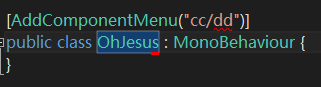
完美!我们来看看Component菜单。。。什么也没有多!!
于是我翻了网上的资料,了解到这个属性有个暗坑,就是类名必须和cs的文件名一致!
好吧,我改回去。
然而,还是什么也没有。。。
这时候我想到Editor是一个特殊的文件夹,会不会和这个有关系呢。
把cs脚本移动到其他位置,这时候,菜单显示就正确了!
选中场景中物件或者文件夹里的预制体,点击菜单,脚本就自动添加上去拉~

需要注意的是,我在菜单里命名为cc/dd,如果你直接点击上图的Add Component按钮,是找不到OhGod这个脚本的!只有cc和dd才能找到。
AddComponentMenu构造函数还有一个参数是优先级,可以设置同级菜单下面的菜单项的顺序,这里不做赘述了。
如果我们有其他的菜单功能的话,最好能够新建一个菜单项。放在Component里肯定是不太好了。
Unity继承了这个功能,不过这个Attribute在Editor命名空间里,就是UnityEditor.MenuItem。
看MenuItem的代码定义:
using System;

using UnityEngine.Scripting;

namespace UnityEditor

{

    // 摘要:

    //     The MenuItem attribute allows you to add menu items to the main menu and

    //     inspector context menus.

    [AttributeUsage(AttributeTargets.Method, AllowMultiple = true)]

    [RequiredByNativeCode]

    public sealed class MenuItem : Attribute

    {

        public string menuItem;

        public int priority;

        public bool validate;

        // 摘要:

        //     Creates a menu item and invokes the static function following it, when the

        //     menu item is selected.

        //

        // 参数:

        //   itemName:

        //     The itemName is the menu item represented like a pathname.  For example the

        //     menu item could be "GameObject/Do Something".

        //

        //   isValidateFunction:

        //     If isValidateFunction is true, this is a validation function and will be

        //     called before invoking the menu function with the same itemName.

        //

        //   priority:

        //     The order by which the menu items are displayed.

        public MenuItem(string itemName);

        //

        // 摘要:

        //     Creates a menu item and invokes the static function following it, when the

        //     menu item is selected.

        //

        // 参数:

        //   itemName:

        //     The itemName is the menu item represented like a pathname.  For example the

        //     menu item could be "GameObject/Do Something".

        //

        //   isValidateFunction:

        //     If isValidateFunction is true, this is a validation function and will be

        //     called before invoking the menu function with the same itemName.

        //

        //   priority:

        //     The order by which the menu items are displayed.

        public MenuItem(string itemName, bool isValidateFunction);

        //

        // 摘要:

        //     Creates a menu item and invokes the static function following it, when the

        //     menu item is selected.

        //

        // 参数:

        //   itemName:

        //     The itemName is the menu item represented like a pathname.  For example the

        //     menu item could be "GameObject/Do Something".

        //

        //   isValidateFunction:

        //     If isValidateFunction is true, this is a validation function and will be

        //     called before invoking the menu function with the same itemName.

        //

        //   priority:

        //     The order by which the menu items are displayed.

        public MenuItem(string itemName, bool isValidateFunction, int priority);

    }

}
可以看到它的附着点在函数上,而且必须是静态函数。

我们还能够给菜单项添加热键,具体热键的定义如下:
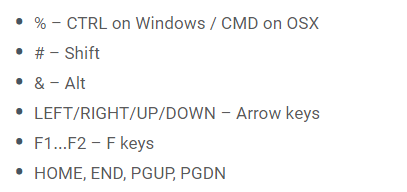
修改我们的代码:

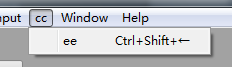
需要注意,热键重复的话,只会调用其中一条指令。
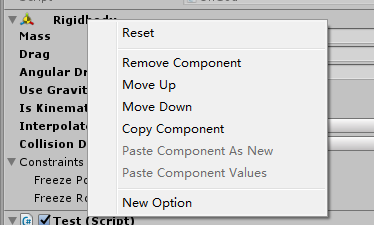
Unity中的右键菜单也可以使用MenuItem来定义,这里有三条特殊的路径:Assets;Assets/Create;CONTEXT/ComponentName。
修改代码如下:
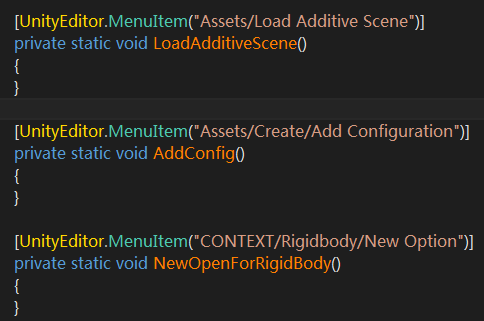
其中上面两个菜单项,你可以在Project视图中右键找到,Create菜单还能在Project的Create按钮里找到新加项目。
最后一个菜单项则是在Inspector视图里,当你右键一个脚本的时候会有菜单弹出。上述例子中,Rigidbody限定了脚本。
MenuItem还有一个参数是验证(Validation),默认为false,如果设为true,则需要方法返回一个布尔值。
添加代码如下:

或者
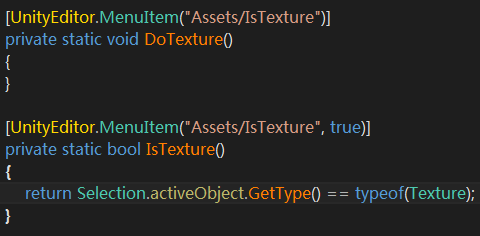
这里比较坑爹的是同样的菜单项你必须写两次,一个用来回调,一个用来验证,只写下面的菜单是显示不出来的!
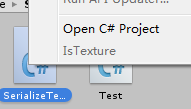
MenuItem的最后一个参数是索引值,可以排顺序。
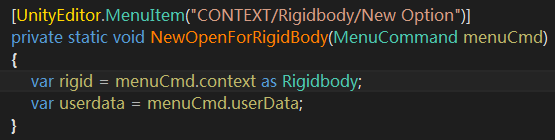
在我们上述三种特殊路径的菜单中,最后一种绑定在RigidBody的菜单,我们可以在回调中获得脚本对象,只要修改代码如下:
在UnityEngine域名中还有ContextMenu和ContextMenuItem两个菜单属性,声明在UnityEngine的命名空间中。
ContextMenu和MenuItem+“CONTEXT/...”的显示效果是一致的,一般用在当前的脚本上(即ContextMenu定义的脚本上),回调方法不能是静态的方法。
代码如下:

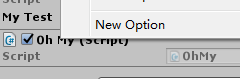
ContextMenu构造函数还有一些参数和MenuItem基本一致,这里不再赘述。
ContextMenuItem的用法我们可以通过一个案例来了解一下:
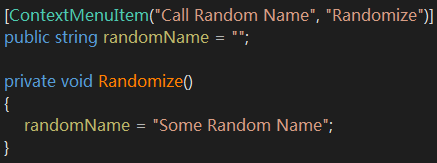

只有在Random Name上面右键才会出现的菜单项。
至此我们关于Menu相关的Attribute讲完了。
从Unity中的Attribute到AOP(五)的更多相关文章
- 从Unity中的Attribute到AOP(七)
本章我们将依然讲解Unity中的Attribute,继续命名空间在UnityEngine里的. PropertyAttribute,这个特性主要来控制变量或者类在Inspector里面的显示方式.和P ...
- 从Unity中的Attribute到AOP(四)
本篇我们将逐一讲解Unity中经常使用的Attribute(Unity对应的文档版本为2018.1b). 首先是Serializable,SerializeField以及NonSerialized,H ...
- 从Unity中的Attribute到AOP(三)
上一篇我们对系统的Attributes进行了MSIL代码的查看,了解到了其本质就是一个类的构造函数.本章我们将编写自己的Attributes. 首先我们定义书的属性代码,如下: [AttributeU ...
- 从Unity中的Attribute到AOP(六)
本文将重点对Unity剩下常用的Attribute进行讲解,其他不常用的Attribute各位可以自行去官方文档查阅. 首先是UnityEngine命名空间下的. ColorUsage,这个主要作用于 ...
- 从Unity中的Attribute到AOP(八)
本文将讲一下在UnityEditor命名空间下的一些特性. CallBackOrder,这个Attribute是所有带callback index的Attribute的基类,由于官方也没有给出详细的说 ...
- 从Unity中的Attribute到AOP(二)
上一篇文章我们初步了解了一下Attributes的含义,并且使用系统自带的Attributes写了点代码.在进一步解剖我们的代码之前,我觉得有个概念可能需要巩固一下:什么是元数据? 我们知道C#代码会 ...
- 从Unity中的Attribute到AOP(一)
首先来看一下微软官方对Attributes(C#)的定义: https://docs.microsoft.com/en-us/dotnet/csharp/programming-guide/conce ...
- Unity中使用Attribute
Attribute是c#的语言特性 msdn说明如下: The Attribute class associates predefined system information or user-def ...
- Unity应用架构设计(12)——AOP思想的实践
想象一下,当程序所有的业务逻辑都完成的时候,你可能还来不及喘口气,紧张的测试即将来临.你的Boss告诉你,虽然程序没问题,但某些方法为什么执行这么慢,性能堪忧.领会了Boss的意图之后,漫长的排查问题 ...
随机推荐
- Centos7.4下用Docker-Compose部署WordPress
前言 最近在学习Docker相关知识,通过阅读第一本Docker书后,正想着手实战用一下这个技术,但又不太敢直接在项目环境下动手.考虑足足三秒钟之后决定买个阿里云ECS搭建一个属于自己的基于Docke ...
- 手把手教你用vue-cli搭建vue项目
手把手教你用vue-cli搭建vue项目 本篇主要是利用vue-cli来搭建vue项目,其中前提是node和npm已经安装好,文章结尾将会简单提到一个简单的例子.使用vue-cli搭建项目最开始我也是 ...
- Python 安装包的导入
1.安装适合的pip python安装pip的命令: python -m pip install --upgrade pip安装Python包,的确是pip最为方便了,简单快捷,因为它直接是从pypi ...
- 人工智能技术实践篇:espeak开发环境调试
一.前言 1.espeak版本: espeak-1.48.04-source 2.开发环境:VC+2015 二.正文 2.1 错误提示 LNK1104: cannot open file 'LIBC. ...
- 数据库SQL优化
1.对查询进行优化,要尽量避免全表扫描,首先应考虑在 where 及 order by 涉及的列上建立索引. 2.应尽量避免在 where 子句中对字段进行 null 值判断,否则将导致引擎放弃使用索 ...
- 5 秒创建 k8s 集群 - 每天5分钟玩转 Docker 容器技术(115)
据说 Google 的数据中心里运行着超过 20 亿个容器,而且 Google 十年前就开始使用容器技术. 最初,Google 开发了一个叫 Borg 的系统(现在命令为 Omega)来调度如此庞大数 ...
- 不解释,分享这个base.css
@charset "utf-8"; /*! * @名称:base.css * @功能:1.重设浏览器默认样式 * 2.设置通用原子类 */ /* 防止用户自定义背景颜色对网页的影响 ...
- php解决json_encode输出GB2312中文问题 (数组)
在 php 中使用 json_encode() 内置函数(php > 5.2)可以使用得 php 中数据可以与其它语言很好的传递并且使用它. 这个函数的功能是将数值转换成json数据存储格式. ...
- Java源码解读(一)——HashMap
HashMap作为常用的一种数据结构,阅读源码去了解其底层的实现是十分有必要的.在这里也分享自己阅读源码遇到的困难以及自己的思考. HashMap的源码介绍已经有许许多多的博客,这里只记录了一些我看源 ...
- C#语言和SQL Server第十章笔记
第十章 :使用关键字模糊查询 笔记 一:使用关键字 :LIKE BETWEEN IN进行模糊查询 通配符: 一类字符,代替一个或多个真正的字符 与LIKE关键字一起使用 通配符: 解释 实例 符 ...