
JSF 2 listbox example
In JSF, <h:selectOneListbox /> tag is used to render a single select listbox – HTML select element with “size” attribute.
//JSF...

<h:selectOneListbox value="#{user.favYear1}">

   	<f:selectItem itemValue="2000" itemLabel="Year1 - 2000" />

   	<f:selectItem itemValue="2010" itemLabel="Year1 - 2010" />

   	<f:selectItem itemValue="2020" itemLabel="Year1 - 2020" />

</h:selectOneListbox>
//HTML output...

<select name="j_idt6:j_idt8" size="3">

	<option value="2000">Year1 - 2000</option>

	<option value="2010">Year1 - 2010</option>

	<option value="2020">Year1 - 2020</option>

</select>
h:selectOneListbox example
A JSF 2.0 example to show the use of “h:selectOneListbox” tag to render a single select listbox, and populate the data in 3 different ways :
- Hardcoded value in “
f:selectItem” tag. - Generate values with a Map and put it into “
f:selectItems” tag. - Generate values with an Object array and put it into “
f:selectItems” tag, then represent the value with “var” attribute.
1. Backing Bean
A backing bean to hold and generate data for listbox values.
package com.mkyong;

import java.io.Serializable;

import java.util.LinkedHashMap;

import java.util.Map;

import javax.faces.bean.ManagedBean;

import javax.faces.bean.SessionScoped;

@ManagedBean(name="user")

@SessionScoped

public class UserBean implements Serializable{

	public String favYear1;

	public String favYear2;

	public String favYear3;

	//getter and setter methods

	//Generated by Map

	private static Map<String,Object> year2Value;

	static{

		year2Value = new LinkedHashMap<String,Object>();

		year2Value.put("Year2 - 2000", "2000"); //label, value

		year2Value.put("Year2 - 2010", "2010");

		year2Value.put("Year2 - 2020", "2020");

	}

	public Map<String,Object> getFavYear2Value() {

		return year2Value;

	}

	//Generated by Object array

	public static class Year{

		public String yearLabel;

		public String yearValue;

		public Year(String yearLabel, String yearValue){

			this.yearLabel = yearLabel;

			this.yearValue = yearValue;

		}

		public String getYearLabel(){

			return yearLabel;

		}

		public String getYearValue(){

			return yearValue;

		}

	}

	public Year[] year3List;

	public Year[] getFavYear3Value() {

		year3List = new Year[3];

		year3List[0] = new Year("Year3 - 2000", "2000");

		year3List[1] = new Year("Year3 - 2010", "2010");

		year3List[2] = new Year("Year3 - 2020", "2020");

		return year3List;

	}

}
2. JSF Page
A JSF page to demonstrate the use “h:selectOneListbox” tag.
<?xml version="1.0" encoding="UTF-8"?>

<!DOCTYPE html PUBLIC "-//W3C//DTD XHTML 1.0 Transitional//EN"

"http://www.w3.org/TR/xhtml1/DTD/xhtml1-transitional.dtd">

<html xmlns="http://www.w3.org/1999/xhtml"

      xmlns:h="http://java.sun.com/jsf/html"

      xmlns:f="http://java.sun.com/jsf/core"

      >

    <h:body>

    	<h1>JSF 2 listbox example</h1>

    	<h:form>

	        1. Hard-coded with "f:selectItem" :

   		<h:selectOneListbox value="#{user.favYear1}">

   			<f:selectItem itemValue="2000" itemLabel="Year1 - 2000" />

   			<f:selectItem itemValue="2010" itemLabel="Year1 - 2010" />

   			<f:selectItem itemValue="2020" itemLabel="Year1 - 2020" />

   		</h:selectOneListbox>

   		<br />

	        2. Generated by Map :

   		<h:selectOneListbox value="#{user.favYear2}">

   			<f:selectItems value="#{user.favYear2Value}" />

   		</h:selectOneListbox>

	        <br />

	        3. Generated by Object array and iterate with var :

   		<h:selectOneListbox value="#{user.favYear3}">

   			<f:selectItems value="#{user.favYear3Value}" var="y"

   			itemLabel="#{y.yearLabel}" itemValue="#{y.yearValue}" />

   		</h:selectOneListbox>

	        <br />

    	        <h:commandButton value="Submit" action="result" />

	        <h:commandButton value="Reset" type="reset" />

    	</h:form>

    </h:body>

</html>
result.xhtml…
<?xml version="1.0" encoding="UTF-8"?>

<!DOCTYPE html PUBLIC "-//W3C//DTD XHTML 1.0 Transitional//EN"

"http://www.w3.org/TR/xhtml1/DTD/xhtml1-transitional.dtd">

<html xmlns="http://www.w3.org/1999/xhtml"

      xmlns:h="http://java.sun.com/jsf/html"

      >

    <h:body>

    	<h1>JSF 2 listbox example</h1>

    	<h2>result.xhtml</h2>

    	<ol>

    		<li>user.favYear1 : #{user.favYear1}</li>

    		<li>user.favYear2 : #{user.favYear2}</li>

    		<li>user.favYear3 : #{user.favYear3}</li>

    	</ol>

    </h:body>

</html>
3. Demo
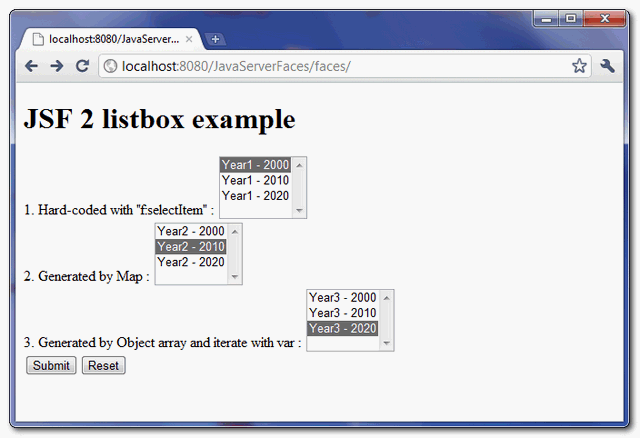
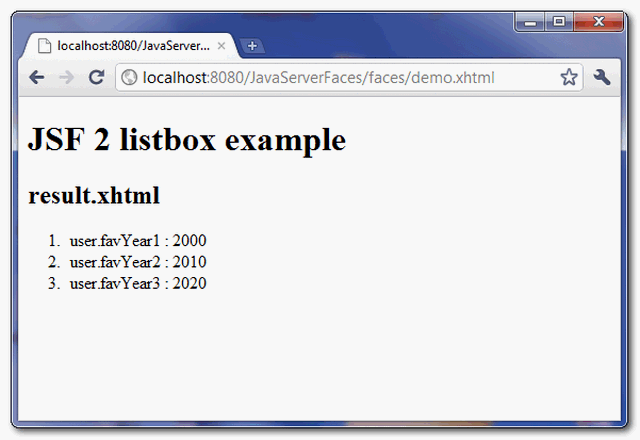
When “submit” button is clicked, link to “result.xhtml” page and display the submitted listbox values.
How to pre-select a listbox value?
The value of “f:selectItems” tag is selected if it matched to the “value” of “h:selectOneListbox” tag. In above example, if you set favYear1 property to “2010” :
@ManagedBean(name="user")

@SessionScoped

public class UserBean{

	public String favYear1 = "2010";

	//...
The “favYear1″ listbox, value “2010” is selected by default.
JSF 2 listbox example的更多相关文章
- JSF 2 multiple select listbox example
In JSF, <h:selectManyListbox /> tag is used to render a multiple select listbox – HTML select ...
- JSF标签大全详解
1. JSF入门 藉由以下的几个主题,可以大致了解JSF的轮廓与特性,我们来看看网页设计人员与应用程序设计人员各负责什么. 1.1简介JSF Web应用程序的开发与传统的单机程序开发在本质上存在着太多 ...
- MVVM下listbox默认显示最后一行
原文地址:http://stackoverflow.com/questions/16866309/listbox-scroll-into-view-with-mvvm public class Scr ...
- WPF 自定义列表筛选 自定义TreeView模板 自定义ListBox模板
有很多项目,都有数据筛选的操作.下面提供一个案例,给大家做参考. 左侧是数据源,搜索框加TreeView控件,右侧是ListBox控件.在左侧数据列点击添加数据,然后点击确定,得到所筛选的数据. 下面 ...
- JSF primefaces dataTable paginator 表格分页 问题
当第一次查询返回list列表,分页1,2,3.....这是选择2,当前页面停留在第2页. 当再次查询后,因为使用的ajax,结果更新了,但当前页面依旧是第2页. 可以在jsf页面,datatable的 ...
- 关于JSF中immediate属性的总结(二)
The immediate attribute in JSF is commonly misunderstood. If you don't believe me, check out Stack O ...
- WPF制作的VS黑色风格的Listbox
最近写的一个玩具,WPF写出来的东西还是挺好看的 style.xaml <ResourceDictionary xmlns="http://schemas.microsoft.com/ ...
- jquery 双向select控件bootstrap Dual listbox
http://www.cnblogs.com/hangwei/p/5040866.html -->jquery 双向select控件bootstrap Dual listboxhtt ...
- jsf初学selectOneMenu 绑定与取值
jsf 的selectOneMenu 最后生成的<select>标签.这里涉及到一个binding 起初一直不知道是干嘛的,后来参考了其他文章.就相当于在asp.net 中如:<as ...
随机推荐
- JAVA中,不同工程间的方法调用
可以调用, 用配置构建路径的方法:点选工程1, 点击右键, 选择 Build Path(构建路径) - > Configure Build Path...(配置构建路径...)然后在弹出的窗口中 ...
- bash shell 合并文件
# 按列合并文件 paste file1 file2 file3 > file4 # 要先 sort, 再 file1 file2 paste格式为: paste -d -s -file1 fi ...
- Jeally Bean中MonekyRunner 帮助文件
基于4.2的SDK导出来的MonkeyRunner的最新帮助,这个版本对MonkeyView和MonkeyRect有了很大的加强,在MonkeyRunner的易用性上有了很大的提高. 对于导出Monk ...
- UVa 11774 (置换 找规律) Doom's Day
我看大多数人的博客只说了一句:找规律得答案为(n + m) / gcd(n, m) 不过神题的题解还须神人写.. We can associate at each cell a base 3-numb ...
- Qt 多线程学习
最近的项目上用到了关于多线程的知识,自己也比较感兴趣,所以就拿了那本<C++ GUI Qt4 编程>来学习. 这本书的第14章是关于多线程的知识,使用的Qt版本是Qt4.x.在下用的是最新 ...
- android studio获取SHA1
1 打开cmd,转到路径:C:\Users\usoft\.android 2 输入命令 keytool -list -v -keystore debug.keystore 3 输入命令 android ...
- Android中shape中的属性大全
---恢复内容开始--- <shape> <!-- 实心 --> <solid android:color="#ff9d77"/> <!- ...
- iOS应用的crash日志的分析基础
Outline如何获得crash日志如何解析crash日志如何分析crash日志 1. iOS策略相关 2. 常见错误标识 3. 代码bug 一.如何获得crash日志 ...
- pl/sql developer 连接本地ORACLE 11g 64位数据库
1.登录PL/SQL Developer 这里省略Oracle数据库和PL/SQL Developer的安装步骤,注意在安装PL/SQL Developer软件时,不要安装在Program Files ...
- Mysql读写分离(mysql-proxy)
MySQL-Proxy是一个处于你的client端和MySQL server端之间的简单程序,它可以监测.分析或改变它们的通信.它使用灵活,没有限制,常见的用途包括:负载平衡,故障.查询分析,查询过滤 ...