
图形用户界面(graphical user interface)
1 java中提供的类库
1.1 定义
- AWT(abstract windows toolkit)抽象窗口工具包:提供了与本地图形界面进行交互的接口,AWT中提供的图形函数与操作系统的图形函数有着对应关系。(为了实现java的平台通用性,AWT牺牲了部分功能,整合所有操作系统的共有图形函数,形成了AWT工具包;由于依赖于本地函数,AWT控件也叫重量级控件)
- Swing是在AWT的基础上构建的一套新的图形函数库,提供了所有AWT的功能,并用100%的java代码对AWT进行了扩充。(平台通用性更好,不使用本地图形操作函数,Swing控件也叫轻量级控件)
- AWT与Swing区别:AWT速度快,Swing速度慢,但移植性更好
1.2 java包
- java.awt包:Frame Button Label TextField TextArea Panel
- javax.swing包:JFrame JButton JLabel JTextField JTextArea JPanel
1.3 组件分类
java中构成用户图形界面的各个元素,统称为组件(Component)
Component又分为容器(Container)和非容器两大类
容器又分为顶层容器和非顶层容器

1.3.1 Component类
- 是所有图形化组件和容器的抽象父类,其中定义了每个容器和组件都可能用到的通用方法
- getBounds() , getSize(), getLocation(), getHeight(), getWidth()
- setVisible(), setEnabled(),setBackground(), setForeground()
- getGraphics()
- requestFocus()
1.3.2 Swing容器
- 顶层容器:JFrame, JDialog, JApplet
- 非顶层容器:JComponent
2 实现图形界面
2.1 实现图形界面的三步曲:
- 创建组件(Component):创建组成界面的各种元素,如按钮、文本框等。
- 指定布局(Layout):根据具体需要排列它们的位置关系。
- 响应事件(Event) : 定义图形用户界面的事件和各界面元素对不同事件的响应, 从而实现图形用户界面与用户 的交互功能。
2.2 示例
import java.awt.*;

import javax.swing.*;

public class ButtonDemo extends JFrame {

    JButton btn1 = new JButton("Jbutton1");

    JButton btn2 = new JButton("dddd");

    JTextField txt = new JTextField(20);

    public ButtonDemo(){

        super("test button");

        btn1.setToolTipText("显示点选按钮");

        btn2.setIcon(new ImageIcon("cupHJbutton.gif"));

        setLayout(new FlowLayout());

        getContentPane().add(btn1);

        getContentPane().add(btn2);

        getContentPane().add(txt);

        setSize(400,300);

        setDefaultCloseOperation(EXIT_ON_CLOSE);

        btn1.addActionListener((e)->{

            String  name = ((JButton)(e.getSource())).getText();

            txt.setText(name + " Pressed");

        });

        btn2.addActionListener((e)->{

            String  name = ((JButton)(e.getSource())).getText();

            txt.setText(name + " Pressed");

        });

    }

    public static void main(String[] args) {

        // TODO Auto-generated method stub

        new ButtonDemo().setVisible(true);

    }

}
3 布局管理
3.1 Java.awt包
常用的三种:FlowLayout BorderLayout GridLayout,还有CardLayout, GridBagLayout等
3.1 FlowLayout
- 对组件逐行定位,行内从左到右,一行排满后换行
- 默认对齐方式为居中对齐,水平和竖直间距为缺省值为5
- 不改变组件的大小,按组件原有尺寸显示组件
- FlowLayout是Panel类的默认布局管理器

3.2 BorderLayout 布局管理器
- BorderLayout将整个容器的布局划分成东、西、南、北、中五个区域,组件只能被添加 到指定的区域
- 如不指定组件的加入部位,则默认加入到Center区域
- 每个区域只能加入一个组件,如加入多个,则先前加入的组件会被遗弃
- BorderLayout是Frame类的默认布局管理器

3.3 GridLayout 布局管理器
- GridLayout型布局管理器将布局划分成规则的矩形网格,每个单元格区域大小相等.
- 组件被添加到每个单元格中,先从左到右添满一行后换行,再从上到下.
- 在GridLayout构造方法中指定分割的行数和列数.

3.4 CardLayout 布局管理器
- CardLayout布局管理器能够帮助用户处理两个以至更多的成员共享同 一显示空间,就好象一叠卡片摞在一起。
3.5 默认的布局管理器
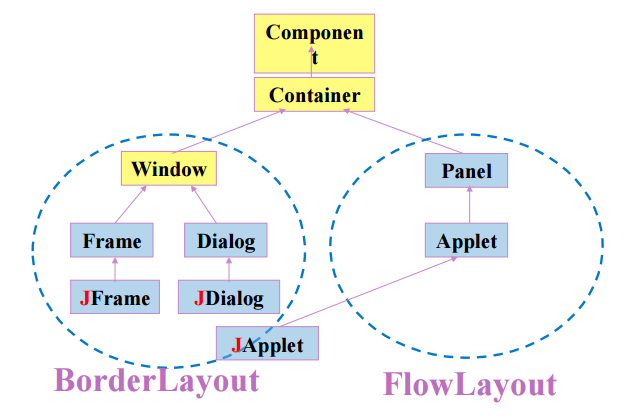
4 事件处理
4.1 定义
- 事件event:鼠标,键盘,布局改变等各种操作
- 事件监听器event Listener:对事件作出相应响应的程序,是AWTEventListener的子接口
4.2 事件适配器Adapter-----简化Listener
- 如WindowListener有7个方法,即使一些方法不做任何事情也得书写完全
- 在适配器类中,实现了相应监听接口的所有方法,但不做任何事情
- 在extends事件适配器类时,只需要override自己所需要的方法即可
4.3 事件处理的步骤
- 创建监听器,并实现监听功能
- 为监听器注册待监听对象
4.4 创建监听器的6种方法
4.4.1 通过类本身实现监听器
import java.awt.*;

import java.awt.event.*;

import javax.swing.*;

public class TestActionEventByAnonymous extends JFrame implements ActionListener{

    JTextField txt = new JTextField( 20);

    JPanel pnl = new JPanel();

    JButton b1 = new JButton("1");

    JButton b2 = new JButton("2");

    JButton b3 = new JButton("3");

    JButton b4 = new JButton("4");

    public void actionPerformed(ActionEvent e){

        if(e.getSource() == b1)

            txt.setText("b1" + " Pressed");

        else if(e.getSource() == b2)

            txt.setText("b2" + " Pressed");

    }

    public TestActionEventByAnonymous(){

        super("Nested Container");

        pnl.setLayout(new GridLayout(2,2));

        pnl.add(b1);         pnl.add(b2);

        pnl.add(b3);        pnl.add(b4);

        add(txt, BorderLayout.NORTH);

        add(pnl, BorderLayout.CENTER);

        b1.addActionListener(this);

        b2.addActionListener(this);

        setSize(200, 120);

        setDefaultCloseOperation(EXIT_ON_CLOSE);

        setVisible(true);

    }

    public static void main(String args[]) {

        new TestActionEventByAnonymous();

    }

}
4.4.2 通过外部类实现监听器
import java.awt.*;

import java.awt.event.*;

import javax.swing.*;

public class TestActionEventByAnonymous extends JFrame {

    JTextField txt = new JTextField( 20);

    JPanel pnl = new JPanel();

    JButton b1 = new JButton("1");

    JButton b2 = new JButton("2");

    JButton b3 = new JButton("3");

    JButton b4 = new JButton("4");

    public TestActionEventByAnonymous(){

        super("Nested Container");

        pnl.setLayout(new GridLayout(2,2));

        pnl.add(b1);         pnl.add(b2);

        pnl.add(b3);        pnl.add(b4);

        add(txt, BorderLayout.NORTH);

        add(pnl, BorderLayout.CENTER);

        ButtonEventListener btnListener = new ButtonEventListener(txt);

        ButtonEventListener btnListener2 = new ButtonEventListener(txt);

        b1.addActionListener(btnListener);

        b2.addActionListener(btnListener2);

        setSize(200, 120);

        setDefaultCloseOperation(EXIT_ON_CLOSE);

        setVisible(true);

    }

    public static void main(String args[]) {

        new TestActionEventByAnonymous();

    }

}

//外部类DialogEventListener,实现ActionListener接口

class ButtonEventListener implements ActionListener {

    JTextField txt;

    public ButtonEventListener(JTextField txt){

        this.txt = txt;

    }

    @Override

    public void actionPerformed(ActionEvent e) {

        //创建JDialog窗口对象

        String name = ((JButton)e.getSource()).getText();

            txt.setText(name + " Pressed");

    }

}
4.4.3 通过内部类实现监听器
import java.awt.*;

import java.awt.event.*;

import javax.swing.*;

public class TestActionEventByAnonymous extends JFrame {

    JTextField txt = new JTextField( 20);

    JPanel pnl = new JPanel();

    JButton b1 = new JButton("1");

    JButton b2 = new JButton("2");

    JButton b3 = new JButton("3");

    JButton b4 = new JButton("4");

    //外部类DialogEventListener,实现ActionListener接口

    class ButtonEventListener implements ActionListener {

        @Override

        public void actionPerformed(ActionEvent e) {

            //创建JDialog窗口对象

            String name = ((JButton)e.getSource()).getText();

                txt.setText(name + " Pressed");

        }

    }

    public TestActionEventByAnonymous(){

        super("Nested Container");

        pnl.setLayout(new GridLayout(2,2));

        pnl.add(b1);         pnl.add(b2);

        pnl.add(b3);        pnl.add(b4);

        add(txt, BorderLayout.NORTH);

        add(pnl, BorderLayout.CENTER);

        ButtonEventListener btnListener = new ButtonEventListener();

        b1.addActionListener(btnListener);

        b2.addActionListener(btnListener);

        setSize(200, 120);

        setDefaultCloseOperation(EXIT_ON_CLOSE);

        setVisible(true);

    }

    public static void main(String args[]) {

        new TestActionEventByAnonymous();

    }

}
4.4.4 通过局部类实现监听器
import java.awt.*;

import java.awt.event.*;

import javax.swing.*;

public class TestActionEventByAnonymous extends JFrame {

    JTextField txt = new JTextField( 20);

    JPanel pnl = new JPanel();

    JButton b1 = new JButton("1");

    JButton b2 = new JButton("2");

    JButton b3 = new JButton("3");

    JButton b4 = new JButton("4");

    public TestActionEventByAnonymous(){

        super("Nested Container");

        pnl.setLayout(new GridLayout(2,2));

        pnl.add(b1);         pnl.add(b2);

        pnl.add(b3);        pnl.add(b4);

        add(txt, BorderLayout.NORTH);

        add(pnl, BorderLayout.CENTER);

        //局部类DialogEventListener,实现ActionListener接口

        class ButtonEventListener implements ActionListener {

            @Override

            public void actionPerformed(ActionEvent e) {

                //创建JDialog窗口对象

                String name = ((JButton)e.getSource()).getText();

                    txt.setText(name + " Pressed");

            }

        }

        ButtonEventListener btnListener = new ButtonEventListener();

        b1.addActionListener(btnListener);

        b2.addActionListener(btnListener);

        setSize(200, 120);

        setDefaultCloseOperation(EXIT_ON_CLOSE);

        setVisible(true);

    }

    public static void main(String args[]) {

        new TestActionEventByAnonymous();

    }

}
4.4.5 通过匿名类实现监听器
import java.awt.*;

import java.awt.event.*;

import javax.swing.*;

public class TestActionEventByAnonymous extends JFrame {

    JTextField txt = new JTextField( 20);

    JPanel pnl = new JPanel();

    JButton b1 = new JButton("1");

    JButton b2 = new JButton("2");

    JButton b3 = new JButton("3");

    JButton b4 = new JButton("4");

    public TestActionEventByAnonymous(){

        super("Nested Container");

        pnl.setLayout(new GridLayout(2,2));

        pnl.add(b1);         pnl.add(b2);

        pnl.add(b3);        pnl.add(b4);

        add(txt, BorderLayout.NORTH);

        add(pnl, BorderLayout.CENTER);

        //局部类DialogEventListener,实现ActionListener接口

        class ButtonEventListener implements ActionListener {

            @Override

            public void actionPerformed(ActionEvent e) {

                //创建JDialog窗口对象

                String name = ((JButton)e.getSource()).getText();

                    txt.setText(name + " Pressed");

            }

        }

        b1.addActionListener(new ActionListener(){

                public void actionPerformed(ActionEvent e) {

                    txt.setText("b1" + " Pressed");

                }

            });

        b2.addActionListener(new ActionListener(){

                public void actionPerformed(ActionEvent e) {

                    txt.setText("b2" + " Pressed");

                }

            });

        setSize(200, 120);

        setDefaultCloseOperation(EXIT_ON_CLOSE);

        setVisible(true);

    }

    public static void main(String args[]) {

        new TestActionEventByAnonymous();

    }

}
4.4.6 通过lambda表达式实现监听器
import java.awt.*;

import java.awt.event.*;

import javax.swing.*;

public class TestActionEventByAnonymous extends JFrame {

    JTextField txt = new JTextField( 20);

    JPanel pnl = new JPanel();

    JButton b1 = new JButton("1");

    JButton b2 = new JButton("2");

    JButton b3 = new JButton("3");

    JButton b4 = new JButton("4");

    public TestActionEventByAnonymous(){

        super("Nested Container");

        pnl.setLayout(new GridLayout(2,2));

        pnl.add(b1);         pnl.add(b2);

        pnl.add(b3);        pnl.add(b4);

        add(txt, BorderLayout.NORTH);

        add(pnl, BorderLayout.CENTER);

        //局部类DialogEventListener,实现ActionListener接口

        class ButtonEventListener implements ActionListener {

            @Override

            public void actionPerformed(ActionEvent e) {

                //创建JDialog窗口对象

                String name = ((JButton)e.getSource()).getText();

                    txt.setText(name + " Pressed");

            }

        }

        b1.addActionListener(e->{

            txt.setText("b1" + " Pressed");

            });

        b2.addActionListener(e->{

            txt.setText("b2" + " Pressed");

            });

        setSize(200, 120);

        setDefaultCloseOperation(EXIT_ON_CLOSE);

        setVisible(true);

    }

    public static void main(String args[]) {

        new TestActionEventByAnonymous();

    }

}
4.4.7 总结
- 类自身实现监听器的方法通过implements多个接口,可以实现创建多个监听器
- 内部类/外部类均能实现一个监听器监听多个对象,或创建多个监听器,但外部类处理对象不方便
- 局部类不能够在函数体外创建监听器,但是在函数体内能够监听多个对象,并能够创建多个监听器
- 匿名类对于多个监听器监听同一个对象
- lambda表达式只适用于仅有一个接口的监听器
4.5 事件与线程
- 线程中,如果要更新界面,要放到the event dispatching thread ,即要调用 SwingUtilities.invokeLater()方法
5 应用示例
简单文本编辑器
import java.awt.*;

import java.awt.event.*;

import java.io.*;

import java.util.logging.*;

import javax.swing.*;

public class TextEditors  {

    public static void main( String [] args){

        javax.swing.SwingUtilities.invokeLater(new Runnable() {

            @Override

            public void run() {

                TextDAL dal = new FileTextDAL();

                TextEditorFrame f = new TextEditorFrame(dal);

                f.setTitle( "简单的编辑器");

                f.setSize( 800, 600 );

                f.setDefaultCloseOperation(WindowConstants.EXIT_ON_CLOSE);

                f.setVisible(true);

            }

        });

    }

}

class TextEditorFrame extends JFrame{

    JTextPane text = new JTextPane();

    JFileChooser fileChooser = new JFileChooser();

    JColorChooser colorChoser = new JColorChooser();

    JDialog about = new JDialog();

    JMenuBar menuBar = new JMenuBar();

    TextDAL dal = null;

    File file = null;

    Color color = Color.BLACK;

    TextEditorFrame(TextDAL dal){

        this.dal = dal;

        initTextPane();

        initMenu();

        initAboutDialog();

        initToolBar();

    }

    void initTextPane(){

        getContentPane().add(new JScrollPane(text));

    }

    JMenu[] menus = new JMenu[]{new JMenu("File"),

            new JMenu("Edit"), new JMenu("Help")

    };

    JMenuItem[][] menuItems = new JMenuItem[][]{

            {new JMenuItem("New"), new JMenuItem("Open..."), new JMenuItem("Save..."),

                new JMenuItem("Exit")},

            {new JMenuItem("Copy"), new JMenuItem("Paste"),    new JMenuItem("Cut"),

                    new JMenuItem("Color...")},

            {new JMenuItem("About")}

    };

    void initMenu(){

        for(int i=0; i<menus.length; i++){

            menuBar.add(menus[i]);

            for(int j=0; j<menuItems[i].length; j++){

                menus[i].add(menuItems[i][j]);

                menuItems[i][j].addActionListener(action);

            }

        }

        this.setJMenuBar( menuBar );

    }

    ActionListener action = new ActionListener(){

        public void actionPerformed(ActionEvent evt){

            JMenuItem mi = (JMenuItem)evt.getSource();

            String id = mi.getText();

            if(id.equals("New")){

                text.setText("");

                file = null;

            }else if(id.equals("Open...")){

                if(file != null) fileChooser.setSelectedFile(file);

                int returnVal = fileChooser.showOpenDialog(TextEditorFrame.this);

                if(returnVal == JFileChooser.APPROVE_OPTION){

                    file = fileChooser.getSelectedFile();

                    openFile();

                }

            }else if(id.equals("Save...")){

                if(file != null) fileChooser.setSelectedFile(file);

                int returnVal = fileChooser.showSaveDialog(TextEditorFrame.this);

                if(returnVal == JFileChooser.APPROVE_OPTION) {

                    file = fileChooser.getSelectedFile();

                    saveFile();

                }

            }else if( id.equals("Exit")){

                System.exit(0);

            }else if( id.equals("Cut")){

                text.cut();

            }else if( id.equals("Copy")){

                text.copy();

            }else if( id.equals("Paste")){

                text.paste();

            }else if( id.equals("Color...")){

                color = JColorChooser.showDialog(TextEditorFrame.this, "", color );

                text.setForeground(color);

            }else if( id.equals("About")){

                about.setSize(100,50);

                about.setVisible(true);

            }

        }

    };

    void saveFile(){ //保存文件,将字符写入文件

        String content = text.getText();

        dal.save(file, content);

    }

    void openFile(){ //读入文件,并将字符置入文本框中

        String content = dal.read(file);

        text.setText(content);

    }

    void initAboutDialog(){

        about.getContentPane().add( new JLabel("简单编辑器 V1.0") );

        about.setModal( true );

        about.setSize(100,50 );

    }

    JToolBar toolBar = new JToolBar();

    JButton[] buttons = new JButton[]{

        new JButton("", new ImageIcon("copy.jpg")),

        new JButton("", new ImageIcon("cut.jpg")),

        new JButton("", new ImageIcon("paste.jpg")),

    };

    void initToolBar(){

        for(int i=0; i<buttons.length; i++)

            toolBar.add(buttons[i]);

        buttons[0].setToolTipText( "copy" );

        buttons[0].addActionListener( new ActionListener(){

            public void actionPerformed( ActionEvent e ){

                text.copy();

            }

        });

        buttons[1].setToolTipText( "cut" );

        buttons[1].addActionListener( new ActionListener(){

            public void actionPerformed( ActionEvent e ){

                text.cut();

            }

        });

        buttons[2].setToolTipText( "paste" );

        buttons[2].addActionListener( new ActionListener(){

            public void actionPerformed( ActionEvent e ){

                text.paste();

            }

        });

        this.getContentPane().add( toolBar, BorderLayout.NORTH );

        toolBar.setRollover(true);

    }

}

//------------- 关于数据存取、关于日志 ---------------

interface TextDAL {

  String read(File file);

  void save(File file, String text);

}

class FileTextDAL implements TextDAL {

  @Override

  public String read(File file) {

        logger.log(Level.INFO, "read", "read..." + file.getPath());

        try{

            FileReader fr = new FileReader( file );

            int len = (int) file.length();

            char [] buffer = new char[len];

            fr.read( buffer, 0, len );

            fr.close();

            return new String( buffer );

        }catch(Exception e ){

            e.printStackTrace();

          logger.log(Level.SEVERE, null, e);

        }

        return "";

    }

    @Override

  public void save(File file, String text) {

        logger.log(Level.INFO, "save", "save..." + file.getPath());

        try{

            FileWriter fw = new FileWriter( file );

            fw.write( text );

            fw.close();

        }catch(Exception ex ){

            ex.printStackTrace();

          logger.log(Level.SEVERE, null, ex);

        }

    }

    //加点日志处理

    Logger logger = Logger.getLogger( FileTextDAL.class.getName());

    {

        try{

            FileHandler handler = new FileHandler("TextEditorApp2.log");//可以用 %h/xxxx.log表示在用户主目录下

            handler.setFormatter( new SimpleFormatter());

            logger.addHandler(handler);

        }catch(IOException ex){}

    }

}
图形用户界面(graphical user interface)的更多相关文章
- 【Swing】图形用户界面基础
前言 简单总结一下图形用户界面(Graphical User Interface)的相关基础,如GUI的基本元素:窗口,以及介绍Java中的图形界面开发设计的技术. 图形用户界面 图形用户界面就是以图 ...
- 图形用户界面(Graphical User Interface,简称 GUI,又称图形用户接口)
图形用户界面(Graphical User Interface,简称 GUI,又称图形用户接口)是指采用图形方式显示的计算机操作用户界面. 与早期计算机使用的命令行界面相比,图形界面对于用户来说在视觉 ...
- GUI(图形用户界面)
ylbtech-Miscellaneos:GUI(图形用户界面) A,返回顶部 1, 图形用户界面(Graphical User Interface,简称 GUI,又称图形用户接口)是指采用图形方式显 ...
- 黑马程序员——【Java基础】——GUI(图形用户界面)
---------- android培训.java培训.期待与您交流! ---------- 一.概述 1.GUI(GraphicalUser Interface):又称图形用户界面,是计算机用户与计 ...
- java-GUI图形用户界面
图形用户界面GUI(Graphical User Interface),指的是在一个程序中用户可以看到的和与之交互的部分. JavaAPI中提供两套组件用于支持编写用户界面AWT and Swin ...
- 黑马程序员_<<GUI(图形用户界面)--------1>>
--------------------ASP.Net+Android+IOS开发..Net培训.期待与您交流! -------------------- 1. GUI图形用户界面 1.简述 Gra ...
- GUI(图形用户界面)
一.GUI(图形用户界面) GUI Graphical User Interface(图形用户接口) 用图形的方式,来显示计算机操作的界面,这样更方便更直观 CLI Command line User ...
- 图形用户界面入门:EasyGui - 零基础入门学习Python035
图形用户界面入门:EasyGui 让编程改变世界 Change the world by program 今天我们来谈谈图形用户界面编程,也就是我们常说的GUI(Graphical User Inte ...
- pix2code:从截图生成图形用户界面代码
将设计人员创建的图形用户界面截图转换为计算机代码是开发人员为构建定制的软件,网站和移动应用程序而进行的一项典型任务. 在本文中,我们展示了深入的学习方法可以用于训练一个端对端的模型,以便从三个不同的平 ...
随机推荐
- Qt官网变更【2012】
Qt最近被Digia完全收购,诺基亚这两年的不理不睬,没有魄力,不仅断送了他的手机霸主地位,也耽误了Qt这两年的快速发展. 希望Digia能让Qt真正实现 run everywhere. 最近Qt的官 ...
- Photoshop:路径填充边缘虚化问题
怎么才能不让它虚化呢? 解决方案一: 1.同样画出路径 2.新建图层 3.回到路径面板,右击路径图层,选择“填充路径” 4.把“羽化”设置为0,取消选择“消除锯齿” 换个背景色看看效果:一点虚化都没 ...
- 转:C语言宏定义时#(井号)和##(双井号)的用法
转自:http://www.cnblogs.com/welkinwalker/archive/2012/03/30/2424844.html#2678295 #在英语里面叫做 pound 在C语言的宏 ...
- 130. Surrounded Regions
题目: Given a 2D board containing 'X' and 'O', capture all regions surrounded by 'X'. A region is capt ...
- eclipse如何导入PHP的项目
http://zhidao.baidu.com/link?url=2jvsgawRlEWzE63-Wm-e51_Nl0dWH1Z4z5VS_s2E824y2fYqsvNzdZ8GfEh6DOVtjY8 ...
- Android开发之parseSdkContent failed Could not initialize class android.graphics.Typeface
在进行android开发过程中,忽然发现经常弹出来parseSdkContent failed 这个错误,然后google了下解决办法 方法1: 删除.android文件 重启eclipse. 该方法 ...
- ,net运行框架
.NET FrameWork框架 是一套应用程序开发框架,主要目的提供一个开发模型. 主要的两个组件: 公共语言运行时(Common Language Runtime)(CLR): 提供内存管理.线程 ...
- C# 判断两张图片是否一致的快速方法
#region 判断图片是否一致 /// <summary> /// 判断图片是否一致 /// </summary> /// <param name="img& ...
- Android 隐藏RadoiButton左边按钮
声明方式 添加属性 android:button=“@null”? 代码方式 radioBtn.setButtonDrawable(new StateListDrawable());
- Eclipse文件编码设置的问题
Eclipse中设置编码的方式 如果要使插件开发应用能有更好的国际化支持,能够最大程度的支持中文输出, 则最好使 Java文件使用UTF-8编码.然而,Eclipse工作空间(workspace)的缺 ...